


TuneFab Spotify Music Converter Review 2026: Is It Worth It?
Is TuneFab Spotify Music Converter worth buying in 2026? With its Spotify-only plan starting at $25.95 for the first month, is it really worth the price? This TuneFab Spotify Music Converter review examines its features, pricing, and real-world performance to find out.
Through hands-on testing, we evaluate its conversion speed, audio quality, metadata accuracy, and stability, alongside feedback from real users. We also compare TuneFab with two more affordable Spotify music converters to help you find the best value for your money.
Quick Verdict
Based on our hands-on testing and user feedback, TuneFab Spotify Music Converter performs well in basic conversion and metadata preservation, but its speed, pricing, and long-term reliability leave room for improvement. Here's a quick breakdown of its overall rating, key strengths, and limitations.
TuneFab Spotify Music Converter: Overall Rating, Pros & Cons
- Supports Spotify Free and Premium.
- Multiple audio output formats.
- Preserves metadata and artwork.
- Relatively expensive monthly plans.
- Higher audio fidelity not verified in our tests.
- Some users report licensing and support issues.
- Actual performance may vary significantly with network conditions.
Part 1. TuneFab Spotify Music Converter at a Glance
TuneFab Spotify Music Converter is a desktop application for Windows and Mac that lets users download Spotify songs, albums, playlists, podcasts, and audiobooks as local audio files. It works with both Spotify Free and Premium accounts through a built-in web player, allowing users to save music in common formats such as MP3, FLAC, and WAV for offline playback on different devices.
Key Features of TuneFab Spotify Music Converter
- Works with Spotify Free and Premium accounts.
- Converts Spotify content into MP3, M4A, FLAC, WAV, AIFF, or ALAC.
- Keeps MP3 output up to 320 kbps with adjustable audio settings.
- Preserves song metadata & cover artwork, saves synchronized lyrics in LRC format.
- Supports custom file naming and automatic folder organization.
💰 Free Trial Limits and Pricing
TuneFab Spotify Music Converter offers a free trial that lets you convert up to three full songs for free. To unlock the full features, you can purchase a Spotify-only license or the All-in-One Suite covering nine streaming services, including Spotify. Both use the same All-in-One application, but the available services depend on your license. Monthly, yearly, and perpetual plans are available, as shown below.
| Plan | Spotify-Only License | All-in-One Suite (9 Music Services) |
|---|---|---|
| 1-Month Subscription | $35.95/month (1st Month Discount: $25.95) | $55.95 |
| 1-Year Subscription | $79.95 | $139.95 |
| Perpetual License | $99.95 | $169.95 |
Is TuneFab Spotify Music Converter worth the price?
TuneFab offers flexible licensing options, but its monthly subscriptions can be expensive, especially for occasional users. The Spotify-only plan costs $35.95 per month after the introductory discount, while the All-in-One Suite costs $55.95 per month. If you need the software for several months, these recurring fees can add up quickly.
Although the annual and perpetual licenses offer better long-term value than paying monthly, it's still worth comparing alternatives before purchasing. Some competing Spotify downloaders offer lower subscription costs, broader streaming platform support, or additional features at a more affordable price.
📒 How to Use TuneFab Spotify Music Converter
TuneFab uses a built-in Spotify web player where you can find and convert music directly within the app. Here is how the process works.
STEP 1 Launch TuneFab Spotify Music Converter, then select "Spotify" to open its built-in web player. Click "Log in" in the upper-right corner and sign in with your Spotify account.
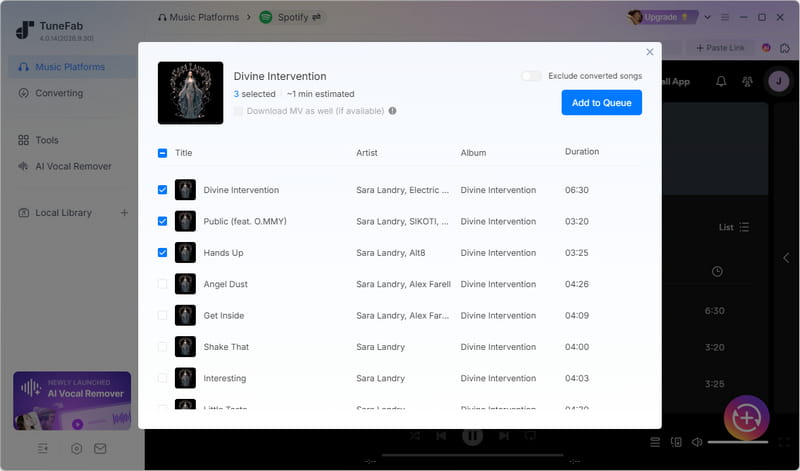
STEP 2 Find the songs, albums, or playlists you want to save. Click the plus button in the bottom-right corner, then select the songs you want and click "Add to Queue".
STEP 3 Choose your output format and quality settings, and click "Confirm". Then click "Convert All" to start the download.
STEP 4 Once the process finishes, open "Local Library" and click the file icon to locate your converted audio files.
Part 2. Hands-On Test Results of TuneFab Spotify Music Converter
To evaluate TuneFab's real-world performance, we conducted hands-on tests using multiple Spotify Free accounts under the free trial. We tested conversion speed, audio quality, metadata preservation, and stability across several small batches. Since the trial has limitations, our results may not fully represent the paid version, particularly in terms of conversion speed and large playlist handling. We also examined technical information and feedback from paying users to provide additional context.
Test Environment
- Date: October 22, 2026
- TuneFab Version: V 4.0.14
- Spotify Account: Spotify Free
- Operating System: Windows 11
- License: Free trial (Multiple accounts)
-
Evaluation Tools: Spek, MediaInfo,
Windows Clock, File Properties
2.1 Conversion Speed
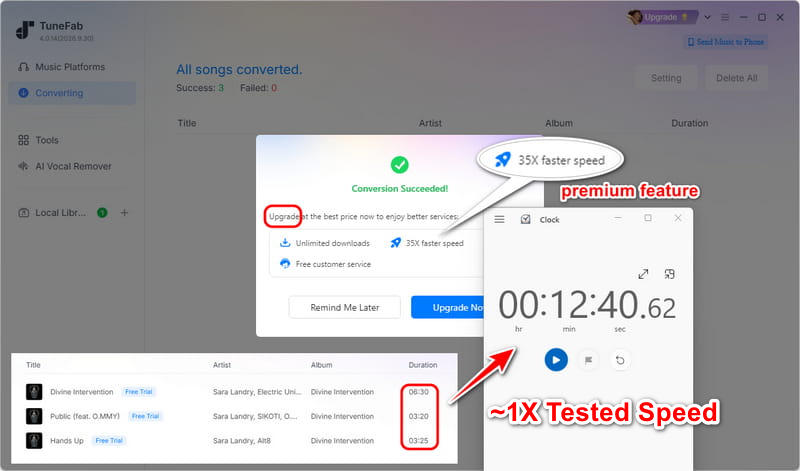
In our multi-batch tests, a small batch of tracks with a total duration of roughly 13 minutes took about 12 minutes and 40 seconds to convert, running at essentially 1X real-time speed. The trial version explicitly restricts the advertised 35X high-speed acceleration. While paid users might unlock faster processing, long-term subscriber feedback confirms that hitting the 35X peak is highly unrealistic in daily use, as actual speed relies heavily on network conditions. The advertised 35X speed represents a maximum rather than a guaranteed conversion rate, and our trial testing could not verify this performance.
2.2 Audio Quality
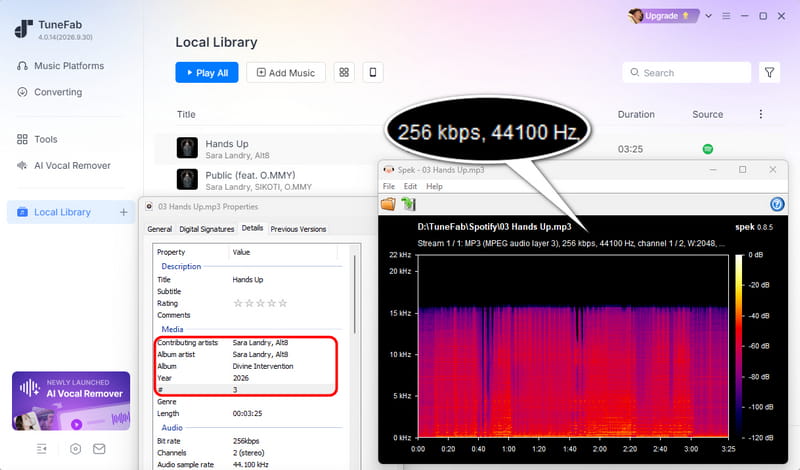
Despite selecting the original MP3 quality setting, our converted files showed a bitrate of 256 kbps rather than TuneFab's advertised maximum of 320 kbps. However, the output bitrate alone cannot confirm the actual audio fidelity. According to Spotify, its web player streams at up to 128 kbps AAC for Free users and 256 kbps AAC for Premium users. Since our tests used a Spotify Free account, further analysis would be needed to determine the source quality and whether TuneFab preserves it accurately. The actual fidelity of its 320 kbps and lossless output options also remains unverified.
2.3 Metadata and ID3 Tags
Metadata handling is a clear strength. As shown in the file properties, the converted file accurately retained the title, artist, album, year, and track number. The cover artwork was also perfectly preserved, ensuring the file is ready for a local music library.
2.4 Conversion Success Rate and Stability
TuneFab completed our short 3-song test without crashing, demonstrating basic reliability for small tasks. However, stability becomes a major concern under heavier workloads. Widespread feedback from long-term subscribers indicates that processing large playlists frequently triggers system errors or prompts an "error code", causing downloads to stall at 90% or fail. This suggests that while TuneFab is adequate for grabbing a few individual tracks, it struggles to maintain consistent performance during large-scale batch downloads.
Part 3. What Real User Reviews Reveal on Trustpilot
While our independent tests reveal TuneFab's core mechanics and baseline limits, evaluating it solely through a trial account has its constraints. To understand its long-term performance, stability under heavy workloads, and after-sales experience, we cross-referenced our findings with a large volume of feedback from paying customers on Trustpilot. Here is what real users report.
TuneFab's Trustpilot performance shows a highly divided user base. Here is the summary of its rating profile.
| Total Reviews | TrustScore | 5-Star Ratings | 1-Star Ratings | Distribution Trend |
|---|---|---|---|---|
| 1,026 | 3.9 / 5 | 62% | 22% | Highly Polarized |
*Trustpilot data checked on October 22, 2026, and is subject to change.
🔍 Common Complaints and Reported Issues
Spotify account suspension is the most serious recurring complaint. Multiple reviewers report that their Spotify accounts were suspended or flagged after using TuneFab. One wrote, "my Spotify account was suspended for illegal copying", and another said, "Spotify flagged my account for 'unauthorized use'." This risk is the main reason some reviewers rate the product low even when conversion works.
Support is inconsistent and private requests are sometimes ignored. Although many users praise support, others report unanswered emails and long delays. One reviewer stated, "My inquiry to TuneFab has not been answered to date", and another said TuneFab "ONLY respond when complaints go public". This makes problem resolution unpredictable.
Refund and cancellation processes are difficult. Users report being given "the run around" on refunds, being told refunds apply only to technical issues, or having to buy the correct product before receiving a refund for the wrong one. Subscription cancellation is also a frequent complaint: "Impossible to cancel my subscription" and "does not allow you to cancel" appear in multiple reviews. Some users say they were charged after cancelling.
License activation and migration cause friction. Reviewers report receiving the wrong platform license, such as a Mac license instead of Windows, and being told they must purchase again before a refund. License migration to a new computer is described as "much too complicated". One user said it took two weeks with support. Poor activation documentation is also mentioned.
Version and maintenance problems affect paid users. The Android app was discontinued after lifetime purchases, standalone converters are no longer updated, and some users report the software stopped working after an update. One wrote, "after the last update, the program no longer allows me to download". This undermines the value of a lifetime license.
Incentivized reviews raise questions about ratings. At least two reviewers state they received an incentive to write a review. One says TuneFab offered "a 20% discount in exchange for leaving a 5-star review", and another begins, "I wrote this review for an incentive". This does not prove that all positive reviews are fake, but it is relevant when interpreting the score.
Part 4. Best Alternatives to TuneFab Spotify Music Converter
While TuneFab offers a useful set of music conversion features, its subscription pricing may not be the most economical choice for everyone. If you're looking for a cheaper alternative to TuneFab Spotify Music Converter, the following two options are worth considering.
1. Tidabie Music Go
Tidabie Music Go is a versatile desktop music converter for Windows and macOS. It supports Spotify, Apple Music, Amazon Music, Tidal, Deezer, YouTube Music, SoundCloud, Qobuz, Audible, and more. It also allows users to add custom websites to record and save audio from additional sources. Tidabie provides a built-in toolkit that includes AI Audio Splitter, Audio Editor, Tag Editor, Format Converter, CD Burner, and more.
What makes Tidabie particularly appealing is its value for money. At $49.95 per quarter, it averages just $16.65 per month, roughly 70% less than TuneFab's $55.95 monthly All-in-One plan. This makes Tidabie a cost-effective choice for users who want broader streaming support and more audio tools without paying a higher monthly fee.
How to use Tidabie Music Go to download Spotify music?
The guide below walks you through the process of saving Spotify tracks with Tidabie Music Go.
STEP 1 Open Tidabie Music Go and go to the "Music" tab to pick the "Spotify" section. The built-in Spotify web player will pop up, where you can sign in to your Spotify account.
STEP 2 Find the specific Spotify playlist, album, or track. Hit the "+" button located at the bottom right. A prompt showing the selectable items will appear. Pick your desired songs and hit the "Add" button to queue them up.
STEP 3 Navigate to the "Settings" menu at the bottom left. Here, you can configure your preferences, including the conversion mode, output format, bit rate, output folder, etc.
STEP 4 Close the settings window and click the "Convert" button to start the download. Once finished, the target folder will automatically open, displaying your newly converted files. You can also go to "History" to locate these files by clicking the folder icon near each track.
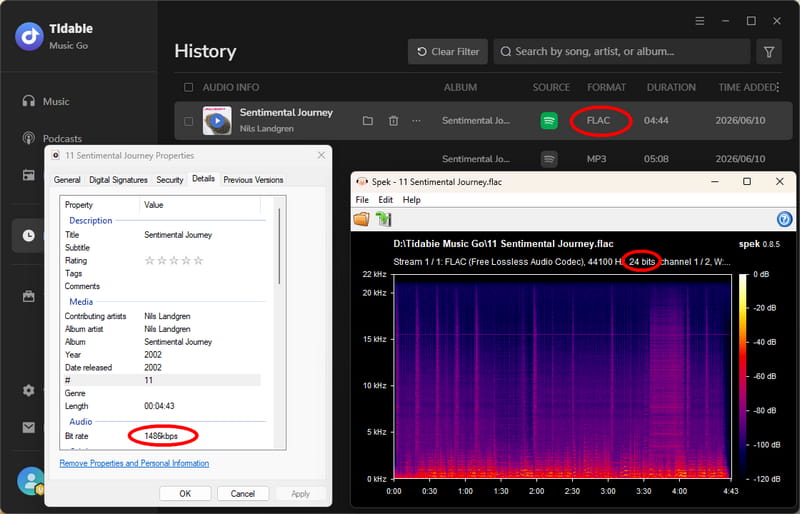
- Best for multi-platform users seeking more features at a lower monthly cost.
2. TuneCable Spotify Downloader
TuneCable Spotify Downloader is a dedicated Spotify converter for Windows, Mac, and Android. It supports MP3, AAC, FLAC, WAV, AIFF, and ALAC output while preserving ID3 tags, album artwork, and playlist order.
TuneCable is also a more budget-friendly alternative to TuneFab. At just $44.95 per year, it costs approximately 44% less than TuneFab's $79.95 Spotify-only annual plan. Better yet, purchasing a Windows or Mac license also unlocks the Android version for free, offering even greater value across devices. For Spotify-focused users, TuneCable combines affordable pricing with the flexibility of desktop and Android downloads.
How to use TuneCable Spotify Downloader to download Spotify music on Android?
While TuneCable's desktop workflow is straightforward and largely mirrors Tidabie, its dedicated Android app is what truly sets it apart. If you are converting directly on your phone, follow the steps below to get started.
STEP 1 Install and launch TuneCable Spotify Downloader on your Android device. Hit "Login Spotify" to sign in to your Spotify profile.
STEP 2 Access "Download Settings" to customize the audio format and sound quality you prefer.
STEP 3 Go back to the "Home" screen. Locate your desired song, album, or playlist and press the "+" icon to analyze the tracks. Deselect any unwanted songs and proceed by tapping "Download".
STEP 4 Double-check the output parameters and hit "Confirm" to kick off the batch conversion process.
STEP 5 Navigate to the "Library" section to access your past downloads.
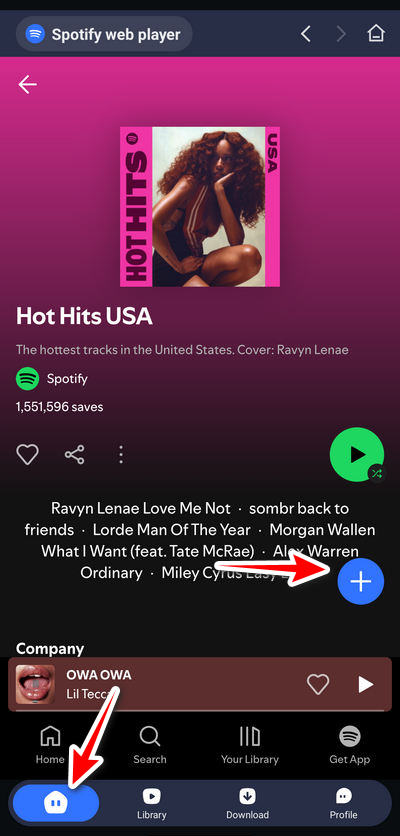
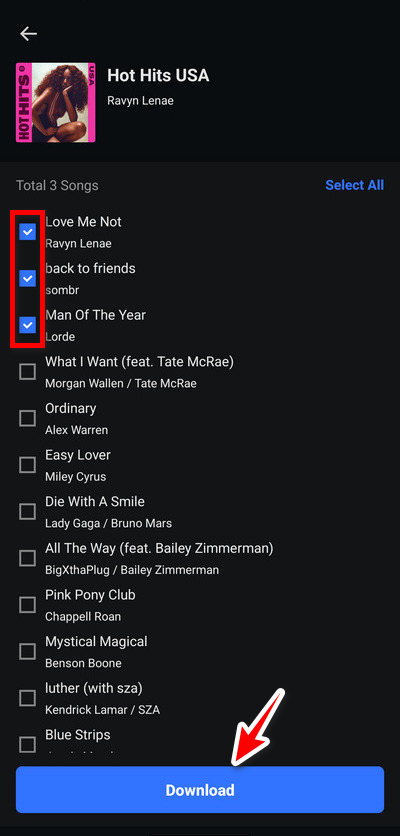
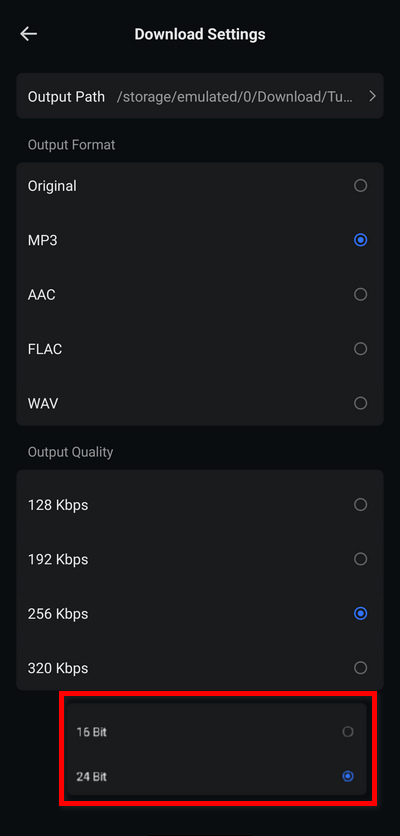
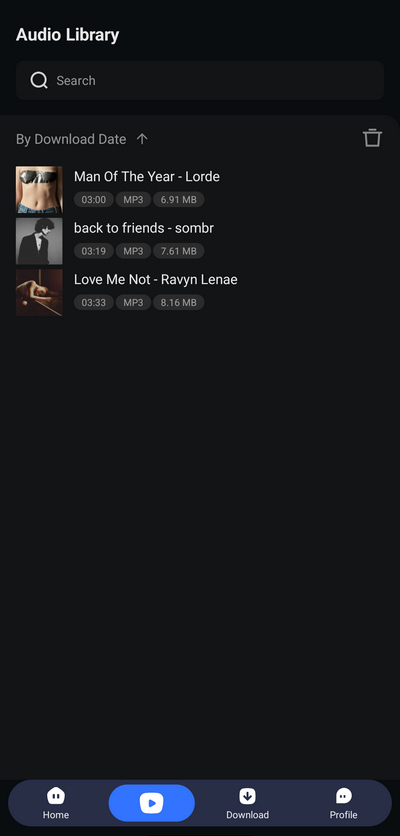
- Best budget-friendly Spotify alternative with desktop and Android access under one license.
➡️ Comparison Table: TuneFab Spotify Music Converter vs. Alternatives
| TuneFab Spotify Music Converter | Tidabie Music Go | TuneCable Spotify Downloader | |
|---|---|---|---|
| Compatibility | Windows, macOS | Windows, macOS | Windows, Mac, Android |
| Streaming Services | Spotify (Individual License), 9 services (All-in-One License) |
Spotify, Apple Music, Amazon Music, Tidal, Deezer, YouTube Music, Line Music, Pandora, YouTube, SoundCloud, Qobuz, Audible & Custom sources (for Recording) | Spotify only |
| Annual Plan Price |
$79.95/year (Spotify only) $139.95/year (All-in-One Suite) |
$79.90/year (All streaming services) | $44.95/year |
| Highest Speed | 35X (Tested: ~1X, Free Trial) | 40X for Spotify, 10X for others | 40X |
| Format (Desktop) | MP3, M4A, FLAC, WAV, AIFF, ALAC | MP3, AAC, FLAC, WAV, AIFF, ALAC | MP3, AAC, FLAC, WAV, AIFF, ALAC |
| Format (Mobile) | ❌ N/A | ❌ N/A | ✅ MP3, AAC, WAV, FLAC |
| Metadata | ✅ Preserved | ✅ Preserved | ✅ Preserved |
| Built-in Extra Tools | AA/AAX Converter, Tag Editor, Format Converter, Spotify Playlist Backup, Playlist Transfer (Total: 5) | AA/AAX Converter, Format Converter, Burn CD, Audio Editor, Tag Editor, Export to iTunes, AI Audio Splitter, Spotify Playlist Backup (Total: 8) | AA/AAX Converter, Format Converter, Burn CD, Audio Editor, Tag Editor, Export to iTunes, Spotify Playlist Backup (Total: 7) |
Part 5. FAQs about TuneFab Spotify Music Converter
Q1. Is TuneFab Spotify Music Converter free to use?
No, it is paid software. It offers a free trial, but it is heavily restricted and only lets you convert 3 songs. To unlock the full version, you must purchase a license.
Q2. Is TuneFab safe and legit?
TuneFab is a commercial music conversion tool, but software legitimacy and Spotify account safety are separate concerns. While TuneFab provides an official website and paid licenses, some users have reported account warnings or suspensions after using it. These reports do not establish how frequently such issues occur, so it's worth reviewing Spotify's terms of use and considering the potential risks before using third-party converters.
Q3. Does TuneFab actually convert at 35X speed?
Based on our hands-on testing and widespread user feedback, hitting the 35X speed is highly unrealistic in everyday use. The free trial is strictly limited to 1X real-time speed. Even with a paid license, actual speed depends heavily on your network and system resources.
Q4. Will using TuneFab get my Spotify account banned?
Multiple users on review platforms report receiving warnings or having their Spotify accounts suspended for "unauthorized use" or "illegal copying" after using TuneFab. If you proceed, it is highly recommended to use a secondary Spotify account rather than your primary profile.
Q5. Does TuneFab Spotify Music Converter have an Android version?
TuneFab appears to have offered an Android version in the past, but we couldn't find an official APK download or current Android support information on its website. It may no longer be available. If you need to download Spotify music directly on Android, TuneCable Spotify Downloader is a more practical alternative, supporting Windows, Mac, and Android under one license.
Conclusion
Overall, TuneFab Spotify Music Converter is a capable desktop tool for downloading Spotify music and preserving metadata. However, whether it's worth the price depends on your budget and the features you actually need. Its monthly subscriptions can become costly over time, particularly when more affordable alternatives offer similar core conversion capabilities.
For users who want to download music from multiple streaming services, Tidabie Music Go offers compelling value with its $49.95 quarterly plan, broader platform support, and extensive built-in audio toolkit. Meanwhile, TuneCable Spotify Downloader is a more budget-friendly choice for Spotify-only users, costing just $44.95 per year compared with TuneFab's $79.95 annual Spotify plan, while also supporting Android.
If affordability is a priority, both alternatives deserve consideration before purchasing TuneFab. Ultimately, the best choice is the one that balances the features you need with a price you're comfortable paying. Testing the available free trials before committing to a license is always recommended.

Jacqueline Swift | Senior Writer
