


How to Check Spotify Wrapped
Ready to rediscover the soundtrack of your year? As 2025 draws to a close, music lovers worldwide eagerly await their personalized Spotify Wrapped recap. This beloved annual feature transforms your listening history into a vibrant, shareable story, highlighting your top artists, genres, and anthems of the past year. But when will Spotify Wrapped come out, and how to check Spotify Wrapped? This guide is your go-to resource for everything Spotify Wrapped 2025. We'll clearly answer the pressing questions and provide simple steps to not only view your highlights but also preserve them. Let's take a look.
- Part 1. Everything You Need to Know About Spotify Wrapped
- What is Spotify Wrapped?
- When does Spotify Wrapped Stop Tracking?
- When will Spotify Wrapped Come Out?
- Why Can't I See My Spotify Wrapped?
- Part 2. How to Check Spotify Wrapped 2025
- How to See My Top Artists on Spotify?
- How to Share Your Spotify Wrapped?
- How to See Old Spotify Wrapped?
- Part 3. Download Music from Spotify Wrapped 2025🔥🔥🔥
Part 1. Everything You Need to Know About Spotify Wrapped
Now that you're excited to see your musical yearbook, let's address the key questions that arise every year. Understanding these details will ensure you don't miss out on your personalized Spotify Wrapped story.
📖What is Spotify Wrapped?
Spotify Wrapped is a popular annual year-in-review feature hosted by Spotify that compiles your personal listening data into a personalized, shareable summary. It transforms your streaming history from the past year into a vibrant visual story, highlighting your most-played songs, your top artists on Spotify, your favorite genres, and other engaging insights like total listening time. It has become a cultural phenomenon, allowing users to reflect on and celebrate their musical journey.

Want to keep the songs from your Spotify Wrapped playlist forever? Tools like Tidabie Spotify Downloader allow you to download Spotify songs to MP3 or many other universal formats for permanent offline access.
⏳When does Spotify Wrapped Stop Tracking?
While Spotify does not publicly announce an exact cut-off date, the consistent pattern from previous years indicates that the primary data collection window typically concludes in late October, often around October 31st. This means your streams from January 1st through late October form the core dataset for your personalized recap. It's a popular tip that if you're hoping to influence your Spotify Wrapped results, maybe to boost a favorite new artist into your top artists on Spotify, you should focus your listening before November begins.
⏰When will Spotify Wrapped Come Out?
Spotify Wrapped 2025 has been officially launched on Wednesday, December 3, 2025. This timing follows the platform's well-established pattern of an early December release:
- Spotify Wrapped 2025: December 3, 2025
- Spotify Wrapped 2024: December 4, 2024
- Spotify Wrapped 2023: November 29, 2023
- Spotify Wrapped 2022: December 1, 2022
- Spotify Wrapped 2021: December 2, 2021
⭕Why Can't I See My Spotify Wrapped?
This is a common issue, especially in the first few days after the Spotify Wrapped date arrives. The problem is not with your account itself, but usually due to simple technical or access issues that are easy to fix. Let's go through the reasons and solutions step by step so you can find your annual music story.
1. App-Related Issues
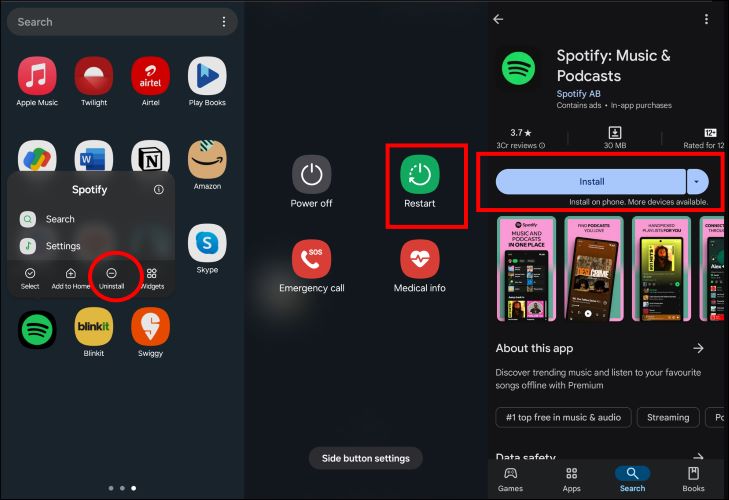
The most frequent culprit is an outdated app. To see Spotify wrapped, you must have the latest version of the Spotify app. If updating doesn't work, try these basic troubleshooting steps:
Fix 1 Close the Spotify app completely and restart it to clear temporary glitches.
Fix 2 Reboot your phone to solve deeper system cache issues.
Fix 3 Reinstall Spotify from your official app store to fully reset the app.
2. Access Method & Eligibility Issues
Many users wait for the prominent wrapped Spotify banner on the app's homepage, but it doesn't always pop up automatically. Proactive access is key.
Fix 4 Open the Spotify app, type "2025 Wrapped" into the search bar at the top, and search. This should take you straight to your personalized report.
Fix 5 When Spotify Wrapped launches, millions of users accessing it simultaneously can cause server congestion and slow loading. The feature is also rolled out in batches by region, so you may need to wait a few hours or even half a day.
Fix 6 Ensure you haven't been using "Private Session" mode or have disabled listening history tracking in your Spotify settings, as this prevents play data from being counted. Also, make sure you are logged into the correct Spotify account that you use regularly.
Note: To generate a Spotify Wrapped, your account needs a minimum level of listening activity. Generally, you need to have played at least 30 different artists and 30 different tracks for more than 30 seconds each before the data cutoff. Therefore, knowing when does Spotify Wrapped stop tracking is important.
Following these steps, you will successfully unlock your Spotify Wrapped 2025 and discover your top artists on Spotify. If all methods fail, the final step is to contact Spotify's official customer support for help.
Part 2. How to Check Spotify Wrapped 2025
Finding your personalized Spotify Wrapped recap for 2025 is straightforward. Here is a step-by-step guide to introduce you to checking Spotify Wrapped 2025.
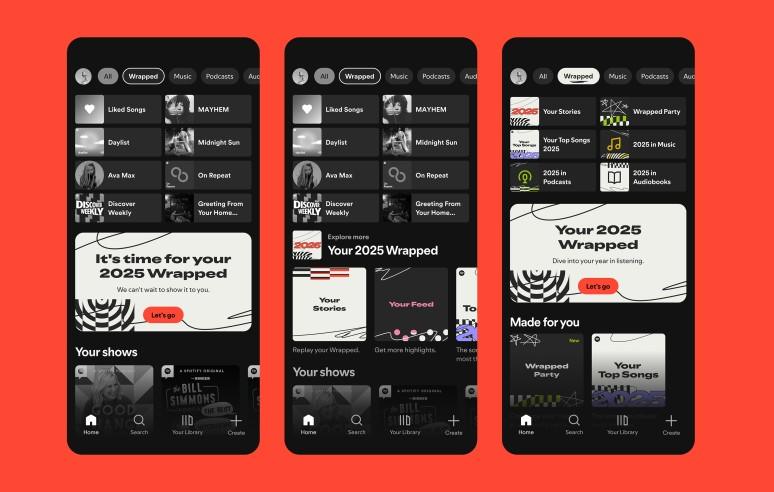
STEP 1 Open the Spotify app on your phone or tablet and ensure you are logged in.
STEP 2 On the app's home screen, tap the "Wrapped" tab on the main screen. Find and click the large banner labeled "Your 2025 Wrapped".
STEP 3 Swipe or tap through the interactive slides to explore your top songs, artists, genres, and other annual statistics. You can tap and hold to pause any slide.
🔎How to See My Top Artists on Spotify?
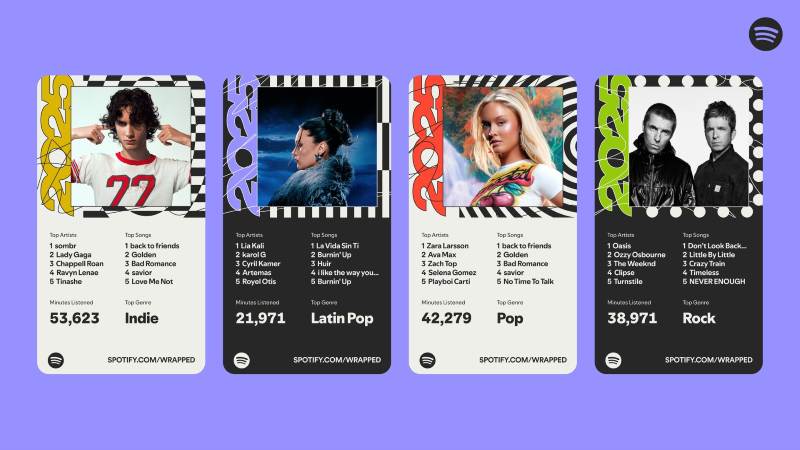
Your top artists on Spotify are a central part of your Wrapped story and are automatically revealed within the experience. To see them, you simply need to access your Spotify Wrapped 2025 recap. Once you start your personalized slideshow, one of the first story cards will highlight your most-streamed artist of the year, followed by your full top five list. A new feature for 2025, the Fan Leaderboard, takes this a step further by showing your exact global ranking among all listeners of your top artist, based on total minutes streamed.
📌How to Share Your Spotify Wrapped?
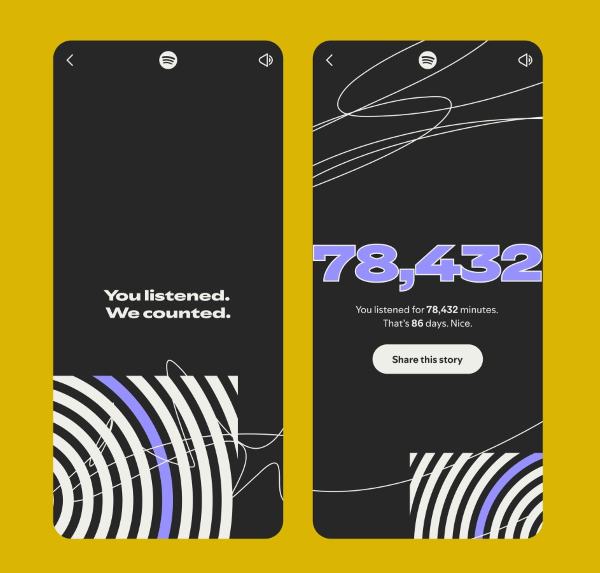
Choose the Wrapped story you'd like to share and let it play through. Once the animation ends, tap "Share this Story" and select your preferred platform to post it.
⏪How to See Old Spotify Wrapped?
While the interactive stories from your annual Spotify Wrapped disappear after the season ends, the personalized playlists they generate are designed to last. If you want to take a nostalgic trip back to the music that defined your previous years, finding these old playlists is a simple process.
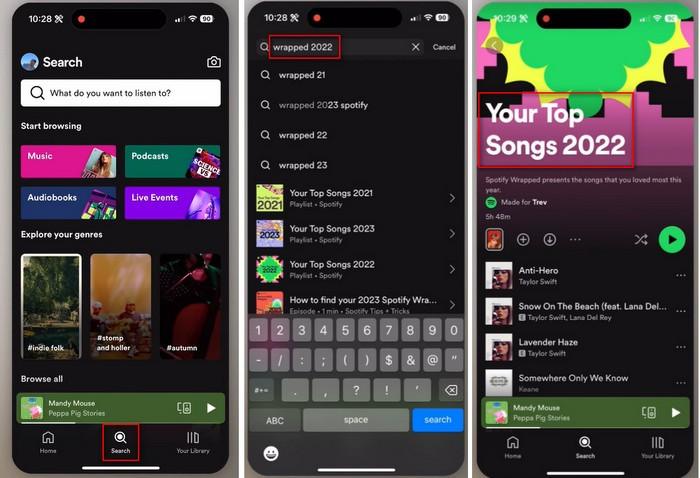
STEP 1 Open the Spotify app on your mobile device. Navigate to the main Search function.
STEP 2 In the search bar, type "Wrapped [Year]" or "Your Top Songs [Year]". For example, to find your playlist from 2022, you would search for "Wrapped 2022".
STEP 3 The search results should display the official playlist compiled by Spotify for that year. You can then open it to listen, add it to Your Library, or share it with others.
Part 3. Download Music from Spotify Wrapped 2025🔥🔥🔥
After viewing and sharing your Spotify Wrapped highlights, you might want to preserve that unique musical snapshot of your year. While Spotify's playlist is great for streaming, downloading the songs allows you to enjoy them offline forever, without a subscription. We may use a professional tool to save your personalized soundtrack: Tidabie Spotify Downloader.
Tidabie Spotify Downloader is a professional desktop tool designed for downloading and converting audio from Spotify. It enables you to download Spotify songs to MP3, AAC, WAV, FLAC, AIFF, and ALAC for compatibility with any device or media player. Tidabie allows users to preserve the original audio quality from the source, such as Spotify lossless audio quality. It can batch download Spotify playlist to MP3 at up to 10x speed. Furthermore, it retains full ID3 tags, including metadata like title, artist, album, and lyrics.
Beyond basic conversion, Tidabie Spotify Downloader provides handy tools like AI Audio Splitter, Format Converter, Burn CD, Audio Editor, and Tag Editor. By using Tidabie for your Spotify to MP3 download needs, you can build a permanent, offline library of your yearly Wrapped Spotify highlights, ensuring you never lose the soundtrack to your year.
Tidabie Music Go
- Download songs, albums, and playlists from Spotify, SoundCloud, Amazon Music, Apple Music, TIDAL, YouTube Music, Qobuz, etc.
- Convert Spotify music to MP3, AAC, WAV, FLAC, AIFF, and ALAC.
- Batch download Spotify songs at up to 10x speed with original quality.
- Keep full ID3 tags, such as title, album, and artist.
- Freely enjoy podcasts online and download podcasts.
- Listen to radio shows and record radio freely.
How to download wrapped Spotify playlist to MP3 with Tidabie?
Follow these steps to learn how to download your wrapped Spotify playlist to MP3 using Tidabie Spotify Downloader.
STEP 1 Launch Tidabie and Log In to Spotify
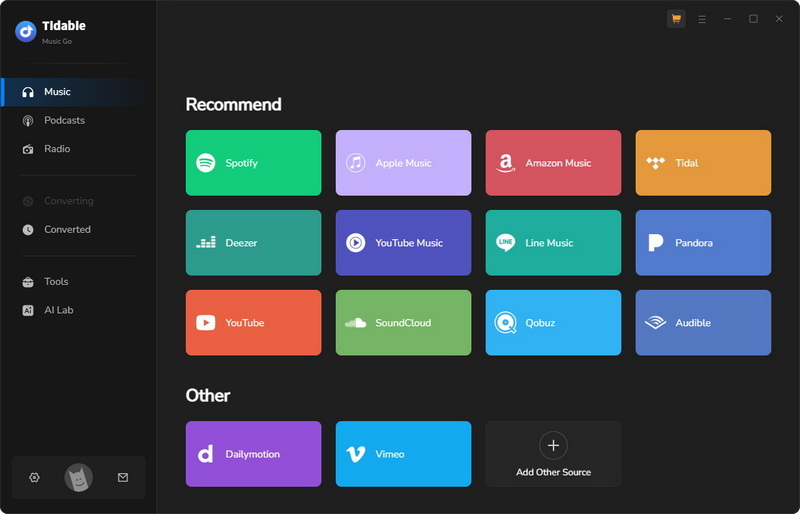
Open Tidabie to begin. Select "Spotify" as your download source. You'll see a clean interface that allows you to convert music from either the Spotify web player or the desktop app. For the best audio quality, we recommend using the app as your source. You can easily switch between the two using the "Spotify web player" or "Spotify App" button on the main screen. Then, log in to your Spotify account. Both Premium and free accounts are supported.
STEP 2 Add Spotify Wrapped Music
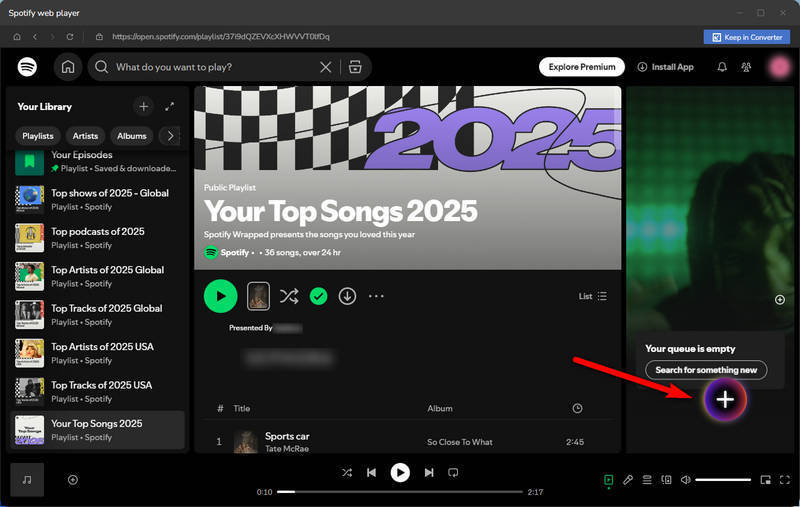
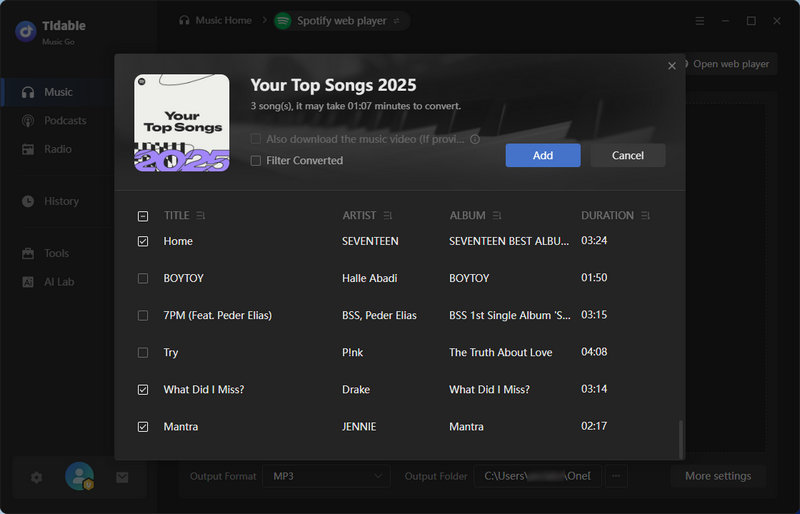
Once logged in, go to your Spotify Wrapped playlist and click the "+" button at the bottom right. A window will pop up showing all the songs in your playlist. If you don't want to download every track, uncheck the ones you wish to skip, then click "Add".
STEP 3 Adjust Spotify Settings
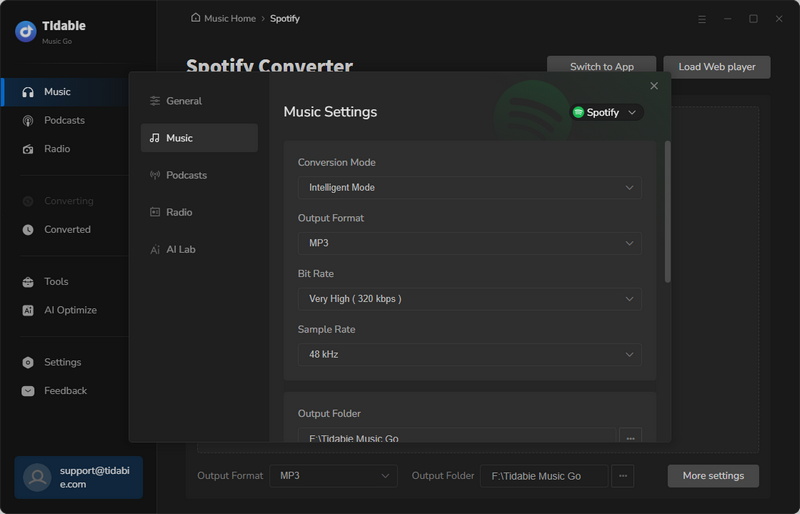
Click the "Settings" icon to customize your conversion options. Here you can choose Conversion Mode, Output Format, Bit Rate, Sample Rate, Output Folder, Output File Name, Output Organized, and more. For broad compatibility, we take Spotify to MP3 download as an example.
📒If you are a premium user and want to download Spotify lossless audio, please refer to this guide: How to download Spotify lossless music with Tidabie?
STEP 4 Convert Wrapped Spotify Music
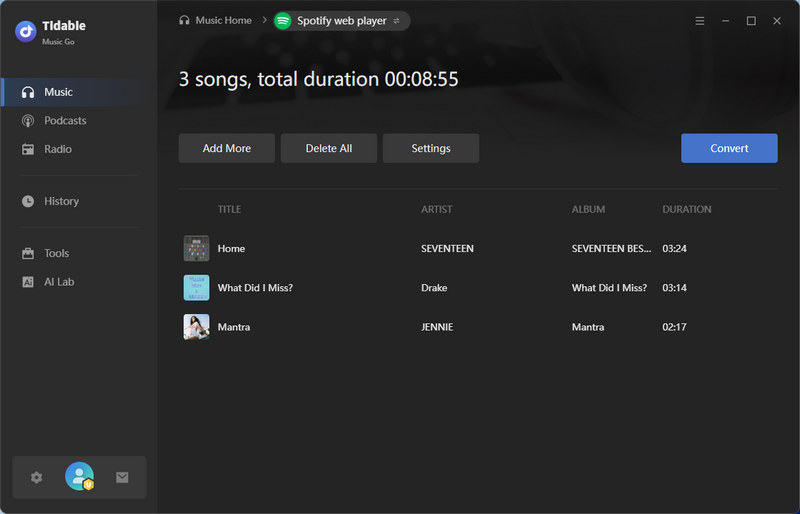
After configuring your settings, click "Convert" to start the process. Tidabie will quickly download and convert your selected tracks from Spotify Wrapped.
STEP 5 Enjoy Your Spotify Wrapped Music
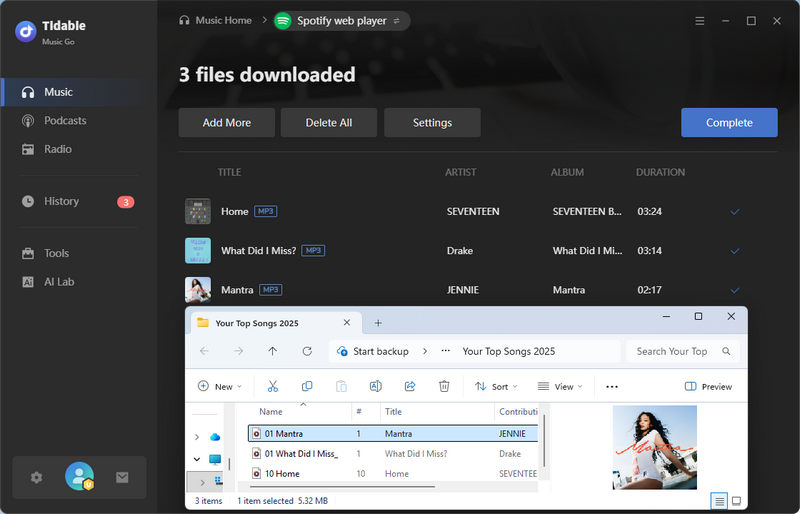
Once the conversion finishes, go to the "History" section to see all your Spotify Wrapped downloads. To locate the files on your computer, click the folder icon next to any track. You can now play your Spotify Wrapped music anytime, anywhere, without restrictions.
Conclusion
Your Spotify Wrapped is more than just a list of songs; it's a digital diary of your year set to music. This guide has walked you through how to find your recap, understand key dates like when Spotify Wrapped stops tracking, troubleshoot common issues, and ultimately, how to preserve Spotify Wrapped. To truly own your yearly soundtrack and enjoy it freely on any device, use Tidabie Spotify Downloader to transform your streaming highlights into a permanent part of your personal music library. Download Tidabie now!

Jacqueline Swift | Senior Writer
