


TOP 8 Spotify Playlist to MP3 Downloaders (Updated 2026)
Fed up with not being able to listen to your Spotify playlists offline? Perhaps you can resort to a Spotify playlist to MP3 converter. This guide will introduce you to the top 8 ways to download Spotify playlist to MP3. Whether you prefer apps or online Spotify downloaders, it’s got you covered.
Part 1: Download Spotify MP3 Playlist (Safe Batch Download)
We’ll introduce 8 easy-to-use downloaders for you to convert Spotify playlist to MP3. Whether you are looking for the best Spotify playlist to MP3 converter for PC or a free Spotify to MP3 converter online, these tools will help you download music from Spotify without Premium effectively. Each one has been tested honestly. Below, we first introduce the safest and most reliable solution: Tidabie Spotify Downloader.
Tidabie Spotify Downloader is an ad-free, versatile tool for batch downloading Spotify playlist to MP3 at up to 10x speed with lossless quality for offline playback on any compatible device. It preserves full ID3 tags to ensure your Spotify music library is well-organized. Support for formats like MP3, AAC, FLAC, WAV, AIFF, and ALAC allows users to permanently save tracks to local storage and transfer them to MP3 players and USB drives.
Tidabie Music Go
- Download songs, albums, and playlists from Spotify, SoundCloud, Amazon Music, Apple Music, TIDAL, YouTube Music, Qobuz, etc.
- Convert Spotify playlist to MP3, AAC, WAV, FLAC, AIFF, and ALAC.
- Batch download Spotify playlist at up to 10x speed with original quality.
- Keep ID3 tags for Spotify music, such as title, album, and artist.
- Freely enjoy podcasts online and download podcasts.
- Listen to radio shows and record radio freely.
How to download Spotify Playlist to MP3 via Tidabie Spotify Downloader?
Check this section and learn how to download playlist from Spotify to MP3 via Tidabie Spotify Downloader.
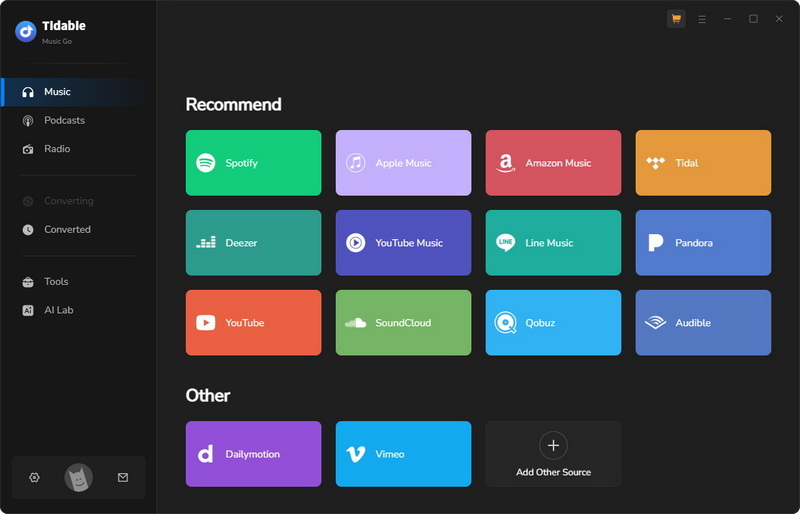
STEP 1 Launch Tidabie, select the "Spotify" portion from the "Music" module, and log in to your Spotify account via the pop-up app or web player.
Note: Tidabie is an all-in-one converter for many major streaming services, including Spotify, Apple Music, Amazon Music, YouTube Music, Tidal, Deezer, SoundCloud, etc. It is even possible to add customized sites. Therefore, there are several different portions for different platforms.
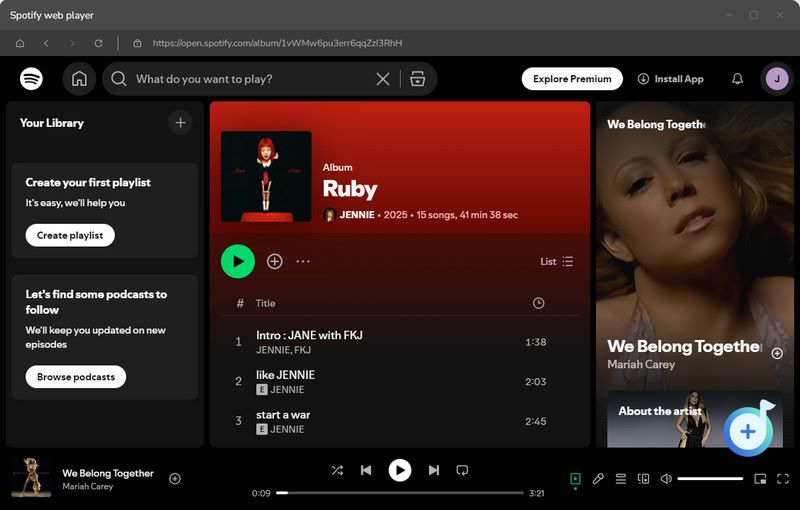
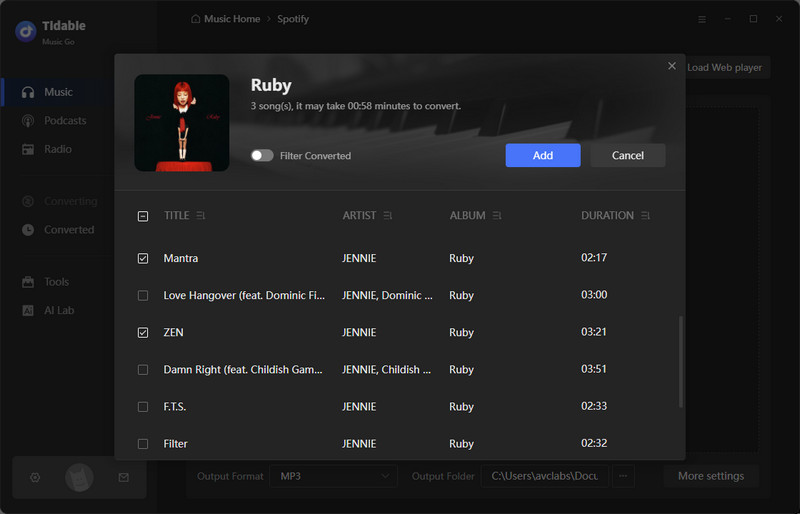
STEP 2 Navigate to the Spotify playlist you want to download within the Tidabie interface and click the cover art to open it. Then click the purple "+" button in the lower right corner. Select songs you like after a page with the selected playlist pops up. Click the "Add" button to add them to the task list.
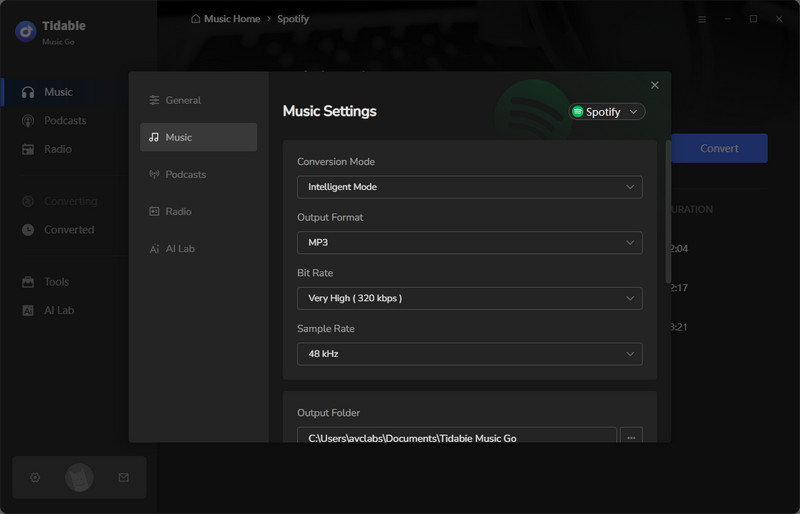
STEP 3 Go to "Settings" in the lower left corner and select the "Music" portion to adjust your preferences. In the first row, choose your conversion mode, then MP3 as the output format, select a bit rate, and set the output folder, etc.
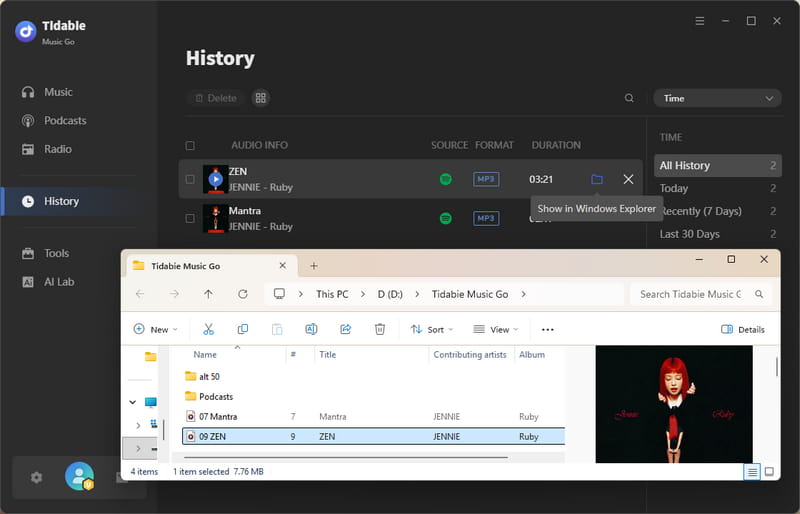
STEP 4 Close the "Settings" window and click "Convert" to initiate the download, and then the designated folder is automatically opened with the converted MP3 files.
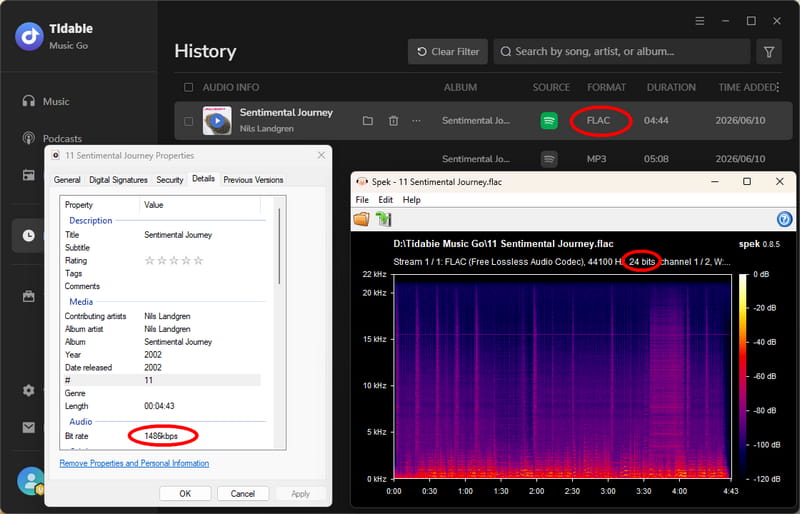
If you are an audiophile seeking higher audio quality, Tidabie Spotify Downloader also supports downloading lossless audio from Spotify.
What are the Pros and Cons of Tidabie?
In this part, we will give the pros and cons of Tidabie in a neutral view, based on its overall features, performance, and actual operation.
- Download from Spotify, YouTube, Amazon Music, Apple Music, Tidal, Deezer, etc.
- Download at 10x faster speed with one-click batch downloads.
- Keep 100% lossless audio quality.
- Preserve full ID3 tags for organized offline playback.
- Support multiple output formats, including MP3, AAC, WAV, FLAC, etc.
 Pros
Pros
- Require to download the app on computers.
 Cons
Cons
Part 2: Free Convert Spotify Playlist to MP3 (One-time Use)
Apart from Tidabie, the 7 tools below are among the most frequently mentioned online Spotify playlist to MP3 converters. They are mostly free and browser‑based. We present them here so you can compare and choose what works best for you.
⚡Security Warning: Please be aware that many free online Spotify download sites come with hidden risks. To protect your device, we recommend using a safe, professional desktop solution like Tidabie to convert your Spotify playlist to MP3 with full security.
1. Spotisaver — Free Online Spotify to MP3 Converter
🔗: https://spotisaver.net/en/playlist-downloader
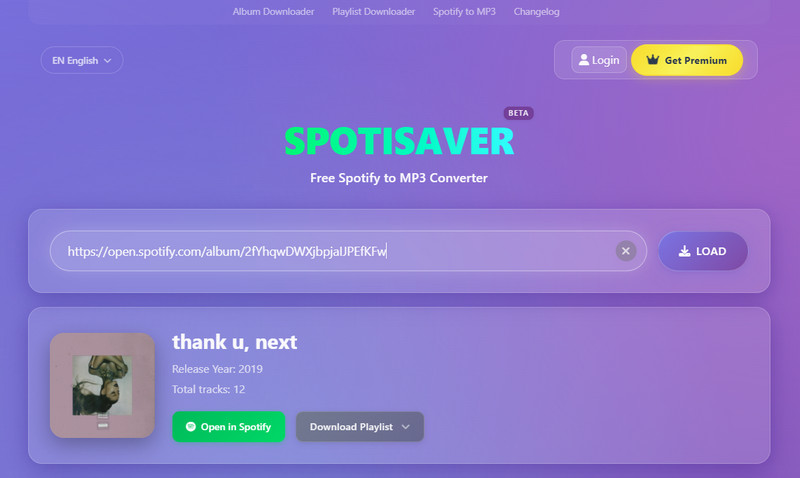
In our testing, Spotisaver showed mixed performance. When it worked, the audio quality hit up to 320 kbps and metadata was preserved nicely. However, download speeds were very unstable. Sometimes it was fast, often painfully slow. Free users are also capped at 200 tracks per playlist and 100 tracks per ZIP, which can be frustrating for larger libraries. Also, the downloaded file's name includes the tool name, "Spotisaver". When the server is overloaded, it will be unavailable. Premium users will be given priority. Still, it’s free and mostly functional if you’re patient.
What are the Pros and Cons of Spotisaver?
- Free to use.
- Audio quality can be up to 320 kbps.
- Essential metadata is preserved.
- Support downloads from Spotify and YouTube.
- Batch downloads of playlists and albums are supported.
Pros
- During our test, we found that the download speed is quite unstable.
- Does not support links to podcasts or shows.
- Free users can only process one playlist at a time with 200 tracks, and ZIP files are restricted to 100 tracks.
Cons
How to convert Spotify playlist to MP3 with Spotisaver?
STEP 1 Open Spotify and copy the URL of the Spotify playlist you want to download.
STEP 2 Visit Spotisaver in your browser. Locate the main input field and paste the copied Spotify URL into it. Click the "LOAD" button to start the analysis. Spotisaver will then process the link.
STEP 3 When a page with a list of songs available for download is displayed, click the "Download" button next to each one. For playlists or albums, click the "Download Playlist" button, which will take you to the "DOWNLOAD ENTIRE PLAYLIST" option. Click it. The MP3 files will be saved to your computer's default download folder.
2. SPOTIDOWN — Spotify Playlist Downloader Free Online
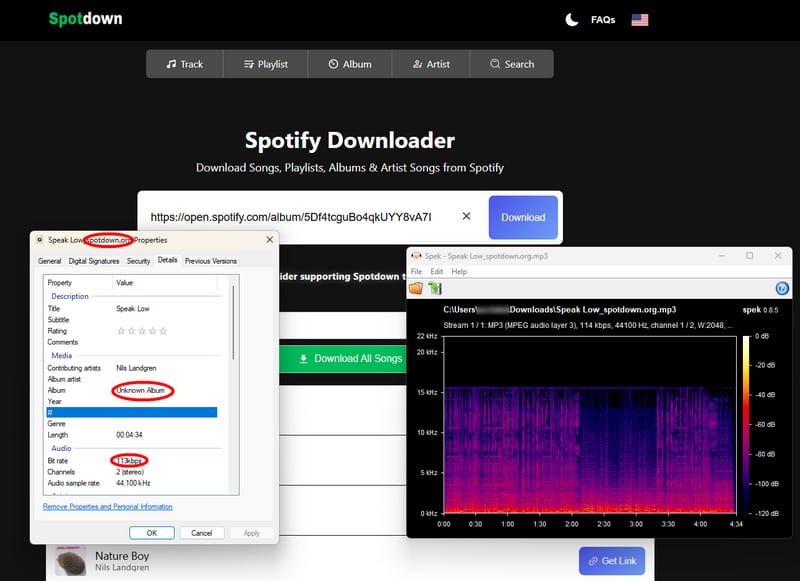
Testing SPOTIDOWN revealed a classic trade‑off: it's free and web‑based, but conversion speed is noticeably sluggish. Pasting a playlist link does work, and you can get a ZIP file of all tracks. Before downloading, you can customize the file name through the template. The options include track number, name, artist, etc. However, you'll be waiting a while. The actual sound quality of the downloaded file is very poor, only 113 kpbs. Also, it won't handle podcast links or artist pages. For simple playlist downloads, it gets the job done, but you'll need patience.
What are the Pros and Cons of SPOTIDOWN?
- Zero installation as a web-based tool.
- Download Spotify playlists in batches as a ZIP file.
Pros
- Slow conversion speed.
- The actual bitrate is only 113 kpbs.
- Limited link support: inaccessible to podcasts, shows, or artist page URLs.
Cons
How to download playlist from Spotify to MP3 via SPOTIDOWN?
STEP 1 Open your Spotify app and find the playlist you want to download.
STEP 2 Click the "Three dots", select "Share", and click on "Copy link".
STEP 3 Paste the link into the URL box, click "Search," and wait for the tool to process.
STEP 4 Click the "Download" button below the track you want to download. Or click the "Download ZIP" button to download the full playlist.

3. SpotifyMate — Fast Free Online Spotify to MP3 Tool
We found SpotifyMate to be surprisingly fast, with output reaching 320 kbps and essential ID3 tags intact. However, pop‑up ads are aggressive and interrupt the flow constantly. Worse, there's no batch download, so you have to save each song individually. Although the "Download Playlist" option has been newly introduced, the download process involves a redirection to another website, namely spotidown.app. If you only need a few tracks and can tolerate ads, it's okay, but for entire playlists, it becomes a chore.
What are the Pros and Cons of SpotifyMate?
- Preserve 320 kbps at a faster output speed.
- Essential metadata retention.
Pros
- Doesn't support downloading Spotify playlists in batches.
- Pop-up ads may affect usage.
Cons
How to download Spotify playlist to MP3 with SpotifyMate?
STEP 1 Open the Spotify website in your browser and open the playlist you want to save as an MP3 file.
STEP 2 Click the "Three Dots", click the "Share" button, and copy the link.
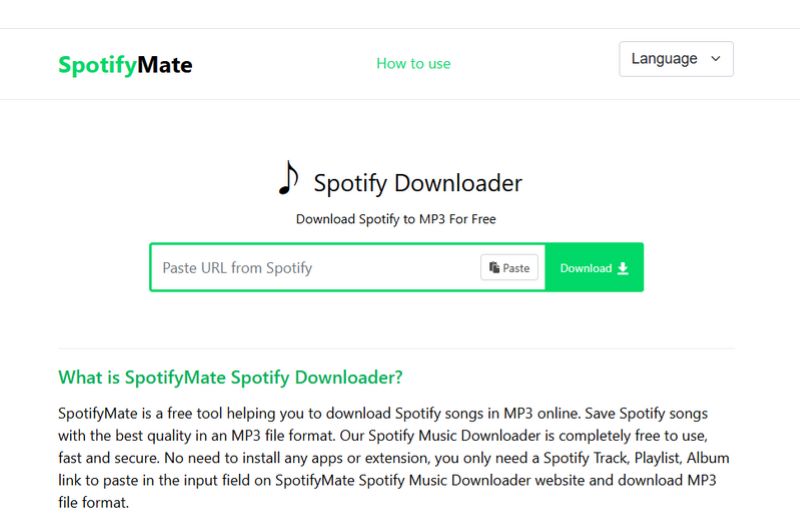
STEP 3 Visit the website and paste the link into the input field that says "Paste URL from Spotify".
STEP 4 Click the download button on the right and select MP3 quality to download.
4. Spowload — No‑Install Spotify Playlist to MP3 Converter
During our hands‑on test, the download speed varied wildly depending on server load. You can only download one song at a time. Downloading playlists or albums in bulk is a paid feature. It works in a pinch for a single track, but not for serious playlist downloading.
What are the Pros and Cons of Spowload?
- Requires no Installation.
- Free to use.
- Universal compatibility.
Pros
- Limited availability in certain countries.
- Based on our real-world testing, it suffers from unstable download speeds depending on the server connection.
- Playlist URL(s) can be parsed, but you can only download one song at a time.
Cons
How to download Spotify playlist to MP3 by Spowload?
STEP 1 Open Spotify and copy the playlist URL.
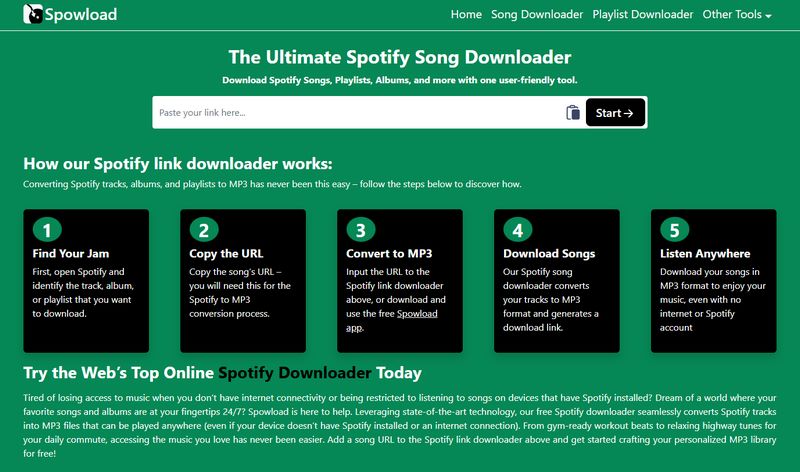
STEP 2 Input the URL to the Spotify link downloader and click “Start”.
STEP 3 Click "Convert" on the new page, then click "Download" to download the Spotify playlist.
5. SpoMp3 — Free Spotify Link to MP3 Converter Online
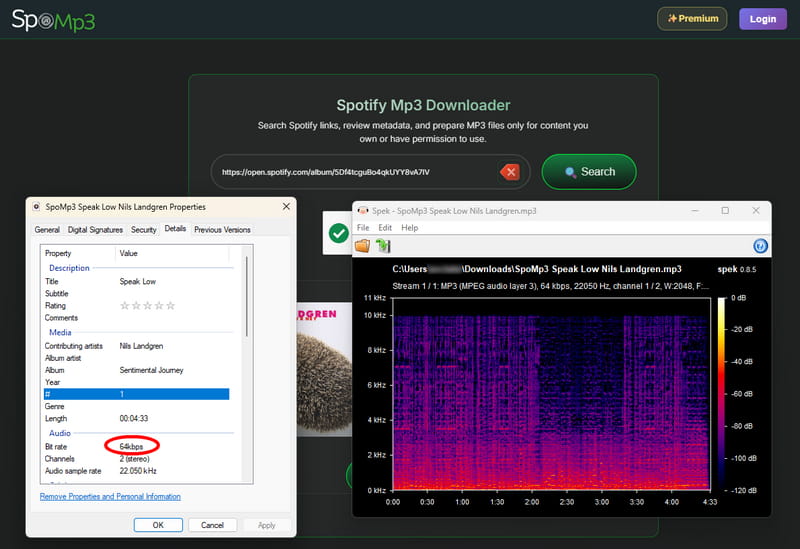
SpoMp3 claims to offer MP3 downloads, but the actual audio quality measured only 64 kbps, far below expectations. Worse, every download attempt involved intrusive redirects. Batch download is locked behind a paid upgrade, and even then, the process feels cluttered. For casual single‑song needs, it might pass, but the low quality and redirects make it a frustrating experience.
What are the Pros and Cons of SpoMp3?
- Free to use for basic downloads.
- No software installation required.
- Supports downloading full playlists and albums as ZIP files.
- Retains basic ID3 tags, such as title, artist, album cover.
Pros
- Free version only supports individual song downloads. Batch download is a paid feature.
- Actual audio quality is only 64 kbps.
- Download process involves redirects, which may be disruptive.
Cons
How to download Spotify playlist to MP3 with SpoMp3?
STEP 1 Open Spotify and copy the URL of the playlist you want to download.
STEP 2 Visit SpoMp3 and paste the copied Spotify URL into the search bar. Click the "Search" button to start processing the link.
STEP 3 Click the "Download All as ZIP" button to download the entire playlist in a single ZIP archive. (Note: Batch download requires payment for full functionality.)
6. SpotiSoft — Online Spotify to MP3 Downloader
🔗: https://spotisoft.com/ (Offline)
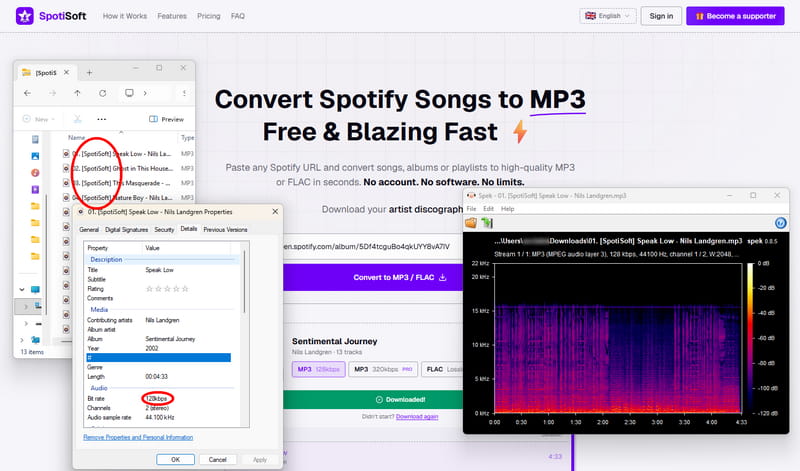
SpotiSoft offered a mix of positives and serious limitations. Free users get unlimited 128 kbps downloads and basic ID3 tags, which is fine for casual listening. However, during our tests, batch downloads of large playlists failed frequently, and the site is filled with self‑promotional ads. To get 320 kbps or FLAC, you need a $5/30‑day Supporter pass. It works for small playlists at low quality, but don't rely on it for bigger collections.
What are the Pros and Cons of SpotiSoft?
- Free with unlimited downloads at 128kbps.
- No account, login, or email required.
- Compatible with iOS, Android, and desktop browsers.
- Preserves ID3 tags, including title, artist, album, and cover art.
- Supports podcast episode downloads via Spotify episode links.
Pros
- Free users are limited to 128kbps MP3. 320 kbps and FLAC require a $5 / 30-day Supporter pass.
- Free users can only download playlists with up to 50 tracks.
- In our practical test, batch download of large playlists frequently fails.
- We noticed the site contains many self-promotional ads.
Cons
How to download Spotify playlist to MP3 with SpotiSoft?
STEP 1 Open Spotify and copy the playlist URL you want to download.
STEP 2 Visit SpotiSoft. Paste the copied Spotify URL into the input field.
STEP 3 Click the purple "Convert to MP3 / FLAC" button. Then select your desired output format and audio quality. Free users can only select MP3 128kbps; Pro users have access to MP3 320kbps and FLAC lossless.
STEP 4 Click "Download xxx tracks" to begin the conversion process.
7. Spotdown — Free Spotify URL to MP3 Downloader Online
Based on our actual testing, Spotdown is best avoided entirely. Every click triggered aggressive redirects to sketchy websites. You have to click the same button a second time or go back to actually proceed. This repeats at almost every step, making a simple download feel like an obstacle course. Multiple security reports also flag this site for malicious activity, so while you might eventually get your MP3s, it’s not worth the hassle or risk.
What are the Pros and Cons of Spotdown?
- Fully web‑based, no account or installation needed.
- Free to use.
Pros
- Every click triggers aggressive redirects to other websites, making the download process extremely disruptive.
- Some ID3 tags and audio quality cannot be verified.
Cons
How to download Spotify playlist to MP3 with Spotdown?
STEP 1 Copy the Spotify playlist link you want to convert to MP3.
STEP 2 Paste the link into Spotdown's input field and click the "Download" button.
STEP 3 Click "Download Now (All Songs)".
⚠ Warning: Due to multiple security reports flagging this site for malicious activity, we strongly advise against using Spotdown. Always use trusted, reputable tools like Tidabie instead to protect your device and personal data.
Part 3: Comparison of Spotify playlist to MP3 Converters
With so many differences between the 8 Spotify playlist to MP3 converters, you may feel a little confused. This part draws a table to give you the details. Check and pick the best Spotify playlist to MP3 downloader for yourself.
| Quality | Ad-free | Batch Download | Customize File Name | Clean Filename | ID3 Tags | Rating | |
|---|---|---|---|---|---|---|---|
| Tidabie Spotify Downloader | Lossless | ✅ | ✅(10x) | ✅ | ✅ | Title, Artist, Album, Track Number, Artwork, Year, Disc Number | ⭐⭐⭐⭐⭐ |
| Spotisaver | 320 kbps | ✅ | ✅ | Premium | ❌ | Title, Artist, Album, Track Number, Artwork, Year | ⭐⭐⭐ |
| SPOTIDOWN | 113 kbps | ✅ | ✅ | ✅ | ✅ | Title, Artist, Album, Year, Artwork | ⭐⭐⭐ |
| SpotifyMate | 320 kbps | ❌ | ❌ | ❌ | ❌ | Title, Artist, Album, Year, Artwork | ⭐⭐ |
| Spowload | 320 kbps | ❌ | ✅ | ❌ | ❌ | Title, Artist, Album, Year, Genre | ⭐⭐ |
| SpoMp3 | 64 kbps | ❌ | ✅(Paid) | ❌ | ❌ | Title, Artist, Album, Track Number, Artwork | ⭐⭐ |
| 128 kbps | ❌ | ✅ | ❌ | ❌ | Title, Artist, Album, Year, Artwork | ⭐⭐ | |
| Spotdown | 113 kbps | ❌ | ✅ | ❌ | ❌ | Title, Artist, Album, Artwork | ⭐ |
Part 4: FAQs about Spotify Playlist to MP3
Q1: How can I convert an entire Spotify playlist to MP3 for free?
Try free online tools like SPOTIDOWN. Copy your Spotify link, paste it into the tool, submit, and download tracks or a ZIP of the playlist. However, ads may frequently pop up when you are using it, which greatly affects the user experience and may cause potential security problems. So we tend to recommend more professional and secure tools like Tidabie Spotify Downloader for reliability and security.
Q2: Can you download a Spotify playlist as a file?
Yes. Tools like Tidabie Spotify Downloader help users download Spotify playlist to MP3 as a file. Check the section above and operate your software according to the steps, then you can find the converted MP3 file in your designated folder.
Conclusion
This guide presents the top 8 Spotify playlists to MP3 converters, catering to both app users and online tool enthusiasts. Among them, Tidabie Spotify Downloader stands out with a 10x download speed, ID3 tag preservation, and a user-friendly interface ideal for offline playback across devices. Many music lovers highly recommend it for its efficiency and premium audio quality. Give Tidabie Spotify Downloader a try now!

Jacqueline Swift | Senior Writer
