


5 Best Ways to Convert YouTube Playlist to MP3 (MP3/ZIP)
Tired of tapping "download" on every single video in a long mix? The smartest way to download YouTube playlist to MP3 is to use a batch YouTube playlist MP3 downloader that pulls all tracks at once, so you get high-quality MP3s without the repetitive clicks. With a reliable YouTube playlist to MP3 downloader, you can save hours and keep your favorite workout mixes, study compilations, or podcasts ready for offline listening wherever you go.
This guide introduces 5 best ways to download a YouTube playlist as MP3s. Pick the method that fits your routine, and you'll never have to stream again when the signal drops.
- Method 1: Download YouTube Playlist to MP3 with Desktop App
- Method 2: Top Free Online YouTube Playlist to MP3 Converters We Tested
- Method 3: Use an Extension to Convert YouTube Playlist to MP3
- Method 4: Save YouTube Playlists as MP3 on Mobile Devices
- Method 5: Command-Line YouTube Playlist MP3 Downloader
- FAQs about YouTube Playlist to MP3
Quick Navigation
Not sure which method fits your workflow? The table below gives you a side‑by‑side comparison of all types we tested, so you can quickly spot the one that matches your needs. Click on any tool type in the first column to jump straight to its detailed walkthrough.
| Batch Download | Speed (per video) | Quality | ID3 Tags | Ad-free | |
|---|---|---|---|---|---|
| Desktop App | ✔️ | ~27s | 320 kbps | ✔️ | ✔️ |
| Online Converters | Rarely | Variable | 128~320 kbps | Often missing | Rarely |
| Browser Extensions | ❌ | ~3 minutes | < 320 kbps | ❌ | ✔️ |
| Mobile Apps | Variable | 1~5 minutes | 128~320 kbps | Partial | ❌ |
| Command‑Line | ✔️ | ~1 minutes | 320 kbps | ✔️ | ✔️ |
Method 1: Download YouTube Playlist to MP3 with Desktop App
For users who need to convert large playlists regularly, a dedicated desktop application is the most powerful and reliable choice. Unlike online YouTube to MP3 converters that often restrict file sizes or limit daily conversions, desktop software runs locally on your computer, which means you get faster processing speeds, full control over output quality, and the ability to handle playlists with hundreds of videos without interruption.
Over the years, several well‑reviewed programs, such as Tidabie Music Go, have earned positive feedback from tech communities for their stability and consistent performance. These playlist downloaders for YouTube are regularly updated to adapt to YouTube's changing protocols, and many offer free trials so you can test their features before committing.
| Security | Ad-free |
| Output Format | MP3, AAC, WAV, FLAC, AIFF, ALAC & MP4 for MVs |
| Download Speed | 2min 11s for 6 videos in the test |
| Quality | 320 kbps |
| ID3 Tags | Title, Artist, Album, & other original ones. |
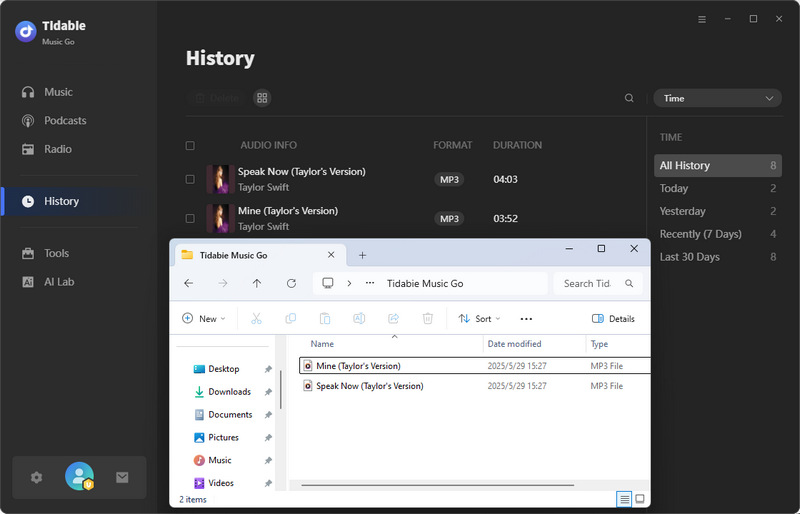
How to convert a YouTube video to MP3 with Tidabie Music Go?
The exact steps may vary slightly between applications, but the general workflow remains similar. Here is a typical process based on the widely used Tidabie Music Go, which numerous audio enthusiasts and tech reviewers have independently tested for its batch‑handling capabilities and output fidelity.
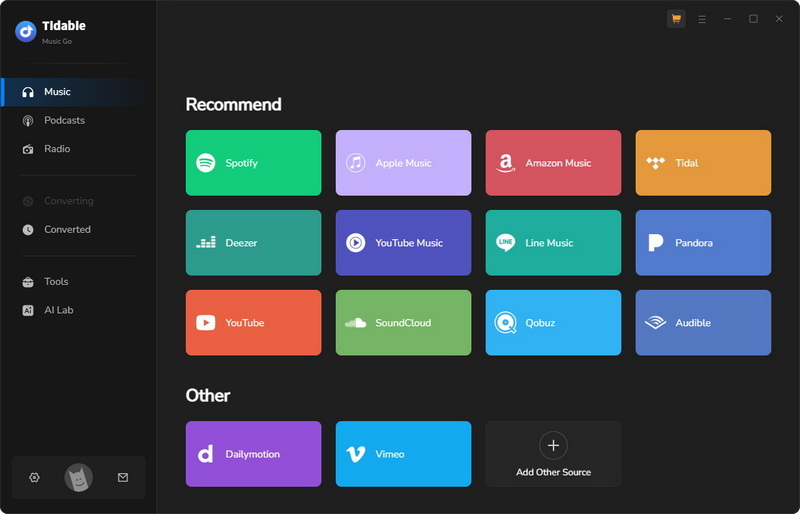
STEP 1 Launch Tidabie Music Go and select the "YouTube" option from the "Music" module, then choose whether to log in to your YouTube account or not. Tidabie supports YouTube playlist to MP3 download without logging in.
Note: Tidabie Music Go also supports "YouTube Music" as a separate source, which allows you to download music videos complete with lyrics. For extracting audio from standard YouTube videos, simply choose the "YouTube" option instead.
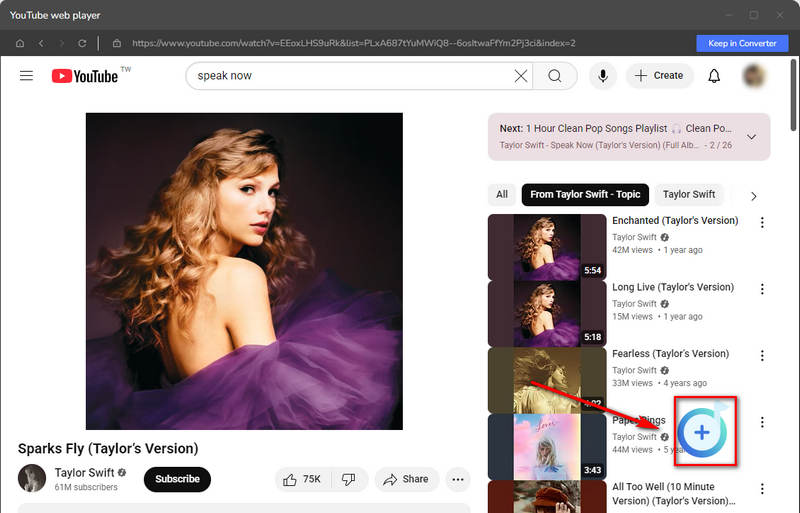
STEP 2 Find the video you want, e.g., in Liked videos or via search. Click the "+" button at the lower right, then after the program parses the URLs, select the desired videos and click "Add" to queue them.
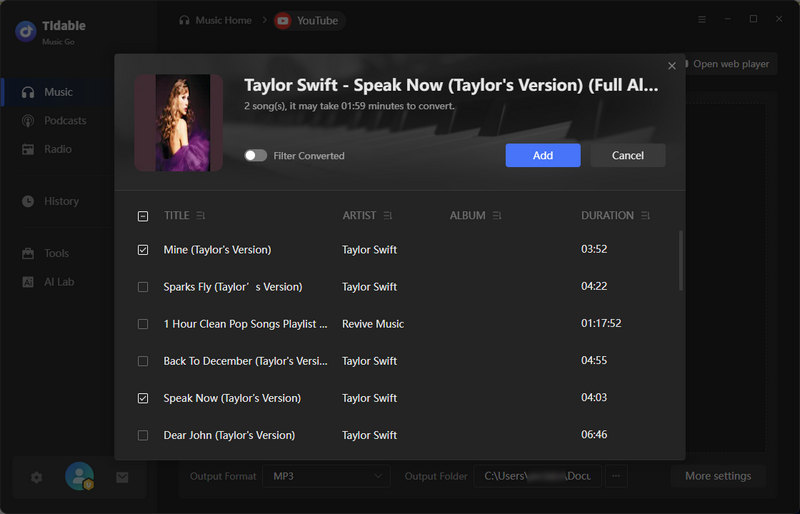
STEP 3 Open "Settings" in the bottom left to adjust preferences. For MP3 output, choose "MP3" as the format. You can also tweak bit rate, sample rate, output file name, and output folder as needed.
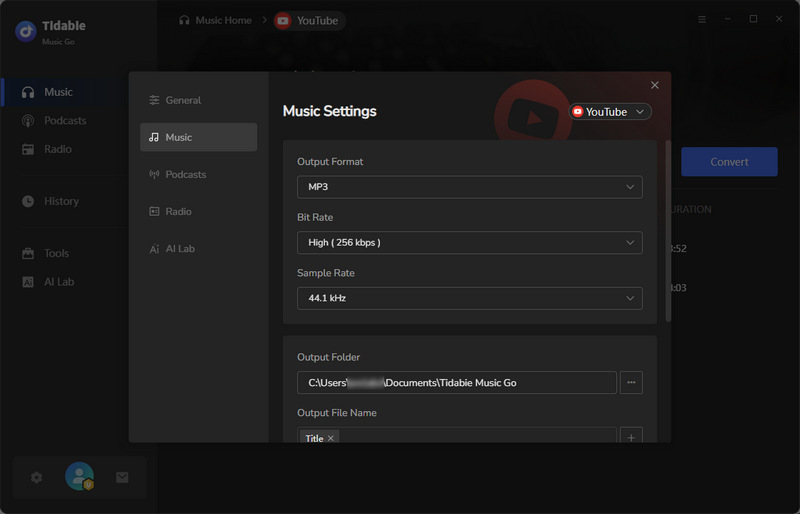
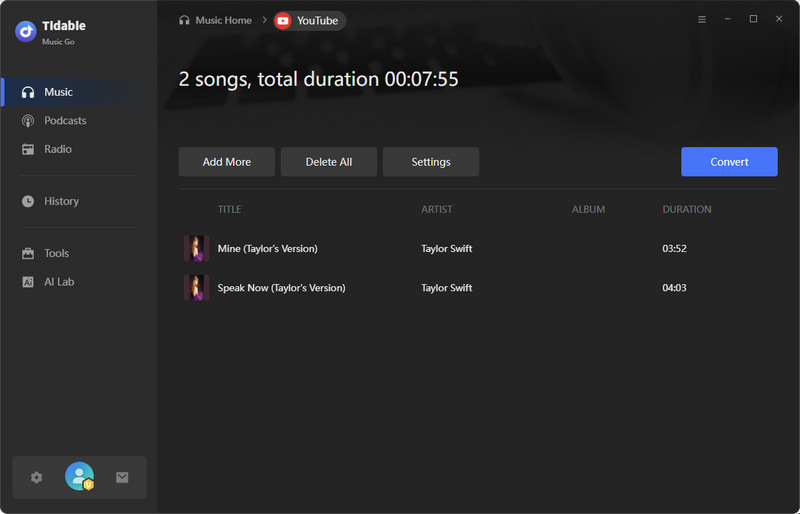
STEP 4 Close the settings window, then click "Convert" to start the YouTube playlist to MP3 download. The output folder will open automatically. You can also check your downloads via "History" in the left sidebar.
- A converted YouTube playlist is easier to enjoy when it lives in a visual library. Sonikr Media Hub imports the MP3 files, arranges them by album, artist, and playlist, and makes every song searchable in one personal music hub.
- Downloads from YouTube, Spotify, Apple Music, SoundCloud, etc.
- High output quality with adjustable bitrate and sample rate.
- No download size limits for batch conversion.
- Up to 10× faster conversion.
- Supports MP3, AAC, WAV, FLAC, AIFF, and ALAC.
- Preserves more ID3 tags than online tools.
- Batch conversion handles entire playlists in one go.
- Requires desktop software installation.
- No mobile app available.
Method 2: Top Free Online YouTube Playlist to MP3 Converters We Tested
⚠️ Security Note: Free online YouTube playlist converters often come with intrusive ads, misleading download buttons, and unexpected redirects. We strongly recommend using an ad‑blocker and avoiding unverified downloads. For a safer, ad-free experience, a professional desktop app like Tidabie is a more reliable alternative.
For users who need a quick, no‑installation solution, free online YouTube Playlist to MP3 converters offer the most convenient way to convert YouTube playlists to MP3. To provide a reliable assessment, we tested 9 free online services and analyzed their performance across key metrics such as download speed, audio quality, ID3 tag preservation, and batch handling capability. Across all these free services, we observed several common strengths and drawbacks.
- No installation required.
- Free to use with no subscription for basic features.
- Some free tools support ZIP packaging.
- Batch downloading is rarely fully supported for free.
- Audio quality is often capped at 192 kbps or lower in free versions.
- ID3 tag preservation is inconsistent and often missing entirely.
- Misleading buttons and redirects are common.
- Some services fail to parse playlist links or show unclear error messages.
After systematically testing 9 online YouTube to MP3 converters, we found that the following 3 YouTube playlist downloaders for MP3 stood out as both reliable and effective for batch conversions.
1. OFA Downloader - Ad‑free YouTube Playlist ZIP Downloader
🌐Website: https://oneforalldownloader.com/
| Security | No ads detected. |
| Output Format | MP3, WAV, FLAC, M4A, OGG, OPUS |
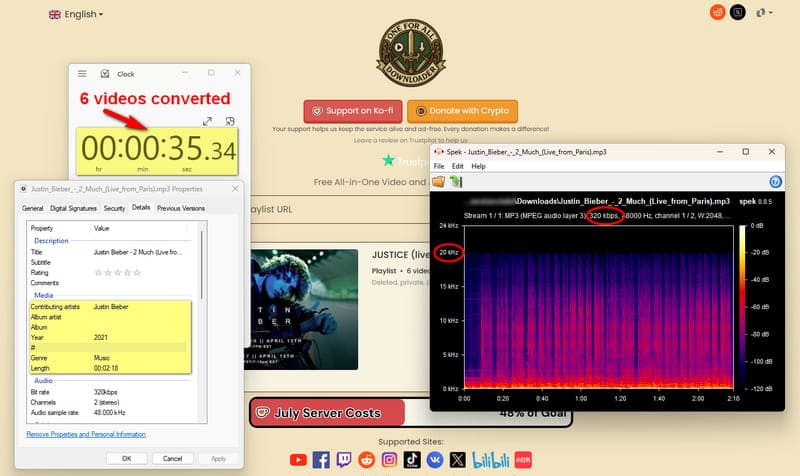
| Download Speed | ~35s for 6 videos |
| Quality | 320 kbps |
| ID3 Tags | Title, Artist, Year, Genre |
OFA Downloader handled our six‑video playlist flawlessly. All files converted to 320 kbps MP3 in about 35 seconds with no ads, and ID3 tags were partially preserved. Its resume feature lets you continue large playlists from any track, a practical touch for frequent users. For example, if you paste a playlist containing 50 tracks, you can start the download from video #21, skipping the ones you've already downloaded.
2. ytmp3.gg - Playlist Downloader for YouTube MP3
🌐Website: https://media.ytmp3.gg/tools/youtube-playlist-downloader/ukhxfy
| Security | No ads. |
| Output Format | MP3, WAV, FLAC, M4A, OGG, OPUS, MP4, WEBM, MKV, AVI, FLV, MOV |
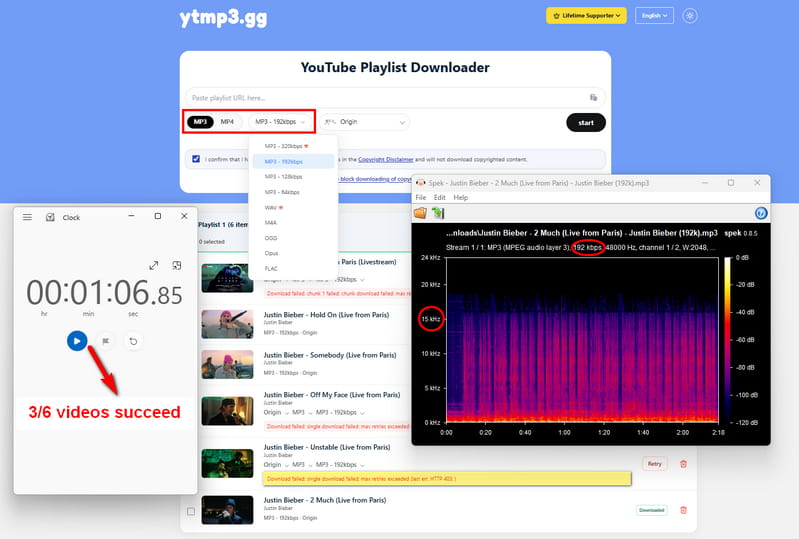
| Download Speed | ~60s (50% success) |
| Quality | 192 kbps (320 kbps MP3 and WAV are paid.) |
| ID3 Tags | None |
Ytmp3.gg is a popular free online YouTube to MP3 converter that supports many formats and packed our playlist into a ZIP in about one minute. However, three out of six videos failed with a "Download failed" error, and output was limited to 192 kbps with no ID3 tags. Higher bitrates require a paid upgrade, so its free version is unreliable for batch jobs.
3. ConverterBear - Online YouTube Playlist MP3 Converter
🌐Website: https://converterbear.pro/playlist-converter.php
| Security | Redirects encountered. |
| Output Format | MP3 only |
| Download Speed | ~19s per video |
| Quality | 128 kbps |
| ID3 Tags | Title, Artist, Album, Year, Genre (cover separate) |
ConverterBear parses playlists but forces you to download each video individually. A single video took ~19s at 128 kbps, with tags preserved but cover art saved separately. It works for occasional single tracks, but not for full‑playlist efficiency.
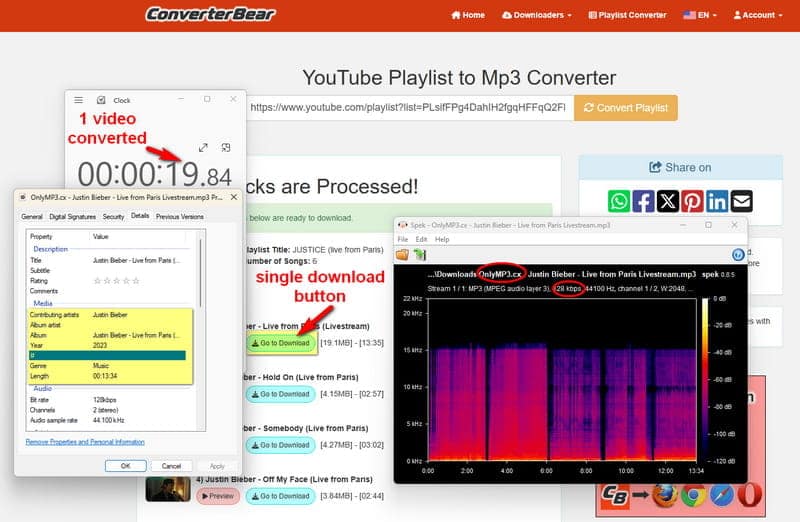
Note: The output file names from ConverterBear contained "OnlyMP3" in the title, which led us to test that service as well. OnlyMP3 could only parse the first video of a YouTube playlist and offered no batch download support, so we did not include it in our main comparison. If you are interested in exploring more options, we recommend reading this article: 15+ Safe & FREE YouTube MP3 Download Sites.
Tools That Did Not Meet Expectations
| Playlist Parsing | Download Success | Note / Error | |
|---|---|---|---|
| ytdlp.online | ✔️ | ✔️ | Processed 6 videos in ~100s but files were not found. |
| Yout | ✔️ | ❌ | Playlist downloads require a Pro (paid) account. |
| vdwn.cloud | ❌ | ❌ | "YouTube blocked this video" error. |
| DDownr | ✔️ | ❌ | Multiple redirects. Only first video parsed. |
Method 3: Use an Extension to Convert YouTube Playlist to MP3
Browser extensions offer a lightweight way to download audio without leaving YouTube. However, most free extensions are either unstable, require a paid upgrade for full functionality, or fail to support batch downloads. We tested YouTube to MP3 Converter to see how it performs.
🌐Website: Chrome Web Store
| Security | High‑risk permissions. |
| Output Format | MP3 Only |
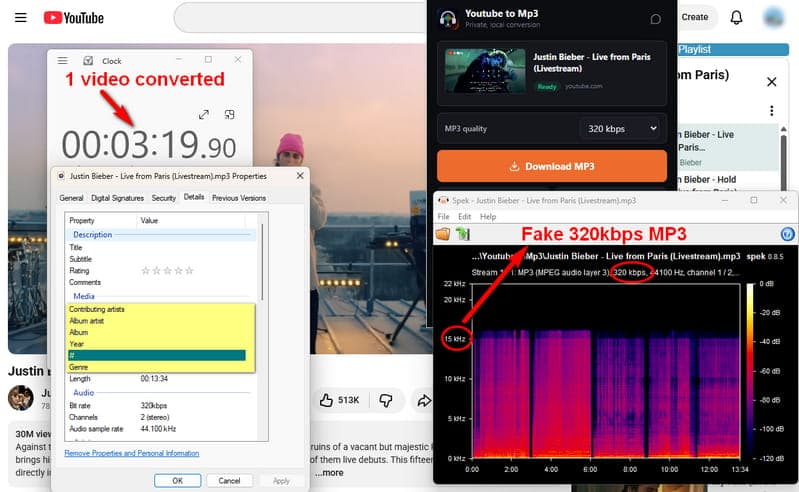
| Download Speed | ~3+ min per video |
| Quality | Claimed 320 kbps, actual 15kHz. |
| ID3 Tags | None |
In our test, this extension only supports MP3 and requires manual conversion per video. A single video took over three minutes to convert, and the claimed 320 kbps output actually measured only 15kHz in Spek, meaning the actual quality is far lower than advertised. No ID3 tags were preserved, and the free version has a usage limit. Unlimited use requires a Pro upgrade. The extension also requests broad permissions, which raises privacy concerns.
- No need to leave the YouTube page.
- Lightweight and easy to install from the Chrome Web Store.
- No batch download support.
- Very slow conversion speed.
- Claimed 320 kbps output is misleading.
- Does not preserve ID3 tags.
- Free version has a usage limit.
- Requests broad permissions that may raise privacy concerns.
Method 4: Save YouTube Playlists as MP3 on Mobile Devices
Your smartphone is often the quickest way to grab audio from YouTube when you're not near a computer. While the Play Store and App Store don't allow full-fledged downloaders, you can still get the job done using third‑party apps (on Android) or native automations (on iPhone). Below are step‑by‑step guides for each platform.
For Android Users
- 🌐Videoder: Google Play Store
- 🌐NewPipe: https://newpipe.net/
- 🌐YMusic: https://ymusic.io/
- 🌐VidMate: https://vidmate-official.su/
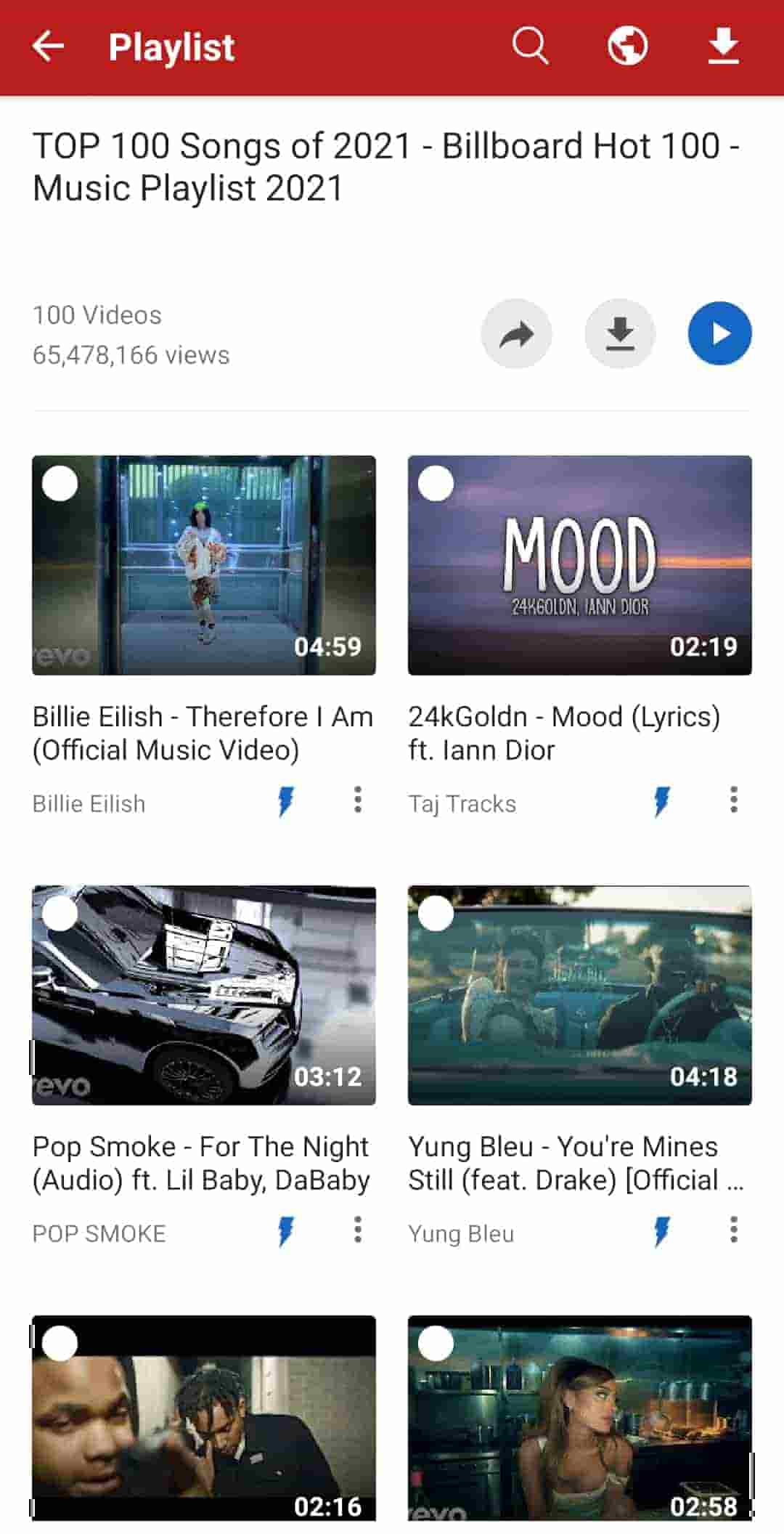
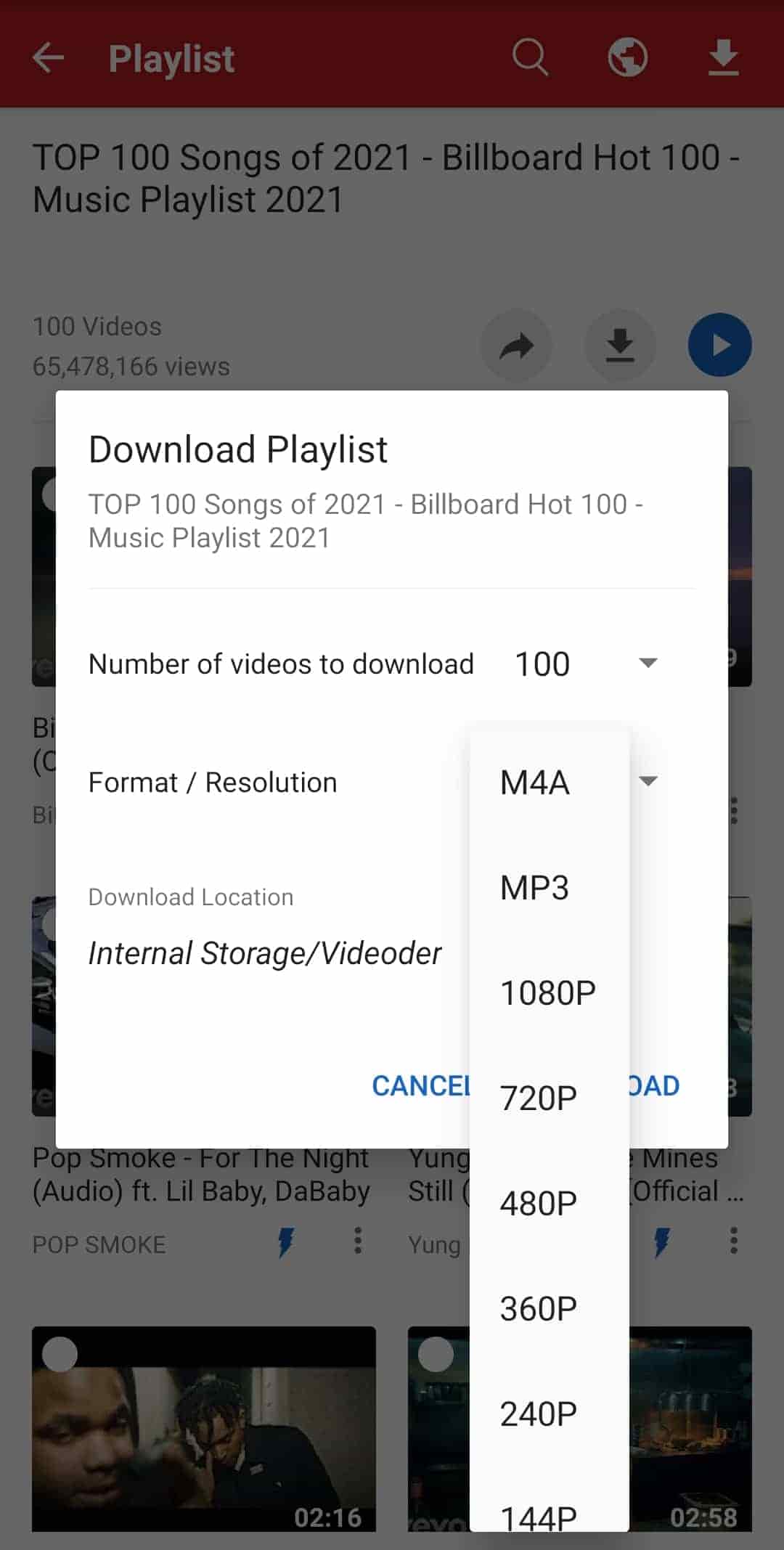
Here, we take Videoder as an example. Videoder is a free Android app that allows you to download videos and audio from YouTube and over 50 other platforms. It supports batch MP3 extraction from playlists, handling up to 100 videos per batch, and does not require you to log in to your YouTube account.
How to convert YouTube playlist to MP3 with Videoder?
STEP 1 Open your phone's browser, go to videoder.com, and download the Android APK.
STEP 2 In your phone's Settings > Security (or Apps > Special access), enable "Install unknown apps" for your browser. Tap the downloaded APK and follow the prompts.
STEP 3 Open the YouTube app, go to your playlist, and copy its link from the share menu.
STEP 4 Open Videoder and either paste the URL into the search bar or use the built‑in browser to navigate to the playlist.
STEP 5 After the playlist loads, tap the download icon. Select individual tracks or tick "Select All". From the format list, pick "MP3".
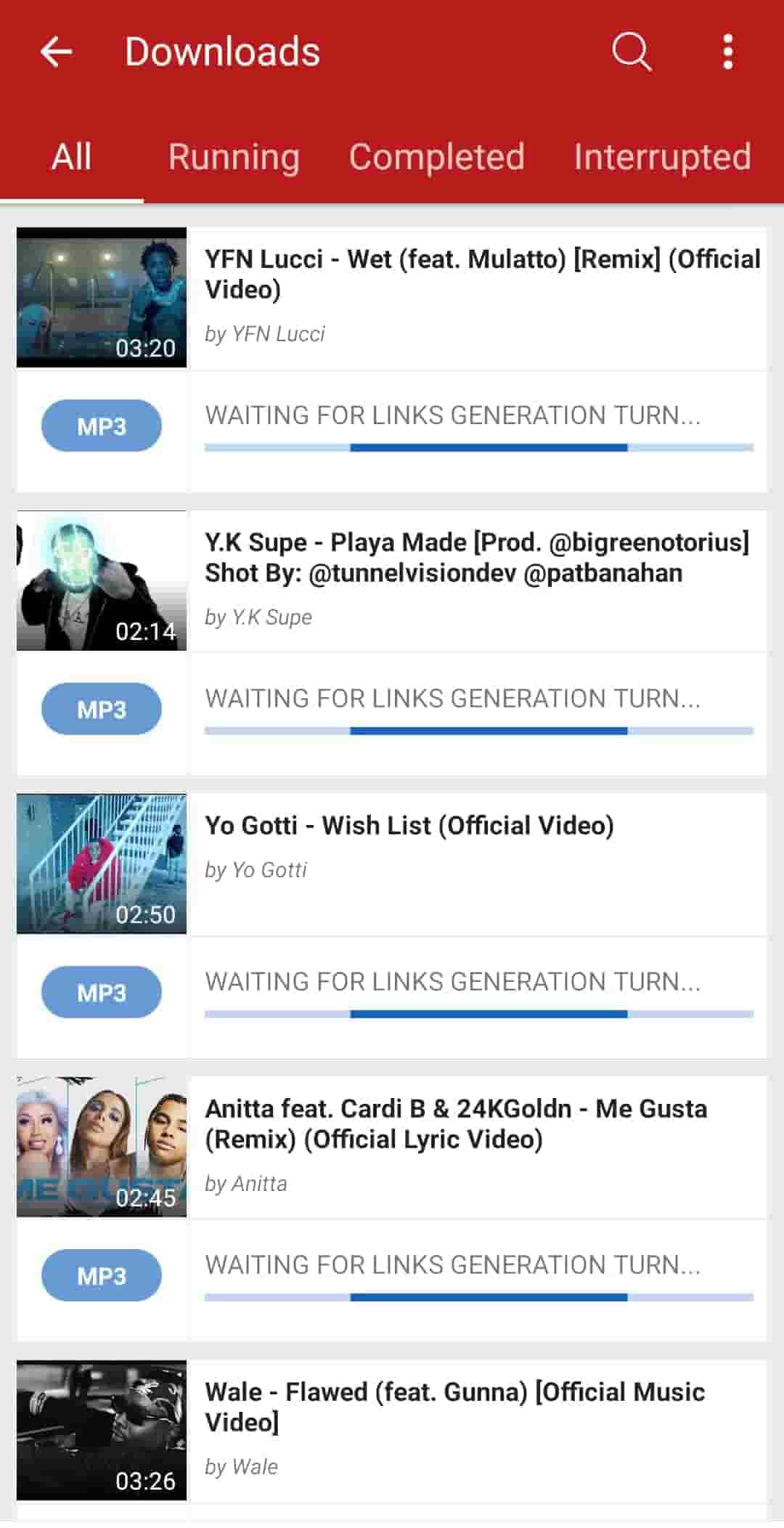
STEP 6 Tap "DOWNLOAD". The app will process all selected videos and save the MP3s to your device's storage, usually in a folder named "Videoder".
For iPhone Users
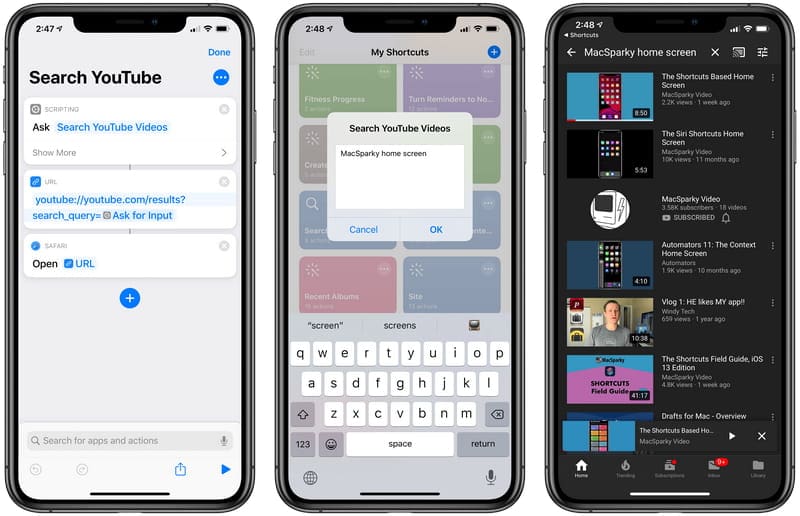
Apple's iOS doesn't allow third‑party downloader apps, but the built‑in Shortcuts app gives you a clever workaround. Community‑created shortcuts like YouTube to MP3 or Media Grabber can extract audio from YouTube videos and save them to your Files app. While most shortcuts process one video at a time, they're completely free, require no additional software, and keep your login credentials private since you're only using YouTube's share sheet.
How to download a YouTube playlist to MP3 with Shortcuts?
STEP 1 Open the Shortcuts app, go to the Gallery, and search for "YouTube to MP3" or "Media Grabber".
STEP 2 In the YouTube app, open your playlist and copy its full URL from the share menu or address bar.
STEP 3 Go back to Shortcuts, tap your installed shortcut, and paste the URL when prompted. Confirm to start the conversion.
STEP 4 The shortcut will extract audio from each video in the playlist. The MP3 files will be saved to your iCloud Drive or local storage.
- Convert and listen on the go without a computer.
- Android apps like Videoder support true batch downloads for large playlists.
- iPhone Shortcuts require no third‑party app installation and keep your account safe.
- Both methods are free to use.
- Android requires manual APK installation, not as straightforward as Play Store apps.
- iPhone Shortcuts usually handle one video at a time.
- Videoder contains ads unless you pay for the premium version.
- Some shortcuts may break after YouTube updates.
Method 5: Command-Line YouTube Playlist MP3 Downloader
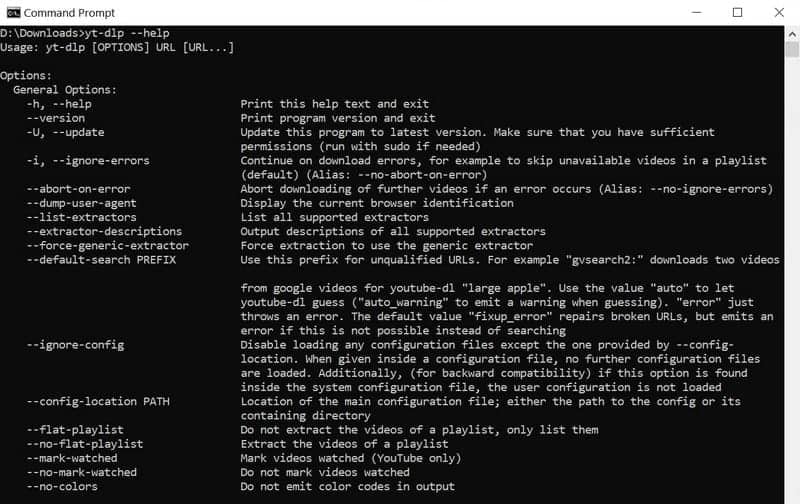
For users comfortable with the terminal, command-line YouTube playlist downloaders offer the most flexible and powerful way to download YouTube playlists as MP3. yt-dlp is the industry-standard open-source downloader that supports thousands of websites and gives you complete control over output quality, format, metadata, and file organization. It is widely used by developers and audio enthusiasts, and it receives regular updates to keep up with YouTube's changes.
For detailed installation instructions and advanced usage, please refer to the official yt-dlp GitHub repository: https://github.com/yt-dlp/yt-dlp.
- Completely free and open-source.
- Full control over quality, format, and metadata.
- Supports batch downloading of entire playlists.
- Regular updates ensure compatibility with YouTube.
- Requires technical skills and comfort with the command line.
- Initial setup can be challenging for beginners.
- No graphical interface.
FAQs about YouTube Playlist to MP3
Q1: Where do my downloaded YouTube MP3 files go after conversion?
It depends. Desktop apps usually let you choose the output folder. Online YouTube MP3 converters save files to your browser's default downloads directory. For mobile apps, files are stored in a dedicated app folder. With browser extensions, files typically land in your "Downloads" folder. For command-line ones like yt-dlp, the files appear in the terminal's current working directory unless you specify a different path.
Q2: Why doesn't my MP3 show album art or artist name?
Not all downloaders embed ID3 metadata. Free online YouTube to MP3 converters and many extensions often strip this information. Desktop applications like Tidabie Music Go preserve tags.
Q3: How can I convert a large playlist without hitting daily limits?
Free online YouTube to MP3 converters typically cap you at 10–30 videos per day. To bypass limits, either use multiple converters or switch to a desktop app (Method 1) or command‑line tool (Method 5), which have no daily restrictions. Paid versions of online services also remove limits, but desktop playlist downloaders for YouTube often provide better value for frequent use.
Conclusion
We have explored five practical methods, from powerful desktop apps and quick online converters to browser extensions, mobile solutions, and command‑line projects. Each has its own strengths and trade‑offs. Among the options we tested, Tidabie Music Go stands out for its consistent performance, format flexibility, and ad‑free experience. Download Tidabie Music Go and enjoy your favorite YouTube playlists without interruptions.

Jacqueline Swift | Senior Writer
