


Download Free MP3 Music with MP3Paw & Alternatives
Finding reliable ways to enjoy music without breaking the bank is a top priority for many listeners. If you're looking for a place to get free MP3 downloads, you've likely come across MP3Paw, a popular platform that has gained attention for its simple approach to music downloading. However, questions about safety, reliability, and audio quality often arise. This guide will walk you through how to use MP3Paw for free MP3 music downloads and introduce top MP3 downloaders as alternatives for you. Read on.
Part 1. What is MP3Paw?
MP3Paw is an online music search engine that gathers MP3 files from various sources across the internet, including YouTube. It offers free MP3 music downloads for songs, albums, and playlists, without requiring an account or any subscription fees. MP3Paw supports searches by song title, artist name, or direct YouTube URL, offering flexibility for different user preferences. Bitrate options range from 64 kbps to 320 kbps, allowing listeners to choose the quality that best suits their needs. However, the original MP3Paw domain is no longer active, and many currently available sites using the MP3Paw name are unofficial mirrors or clones that may pose additional risks.
- Free to use with no registration required.
- Simple interface with fast search results.
- Works on any device with a web browser.
- Supports search by song, artist, or YouTube link.
- Offers multiple bitrate options up to 320 kbps.
✅ Pros
- Frequent pop-up ads and redirects during download.
- Audio quality is inconsistent despite claimed bitrates.
- No batch download support for playlists or albums.
- Domain names change frequently.
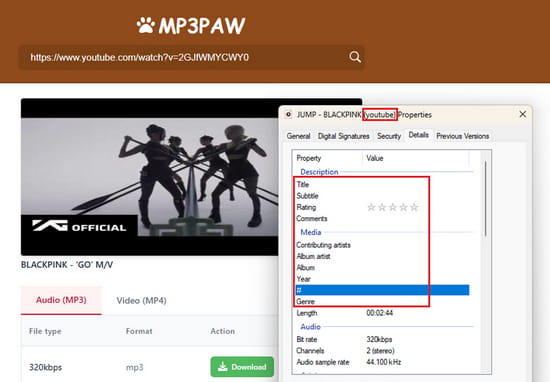
- Downloaded files often lack ID3 tags and metadata.
- The downloaded file name includes its sources, such as "YouTube".
❌ Cons

Given the security concerns with the MP3Paw download, a safer alternative is worth considering. Download this powerful tool for high-quality MP3 downloads without ads. 👉👉
Part 2. How to Download Free MP3 Music with MP3Paw
Follow these simple steps to download free MP3 music with MP3Paw. While the process is simple, get prepared to handle occasional pop-up windows and redirects along the way.
STEP 1 Open your browser and go to an active MP3Paw domain. Use an ad blocker or keep antivirus software active for safety.
- 🌐Link 1: https://v4.mp3paw.link/en/
- 🌐Link 2: https://mp3paw.blog/
STEP 2 Enter a song title, artist name, album, or YouTube link in the search bar and press the search icon. MP3Paw will display matching results.
STEP 3 Click the "Download" button next to your chosen track, then select your preferred bitrate from the list.
STEP 4 Close any pop-up or ad windows that appear. Click the "Download Now" button to save the MP3 file to your device.
Part 3. Download Free MP3 Music with MP3Paw Alternatives
While MP3Paw offers a quick way to grab free MP3 downloads, its security risks and unreliable performance often leave users looking for better options. Below, we explore top MP3Paw alternatives to suit different needs.
1. Safe & Professional Desktop MP3 Downloader
Tidabie Music Go is a professional desktop application designed to download and convert audio content from Spotify, Apple Music, Amazon Music, Tidal, YouTube Music, Deezer, SoundCloud, Pandora, Qobuz, and more. It efficiently handles songs, albums, playlists, podcasts, audiobooks, and radio shows in batches at speeds up to 10 times faster than real-time, saving users with large music collections a significant amount of time.
For those seeking a reliable MP3 downloader, Tidabie supports multiple output formats, including MP3, AAC, WAV, FLAC, AIFF, and ALAC. All downloaded files retain their original audio quality, whether it's Spotify Lossless, Apple Music Hi-Res, or Tidal Hi-Fi. It preserves complete ID3 tags and lyrics, ensuring that downloaded music stays organized with proper metadata information. Unlike free online MP3 downloader, Tidabie provides a completely ad-free experience.
Tidabie Music Go
- Download songs, albums, and playlists from Spotify, Apple Music, SoundCloud, Amazon Music, TIDAL, YouTube Music, Qobuz, etc.
- Convert music to MP3, AAC, WAV, FLAC, AIFF, and ALAC.
- Batch download music at up to 10x speed with original quality.
- Keep full ID3 tags such as title, album, and artist.
- Freely enjoy podcasts online and download podcasts.
- Listen to radio shows and record radio freely.
How to Download MP3 Music with Tidabie Music Go?
Follow the steps below to download free MP3 music with Tidabie Music Go.
STEP 1 Select Your Music Source
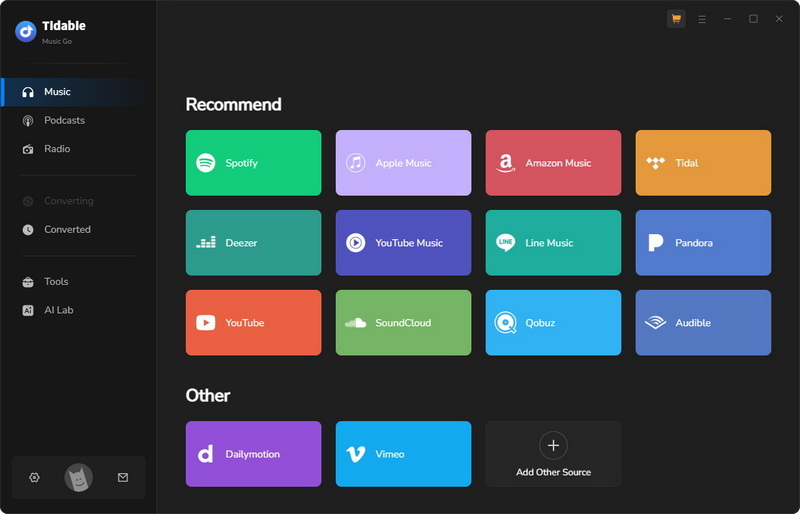
Install and open Tidabie Music Go on your computer. The "Music" section presents multiple options for music sources. Just select the one you want. Here we take "YouTube Music" for example. Log in to your YouTube account if needed.
STEP 2 Add Music to Download
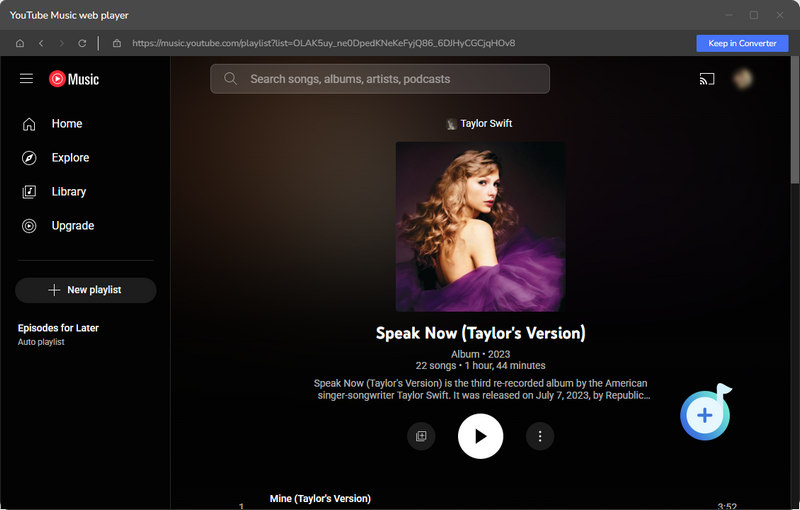
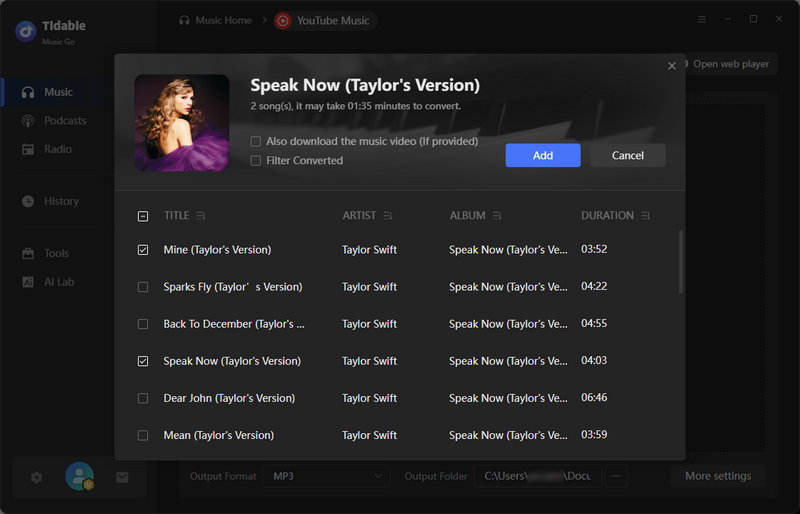
Navigate to locate the songs, albums, or playlists you wish to download. Once you find the content you want, click the "+" button in the bottom right corner. Tidabie will analyze the URL and display a list of the tracks it has detected. Review the selection, check specific tracks as needed, and then click the "Add" button.
STEP 3 Configure Output Settings
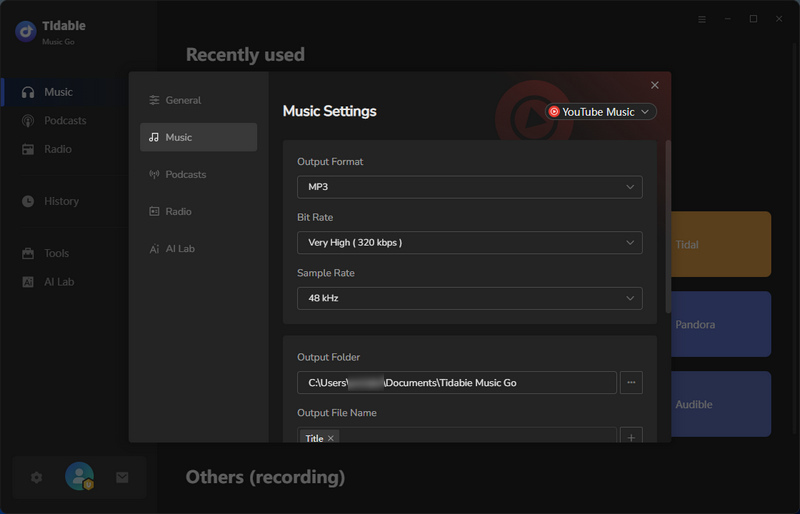
Before beginning the MP3 download, click the gear icon in the bottom left corner or the "Settings" button to customize your output preferences. To ensure your files download in MP3 format, select "MP3" from the Output Format dropdown menu. You can also adjust the bit rate and sample rate to match your quality requirements. Additional options allow you to organize output files by playlist, artist, or album, and specify a custom output folder for storing your downloaded music. Close the settings window once you have made your selections.
STEP 4 Start to Download MP3 Music
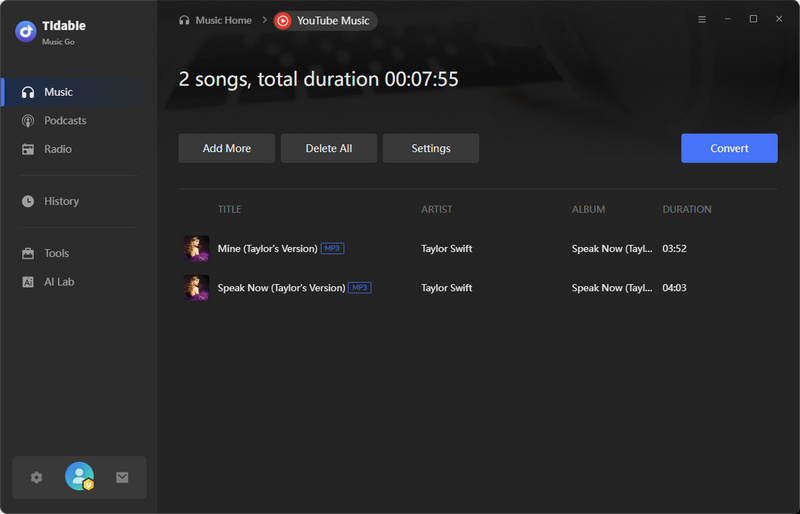
If you want to add multiple playlists or albums, click "Add More". With your music added and settings configured, click the "Convert" button. Tidabie will process the tracks at up to 10x speed. Once the conversion completes, click the folder icon next to any track to open its location directly on your computer, or access all your downloaded music in the "History" tab.
2. Free MP3 Music Download Sites
For users who prefer legal, royalty-free music from independent artists, two platforms stand out as the most trusted and popular choices. Both offer completely legitimate MP3 downloads without the security risks associated with unverified sites.
1. Free Music Archive
Website: https://freemusicarchive.org/home
Free Music Archive is a curated online library that offers legal and free MP3 downloads for personal use. Founded by the renowned WFMU radio station, FMA provides access to over 100,000 tracks from independent artists across a wide range of genres, including indie rock, classical, electronic, and lo-fi. Unlike many MP3 music downloaders that operate in legal gray areas, FMA works directly with artists and curators to ensure all content is properly licensed for free distribution. It is ideal for users looking to discover unique, alternative tracks while staying completely safe from copyright issues or malware risks.
How to Download Free MP3 Music from Free Music Archive?
STEP 1 Go to freemusicarchive.org and click "Enjoy FMA" to enter the music section.
STEP 2 Search by artist, song, or album, or browse by genre or curator. Click on a track to open its page and preview it if needed.
STEP 3 Click the download icon, review the Creative Commons license, then click "I understand and agree". The MP3 file will save directly to your device.

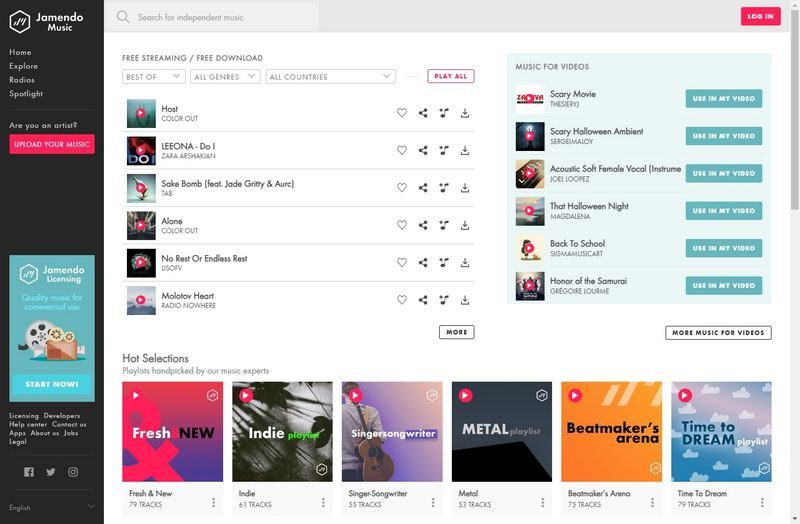
2. Jamendo
Website: https://www.jamendo.com/
Jamendo is an open music platform that connects independent artists with listeners, offering free MP3 downloads for personal use under Creative Commons licenses. With over 500,000 tracks available, it serves as a legal and safe alternative for those seeking royalty-free music. The platform features an intuitive interface, including both a free music streaming section called Jamendo Music and a commercial licensing section called Jamendo Licensing for businesses and content creators. For users who want a reliable MP3 downloader that supports independent artists, Jamendo provides a straightforward experience without the security risks associated with unverified free MP3 download sites.
How to Download Free MP3 Music from Jamendo?
STEP 1 Go to jamendo.com. Click "Sign Up" to create a free account, or log in if you already have one.
STEP 2 Use the search bar to look for an artist, song, or album. You can also browse playlists or charts. Click on a track to open its page.
STEP 3 Click "FREE DOWNLOAD" on the track page, then select "FREE DOWNLOAD FOR PERSONAL USE (MP3 QUALITY)". The file will save to your device.
3. Free Online MP3 Downloaders
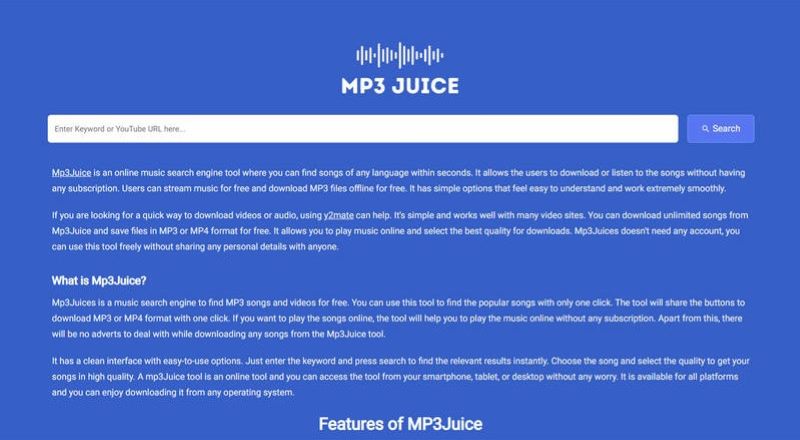
Beyond dedicated music platforms, many users turn to online web tools for quick MP3 downloads. Among these, MP3Juice remains one of the most frequently used options.
Website: https://v3.mp3juice.za.com/
MP3Juice is a widely used online MP3 music downloader that allows users to find and download MP3 files from various sources across the web. MP3Juice accepts searches by song title, artist name, or direct YouTube links. It offers MP3 downloads with bitrate options up to 256 kbps and also supports MP4 video downloads. The service primarily sources audio from YouTube and other video platforms, so sound quality depends on the source. While MP3Juice provides fast access to a vast database of tracks, be aware that the site generates revenue through advertisements, which can include pop-ups and redirects.
How to Download Free MP3 Music with MP3Juice?
STEP 1 Go to an active MP3Juice domain. Use an ad blocker for a safer experience, as many unofficial clones exist.
STEP 2 Type a song title, artist name, or paste a YouTube URL in the search bar, then press Enter. MP3Juice will display matching results.
STEP 3 Click "Play" next to any result to preview the track. Once you find the correct version, click the "MP3" button beneath it.
STEP 4 Close any pop-up or ad windows that appear. Click the download link to save the MP3 file to your device.
Part 4. MP3Paw vs. MP3 Downloader Alternatives 📊
To help you decide which MP3 downloader best fits your needs, the table below compares MP3Paw against the alternatives covered in this guide across key factors.
| Ad-Free | Compatibility | Audio Source | Output Format | Best Quality | Batch Download | ID3 Tags | Rating | |
|---|---|---|---|---|---|---|---|---|
| MP3Paw | ❌ | Web | YouTube | MP3 | 320kbps | ❌ | Missing | ⭐⭐ |
| Tidabie Music Go | ✔️ | Windows, Mac | Direct from Spotify, Apple Music, and 10+ services | MP3, AAC, WAV, FLAC, AIFF, ALAC | Original | ✔️ | Title, Album, Artist, Album Art, Track Number, Year, Genre, Lyrics | ⭐⭐⭐⭐⭐ |
| Free Music Archive | ✔️ | Web | Independent artists | MP3 | 320kbps | ❌ | Basic | ⭐⭐⭐ |
| Jamendo | ✔️ | Web | Independent artists | MP3 | 320kbps | ❌ | Basic | ⭐⭐⭐ |
| MP3Juice | ❌ | Web | YouTube | MP3, MP4 | 256kbps | ❌ | Missing | ⭐⭐ |
FAQs about Free MP3 Music Download
Q1: Is MP3Paw safe to use?
No. The site frequently displays redirects that can lead to malicious websites. Clicking on the wrong button may result in downloading unwanted software or exposing your device to malware. For a safer experience, use an ad blocker and keep your antivirus software active. If you prefer a completely ad-free and secure alternative, Tidabie Music Go eliminates these risks.
Q2: Are there any completely legal free MP3 download sites?
Yes. FMA, Jamendo, SoundCloud, Bandcamp, and Internet Archive. These sites ensure you can build your music library without worrying about copyright infringement or security risks.
Q3: Can I download entire playlists with free MP3 downloaders?
No. Most free MP3 downloaders, including MP3Paw and MP3Juice, only support single-track downloads. If you need to download full playlists or albums in batches, Tidabie Music Go is a better choice. It supports batch downloading at up to 10x speed, allowing you to grab entire playlists with just a few clicks.
Q4: Can I download music from Spotify with MP3Paw?
No, MP3Paw does not directly download from Spotify. It primarily sources audio from YouTube and other publicly accessible websites. To download music from subscription-based streaming platforms like Spotify, Apple Music, Tidal, or Amazon Music, try Tidabie.
Conclusion
Finding a reliable way to download free MP3 music often involves balancing convenience against safety and quality. This guide has walked you through MP3Paw and a range of alternatives. For those who value security, high-quality audio, and the ability to download entire playlists in batches, Tidabie Music Go stands out as the most comprehensive solution. Click the button below to try Tidabie Music Go now!

Jacqueline Swift | Senior Writer
