


Top 10 YouTube to FLAC Converters [Free & Desktop]
For music lovers who demand the highest sound quality, discovering a perfect song on YouTube often comes with a wish: to convert YouTube to FLAC format. While standard formats like MP3 are convenient, they compress files in a way that discards some audio data. This is where FLAC files shine. The challenge, however, lies in finding a reliable way to extract this high-fidelity audio from online videos. To solve this, we have explored the top 10 YouTube to FLAC converters to help you easily download your favorite YouTube finds into FLAC files.

Part 1. What is FLAC? FLAC vs MP3
FLAC (Free Lossless Audio Codec) is an audio format designed for those who prioritize perfect sound production. Unlike common compressed formats, it reduces file size without removing the original audio data. FLAC lossless audio has become the preferred choice for archiving music collections and for critical listening, as it preserves every detail of the recording exactly as the artist and sound engineers intended.
The following table highlights the key distinctions between FLAC and MP3:
| FLAC | MP3 | |
|---|---|---|
| Compression Type | Lossless | Lossy |
| Quality | Original | Variable |
| File Size | Larger | Smaller |
| Compatibility | Most devices | All |
| Primary Use | Archiving, home/studio listening, audiophile collections. | Everyday listening, streaming. |
Part 2. Can I download FLAC from YouTube?
Not directly. YouTube itself does not officially offer an option to convert videos to FLAC format, either for free or Premium users. It streams audio in compressed formats that are suitable for online playback but are not lossless.
To obtain FLAC files from YouTube, you must use a YouTube to FLAC converter or FLAC downloader. These tools work by accessing the video stream, extracting the audio track, and then encoding it into the lossless FLAC format. The following section introduces the top 10 YouTube to FLAC Converters designed for this specific task.
Part 3. Top 10 YouTube to FLAC Converters
To help you make the best choice, we have compiled a detailed list of the top 10 YouTube to FLAC converters, from powerful desktop software to convenient online downloaders.
## How We Tested:
- Testing period: September 2026
- Devices: Windows 11, Chrome latest version
- Content: Same YouTube videos (7 rings by Ariana Grande), FLAC output selected
- Standard for evaluation: We evaluated each converter based on audio output quality, conversion success rate, metadata preservation, ads and redirects, and batch download capability. The evaluation results are shown below.
1. Tidabie Music Go [Desktop]🔥🔥🔥
Tidabie Music Go is a professional desktop streaming music downloader that allows users to extract high-quality FLAC files from YouTube or other customized sites. It also supports downloading music from YouTube Music, Spotify, Apple Music, SoundCloud, Amazon Music, TIDAL, Qobuz, and more into various formats, including FLAC, MP3, AAC, WAV, AIFF, and ALAC. It can batch download YouTube videos at up to 10x faster high speed. With complete metadata preserved, it helps you create a high-fidelity, organized music library. Also, Tidabie provides users with many free audio editing tools, such as AI Audio Splitter, Format Converter, Burn CD, Audio Editor, and Tag Editor.
- Security
- ✓Ad-free, 100% safe for personal use
- Output Format
- MP3, AAC, WAV, FLAC, AIFF, ALAC
- Batch Download
- ✓No limits
- Quality
- 20 kHz (Original)
- ID3 Tags
- Title, Artist, Album, Artwork, Year, Track#
How to Convert YouTube to FLAC with Tidabie Music Go?
Check this tutorial on how to download audio from YouTube and save it as high-quality FLAC files.
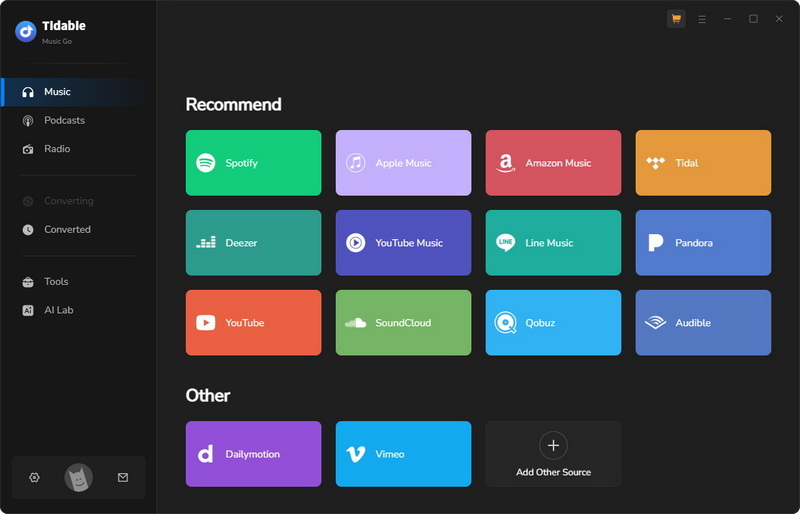
STEP 1 Launch Tidabie on your computer. On the main interface, locate the "Music" module. From the list of available sources, select "YouTube" to extract FLAC files from YouTube. When you access the YouTube Web Player, you can choose to log in or not with your YouTube account. Tidabie works with both YouTube Premium and free accounts.
Note: If you want to download songs, albums, and playlists from the music streaming service YouTube Music, select "YouTube Music". From this source, you can also download YouTube Music videos with lyrics.
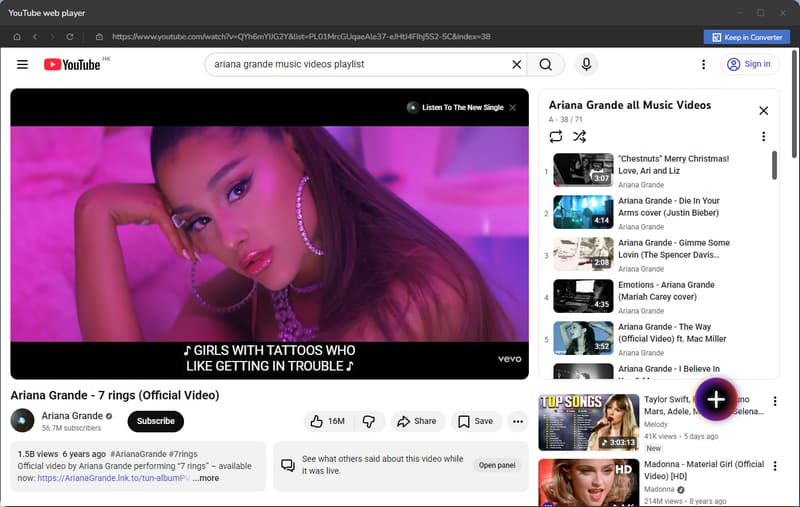
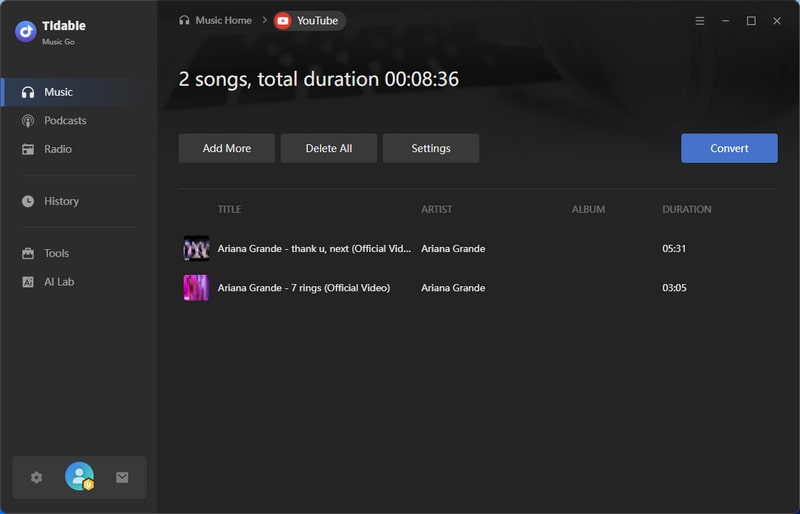
STEP 2 Within the built-in YouTube web player, navigate to the YouTube video or playlist you wish to convert. Then click the "+" button to parse the URL(s). When a window with the list of videos pops up, select the specific videos you want and click "Add". All chosen items will be sent to your conversion task list.
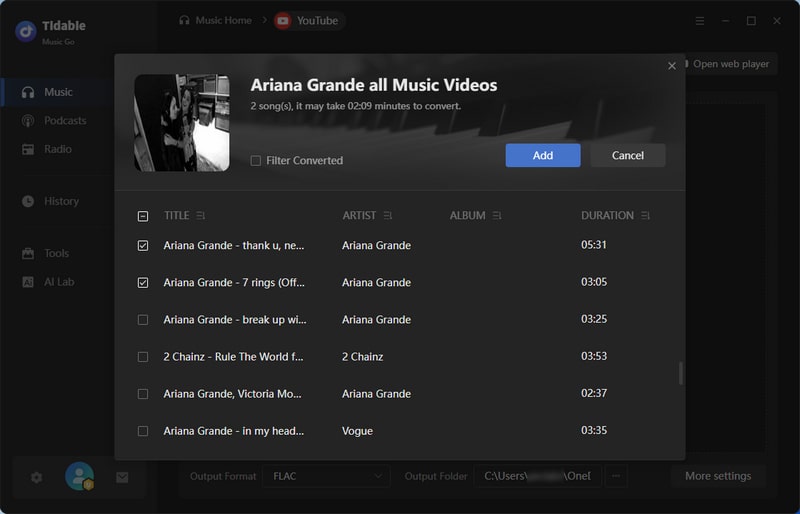
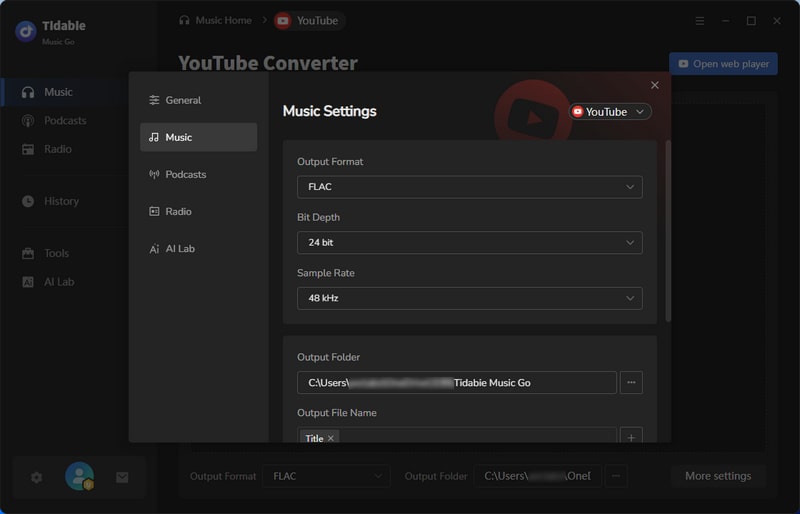
STEP 3 Before starting the conversion, click the "Settings" button to configure the output. In the settings window, set the "Output Format" to "FLAC". You can also customize other parameters here, such as the bit depth, sample rate, and output folder, output file name, etc.
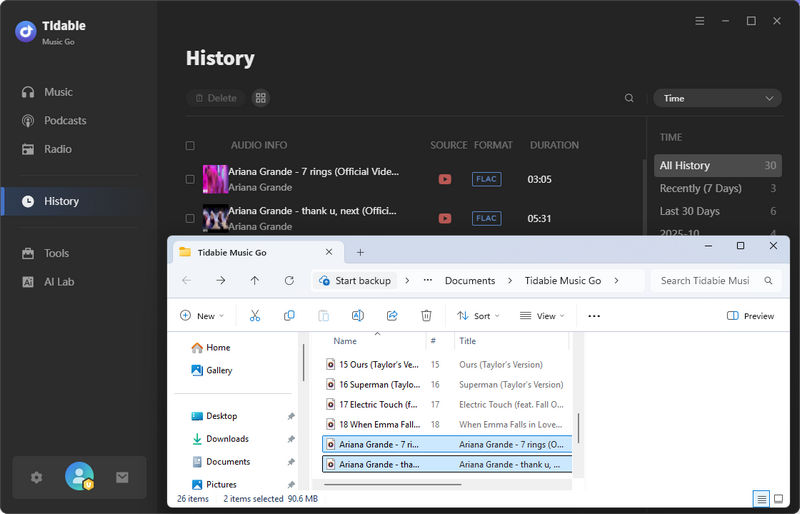
STEP 4 Once your settings are configured, close the settings window. Back on the screen with your tasks listed, click the "Convert" button to begin the conversion process. Tidabie will now convert YouTube to FLAC format at high speed. You can find your finished FLAC files in the designated output folder or by checking the "History" section.
- Downloads audio from YouTube, YouTube Music, Spotify, Amazon Music, Apple Music, Tidal, etc.
- Supports FLAC, MP3, WAV, AIFF, ALAC, and AAC.
- Preserves original quality of downloaded files.
- Retains complete ID3 tags and lyrics.
- Operates at conversion speeds up to 10x faster.
- Batch downloads playlists, albums, or videos.
- Provides advanced tools like an AI Audio Splitter, Audio Editor, Tag Editor, etc.
- Requires installing the desktop software.
- Does not offer a dedicated mobile version.
2. Any Video Converter [Desktop]
🔗: https://www.any-video-converter.com/en8/for_video_free/
Any Video Converter is a comprehensive desktop video processing toolkit. Unlike simple online YouTube to FLAC Converters, AVC is a dedicated application for Windows and macOS that combines video downloading, format conversion, and basic editing into one package. It allows users to directly download and convert videos from YouTube and over a thousand other sites into high-quality FLAC files. AVC is free to use, though it may promote premium features, and is particularly noted for supporting batch conversions, allowing you to process multiple videos to FLAC format simultaneously.
- Security
- ✓Ad-free
- Output Format
- MP3, M4A, WAV, FLAC, MP4, MKV
- Batch Download
- ✓No limits
- Quality
- 20 kHz
- ID3 Tags
- Title, Artist, Year, Track#, Genre
How to Convert YouTube to FLAC with Any Video Converter?
STEP 1 Visit the official website of Any Video Converter or click the button below to download the free version of the software. Run the installer and follow the on-screen instructions to complete the installation on your computer.
STEP 2 Launch Any Video Converter and go to the "Video Download" tab. Click the "+ Add URL(s)" button to paste copied URLs. Or click the magnifier icon, then select YouTube to access the built-in YouTube web player and log in to your account if necessary. You can then directly search for the video you want.
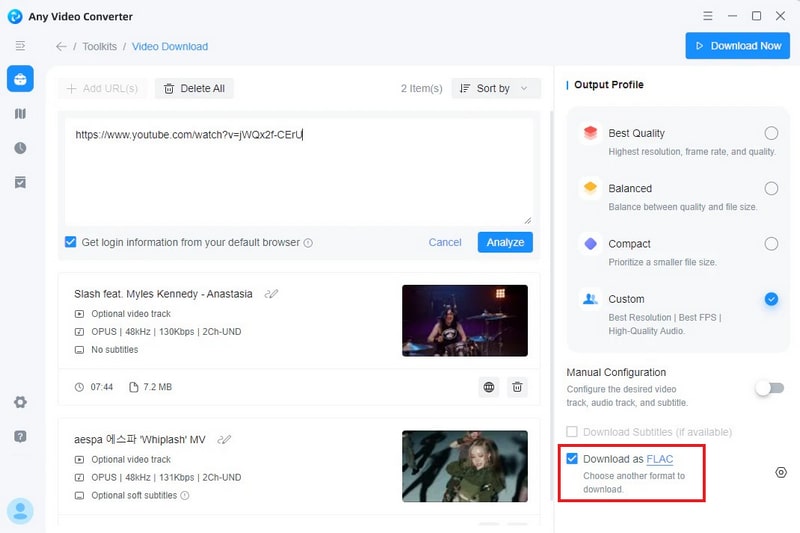
STEP 3 Once you've found your video, click the "Parse Now" button. After parsing, locate the output settings on the right. Select "FLAC" from the list of audio formats.
STEP 4 Click the "Download Now" button in the upper-right corner. AVC will then convert it to a FLAC file and save it to your specified output folder.
- Supports batch downloading videos.
- Allows detailed customization of ID3 tags.
- Output formats include FLAC, MP3, MP4, AVI, etc.
- Offers tools like a screen recorder, video trimmer, and vocal remover.
- Requires download and installation.
- Available on Windows and macOS only.
3. YTFLAC [Online]
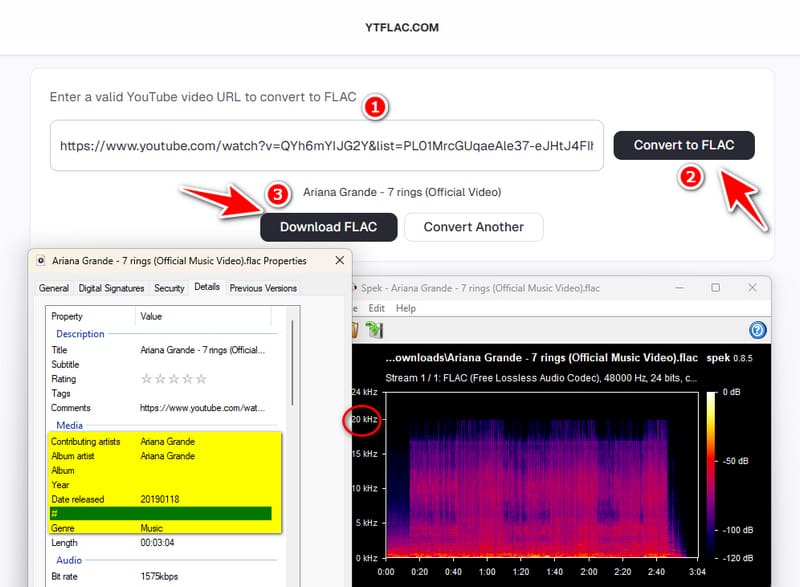
In our test, YTFLAC preserved Title, Artist, Year, and Genre tags, better than most online converters. However, performance was unstable: conversion speeds fluctuated, and some attempts stalled or failed before completing. No ads appeared during testing, but downloads triggered redirects, which may raise privacy concerns. It does not support batch conversion.
- Security
- ×There are redirects during the download.
- Output Format
- FLAC
- Batch Download
- ×Not supported
- Quality
- 20 kHz
- ID3 Tags
- Title, Artist, Year, Genre
How to Turn YouTube Videos into FLAC with YTFLAC?
STEP 1 Copy the YouTube video link and paste it into YTFLAC.
STEP 2 Click "Convert to FLAC" and wait for the conversion to finish.
STEP 3 Click "Download FLAC" to save the file.
- Retains Title, Artist, Year, and Genre tags.
- Outputs high-quality 20 kHz FLAC.
- Speeds vary and conversions may fail.
- Download redirects may be a privacy concern.
- No batch download support.
- Supports FLAC only.
4. CutYT [Online]
🔗: https://www.cutyt.com/yt-flac
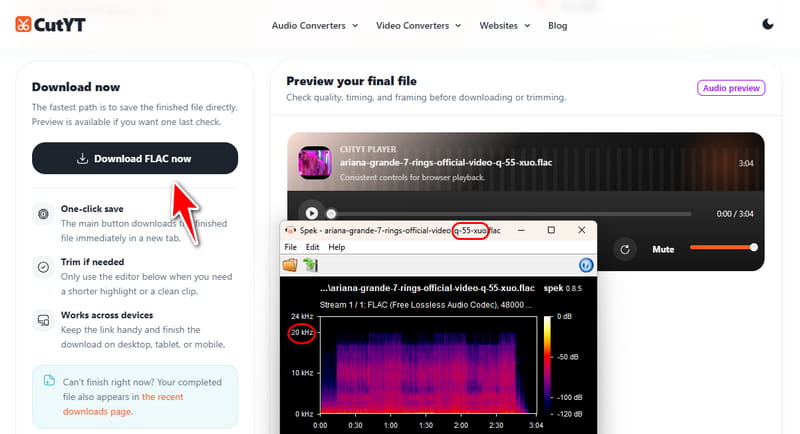
In our hands-on test of CutYT, no ads appeared. It supports many formats, such as FLAC, MP3, WAV, etc. However, it retains no ID3 tags and does not support batch downloads. One practical issue from testing is that downloaded files came with random, meaningless filenames instead of track titles, so manual renaming is usually necessary.
- Security
- ✓No ads were displayed during the test (with an ad-blocker).
- Output Format
- FLAC, MP3, WAV, M4A, AAC, ALAC, OPUS, MKV, MP4, WEBM
- Batch Download
- ×Not supported
- Quality
- 20 kHz
- ID3 Tags
- None
How to Extract FLAC Audio from YouTube with CutYT?
STEP 1 Copy the video link from YouTube.
STEP 2 Open CutYT YouTube to FLAC converter, and paste the URL.
STEP 3 Click "Download FLAC", then save the file and rename it if needed.
- No ads appeared during testing.
- Browser-based with no installation required.
- Supports FLAC and many other formats.
- No ID3 tags.
- No batch download support.
- Downloaded filenames are gibberish and require manual renaming.
5. ytmp3.gg [Online]
🔗: https://media.ytmp3.gg/tools/youtube-to-flac/xshpju
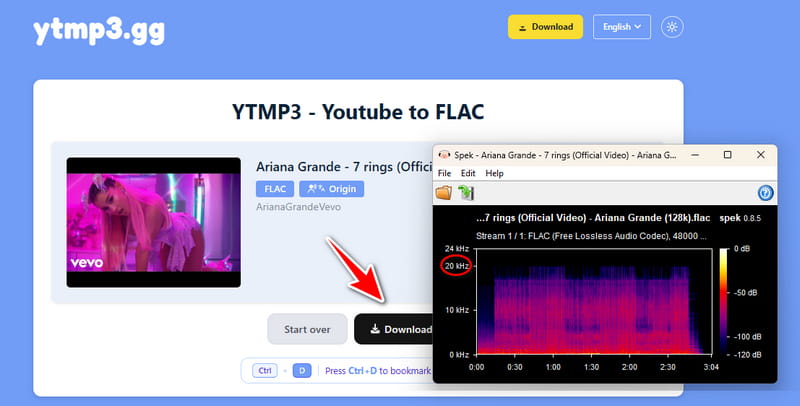
Based on our testing, ytmp3.gg extracts audio at 20 kHz, with ID3 tags not retained. It supports a broad range of output formats, including FLAC, MP3, M4A, AAC, ALAC, OPUS, OGG, WAV, and MP4. It operates on a freemium model: basic conversions are free, but batch downloads and ad-free access require a paid plan.
- Security
- ×Ad-free access is available with the paid plan.
- Output Format
- FLAC, MP3, M4A, AAC, ALAC, OPUS, OGG, WAV, MP4
- Batch Download
- ×Paid feature
- Quality
- 20 kHz
- ID3 Tags
- None
How to Save YouTube Music as FLAC with ytmp3.gg?
STEP 1 Copy the YouTube video link.
STEP 2 Paste it into the converter box.
STEP 3 Click the "Download" button to begin the conversion.
- Free basic conversion with no registration required.
- Supports many output formats, including lossless FLAC.
- ID3 tags are entirely absent.
- Batch download is locked behind a paid plan.
- Ad-free access requires a paid subscription.
6. y2down.cc [Online]
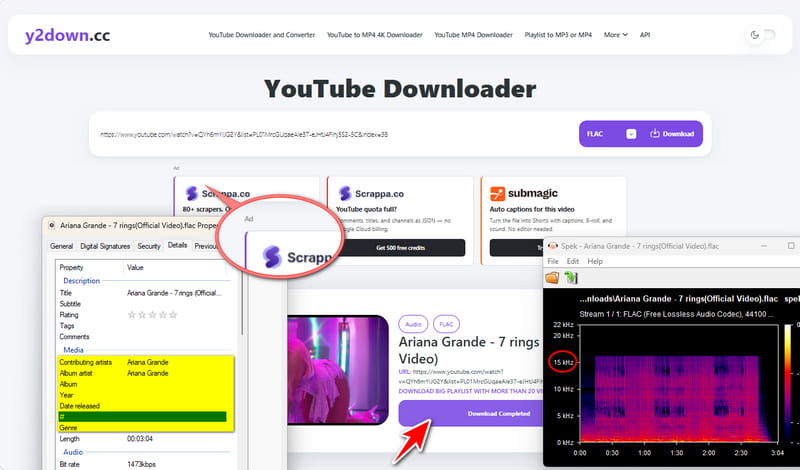
y2down.cc is a free online YouTube to FLAC converter and downloader. It allows users to directly convert videos from platforms like YouTube into high-quality audio files without needing to install any software. The tool is accessible through any web browser. It supports a wide range of output formats, including the lossless FLAC format at up to 24-bit/96kHz quality, making it a convenient FLAC music downloader for quick conversions.
- Security
- ×Not ad-free
- Output Format
- FLAC, MP3, M4A, WEBM, WAV, AAC, OPUS, OGG, MP4
- Quality
- 15 kHz
- ID3 Tags
- Title, Artist
- Batch Download
- ×The "DOWNLOAD BIG PLAYLIST WITH MORE THAN 20 VIDEOS" text is just an ad.
How to Convert YouTube Links to FLAC with y2down.cc?
STEP 1 Open your preferred web browser and go to YouTube to find the video you want to convert. Copy the full URL of the video from the address bar.
STEP 2 Go to y2down.cc. Paste the copied YouTube link into the search box. Beside the search box, select "FLAC" from the list of available audio formats.
STEP 3 Click the "Download" button. The site will process the link. After a brief moment, a download button for your file will appear. Click it to save the FLAC file to your computer.
- Free to use with no registration required.
- Supports formats including FLAC, MP3, MP4, etc.
- Users can paste links for entire playlists for batch downloading.
- Keeps only basic metadata.
- Download speeds are inconsistent and often slow.
- Requires a stable internet connection throughout the process.
7. TOOLESH [Online]
🔗: https://toolesh.com/youtube-to-flac-converter/
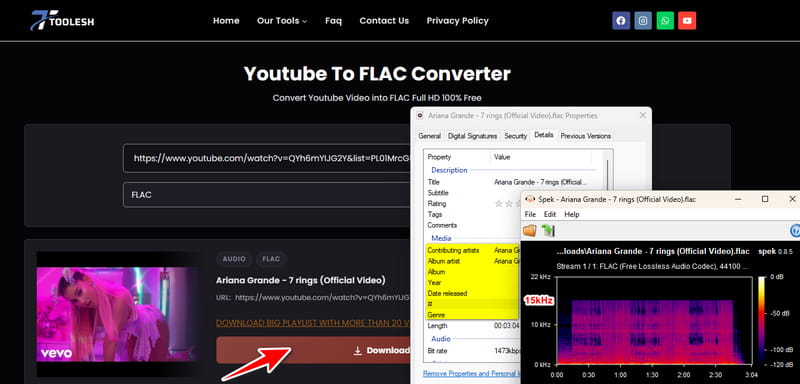
In our test run, TOOLESH played no ads and never interrupted the process. Output quality measured at 15 kHz, and only Title and Artist tags were preserved. It handles FLAC, MP3, WAV, M4A, etc. One thing we verified is that the “DOWNLOAD BIG PLAYLIST WITH MORE THAN 20 VIDEOS” button is an ad, not a working batch feature.
- Security
- ✓No ad interruptions occurred (with an ad-blocker enabled).
- Output Format
- FLAC, MP3, WAV, M4A, OPUS, OGG, MP4, WEBM
- ID3 Tags
- Title, Artist
- Quality
- 15 kHz
- Batch Download
- ×The "DOWNLOAD BIG PLAYLIST WITH MORE THAN 20 VIDEOS" text is an ad.
How to Convert YouTube to FLAC with TOOLESH?
STEP 1 Copy the YouTube video URL.
STEP 2 Paste it into TOOLESH and select FLAC as the output format.
STEP 3 Click "Download", wait for processing, then click "Download Now".
- Keeps Title and Artist metadata.
- Supports FLAC plus several other formats.
- Quality is only 15 kHz.
- No batch download support.
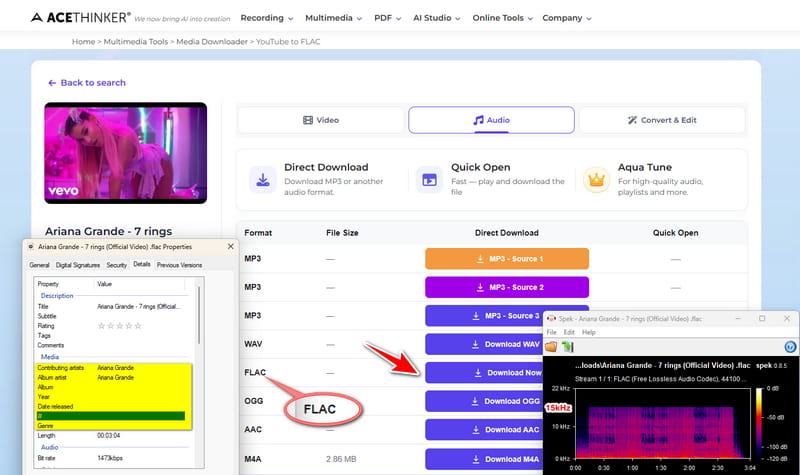
8. ACETHINKER [Online]
🔗: https://www.acethinker.ai/convert-youtube-to-flac
ACETHINKER covers FLAC, MP3, WAV, AAC, OGG, and WEBM. Based on our hands-on test, audio quality was capped at 15 kHz, and only Title and Artist tags survived the conversion. More concerning was reliability, that is parsing failed intermittently, and on more than one occasion we ended up with an audio file that did not match the source video. It occasionally experiences performance issues with large or long videos. Its reliability may vary depending on the video source.
- Security
- ✓No ads were observed during the test (with an ad-blocker).
- Output Format
- FLAC, MP3, WAV, AAC, OGG, WEBM
- Batch Download
- ×Not supported
- Quality
- 15 kHz
- ID3 Tags
- Title, Artist
How to Convert YouTube to FLAC with ACETHINKER?
STEP 1 Copy the YouTube video URL, paste it into the input field, and click the download icon.
STEP 2 Hit "Download FLAC" and wait for the conversion.
STEP 3 Click "Download Now" to save the FLAC file.
- Preserves some of the metadata.
- Supports a range of formats, including FLAC.
- Parsing failures occurred during testing.
- Downloaded files sometimes did not match the source video.
- Quality is limited to 15 kHz.
9. loader.to [Online]
Loader.to is an online YouTube video downloader that allows users to download videos and extract audio from various platforms. While renowned for downloading videos in resolutions up to 8K, it also supports converting YouTube to FLAC files, making it a practical FLAC music downloader for users seeking lossless audio. The website is designed to be simple and fast, supporting a wide range of input sites and output formats, including MP3, FLAC, WAV, MP4, WEBM, etc.
- Free to use with no software installation.
- The interface is straightforward and user-friendly.
- Supports downloading from YouTube, SoundCloud, TikTok, etc.
- Offers a wide selection of output formats from FLAC, MP3, WAV, MP4, WEBM, etc.
- Features intrusive ads or pop-ups.
- Parsing URLs often fails.
- Does not support batch conversion of multiple videos.
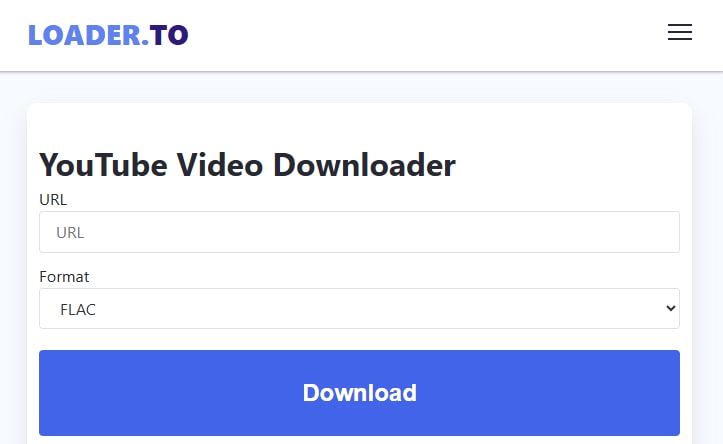
How to Download YouTube Videos to FLAC with loader.to?
STEP 1 Visit the Loader.to website. Keep this tab open as you proceed.
STEP 2 In a new tab, open YouTube and find the video you'd like to convert. Copy the URL from your browser's address bar. Then return to the Loader. to tab and paste the link into the main search box on the page.
STEP 3 Under "Format", select "FLAC", then click the "Download" button.
10. TubeRipper [Online]
TubeRipper is a free, web-based YouTube to FLAC converter for quick audio extractions. It allows users to paste a video link to convert content from YouTube to FLAC files. It requires no registration or software installation and is available on any device, from desktops to mobile phones.
- Free to use with no hidden charges or subscriptions.
- Requires no installation or sign-up.
- Output formats include FLAC, MP3, WAV, and OGG.
- Poses numerous intrusive banner and redirect ads.
- Only supports processing single videos.
- Keeps incomplete ID3 tags.
- Download speeds are generally slow.
- Performance is unstable, so sometimes the download fails to complete successfully.
How to Rip YouTube Audio to FLAC with TubeRipper?
STEP 1 Open your web browser and go to TubeRipper. Keep this page open for the next steps.
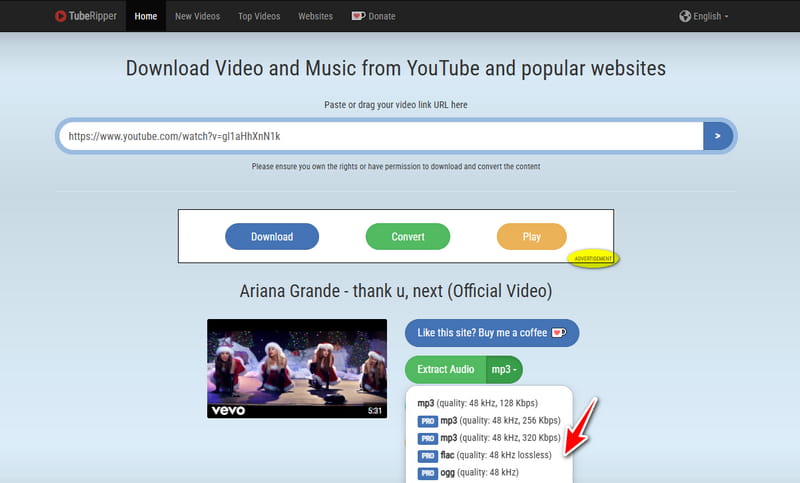
STEP 2 Open YouTube and find the video you want to download. Copy its URL from the address bar, then return to the TubeRipper tab and paste the link into the input box.
STEP 3 Press "Enter" or click the ">" button next to the input box to process the link. Once available formats are displayed, choose "FLAC", then click "Download".
Part 4. Comparison Table: Top YouTube to FLAC Converters at a Glance
After hands-on testing, we've summarized the key metrics in the table below to help you find the right YouTube to FLAC converter.
| Ad-Free | Output Formats | Batch Download | Quality | ID3 Tags | |
|---|---|---|---|---|---|
| Tidabie Music Go | ✔️ | FLAC, MP3, AAC, WAV, AIFF, ALAC | ✔️ | 20 kHz (Original) | Title, Artist, Album, Artwork, Year, Track# |
| Any Video Converter | ✔️ | FLAC, MP3, M4A, WAV, MP4, MKV | ✔️ | 20 kHz | Title, Artist, Year, Track#, Genre |
| YTFLAC | Redirects on download | FLAC | ❌ | 20 kHz | Title, Artist, Year, Genre |
| CutYT | Ad-blocker required | FLAC, MP3, WAV, M4A, AAC, ALAC, OPUS, MKV, MP4, WEBM | ❌ | 20 kHz | None |
| ytmp3.gg | Paid to remove ads | FLAC, MP3, M4A, AAC, ALAC, OPUS, OGG, WAV, MP4 | Paid | 20 kHz | None |
| y2down.cc | Ads present | FLAC, MP3, M4A, WEBM, WAV, AAC, OPUS, OGG, MP4 | ❌ | 15 kHz | Title, Artist |
| TOOLESH | Ad-blocker required | FLAC, MP3, WAV, M4A, OPUS, OGG, MP4, WEBM | ❌ | 15 kHz | Title, Artist |
| ACETHINKER | Ad-blocker required | FLAC, MP3, WAV, AAC, OGG, WEBM | ❌ | 15 kHz | Title, Artist |
Conclusion
In summary, extracting audio from YouTube videos and saving it in FLAC format can be done with the right tools. This guide has provided a detailed review of the top 10 YouTube to FLAC converters. For users who prioritize not only FLAC format, a dedicated desktop converter like Tidabie Music Go is the superior choice. It streamlines the entire process, allowing you to batch download playlists with complete tags at high speed. Download and try Tidabie now!

Jacqueline Swift | Senior Writer
