


Top 4 Amazon Music to MP3 Converters [Free & Desktop]
Do you love streaming music on Amazon Music and wish you could listen to your favorite songs at anytime on any device? You're not alone. Many users find the platform's DRM protection limitations, preventing them from enjoying purchased or downloaded tracks on unsupported media players. This common frustration leads people to search for ways to convert Amazon Music to MP3.
In this guide, we've compared the top 4 Amazon Music to MP3 converters available to help you find the best way to download and enjoy your Amazon Music playlist without limits.

Part 1. Can I download MP3 from Amazon Music?
It depends entirely on what type of music you are trying to download.
For Purchased Music: Yes, you can. When you buy a song or album from the Amazon Music Store, you own it. Amazon provides a straightforward, official method to download these tracks as permanent, DRM-free MP3 files that you can store on any device and play with any media player.
For Music on a Streaming Plan (Amazon Music Prime / Unlimited): No, not directly. While you can download songs for offline listening within the Amazon Music app, these are not standard MP3 files. They are encrypted, protected cache files tied to your Amazon Music subscription and within the app. You cannot access these files directly on your computer, transfer them to other devices, or play them if you cancel your Amazon Music subscription. This fundamental limitation for streaming content is why many users search for ways to convert Amazon Music to MP3.
📒Note: If you are interested in converting Amazon Music to MP3 without purchasing or even subscribing to an Amazon Music Prime / Unlimited plan, you can skip directly to Part 2.
📌 How to Download Music Purchased on Amazon?
If you own the music, downloading your purchased tracks as MP3s is simple and fully supported by Amazon.
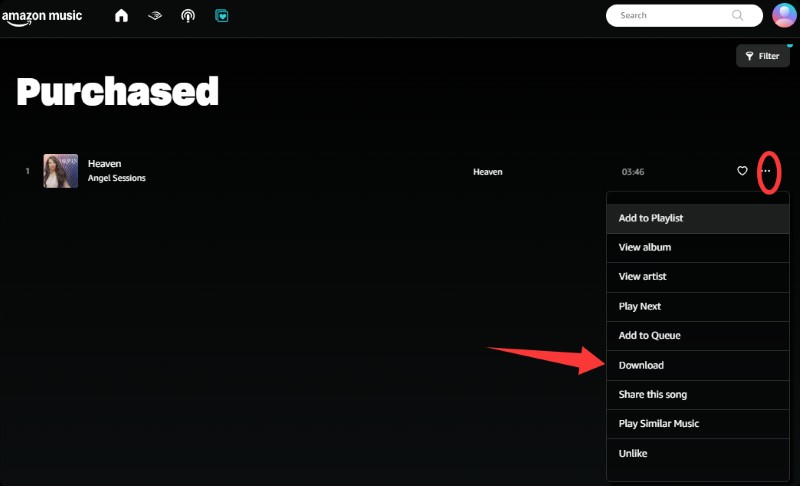
STEP 1 Launch the Amazon Music app on your desktop and ensure you are signed in. Go to your "Library". Select "Purchased".
STEP 2 Tap the Three Dots icon next to the song or album in your purchased library, and choose Download. It will save the MP3 files directly to your computer.
Part 2. Best Tools to Convert Amazon Music to MP3
As you can see, the process for downloading purchased Amazon Music is simple. However, you cannot apply this method to the vast Amazon Music library available through your subscription. This gap is precisely what drives the need for a dedicated Amazon to MP3 converter. Let's explore the best tools available for this task.
1. Tidabie Music Go - Best & Professional Amazon Music Downloader
Tidabie Music Go is a professional desktop tool designed to download songs, albums, and playlists from Amazon Music, Spotify, Apple Music, Tidal, YouTube Music, Deezer, and more. It enables you to convert Amazon Music to MP3, AAC, WAV, FLAC, AIFF, and ALAC. Tidabie excels at downloading entire Amazon Music playlists or albums in batches with high efficiency at up to 10x faster speed. Furthermore, it retains Amazon Music HD & Ultra HD audio quality and keeps essential ID3 tags and even lyrics with the exported files.
Beyond an Amazon Music downloader, Tidabie includes a suite of practical audio tools, such as AI Audio Splitter, Format Converter, Tag Editor, Burn CD, etc. By using Tidabie to handle your Amazon Music download needs, you gain the freedom to enjoy your music on any device or player indefinitely, irrespective of your Amazon Music subscription status.

Tidabie Music Go
- Download songs, albums, and playlists from Amazon Music, Spotify, Apple Music, YouTube, YouTube Music, TIDAL, SoundCloud, Qobuz, etc.
- Preserve Amazon Music HD, Ultra HD, Dolby Atmos, and Spatial Audio quality.
- Save Amazon Music as MP3, WAV, FLAC, AAC, AIFF, ALAC, & Dolby EAC3/AC4.
- Batch download Amazon Music playlists at up to 10x speed with original quality.
- Keep ID3 tags such as title, album, artist, and lyrics.
- Freely enjoy podcasts online and download podcasts.
- Listen to radio shows and record radio freely.
How to download Amazon Music to MP3 with Tidabie Music Go?
Here is a step-by-step guide for using Tidabie Music Go to convert Amazon Music to MP3.
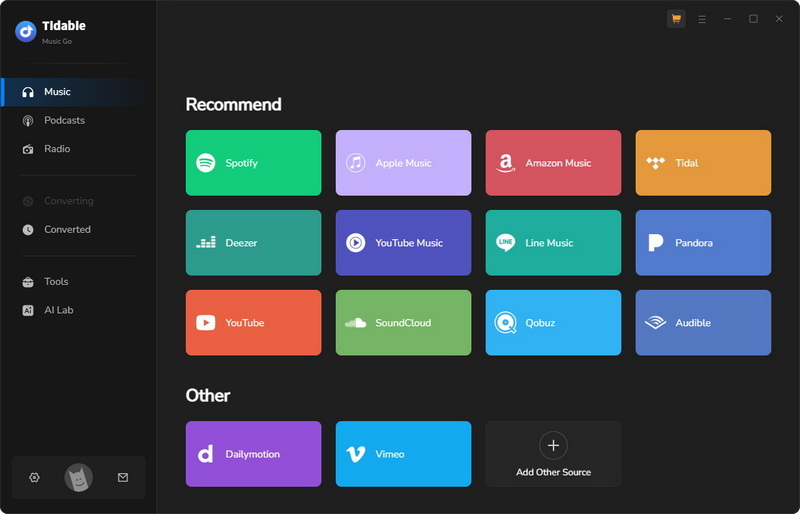
STEP 1 Log in to Amazon Music Account
Launch Tidabie Music Go and select "Amazon Music" from the list of available streaming sources. To download music in HD or Ultra HD quality, select the "Amazon Music App" as your source in the upper centre of the window. If your priority is a faster process and HD quality is sufficient, switch to the "Amazon Music web player", which functions at a 10x speed. Then the built-in Amazon Music web player or the Amazon Music app will pop up and guide you to log in to your Amazon Music account.
📒Note: Tidabie works with various Amazon account types, including Amazon Music Free, Amazon Music Prime, and Amazon Music Unlimited. For the highest quality downloads, an Amazon Unlimited account is required.
STEP 2 Add Amazon Music for Conversion
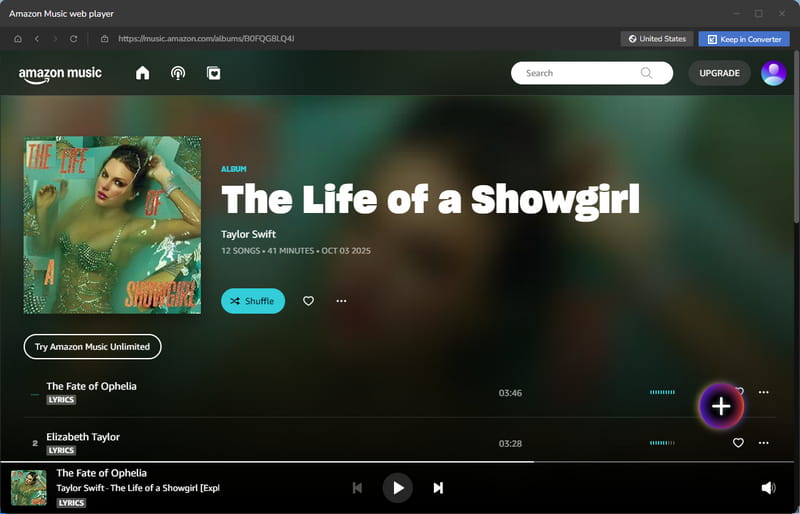
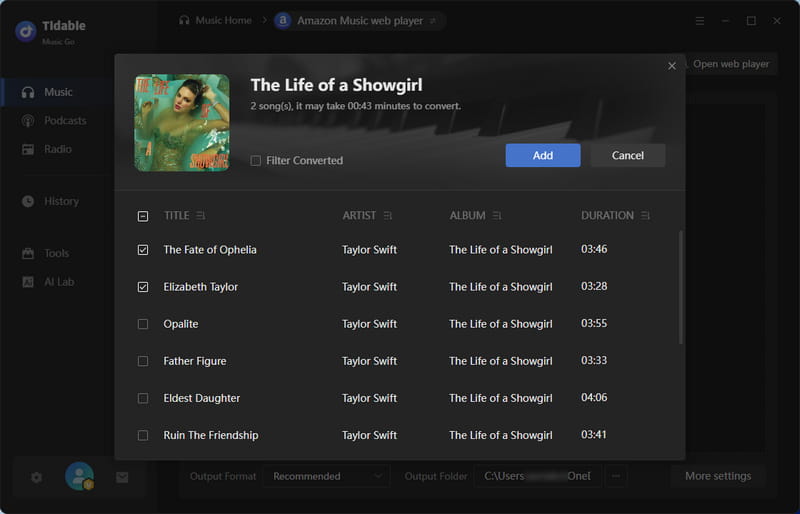
Within the Amazon Music web player or app, browse and select the specific songs, albums, or playlists you wish to download. Then, click the "+" button in the lower right corner to parse your selection. A new window will display the parsed tracks, where you can check the items you want and finalize your list by clicking "Add".
STEP 3 Configure Amazon Music Settings
After you add them to the download queue, click the gear icon in the bottom left corner to customize your conversion preferences. This includes options for the conversion mode, output format, bit rate, sample rate, output folder, output file name, and more.
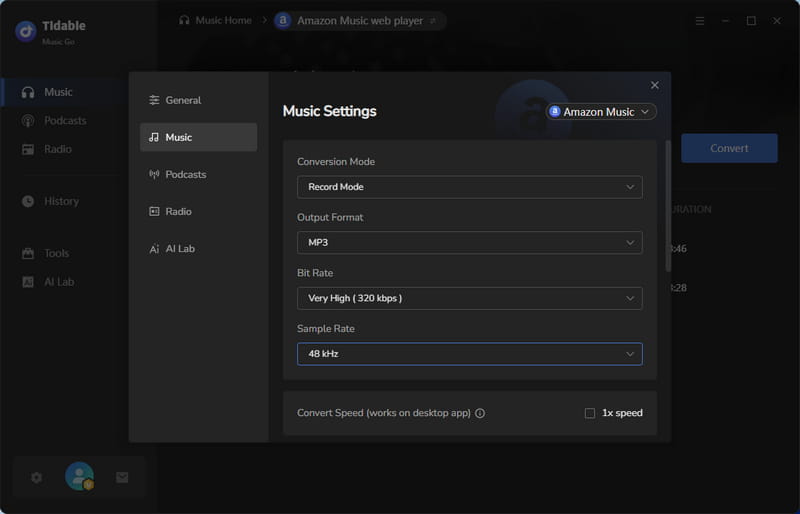
STEP 4 Convert Amazon Music to MP3
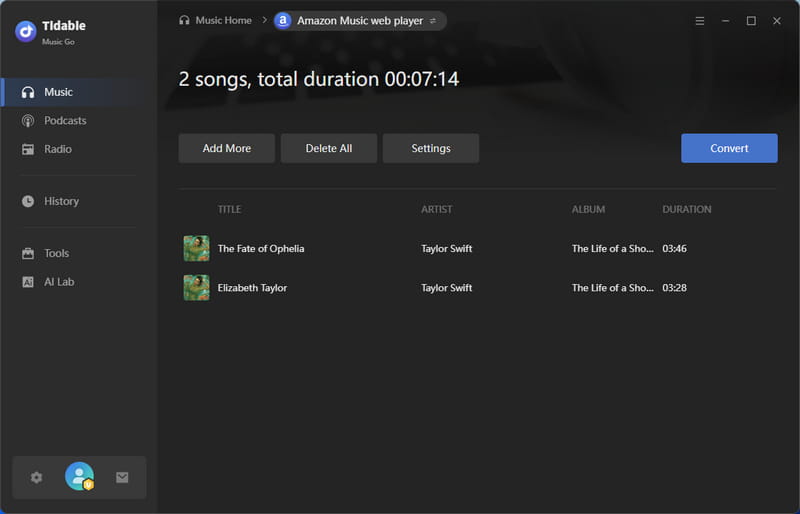
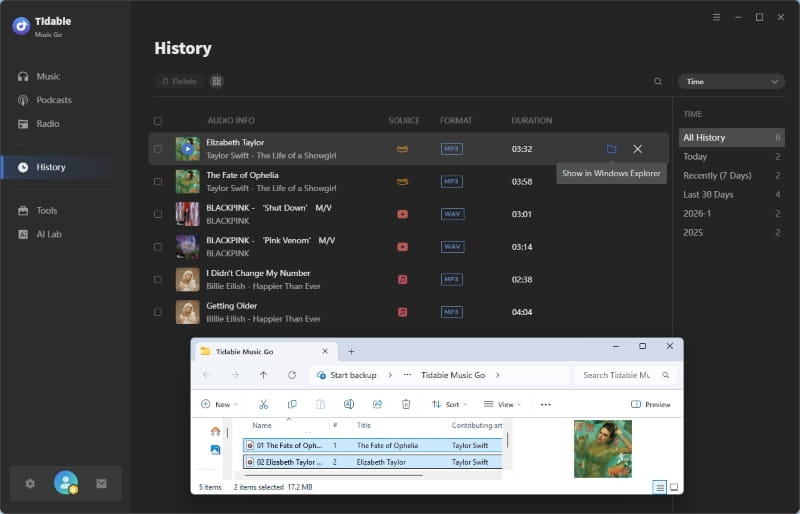
Click the "Convert" button to begin converting Amazon Music to MP3. Tidabie will process your queue, and you can monitor the progress until all tasks are completed. After conversion, go to the "History" section. All successful Amazon Music downloads will be listed here. By clicking the folder icon next to any item, you can instantly open the local folder on your PC where the audio files are stored.
- Downloads audio from Amazon Music, Spotify, Apple Music, YouTube Music, and more.
- Supports multiple output formats, such as MP3, WAV, FLAC, AAC, etc.
- Preserves HD & Ultra HD quality from Amazon Music.
- Retains essential ID3 tags and lyrics.
- Performs conversions up to 10 times faster than standard.
- Offers fast batch conversion for Amazon Music playlists.
- Includes additional audio tools like AI Audio Splitter and Tag Editor.
 Pros
Pros
- Requires installation as a desktop application.
- Lacks a dedicated mobile app version.
 Cons
Cons
2. Amazon Music Downloader - Free & Easy-to-Use Amazon Music to MP3 Converter
🔗: https://amazon-music-downloader.com/
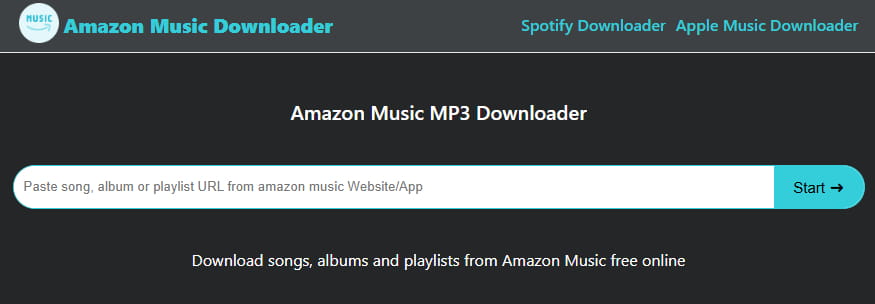
Amazon Music Downloader is a web-based service designed to convert Amazon Music to MP3. It allows users to paste a shareable link from any Amazon Music playlist, album, or song. It can preserve some of the metadata, like title, artist, and album. The speed of converting Amazon Music to MP3 can be fast. However, the output audio quality is limited to around 128 kbps in practice, not matching the higher quality promoted by itself.
- Simple to use and requires no installation.
- Fast conversion and download speed.
- Preserves basic song metadata.
Pros
- Potential for malware or privacy threats.
- Audio quality may be low or inconsistent.
- Batch downloading is not supported.
- The only output format is MP3.
Cons
How to convert Amazon Music to MP3 with Amazon Music Downloader?
STEP 1 Open the Amazon Music web player or app. Navigate to the specific song, album, or Amazon Music playlist you wish to download. Click the "Three Dots" button and select the "Share" option to copy its link to your clipboard.
STEP 2 Visit the Amazon Music Downloader. Paste the copied link into the input field. Click the "Start" button to begin analyzing the link. It will parse the link and display a list of the tracks contained within your selection.
STEP 3 Click the "Download MP3" button. Your browser will then begin to convert Amazon Music to MP3 and save the final audio files directly to your computer's default download folder.
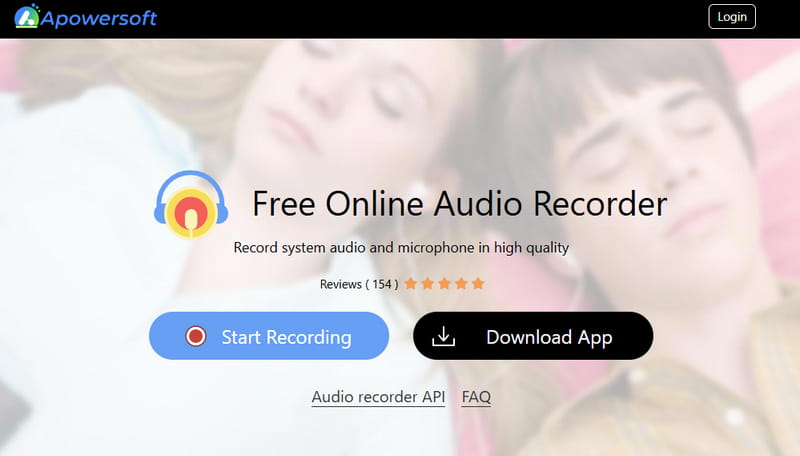
3. Apowersoft - Free & Online Audio Recorder
🔗: https://www.apowersoft.com/free-audio-recorder-online
Apowersoft Audio Recorder is a browser-based tool for converting Amazon to MP3 by capturing the audio output from your computer in real-time. Instead of directly downloading the files, it records the sound playing from your Amazon Music web player or desktop app and saves it as an MP3. This method is a practical workaround for users to download Amazon Music from their Amazon Music library without using a specialized downloader. It's free to use and accessible from any web browser.
- Free to use with no hidden subscriptions.
- Works directly in a browser without software installation.
- Intuitive user interface for quick recording.
- Captures any audio playing on your system, not limited to Amazon Music.
Pros
- Recording quality is determined by the audio output of your computer.
- The file format can only be MP3.
- Cannot batch process Amazon Music playlist.
- Each song must be recorded in real-time.
- Requires a stable internet connection throughout the recording.
- Requires you to start and stop recordings for each track.
- Recorded files will lack ID3 metadata.
- The online version only supports recordings up to one hour. For recordings longer than one hour, you must download the desktop version.
Cons
How to use Apowersoft to convert Amazon Music to MP3?
STEP 1 Go to the Apowersoft Free Online Audio Recorder website. Click the prominent "Start Recording" button. For audio input, disable the "Microphone" option and ensure the "System Sound" option is enabled.
STEP 2 Find and play the specific song you wish to convert in the Amazon Music web player or app, and then immediately return to Apowersoft and click the "Start Recording" button. Select a web, window, or the entire screen to share the audio.
STEP 3 Once finished, click the "Stop" button. Apowersoft will present you with a preview. You can listen to a snippet to check. Finally, click the "Save" button. Apowersoft will download the recorded audio to your computer as an MP3 file.
4. Audacity - Professional Amazon Music Recorder
🔗: https://www.audacityteam.org/download/
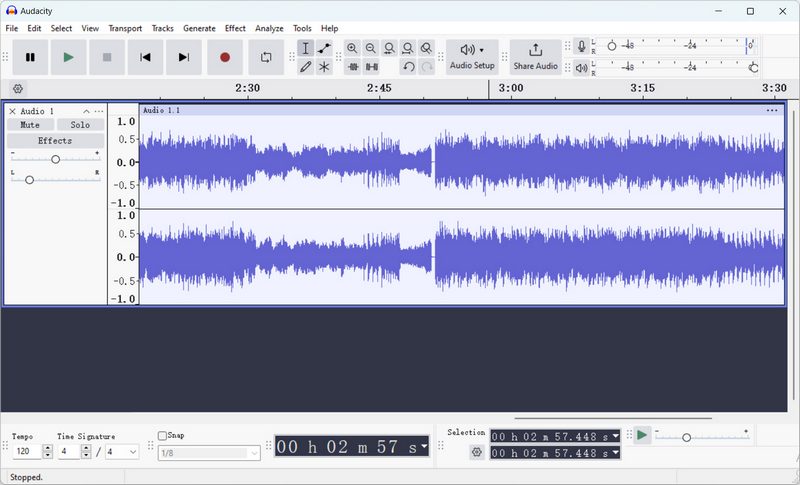
Audacity is a free, open-source audio editing software that can function as a manual Amazon to MP3 converter through its system audio recording capability. Unlike dedicated Amazon Music downloaders, it records the sound output from your computer in real-time. You can capture music playing from your Amazon Music web player or desktop app and save it as an MP3 file.
- Free and open-source.
- Available on Windows, macOS, and Linux.
- Supports various output formats, including MP3, WAV, and FLAC.
- Offers powerful audio editing and effects tools.
- Can record audio from any application on your system.
Pros
- Requires manual configuration to record system audio.
- Only records in real-time, making the process slow.
- Does not fetch song metadata.
- The interface is not intuitive for beginners.
Cons
How to convert Amazon Music to MP3 with Audacity?
STEP 1 Open the Amazon Music web player or app and find the song you want to convert.
STEP 2 In Audacity, click the red Record button, then immediately start playing the music on Amazon. Audacity will capture the audio in real-time.
STEP 3 Once the song ends, click "Stop" in Audacity. Use the editing tools to trim any unwanted silence. Finally, go to File > Export > Export as MP3, add metadata if desired, and save the file to your computer.
Part 3. Quick Comparison: Which Is the Best Amazon Music to MP3 Converter? 📊
For a clear overview to support your decision, the table below compares the key features of each Amazon Music downloader.
| Compatibility | Max Quality | Output Format | Speed | ID3 Tags | Batch Download | Ease to Use | Supported Music Services | |
|---|---|---|---|---|---|---|---|---|
| Tidabie Music Go | Desktop | HD / Ultra HD | MP3, AAC, WAV, FLAC, AIFF, ALAC, EAC3 & AC4 (Dolby Atmos) | Up to 10x faster | Title, Album, Artist, Artwork, Track Number, Disc Number, Year | ✅ | ✅ | Amazon Music, Spotify, Apple Music, Tidal, YouTube Music, Deezer, Line Music, Pandora Music, SoundCloud, YouTube, Qobuz... |
| Amazon Music Downloader | Online | 128 kbps | MP3 only | Fast | Title, Album, Artist | ❌ | ✅ | Amazon Music |
| Apowersoft | Online & Desktop | Variable | MP3 only | Real-time | None | ❌ | ❌ | Any audio played on your system |
| Audacity | Desktop | Variable | MP3, WAV, AAC, FLAC, OGG, OPUS | Real-time | Manually Added | ❌ | ❌ | Any audio played on your system |
Part 4. FAQs About Amazon Music to MP3
Q1: Can I convert Amazon Music Unlimited to MP3?
Amazon Music Unlimited songs are protected by DRM and are only playable within the official app, even when downloaded for offline listening. To convert Amazon Music Unlimited to MP3 for personal use, you would need to use an Amazon Music downloader like Tidabie Music Go.
Q2: Where does Amazon Music download to?
When you download purchased music through the Amazon Music desktop application, the app stores these MP3 files to a default directory on your computer. The specific path varies depending on your operating system:
- On Windows: C:\Users\[YourUsername]\Music\Amazon Music
- On Mac: ~/Music/Amazon Music
Q3: Why can't I find downloaded Amazon Music files?
There are two common reasons. If you downloaded songs via your Amazon Music subscription, they are encrypted cache files hidden in a protected system folder, like AppData or Application Support, not standard MP3s you can browse. For purchased music, the files are saved to a default directory. You can refer to Q2.
Q4: What's the best download quality for Amazon Music?
The best possible quality depends on your Amazon Music subscription tier and the tool you use. Amazon Music Unlimited offers HD and Ultra HD lossless streams. To preserve this studio-grade quality offline, you need specialized Amazon Music downloaders like Tidabie.
Q5: Can I keep Amazon Music MP3 after canceling the subscription?
No. Once you cancel Amazon Music subscription, access to all streamed and offline downloaded songs within the app is revoked. The only way to keep songs permanently is to purchase them from the Amazon store or use an Amazon Music downloader like Tidabie to save them as local files before your Amazon Music subscription lapses.
Conclusion
Your Amazon Music library is often a collection of your favorite moments, but the limitations of streaming subscriptions can lock those songs away. This guide has compared the top 4 tools for converting Amazon Music to MP3, and highlighted why a professional Amazon Music to MP3 converter like Tidabie Music Go is the superior choice for quality, speed, and permanence. To build a lasting music collection from your Amazon Music playlists, take the final step. Download Tidabie Music Go and start enjoying your music anywhere.

Jacqueline Swift | Senior Writer
