


Top 10 Free Spotify Link to MP3 Converters 2026 [Tested]
Converting a Spotify link to MP3 is not a built-in feature of the streaming service, but it is absolutely achievable with the right approach. Whether you need a Spotify link to MP3 converter to build a personal library, or a Spotify music downloader to free your playlists from platform restrictions, multiple effective solutions exist, ranging from apps to online services and open-source tools. In this guide, we'll explore the best ways to handle a Spotify link to MP3 format, covering everything from finding a Spotify URL to using a Spotify downloader to MP3 across different devices.
Part 1. How to Get a Spotify Link for Any Song/Playlist/Album?
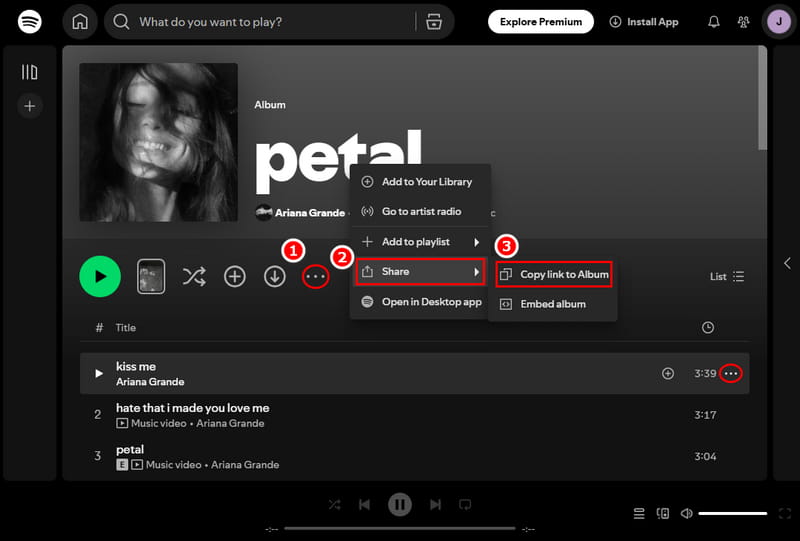
Before you can perform a Spotify link to MP3 download or use any Spotify MP3 converter, you first need to obtain the correct link for your target content. Fortunately, Spotify makes it incredibly easy to grab a shareable link for virtually anything on the platform, whether it's a single track, a curated playlist, or a full album.
STEP 1 Open Spotify and navigate to the song, playlist, album, or artist you want to share.
STEP 2 Right-click on the item (or click the three dots next to it).
STEP 3 Select "Share" from the context menu.
STEP 4 Choose "Copy Link to Song/
In the following sections, we'll introduce several tested types of Spotify link to MP3 converters. To help you quickly find the one that suits your needs, we've included a simple comparison table below. Just click the type in the first column to jump directly to that section.
| Ad-Free | Audio Quality | Batch Download | Ease of Use | Output Formats | ID3 Tags | |
|---|---|---|---|---|---|---|
| Desktop Software | ✔️ | up to lossless | ✔️ | ✔️ | MP3, AAC, WAV, FLAC, AIFF, ALAC | Title, Artist, Album, Artwork, Track#, Disc#, Year |
| Online Converters | ❌ | Typically 128 kbps MP3 | Varies | ✔️ | MP3 | Typically basic (Title, Artist, Album) |
| Open‑Source Tools | ✔️ | 128 kbps | ✔️ | ❌ | MP3, M4A, OPUS | Title, Artist, Album, Artwork, Year |
| Android Apps | ✔️ | up to 320 kbps | ✔️ | ✔️ | MP3, AAC, WAV, FLAC | Title, Artist, Album, Artwork, Year, Track#, Disc# |
Part 2. Best Desktop Spotify to MP3 Downloaders for PC & Mac 🔥🔥
Having tested numerous Spotify to MP3 converters, we found that Tidabie Spotify Downloader handles the conversion process more smoothly than most.
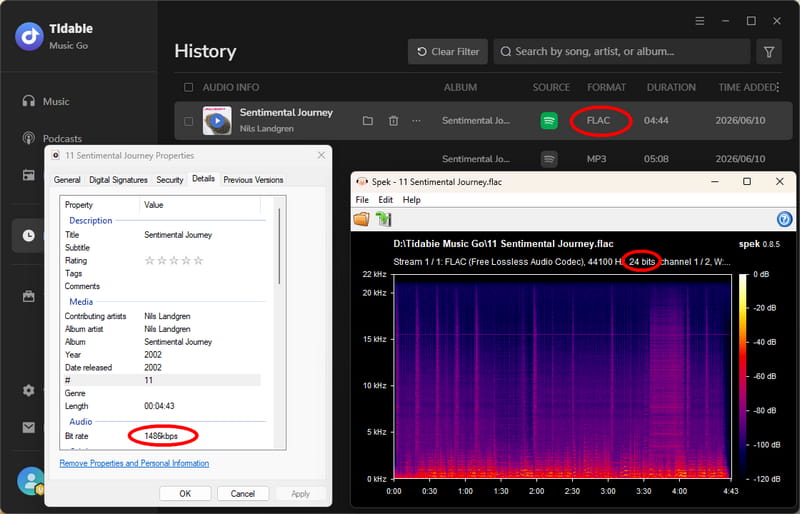
We pasted a playlist link, and Tidabie pulled all the tracks without any glitches. The batch processing is genuinely practical: downloading 3 songs took only about 43 seconds at up to 40X speed, and the output sounded identical to the original streams on my studio headphones, thanks to its lossless FLAC and WAV support. We also appreciated the metadata preservation. Every track came with correct ID3 tags and album art, which saved me hours of manual organization. Tidabie Spotify downloader to MP3 also lets me rename files and automatically sort them by artist or album.
| Security | Ad-free |
| Output Format | MP3, AAC, WAV, FLAC, AIFF & ALAC |
| Batch Download | ✔️ |
| Quality | 1486 kbps; 320 kbps for MP3 |
| ID3 Tags | Title, Artist, Album, Artwork, Year, Track#, Disc# |
| Functionality & User Experience | ⭐⭐⭐⭐⭐ |
How to Convert a Spotify Playlist Link to MP3 Using Tidabie Spotify Downloader?
Follow the steps below to turn any Spotify playlist link into MP3 with Tidabie.
STEP 1 Launch Tidabie and select "Spotify" from the list of music services in the "Music" section. You'll then be asked to log in to your Spotify account.
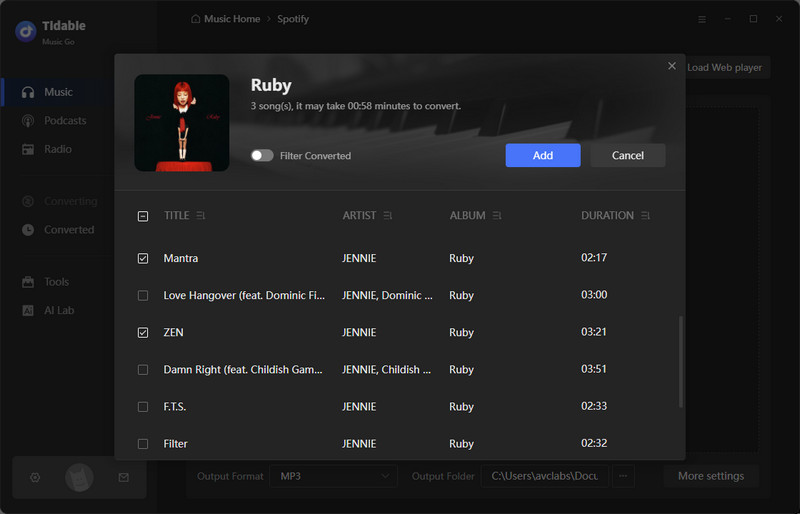
STEP 2 Once inside, browse to the song, album, or playlist you want, click its cover art, and press the "+" button at the bottom right. A window will pop up showing every track. Choose the ones you wish to save and click "Add".
Note: If you prefer not to use the built‑in add button, Tidabie also supports downloading by pasting a Spotify link directly. For the built‑in web player, click the "Paste" button at the top right. For the Spotify app, paste the link into the input box within Tidabie labeled "Please copy and paste Spotify track / playlist / album link here."
STEP 3 Before you start the actual Spotify link to MP3 download, head over to "Settings" to set your output format to "MP3". You can also customize bit rate, sample rate, and output folder, etc.
STEP 4 Finally, hit the Convert button to begin the download. When the process finishes, the output folder will automatically open, giving you instant access to your offline Spotify MP3 files. You can also check them in the "History" tab.
- Completely ad‑free and secure.
- Works with Spotify, Apple Music & TIDAL, etc.
- Supports MP3, AAC, WAV, FLAC, AIFF & ALAC.
- Delivers lossless audio quality with full ID3 tags & album art.
- Supports batch downloading of entire playlists at high speed.
- Requires software installation on your computer.
- No mobile version.
Part 3. Top 10 Free Online Spotify Link to MP3 Converters
For quick, occasional conversions, free online Spotify to MP3 converters offer a convenient no‑install option. Below are 10 workable picks we've tested.
- In our tests, most online Spotify link to MP3 converters triggered aggressive ads and pop-ups, so we recommend using an ad-blocker. Or, better, use a professional desktop tool for safety.
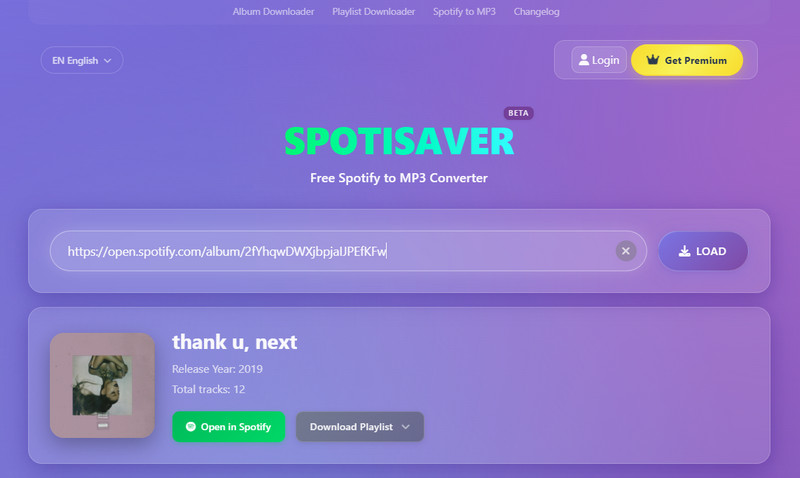
1. spotisaver.net - Ad‑free 320kbps Batch Spotify MP3 Downloader
We tested spotisaver.net and found that it reliably converts Spotify playlists, albums, and single tracks to 320 kbps MP3. The batch download handled up to 100 tracks per playlist, and every file came with basic ID3 tags.
| Security | Ad-free during test |
| Output Format | MP3 |
| Batch Download | ✔️ |
| Quality | 320 kbps |
| ID3 Tags | Title, Artist, Album, Track#, Artwork, Year |
| Functionality & User Experience | ⭐⭐⭐⭐ |
How to download Spotify playlist to MP3 using spotisaver.net?
STEP 1 Grab a shareable link from Spotify.
STEP 2 Paste that link into spotisaver.net and click "Submit".
STEP 3 Once the track list appears, you can download each song individually via its "Download" button. For a full playlist or album, click "Download Playlist", then select "DOWNLOAD ENTIRE PLAYLIST".
2. spotisoft.com — Online Spotify to MP3 Downloader
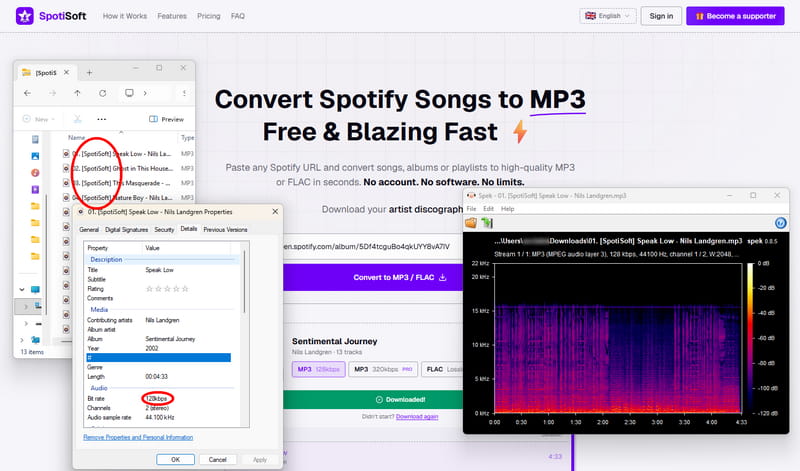
We tested SpotiSoft and found it works for small playlists at 128 kbps (free tier), but batch downloads of larger playlists often failed. The site is cluttered with self‑promotional ads, and to get 320 kbps or FLAC, you need a $5/30‑day Supporter pass.
| Security | The site contains many self-promotional ads. |
| Output Format | MP3, FLAC (Paid) |
| Batch Download | ✔️ |
| Quality | 128 kbps |
| ID3 Tags | Title, Artist, Album, Artwork |
| Functionality & User Experience | ⭐⭐⭐ |
How to download Spotify music to MP3 with spotisoft.com?
STEP 1 Copy a playlist link from Spotify.
STEP 2 Visit SpotiSoft, paste the URL into the input field, and click the purple "Convert to MP3" button.
STEP 3 Choose your output format and quality. Free users get MP3 128 kbps only.
STEP 4 Click "Download xxx tracks" to begin the conversion.
3. spotimate.io - Spotify Link to MP3 Downloader
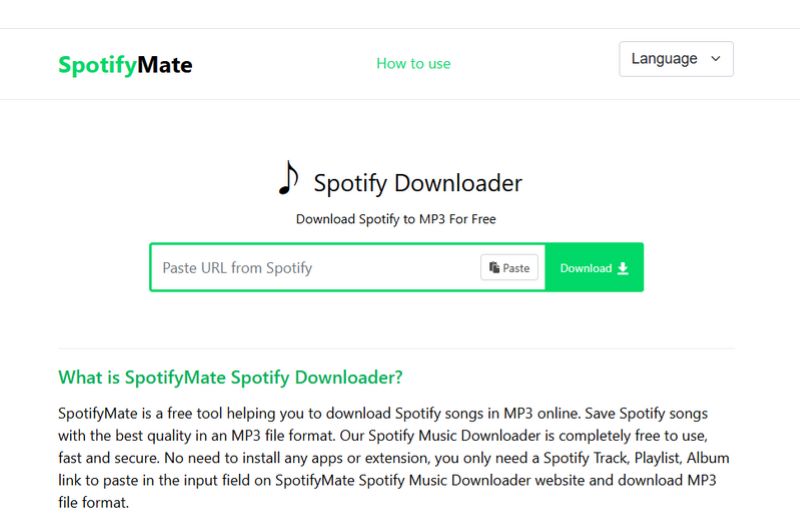
Our testing showed that spotimate.io parses playlists correctly but requires you to download each track individually. The batch download button actually leads to a suspicious third‑party site. It outputs 320 kbps MP3s and preserves ID3 tags.
| Security | Fake download button redirects to suspicious websites. |
| Output Format | MP3 |
| Batch Download | ❌ |
| Quality | 320 kbps |
| ID3 Tags | Title, Artist, Album, Artwork, Year |
| Functionality & User Experience | ⭐⭐⭐ |
How to download Spotify playlist to MP3 with spotimate.io?
STEP 1 Copy the URL from Spotify and visit spotimate.io.
STEP 2 Paste the link and click "Download" next to the track you want.
STEP 3 Choose "Download MP3" and wait for the conversion to finish.
4. spotmate.online - Popular Spotify URL to MP3 Converter
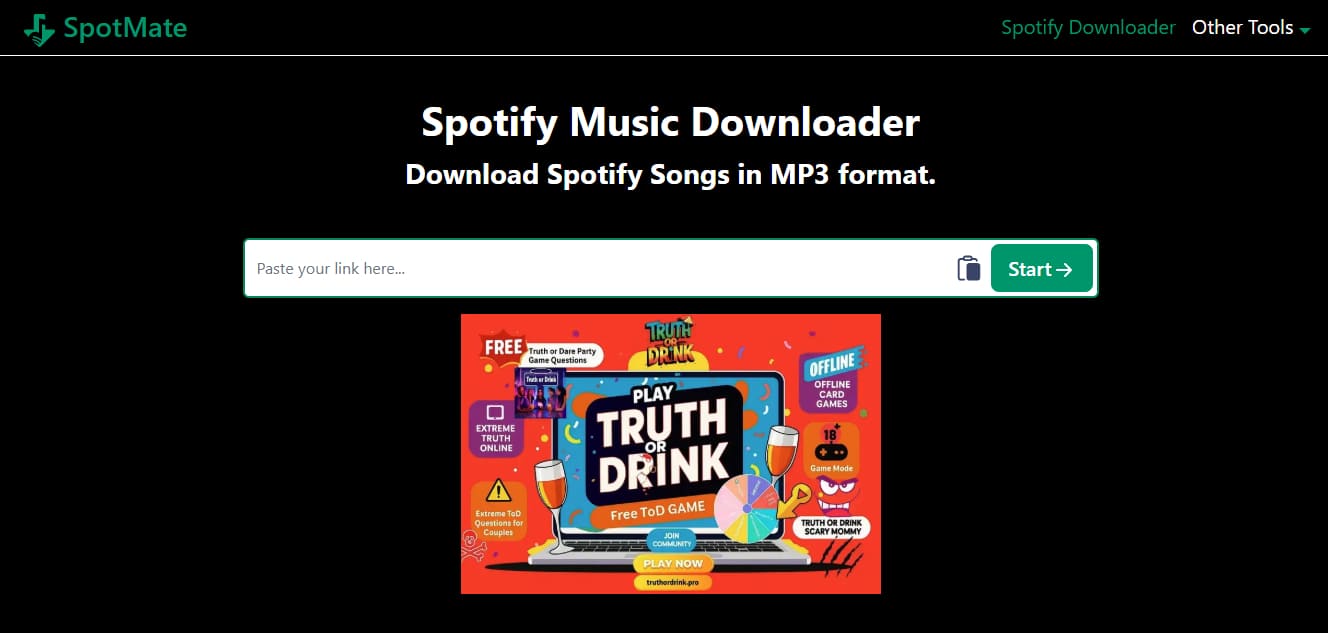
In our test, spotmate.online was slow and sometimes failed to parse links properly. It claims 320 kbps output, but we noticed the actual audio lacked high‑frequency detail. Free users can only download three songs per batch, and we encountered intrusive ads and pop‑ups throughout the process.
| Security | Intrusive ads and pop-ups during use. |
| Output Format | MP3 |
| Batch Download | Only 3 songs per batch for free users. |
| Quality | 128 kbps (Fake 320 kbps) |
| ID3 Tags | Title, Artist, Album, Artwork, Year |
| Functionality & User Experience | ⭐⭐ |
How to convert Spotify link to MP3 with spotmate.online?
STEP 1 Copy a link from Spotify.
STEP 2 Go to spotmate.online and paste the link into the box.
STEP 3 Press "Start" to parse the link.
STEP 4 For each track you want, click "Convert" and then "Download" to save the MP3.
5. spotidown.app - Free Spotify Music to MP3 Downloader
We found that spotidown.app supports batch downloading of Spotify playlists or albums, but free users are limited to five songs per batch. The actual output quality we measured was 119 kbps, not 320 kbps. The site is full of redirects.
| Security | There are redirects everywhere. |
| Output Format | MP3 |
| Batch Download | Limited to 5 songs for free users. |
| Quality | 119 kbps |
| ID3 Tags | Title, Artist, Album, Artwork, Year |
| Functionality & User Experience | ⭐⭐ |
How to convert Spotify music to MP3 using spotidown.app?
STEP 1 Copy a Spotify link.
STEP 2 Open spotidown.app and paste the link into the input box.
STEP 3 Click "Download MP3" next to the desired song to start the conversion.
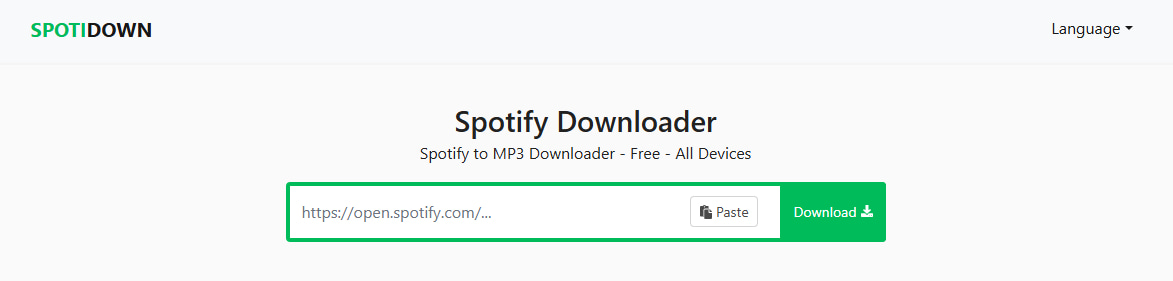
6. spotidown.co - Spotify to MP3 ZIP Downloader
During our test, spotidown.co offered batch downloads as ZIP files, but the actual audio quality turned out to be 113 kbps, despite the site implying higher quality. We also had to close several aggressive pop‑up ads. Metadata was retained, but the low bitrate was disappointing.
| Security | Frequent ads and pop-ups. |
| Output Format | MP3 |
| Batch Download | ✔️ |
| Quality | 113 kbps |
| ID3 Tags | Title, Artist, Album, Artwork, Year |
| Functionality & User Experience | ⭐⭐ |
How to download Spotify link to MP3 using spotidown.co?
STEP 1 Copy the Spotify URL of any song, playlist, or album.
STEP 2 Visit spotidown.co, paste the URL, and click "Search".
STEP 3 For the whole playlist, select "Download ZIP" and complete any verification steps if prompted.

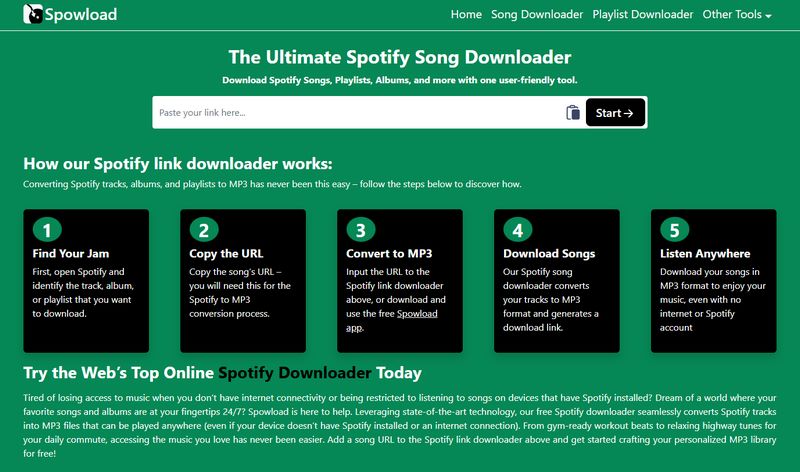
7. spowload.cc - Spotify Link to MP3 Converter
In our trial, spowload.cc allowed downloading tracks and playlists, but we had to convert each track manually. There is no batch option. The output quality is fake 320 kbps because it shows only about 15 kHz in Spek. And we had to close intrusive overlay ads before the download button became active.
| Security | Frequent ads and pop-ups during use. |
| Output Format | MP3 |
| Batch Download | ❌ |
| Quality | 128 kbps (Fake 320 kbps) |
| ID3 Tags | Title, Artist, Album, Artwork, Year |
| Functionality & User Experience | ⭐⭐ |
How to convert Spotify link to MP3 with spowload.cc?
STEP 1 Copy a Spotify URL from the app or web player.
STEP 2 Go to spowload.cc and paste the URL, then click "Start".
STEP 3 Click "Convert" for the track you want, then click "Download" to save the MP3.
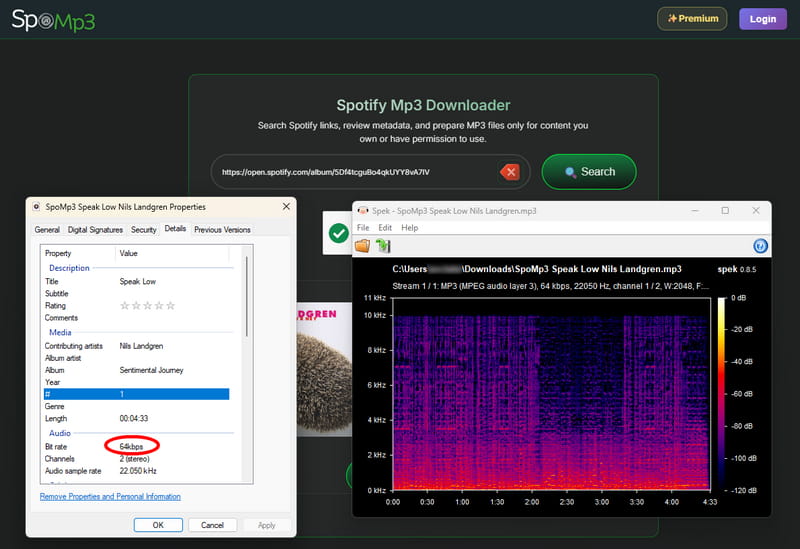
8. spomp3.com - Spotify URL to MP3 Converter
Our testing showed that spomp3.com can download songs, playlists, and albums via a Spotify link or search, but the free output is only 64 kbps. Batch downloading as a ZIP requires payment, and the site involves redirects during the process.
| Security | Download process involves redirects. |
| Output Format | MP3 |
| Batch Download | Paid |
| Quality | 64 kbps |
| ID3 Tags | Title, Artist, Album, Artwork |
| Functionality & User Experience | ⭐⭐ |
How to convert Spotify URL to MP3 using spomp3.com?
STEP 1 Copy a Spotify link.
STEP 2 Paste it into spomp3.com and click "Search" to load the track.
STEP 3 Click "Download All as ZIP" to save the entire playlist.
9. spotdown.org — Free Spotify URL to MP3 Downloader Online
Every click we made on Spotdown triggered aggressive redirects to shady sites. You often have to click twice or go back to proceed. The process is frustrating, and multiple security reports flag this site for malicious activity. The output quality is only 113 kbps.
| Security | Every click triggers aggressive redirects to other websites. |
| Output Format | MP3 |
| Batch Download | ✔️ |
| Quality | 113 kbps |
| ID3 Tags | Title, Artist, Album, Artwork |
| Functionality & User Experience | ⭐ |
How to convert Spotify link to MP3 using spotdown.org?
STEP 1 Copy a Spotify link you want to convert.
STEP 2 Paste it into Spotdown and click "Download".
STEP 3 Then click "Download Now (All Songs)" to start the ZIP export.
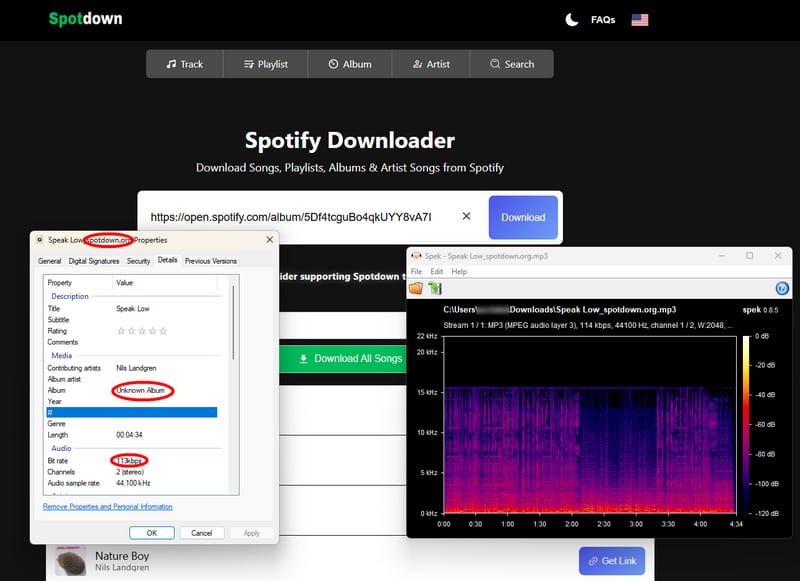
Due to multiple security reports flagging this site for malicious activity, we strongly advise against using Spotdown. Always use trusted tools like Tidabie instead to protect your device.
10. spotidost.com - Spotify Music Downloader to MP3
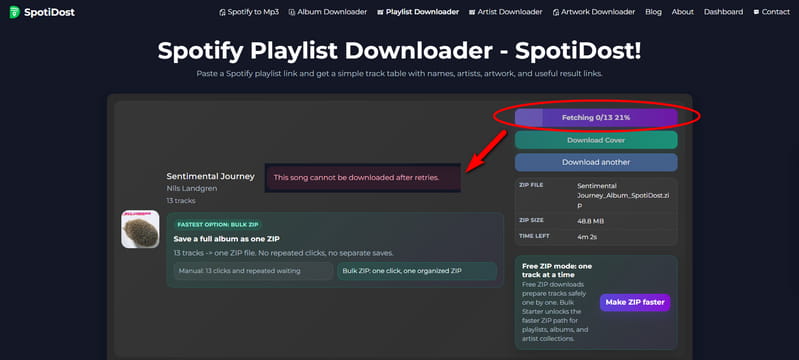
In our latest test, spotidost.com did not work as expected. The site required us to sign in before we could proceed with any download. Even after logging in, the process got stuck on a "Fetching" screen indefinitely, and we were never able to complete a single download. While the interface was ad‑free, the tool proved completely unusable in our trial.
| Security | Ad-free during test. |
| Output Format | MP3 |
| Batch Download | ✔️ |
| Quality | 128 kbps |
| ID3 Tags | Title, Artist, Album, Artwork, Year |
| Functionality & User Experience | ⭐ |
How to use spotidost.com to download Spotify link to MP3?
STEP 1 Copy a link from Spotify.
STEP 2 Paste it into spotidost.com and click "Download".
STEP 3 Wait for parsing, then click "Download All ZIP".
- No installation required.
- Convenient for quick single‑track downloads.
- Compatible with any device that has a browser.
- Most are filled with aggressive ads and pop‑ups.
- Audio quality is often low, actually 64–128 kbps.
- Batch downloads are usually limited, fake, or require payment.
- Many have security risks and redirect to suspicious sites.
Part 4. Free Open-Source Spotify MP3 Converter
For users comfortable with the command line, open‑source Spotify downloaders offer a completely free and transparent way to convert Spotify links to MP3.
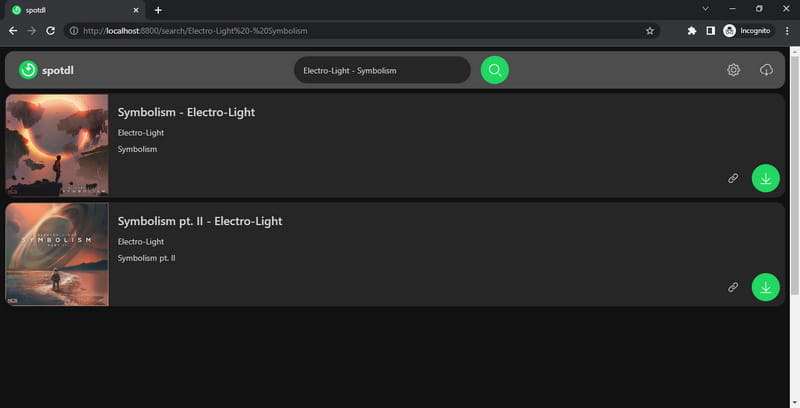
We tested spotDL, one of the most active open‑source Spotify link to MP3 converter on GitHub. It works by fetching your Spotify playlist or track URL, then downloading matching audio from YouTube. The download quality depends entirely on the YouTube source, which means results can vary. It supports MP3, FLAC, OGG, and other formats. That said, it requires Python, FFmpeg, and Deno to be set up properly, so it's not for everyone.
| Security | Ad-free |
| Output Format | MP3, M4A, OPUS |
| Batch Download | ✔️ |
| Quality | 128 kbps for regular users and 256 kbps for YouTube Music Premium users |
| ID3 Tags | Title, Artist, Album, Artwork, Year |
| Functionality & User Experience | ⭐⭐⭐ |
How to use spotDL to convert a Spotify link to MP3?
STEP 1 Install Python on your computer if you don't have it already.
STEP 2 Open your terminal (Command Prompt on Windows, Terminal on Mac/Linux) and run:
pip install spotdl
STEP 3 Install FFmpeg by running: spotdl --download-ffmpeg
STEP 4 Install Deno by running: spotdl --download-deno
STEP 5 Copy a Spotify playlist, album, or track URL.
STEP 6 In the terminal, run: spotdl [your Spotify URL]
- Completely free and open‑source with no ads.
- Supports batch downloading of full playlists.
- Preserves ID3 tags and album art.
- Not user‑friendly for non‑technical users.
- Audio quality depends on YouTube sources (typically 128 kbps).
Part 5. How to Convert Spotify Link to MP3 on Android 👍
For Android users who prefer a direct, app‑based solution, we tested TuneCable Spotify Downloader for Android. Unlike many free tools that source audio from YouTube, TuneCable works directly with Spotify content and supports both Spotify Premium and Free accounts. In our testing, it handled batch downloads of playlists smoothly, preserved 320 kbps audio quality, and kept full ID3 tags, something we didn't see consistently with other Android apps. The app does require registration and sign‑in, but the trade‑off is a more stable and reliable experience compared to the ad‑ridden alternatives we encountered.
| Security | Ad-free |
| Output Format | MP3, AAC, WAV, FLAC |
| Batch Download | ✔️ |
| Quality | 320 kbps |
| ID3 Tags | Title, Artist, Album, Artwork, Year, Track#, Disc# |
| Functionality & User Experience | ⭐⭐⭐⭐⭐ |
How to convert a Spotify link to MP3 on Android using TuneCable?
STEP 1 Download and open TuneCable on your Android phone. Tap "Login Spotify" to connect your account.
STEP 2 Tap "Download Settings" to configure your output format and quality preferences.
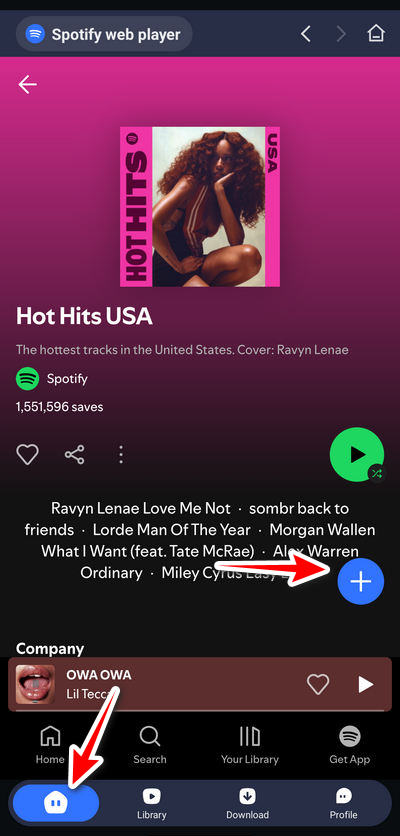
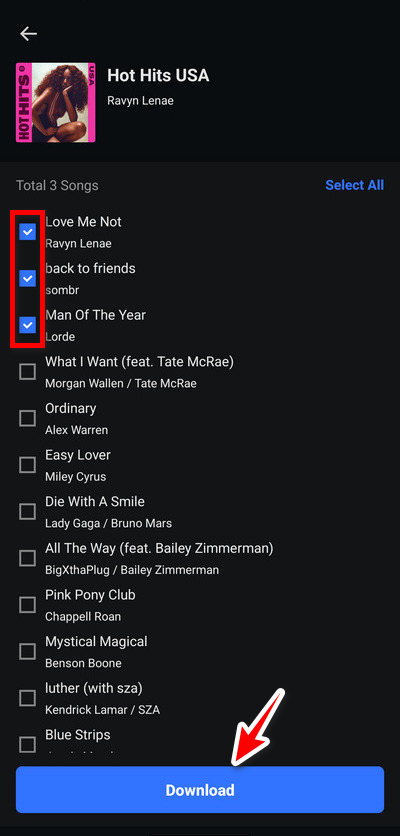
STEP 3 Return to "Home", find the playlist, album, or song you want, and tap the "+" button to parse the tracks. Uncheck any tracks you don't want, then tap "Download".
STEP 4 Review the settings and tap "Confirm" to start the batch download.
STEP 5 Go to "Library" to view your download history.
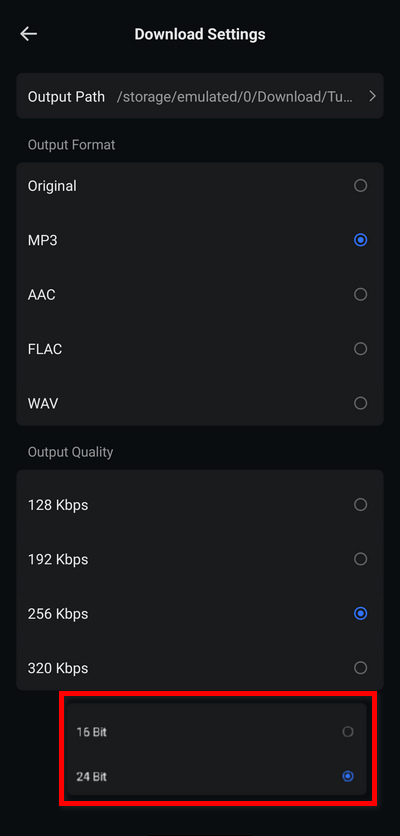
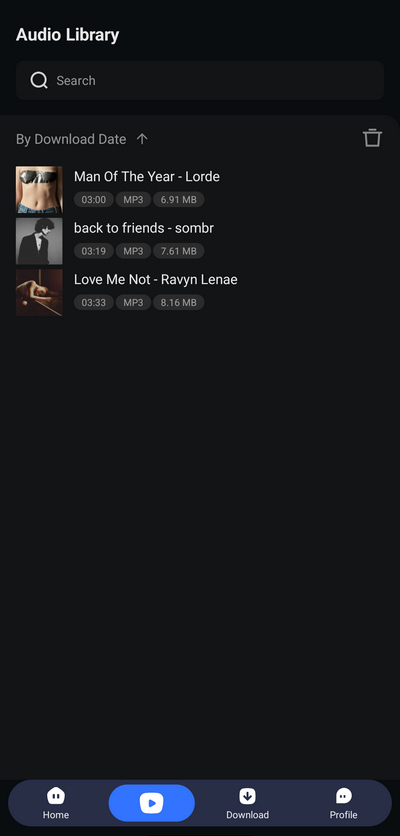
- Downloads directly on your Android device.
- Supports batch downloads and preserves up to 320 kbps quality.
- Keeps full ID3 tags and album art.
- Ad‑free experience.
- Requires APK installation from the official website.
- Needs registration and sign‑in to use.
- No iOS version available.
Quick Comparison between Spotify Link to MP3 Converters ⏩
Based on our hands‑on testing, the following summary table compares the essential features and performance of all Spotify downloaders reviewed.
| Ad-Free | Supported Platforms | Output Format | Audio Quality | Batch Download | ID3 Tags | |
|---|---|---|---|---|---|---|
| Tidabie Spotify Downloader | ✔️ | 15+ music services | MP3, AAC, WAV, FLAC, AIFF, ALAC | Lossless | ✔️ | Title, Artist, Album, Artwork, Track#, Disc#, Year |
| spotisaver.net | ✔️ | Spotify | MP3 | 320 kbps | ✔️ | Title, Artist, Album, Track#, Artwork, Year |
| ❌ | Spotify | MP3, FLAC (Paid) | 128 kbps | ✔️ | Title, Artist, Album, Artwork, Year | |
| spotimate.io | ❌ | Spotify | MP3 | 320 kbps | ❌ | Title, Artist, Album, Artwork, Year |
| spotmate.online | ❌ | Spotify | MP3 | 128 kbps | Limited | Title, Artist, Album, Artwork, Year |
| spotidown.app | ❌ | Spotify | MP3 | 119 kbps | Limited | Title, Artist, Album, Artwork, Year |
| spotidown.co | ❌ | Spotify | MP3 | 113 kbps | ✔️ | Title, Artist, Album, Artwork, Year |
| spowload.cc | ❌ | Spotify | MP3 | 128 kbps | ❌ | Title, Artist, Album, Artwork, Year |
| spomp3.com | ❌ | Spotify | MP3 | 64 kbps | Paid | Title, Artist, Album, Artwork |
| spotdown.org | ❌ | Spotify | MP3 | 113 kbps | ✔️ | Title, Artist, Album, Artwork |
| spotidost.com | ✔️ | Spotify | MP3 | 128 kbps | ✔️ | Title, Artist, Album, Artwork, Year |
| spotDL | ✔️ | Spotify | MP3, M4A, OPUS | 128 kbps | ✔️ | Title, Artist, Album, Artwork, Year |
| TuneCable | ✔️ | Spotify | MP3, AAC, WAV, FLAC | 320 kbps | ✔️ | Title, Artist, Album, Artwork, Year, Track#, Disc# |
FAQs About Spotify Link to MP3
Q1: Does Spotify Premium let me download songs as MP3 files?
No. Spotify Premium's offline downloads are stored in an encrypted format that can only be played within the Spotify app. You don't get actual MP3 files you can move to other devices or burn to a CD.
Q2: Do Spotify link to MP3 converters work with a free Spotify account?
Yes, most Spotify link to MP3 converters work with free accounts. However, the output quality may be limited to what the free tier streams at, typically under 160 kbps.
Q3: What real audio quality can I expect from a Spotify music downloader?
It varies widely. Some online Spotify link to MP3 converters claim 320 kbps but actually output 128 kbps or lower. Our tests confirmed this repeatedly. Desktop tools like Tidabie tend to deliver more consistent quality, up to lossless with a Spotify Premium account, while open‑source options like spotDL source audio from YouTube, which caps at 128 kbps for regular users.
Q4: Can I download an entire Spotify playlist at once?
It depends. Some support batch downloads (spotisaver.net, spotidown.co), while others require you to download each track individually (spotimate.io, spowload.cc). Desktop solutions generally handle batch downloads more reliably than online Spotify to MP3 converters.
Conclusion
Throughout this guide, we've walked you through every viable approach to convert a Spotify link to MP3, from desktop software to online converters, open‑source tools, and Android apps. Our testing revealed that while free options exist, most come with significant trade‑offs: poor audio quality, intrusive ads, security risks, or frustrating limitations. For a reliable, high‑quality, and hassle‑free experience, Tidabie Spotify Downloader stands out. It delivers lossless audio, preserves full metadata, and handles batch downloads effortlessly. Try Tidabie to build your own offline library!

Jacqueline Swift | Senior Writer
