


9 Ways to Get SoundCloud Unblocked Anywhere
Is SoundCloud blocked on your school or work network? You may still be able to listen to SoundCloud music using a permitted mobile hotspot, a trusted VPN where allowed, or music saved for offline playback. The best solution depends on what's causing the restriction. A network filter, browser issue, or regional availability problem may require a different approach.
In this guide, we'll explain why SoundCloud gets blocked, compare 9 possible solutions to get SoundCloud unblocked, and show you how to enjoy your favorite tracks offline when streaming isn't available.
- Quick Answer: Why Is SoundCloud Blocked?
- Quick Comparison: SoundCloud Unblocked Methods
- Method 1. Download SoundCloud Music for Offline Listening 👍
- Method 2. Use a VPN
- Method 3. Connect to a Phone Hotspot
- Method 4. Try a Web Proxy
- Method 5. Change DNS Settings
- Method 6. Check and Edit the HOSTS File
- Method 7. Try a Different Browser or Reset Chrome
- Method 8. Try a URL Shortener
- Method 9. Switch to Other Streaming Services
- FAQs about Getting SoundCloud Unblocked
Quick Answer: Why Is SoundCloud Blocked?
Schools and workplaces rarely block SoundCloud by itself. It is usually caught by broader filtering rules. That rule may sit at the DNS level, in a URL filter, or in a firewall, and its scope varies widely: some networks block one domain, some block every music service, and some block only during certain hours. The same account can therefore work at home, partly work on a hotspot, and fail on campus Wi-Fi.
Reasons Why SoundCloud Is Blocked
- Category blocking. The filter places music and video sites into one category and blocks that entire category, without judging SoundCloud individually.
- Bandwidth protection. Streaming audio uses shared network capacity continuously, so administrators limit or block streaming traffic to keep teaching and work systems responsive. This is a performance measure, not a content category rule.
- Focus control. Entertainment access is restricted during class or work hours to reduce distraction.
- Content control. SoundCloud lets users upload audio, and some uploads may be unsuitable for a school audience, so schools block the site instead of reviewing every track.
- Blanket entertainment bans. Some networks block all entertainment sites that are not essential, regardless of what each site contains.
- Regional or ISP restrictions. A government regulation or an internet service provider's policy can limit access in some regions. This is less common than school filtering.
Knowing the cause matters because it determines which methods below will actually work. A fix aimed at a DNS block will do nothing against a firewall that inspects traffic, and a tool that bypasses a category filter may still be caught by a bandwidth rule.
Quick Comparison: SoundCloud Unblocked Methods
Not sure which method to try? Compare these 9 ways to access SoundCloud or listen to music offline. Each solution works differently depending on your network, device, and the type of restriction. Click the method name in the first column to jump to the corresponding section.
| Method | Best For | Limitations |
|---|---|---|
| Offline Download | Listening without internet access | Music must be saved beforehand |
| VPN | Accessing SoundCloud on restricted networks | May be blocked or restricted |
| Mobile Hotspot | Using a different internet connection | Requires mobile data |
| Web Proxy | Accessing SoundCloud in a browser | Privacy and playback risks |
| Change DNS | Fixing DNS resolution issues | Won't bypass firewall restrictions |
| Edit HOSTS File | Correcting incorrect domain mappings | Requires system access |
| Browser Reset | Fixing Chrome or browser issues | Won't remove network blocks |
| URL Shortener | Testing basic URL filtering | Unlikely to bypass most blocks |
| Other Music Services | Finding alternative music sources | May also be restricted |
Method 1. Download SoundCloud Music for Offline Listening 👍
Every other method in this list depends on the network allowing something. VPNs can be detected, proxies can be blacklisted, and DNS changes can be overwritten. However, downloaded files do not depend on the network at all. Once your SoundCloud music is local, "blocked" becomes irrelevant, because there is no stream to block. This is also the cleanest way to get SoundCloud unblocked music for daily use at school, since it lets you prepare your library at home and then listen anywhere.
Tidabie Music Go is an all-in-one music converter that supports SoundCloud alongside Spotify, Apple Music, Amazon Music, TIDAL, YouTube Music, Deezer, and others. For SoundCloud, Tidabie downloads from the SoundCloud web player and converts tracks, playlists, and albums to MP3, AAC, WAV, FLAC, AIFF, or ALAC. It supports batch processing at up to 10× speed and original audio quality. It also preserves full ID3 tags, so your offline library stays organized. Once your music is saved locally, you have unblocked SoundCloud music that plays without connecting to SoundCloud.
Tidabie Music Go
- Download songs, albums, and playlists from SoundCloud, Spotify, Apple Music, Amazon Music, TIDAL, YouTube Music, Qobuz, etc.
- Convert SoundCloud music to MP3, AAC, WAV, FLAC, AIFF, and ALAC.
- Batch download SoundCloud music at up to 10x speed with original quality.
- Keep full ID3 tags such as title, album, and artist.
- Freely enjoy podcasts online and download podcasts.
- Listen to radio shows and record radio freely.
How to Download SoundCloud Unblocked Music with Tidabie?
Check this section to learn how to download music from SoundCloud with Tidabie Music Go.
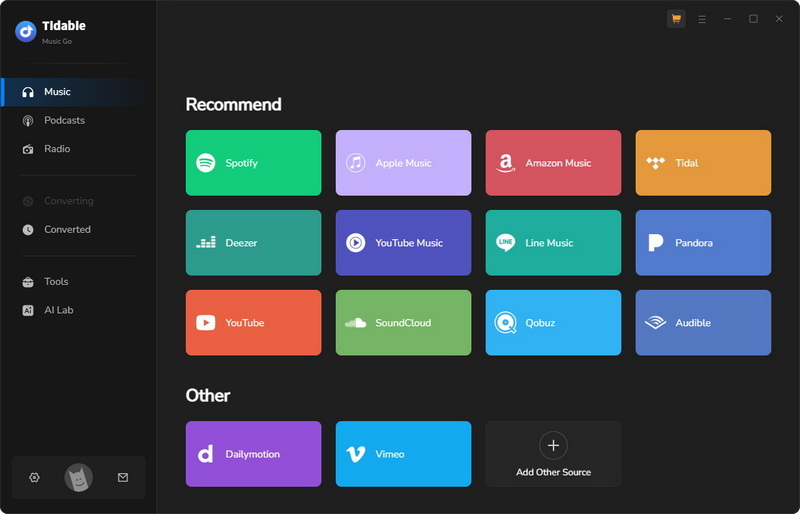
STEP 1 Select SoundCloud as the source
Launch Tidabie and choose "SoundCloud" from the main interface.
STEP 2 Add SoundCloud tracks to the task list
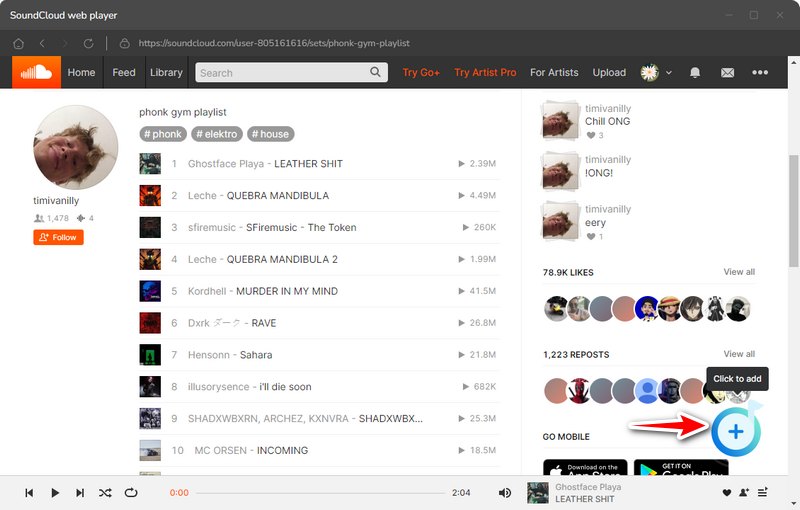
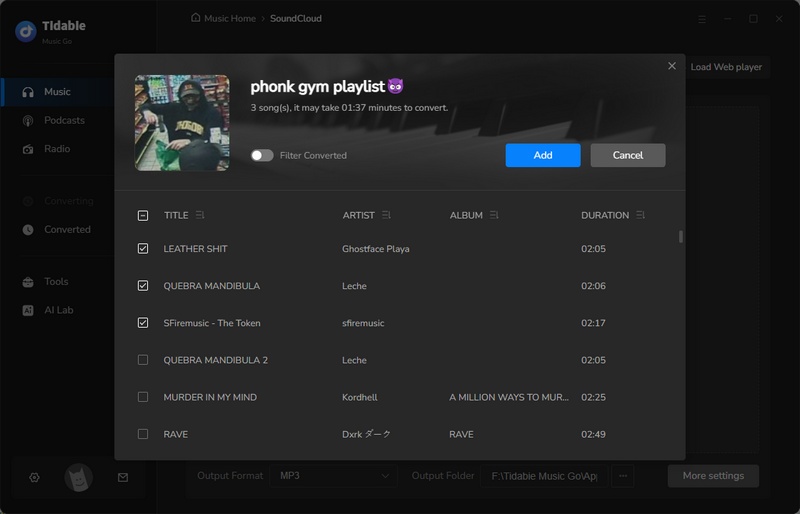
Open any SoundCloud track, playlist, or album you want. Then use the "+" button in the bottom right to paste the URL. Tidabie parses the content and lists the individual tracks. Select songs and click "Add".
STEP 3 Adjust SoundCloud output settings
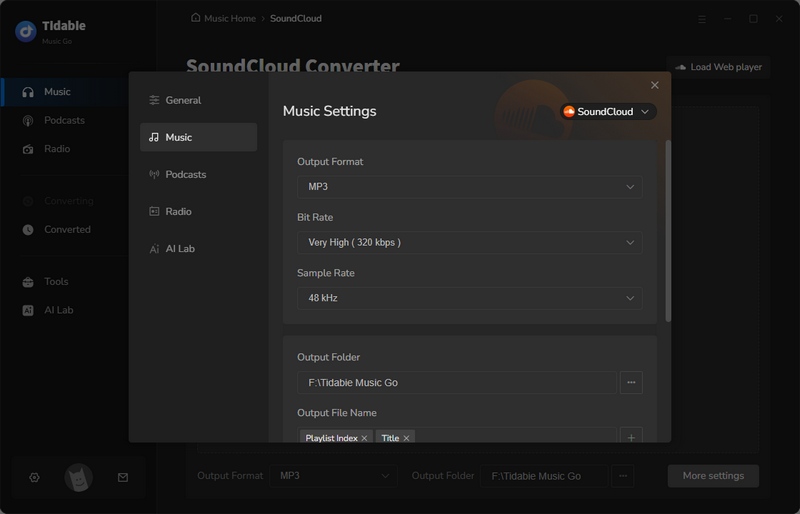
Click the "Settings" button to adjust your download preferences. Choose your format, bitrate, and set naming/organization rules.
STEP 4 Convert and locate downloaded SoundCloud files
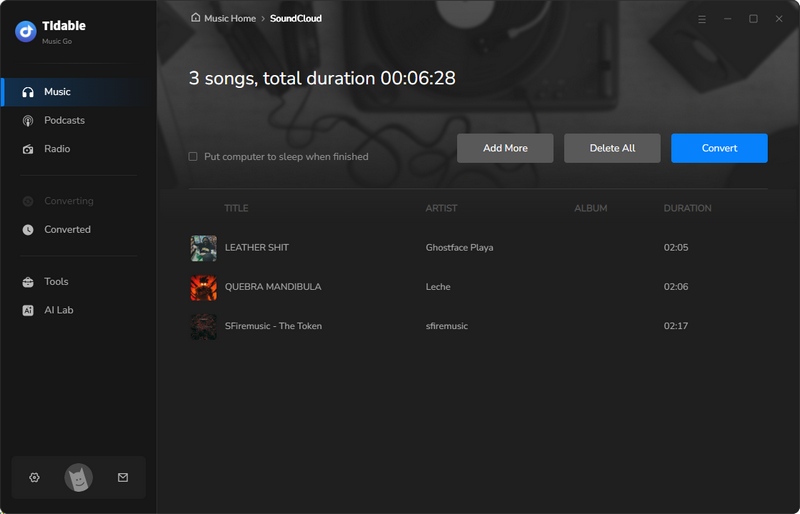
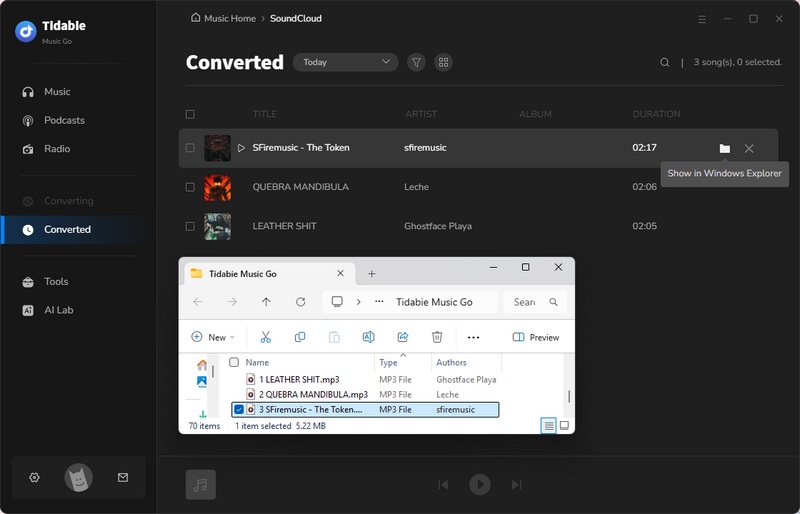
Click "Convert". When finished, open "History" and click the folder icon next to any track to find the downloaded file on your local drive.
Method 2. Use a VPN
A VPN (Virtual Private Network) is one of the most common ways to get SoundCloud unblocked when access is restricted by a school, workplace, or public Wi-Fi network. It encrypts your internet connection and routes traffic through a remote server, which may help you access SoundCloud if the restriction is based on network filtering.
However, not every VPN works on restricted networks. Some schools and workplaces block VPN connections, and managed devices may have additional restrictions. For better privacy and connection stability, choose a reputable VPN provider and make sure its use is permitted on your network.
How to Get SoundCloud Unblocked Using a VPN?
STEP 1 Download and install a trusted VPN from its official website, then launch the application on your device.
STEP 2 Choose a VPN server in a region where SoundCloud is available, and click "Connect" to establish a secure connection.
STEP 3 Once connected, open https://soundcloud.com in your browser or launch the SoundCloud app. If the network permits the connection, you should be able to browse and stream music.
Method 3. Connect to a Phone Hotspot
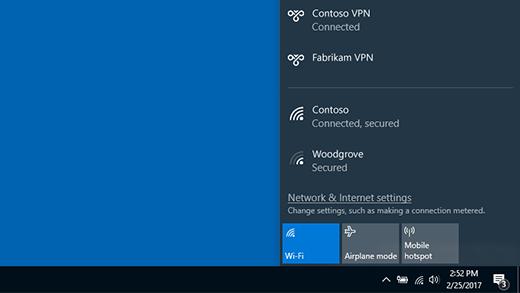
If you are on a school laptop or Chromebook, switching from school Wi-Fi to your phone's personal hotspot bypasses the school network entirely. It is simple and reliable in the moment, but it consumes mobile data and is not practical for extended daily use. For occasional breaks or a quick listening session, it remains one of the fastest fixes.
How to Unblock SoundCloud by Connecting a Mobile Hotspot?
STEP 1 Turn on Hotspot on iPhone or Android.
On iPhone: Go to Settings > Personal Hotspot and toggle it on.
On Android: Go to Settings > Connections > Mobile Hotspot and Tethering and toggle Mobile Hotspot on.
STEP 2 Connect your computer to the hotspot you turned on using your iPhone or Android phone.
Method 4. Try a Web Proxy
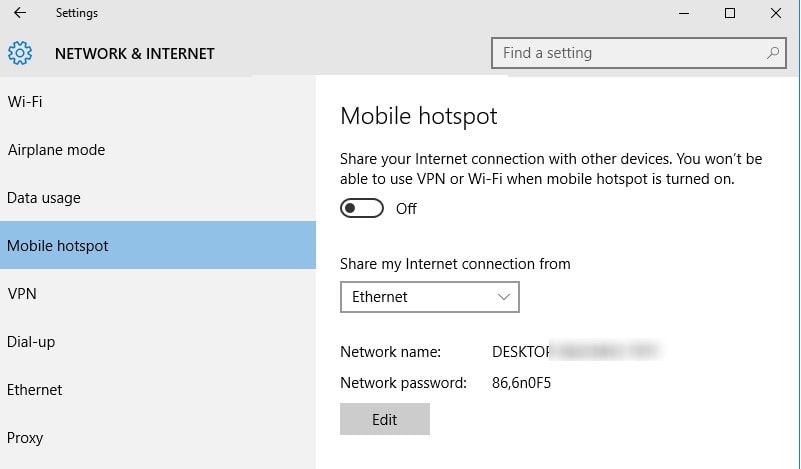
A proxy loads SoundCloud through a third-party server, so your network only sees traffic to the proxy domain. It requires no installation and works in a browser. The trade-offs are real: proxies generally do not encrypt your traffic, and free proxy sites can log credentials or inject ads. Use a proxy only for casual, logged-out listening, never for entering your SoundCloud account password.
How to Access Unblocked SoundCloud Music with a Web Proxy?
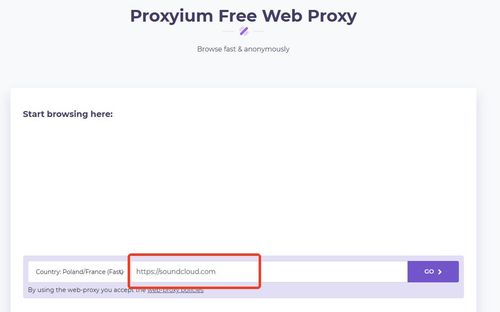
STEP 1 Open a free web proxy service in your browser (e.g., Proxyum or a similar public proxy portal), and enter https://soundcloud.com in its URL/address box.
STEP 2 If the proxy offers a server-region option, select a country where SoundCloud is available (such as the United States), then click Go/Browse to load SoundCloud through the proxy in your current browser tab.
STEP 3 Once the proxied SoundCloud page opens, try playing a public track without signing in. Avoid entering your SoundCloud password or other sensitive information on untrusted proxy websites.

Want to Skip the Network Restrictions? If a web proxy doesn't work, try downloading SoundCloud music as MP3 and enjoy your favorite tracks offline without network limitations.
Method 5. Change DNS Settings
If SoundCloud isn't loading due to DNS-related issues, changing your DNS settings may help restore access. DNS (Domain Name System) translates website addresses like soundcloud.com into IP addresses. If your current DNS server fails to resolve SoundCloud correctly or applies DNS-based filtering, switching to a public DNS service, such as Google Public DNS or Cloudflare DNS, may help.
However, changing DNS settings won't unblock SoundCloud if access is restricted by a firewall, school network policy, or device-level controls. Only modify DNS settings on devices or networks you're authorized to manage.
How to Get SoundCloud Unblocked by Changing DNS Settings?
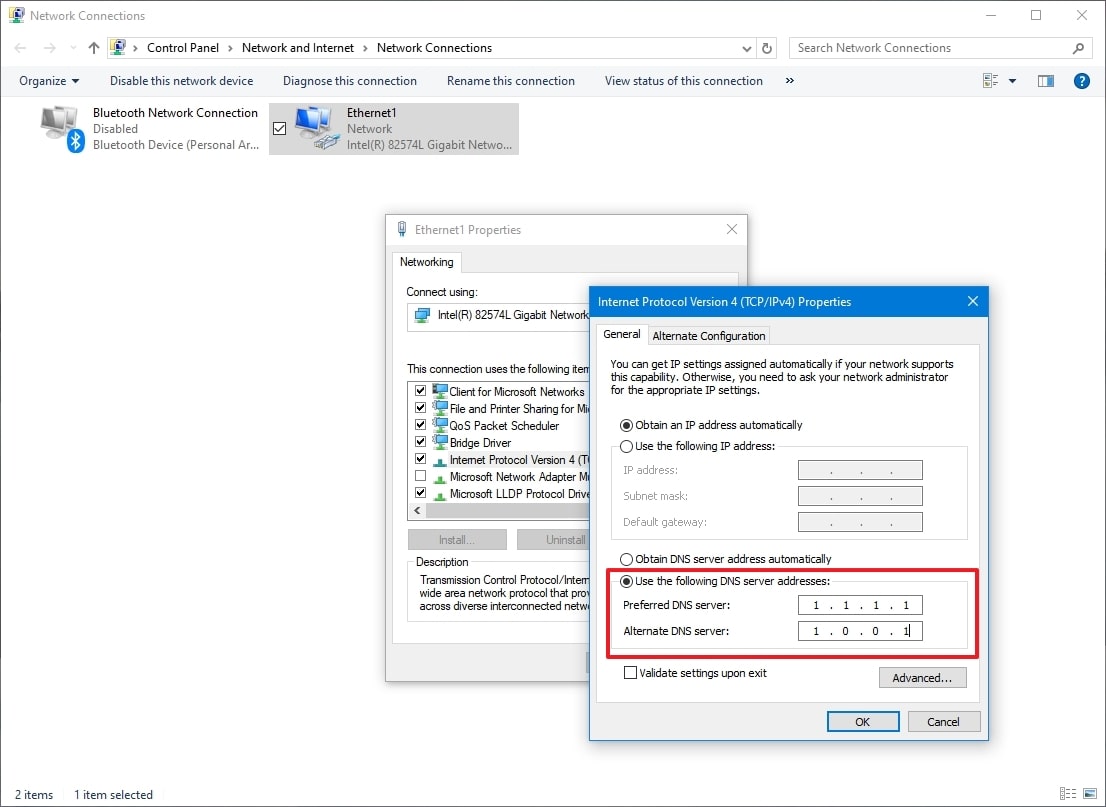
You can try switching to a public DNS service if SoundCloud fails to load because of DNS resolution problems. For example, Google Public DNS uses 8.8.8.8 and 8.8.4.4, while Cloudflare DNS uses 1.1.1.1 and 1.0.0.1.
For Windows Computer:
STEP 1 Open Control Panel > Network and Internet > Network and Sharing Center.
STEP 2 Click "Change adapter settings". Right-click your active Wi-Fi or Ethernet connection and select "Properties".
STEP 3 Select "Internet Protocol Version 4 (TCP/IPv4)" and click "Properties".
STEP 4 Select "Use the following DNS server addresses". Enter 8.8.8.8 as the preferred DNS server and 8.8.4.4 as the alternate DNS server, then click "OK".
STEP 5 Restart your browser and visit SoundCloud to see whether the issue is resolved.
For Mac Computer:
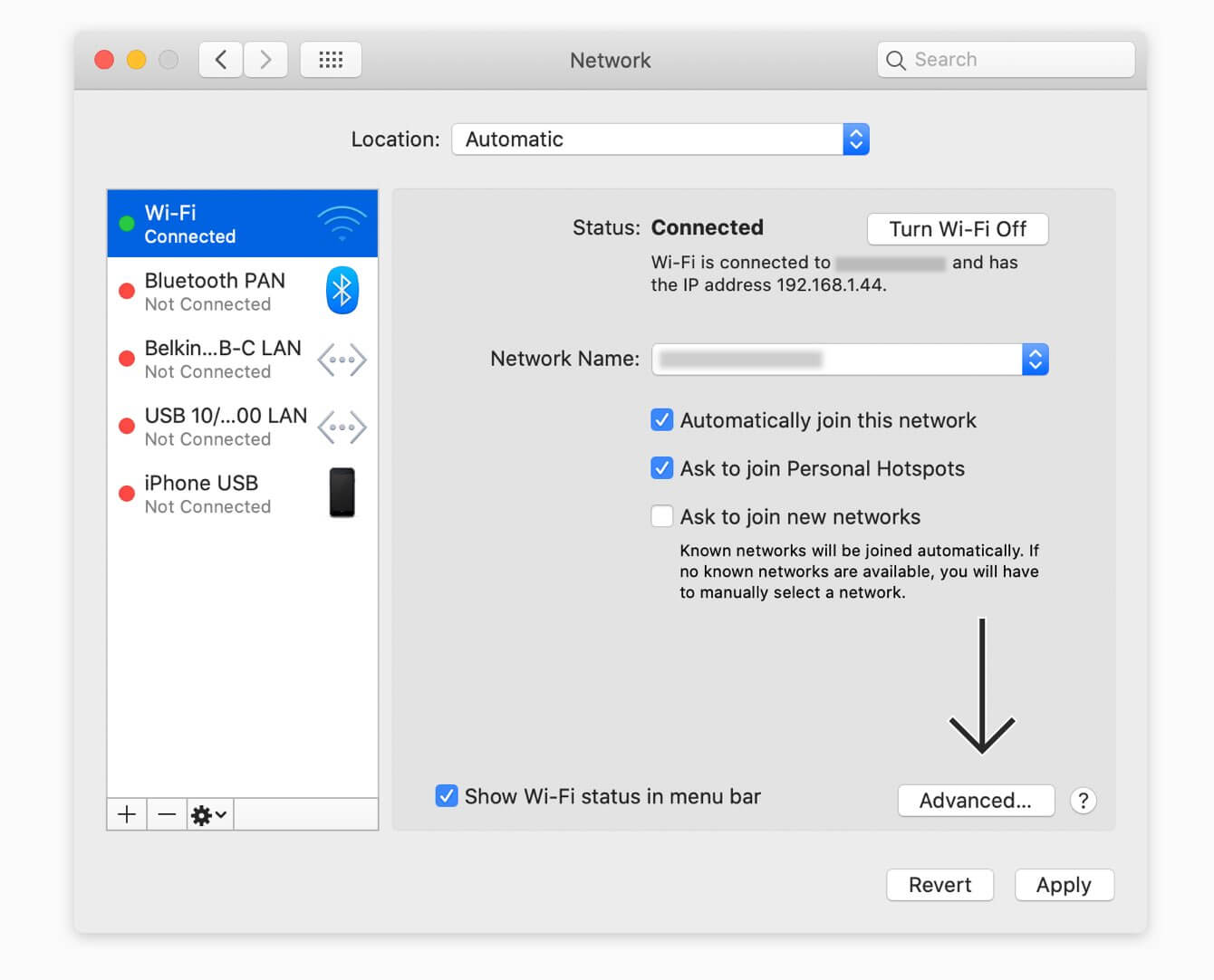
STEP 1 Open Apple menu > System Settings > Network.
STEP 2 Select your active network connection, then click "Details".
STEP 3 Open the "DNS" section and click the "+" button under DNS Servers.
STEP 4 Add 8.8.8.8 and 8.8.4.4, then click "OK" to save your changes.
STEP 5 Reopen your browser and visit SoundCloud to check whether the website loads correctly.
Method 6. Check and Edit the HOSTS File
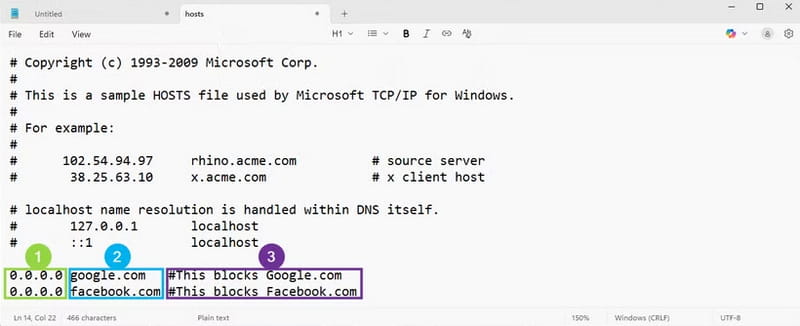
The HOSTS file is a system file that maps website domains to specific IP addresses, overriding normal DNS lookups. If SoundCloud has been blocked or redirected by an incorrect HOSTS entry, checking and correcting that entry may help you access the website again.
Unlike changing DNS servers, editing the HOSTS file requires modifying system settings directly. This method only works when a HOSTS entry is causing the issue and won't bypass school firewalls or other network restrictions. Be sure to back up the file before making changes, and only edit it on a device you're authorized to manage.
How to Unblock SoundCloud by Editing the HOSTS File?
For Windows Computer:
STEP 1 Search for Notepad in the Start menu, right-click it, and select "Run as administrator".
STEP 2 In Notepad, select File > Open and navigate to C:\Windows\System32\drivers\etc\hosts. Change the file type filter to "All Files" if the HOSTS file is not visible.
STEP 3 Look for any entry containing soundcloud.com or www.soundcloud.com. If you find an unexpected entry redirecting SoundCloud to another IP address, back up the file and remove only that entry.
STEP 4 Save the file and reopen SoundCloud to check whether access has been restored.
For Mac Computer:
STEP 1 Open Terminal from Applications > Utilities.
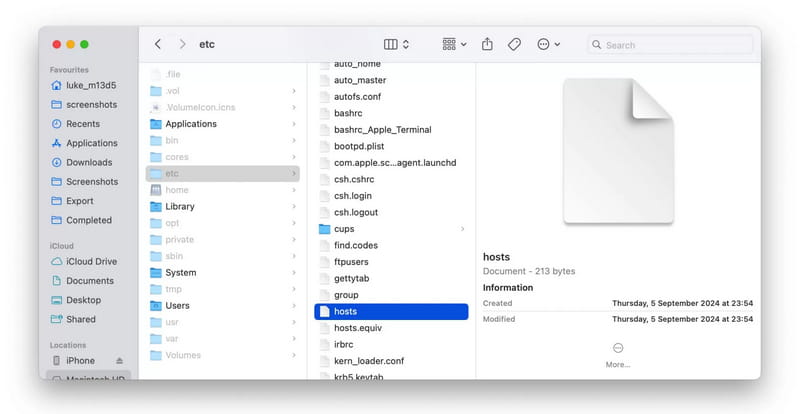
STEP 2 Enter sudo nano /etc/hosts and provide your administrator password when prompted.
STEP 3 Check for unexpected entries containing soundcloud.com. Back up the original file before removing any incorrect entry.
STEP 4 Save the file by pressing Control + O, press Enter, and then press Control + X to exit. Restart your browser and test SoundCloud again.
Method 7. Try a Different Browser or Reset Chrome
Occasionally, the block is applied only to the default browser on a school device. Installing Firefox or another browser can sometimes bypass a browser-level restriction. On a school Chromebook, SoundCloud may appear under Chrome's Safety Check / Site Settings → Insecure content. If it is listed there, remove it and reload. These fixes are device-specific and do not address network-level blocking, but they cost nothing to try.
How to Get SoundCloud Working Again in Chrome?
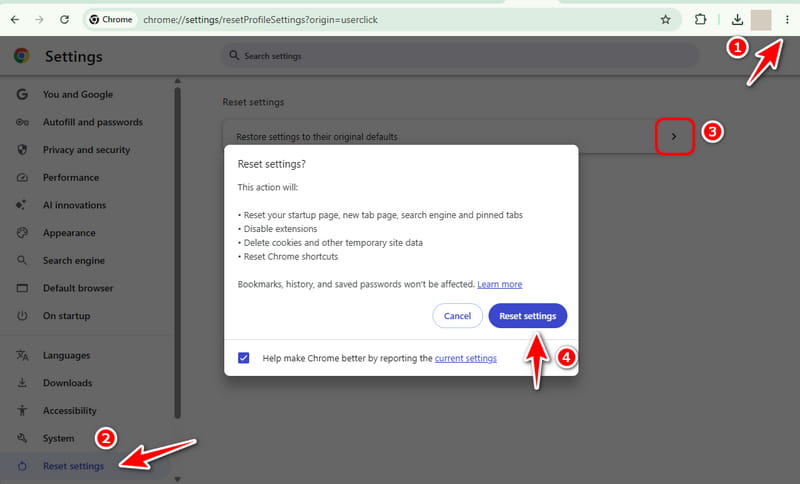
STEP 1 Open Google Chrome and click the three vertical dots (More) in the top-right corner. Select "Settings" from the menu.
STEP 2 Find "Reset settings" in the left sidebar.
STEP 3 Click "Restore settings to their original defaults", then confirm by clicking "Reset settings".
Method 8. Try a URL Shortener
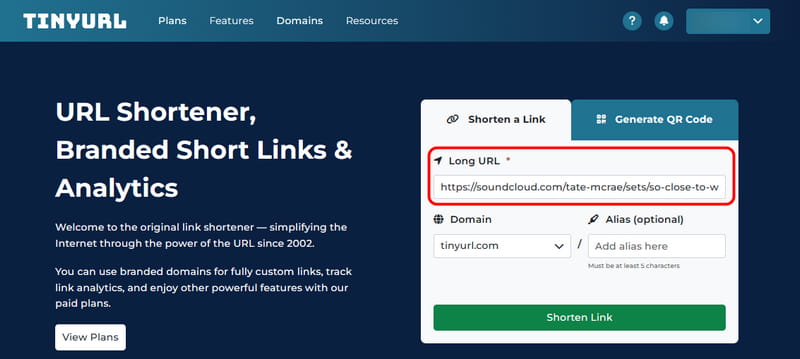
A URL shortener creates a shorter link that redirects to the original SoundCloud address. In rare cases, it may help when a basic URL filter only checks the initial link. However, most modern network filters also inspect the final destination, so a shortened link usually cannot get SoundCloud unblocked. This method does not resolve DNS-level blocking or firewall restrictions. You can try it as a quick test, but it is not a reliable solution for accessing SoundCloud on restricted networks.
How to Open SoundCloud Links Using a URL Shortener?
STEP 1 Copy an existing SoundCloud track or playlist link from a message, search result, or previously saved bookmark.
STEP 2 Open a reputable URL-shortening service such as Bitly or TinyURL, paste the full SoundCloud link into the tool, and generate a shortened link (e.g., bit.ly/xxxxxx).
STEP 3 Type or paste the new short link into your browser’s address bar and press Enter to open it.
Method 9. Switch to Other Streaming Services
If SoundCloud is unavailable on your network, you can try another music streaming platform. Spotify and YouTube Music offer extensive music libraries, while Bandcamp is a great place to discover independent artists and purchase downloadable tracks.
This is where Tidabie Music Go becomes especially useful. It supports many major platforms in one go, including Spotify, Apple Music, YouTube Music, Amazon Music, TIDAL, and Deezer, alongside SoundCloud. Instead of installing a separate downloader for each service, you can use one program to download tracks and playlists from whichever platform is accessible. That also gives you a backup plan. If your school later blocks the service you switched to, your downloaded music remains available offline.
FAQs about Getting SoundCloud Unblocked
Q1: Can I get SoundCloud unblocked without a VPN?
Yes. Hotspots, proxies, DNS/HOSTS changes, and offline downloads can all get SoundCloud unblocked at school without a VPN. Offline downloading is the most durable because it does not rely on the network at all.
Q2: Does SoundCloud Go+ offline mode work when SoundCloud is blocked?
Official Go+ downloads still require in-app authentication and periodic verification. In a strictly filtered environment, those checks may fail. However, a third-party SoundCloud converter like Tidabie Music Go avoids this by downloading independent local files.
Q3: Why does my VPN stop working on the school network?
Schools increasingly use deep packet inspection and VPN-blocking rules. When the protocol or server IP is identified, the VPN is throttled or blocked. Offline files downloaded from Tidabie are unaffected by protocol-level blocking.
Conclusion
A blocked SoundCloud page is a network policy issue, not a broken platform. Many temporary methods mentioned above solve the immediate problem, but they are reactive and can stop working without warning. The SoundCloud unblocked approach that lasts is to download your music while you are on an unrestricted network, then listen locally. Use Tidabie Music Go to turn SoundCloud tracks and playlists into MP3 or lossless files, and school filters become irrelevant.

Jacqueline Swift | Senior Writer
