


[2026 Guide] How to Download Apple Podcast to MP3
Downloading Apple Podcasts episodes as MP3 files is entirely straightforward. The official Podcasts or iTunes app comes with built‑in support for offline downloads and saves every episode directly in MP3 format so that you can enjoy them without any extra conversion steps.
Still, you might also be looking for free or more flexible ways to handle your downloads. This guide covers 3 reliable methods to download Apple Podcast to MP3, from the official iTunes method to web-based downloads and Apple Podcast downloaders. We'll show you how to download MP3s from Apple Podcasts using simple steps. Let's dive in and pick the best approach so you can enjoy your favorite shows anywhere.
Part 1. Download Apple Podcasts Using Podcasts / iTunes (Official)
The simplest way to get Apple Podcasts episodes onto your device is through Apple's own apps: the Podcasts app on iPhone, iPad, and Mac, and iTunes on Windows. All these allow you to download episodes for offline playback at no cost.
- Free and built into macOS & Windows.
- No third-party software installation is required.
- The MP3 files are directly accessible in system folders.
- The downloaded files have random filenames.
- There is no batch download option.
- On iOS devices, you cannot directly access the downloaded MP3 files from the app.
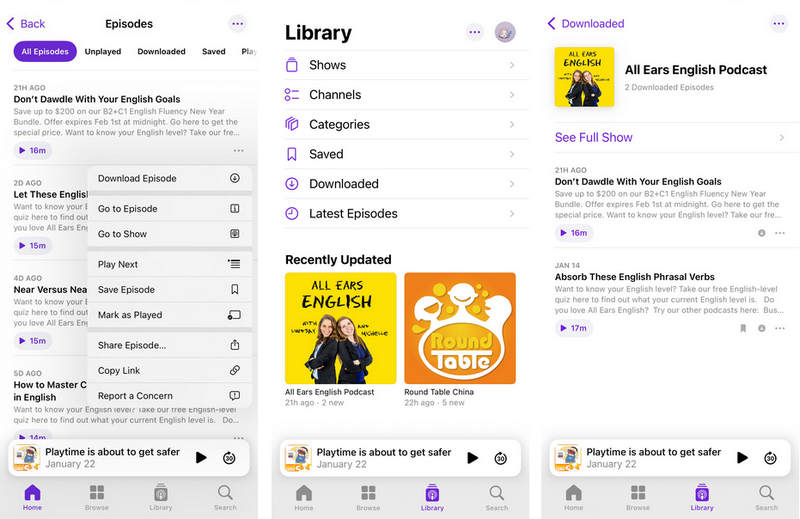
On iPhone or iPad:
STEP 1 Open the Podcasts app and find the episode you want.
STEP 2 Tap the three dots (•••) next to the episode and select "Download Episode".
STEP 3 The episode will appear in your "Library" under "Downloaded", ready for offline playback.
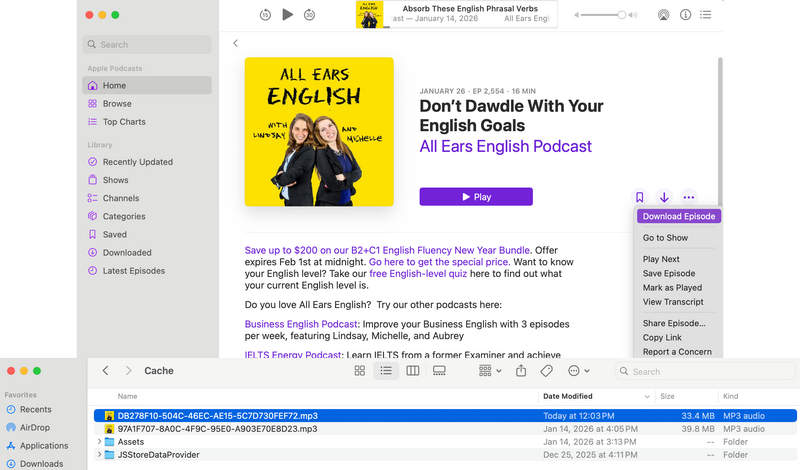
On Mac:
STEP 1 Open the Podcasts app on your Mac.
STEP 2 Locate the episode, and click the download button to save it.
STEP 3 In the Finder, click "Go" > "Go to Folder" from the menu bar. Paste the following path: ~/Library/
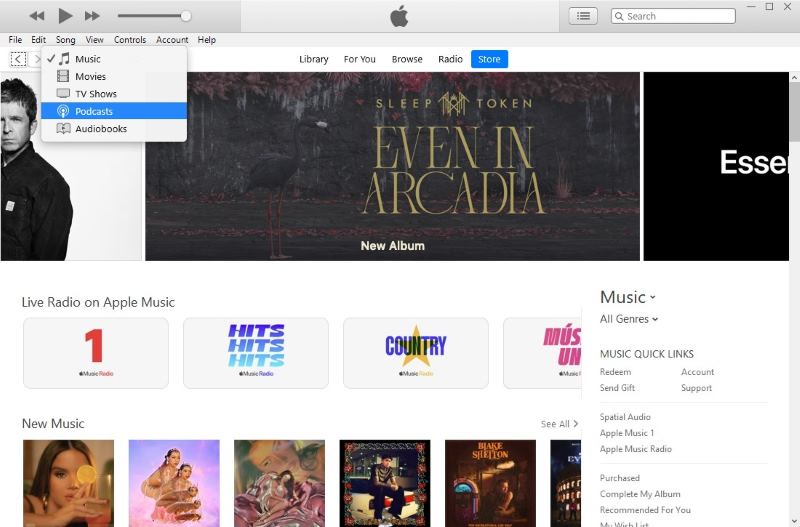
On Windows:
STEP 1 Open iTunes on your Windows computer and log in to your iTunes account.
STEP 2 Click "Podcasts" in the upper left corner to switch the page. Click "Store" and open the podcast you want to download.
STEP 3 Click "Get" on the right of the episode you want to download, then it will start downloading when a download icon flashes in the upper right corner. Later, you can find the downloaded episode in the iTunes folder (C:\
This method works perfectly for desktop users who only need a few episodes and don't mind manually locating and renaming files. For a smoother experience, especially if you regularly download many episodes, want batch downloads and automatic naming, a professional Apple Podcast downloader offers a much more efficient alternative, which we will cover in the next sections.
- Casual listeners need only occasional episodes and accept manual renaming.
- Desktop users can locate files by navigating system folders.
- Those who prefer free built‑in tools over third‑party software.
Part 2. Convert Apple Podcasts to MP3 with Tidabie Music Go (Professional)
While the official method works fine for occasional downloads, it comes with limitations, cryptic filenames, manual folder navigation, and no batch support. For a more professional and time‑saving experience, Tidabie Music Go offers a dedicated Apple Podcast downloader built specifically for this purpose. Its web player lets you download episodes as MP3s with no manual folder digging or renaming, and supports single, batch, and Apple Music downloads.
- Keeps titles intact & ID3 tags.
- Free to use with 126k+ podcasts. (Method 2)
- Batch downloads save time. (Method 2, Method 3)
- Download without signing in to your Apple account. (Method 1)
- Installation is required before use.
Method 1: Download Single Apple Podcast Episode to MP3
If you only need one or two specific episodes, this is the quickest and simplest approach. Tidabie Music Go lets you grab a complete episode in just a few clicks, with automatic naming and proper MP3 formatting. The built‑in Apple Podcast web player means you can search and select episodes right inside the app, and you don't even need to sign in to your Apple account to get started.
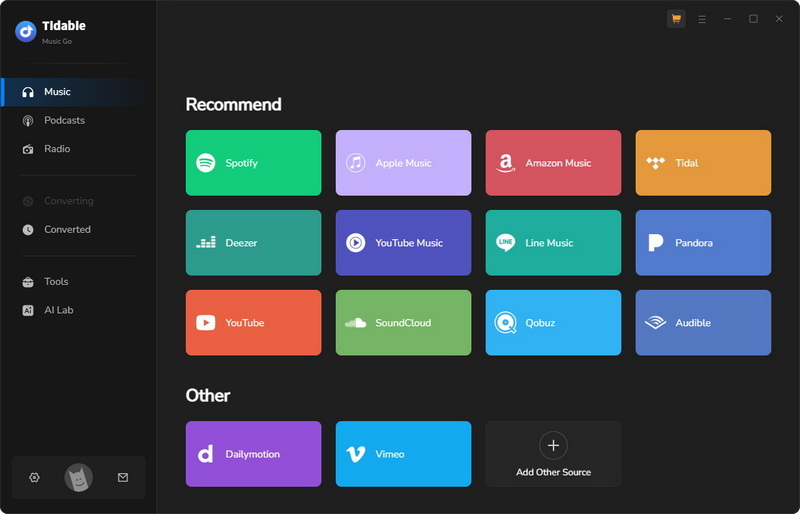
STEP 1 Launch Tidabie Music Go and navigate to the "Music" section. Select "Apple Podcast" to open the integrated web player. You can download Apple Podcasts without even signing in to your Apple account.
Note: At the top of the interface, locate the toggle switch and choose "Apple Podcast Download Mode". This mode downloads full episodes directly. The other option, "Apple Podcast Recording Mode", is convenient for capturing segments or multiple consecutive episodes.
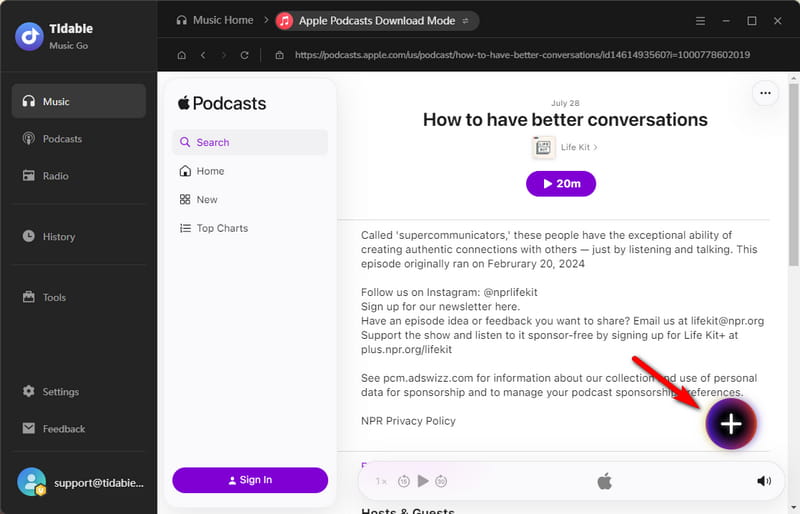
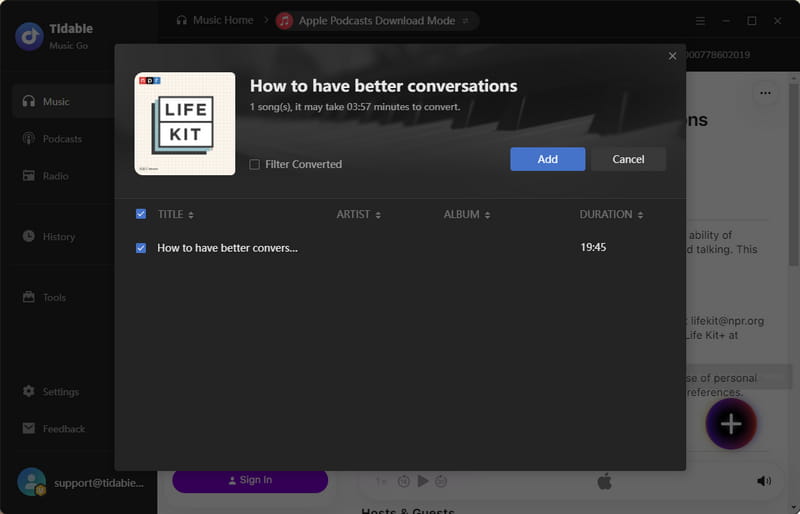
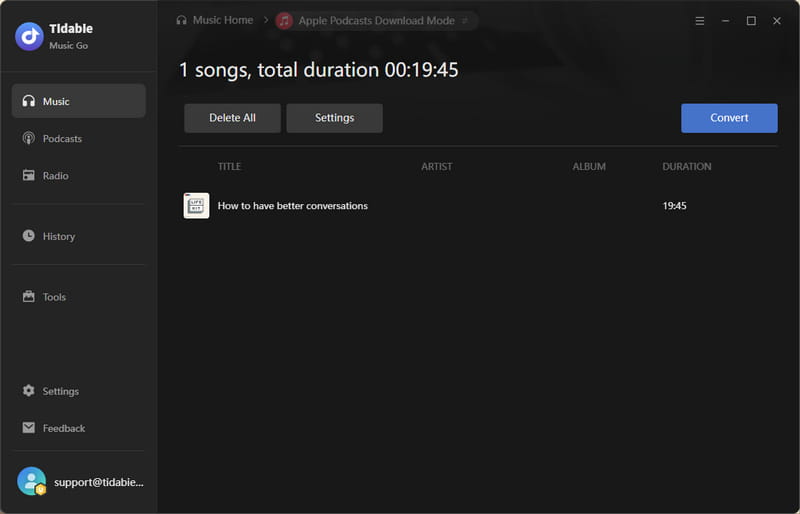
STEP 2 Browse or search for the podcast you want. Click on the title of the specific episode you wish to download. Click the "+" button at the bottom right corner to parse the episode link. A confirmation window will appear. Review the details and click "Add" to place the episode in your download queue.
Note: Links to entire podcast episodes will not be recognized. You need to select a single episode.
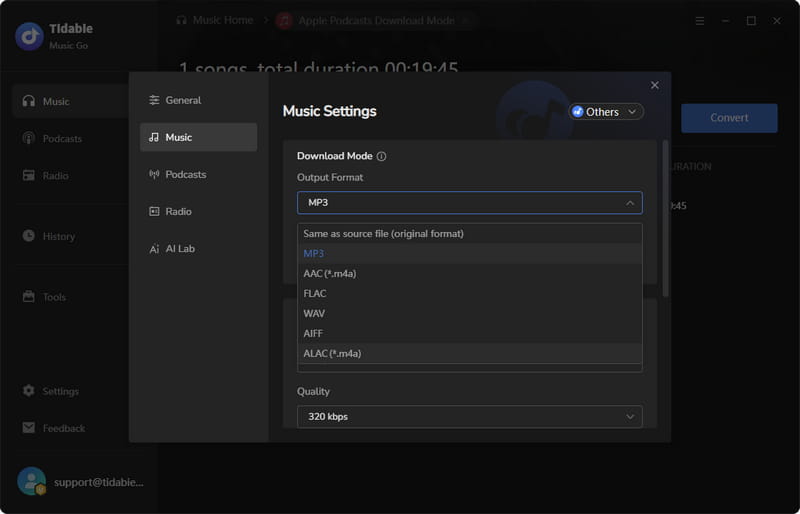
STEP 3 Click the "Settings" button. Set the output format to "MP3" and choose your preferred output folder where the file will be saved.
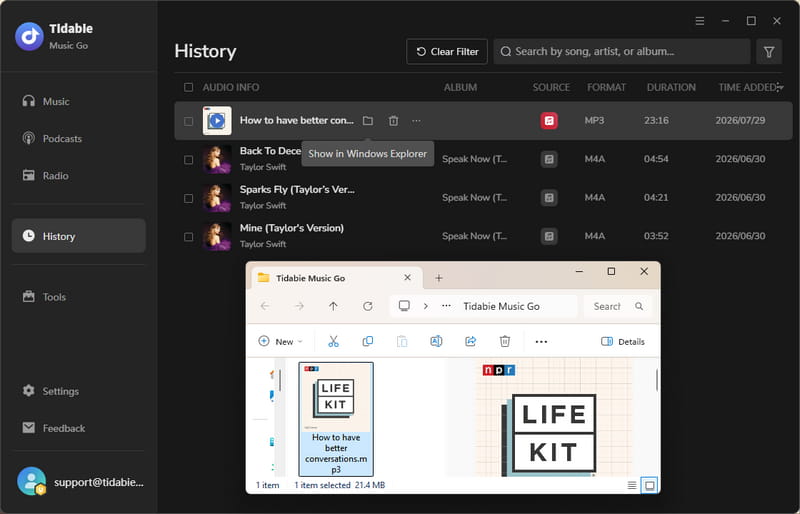
STEP 4 Click "Convert" to begin the download. The process completes quickly, and once finished, the output folder will open automatically so you can access your MP3 file right away. For future reference, click "History" in the left sidebar to view all your download records. To locate a saved file at any time, click the folder icon next to the episode in the history list.
- Listeners need just one or two episodes and quick downloads.
- Users prefer automatic naming and avoid cryptic filenames.
- Those who want downloads without Apple login.
Method 2: Batch Download Apple Podcast as MP3 for Free 🔥
If you have multiple episodes to save, doing them one by one is tedious. Tidabie Music Go supports batch downloading, allowing you to select several episodes at once and convert them all to MP3 in a single operation. This method is completely free and works with 126k+ podcast sources, not just Apple Podcasts.
STEP 1 Open Tidabie and select "Podcasts" from the left. Browse the catalog or use the search bar to find a specific Apple Podcast.
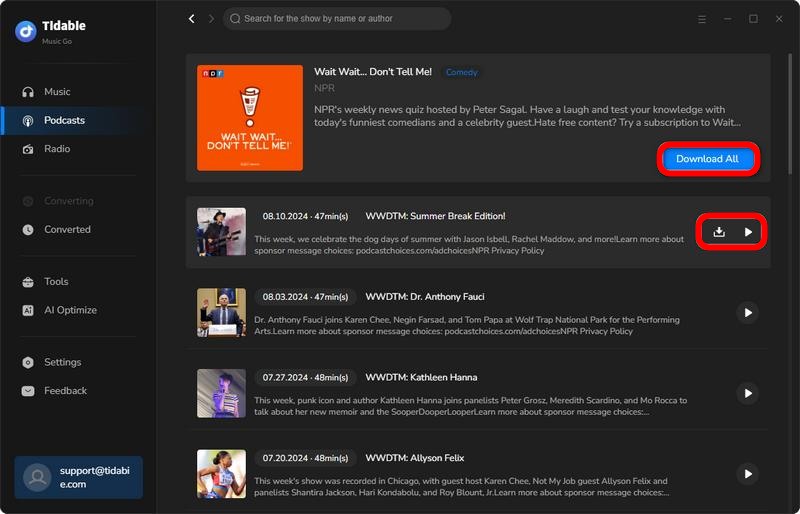
STEP 2 Hover over any podcast to reveal the  and
and  icons. Click the podcast cover to open its details page. Select the episodes you want and click "Download Selected" or use the "Download All" button. After you choose the ones to download, click "Add".
STEP 3 Before downloading, go to "Settings" and customize the output folder under the "Podcasts" section. Then click "Convert".
STEP 4 After the download finishes, find your saved podcasts in the "History" tab. Alternatively, click the folder icon next to any episode to open its location directly on your computer.
For a detailed walkthrough to batch download Apple Podcast to MP3 for free, check out the full guide below.
How to Download Podcast to MP3 for Free [4 Ways]
Read this article to find best 4 methods to save your podcasts as MP3s with different podcast downloaders. Learn More →
- Podcast collectors download multiple episodes for an offline library.
- Users value batch processing and automatic ID3 tagging.
- Anyone who wants a free high-speed solution for an entire series.
Method 3: Save Podcast as MP3 from Apple Music
- This method works only with the Music app (Mac) or iTunes app (Windows) within Tidabie. Downloads from the Apple Music web player are not supported. On Mac, only podcasts already added to your library are available for download.
Apple Music and Apple Podcasts are separate services, but some podcast content also appears within the Apple Music library, especially if you've saved episodes there. Tidabie Music Go lets you access and download these podcast files from the Apple Music section of the app, converting them to MP3 just like regular episodes. This approach is useful when your podcasts are mixed in with your music library or when you prefer to manage everything through Apple Music.
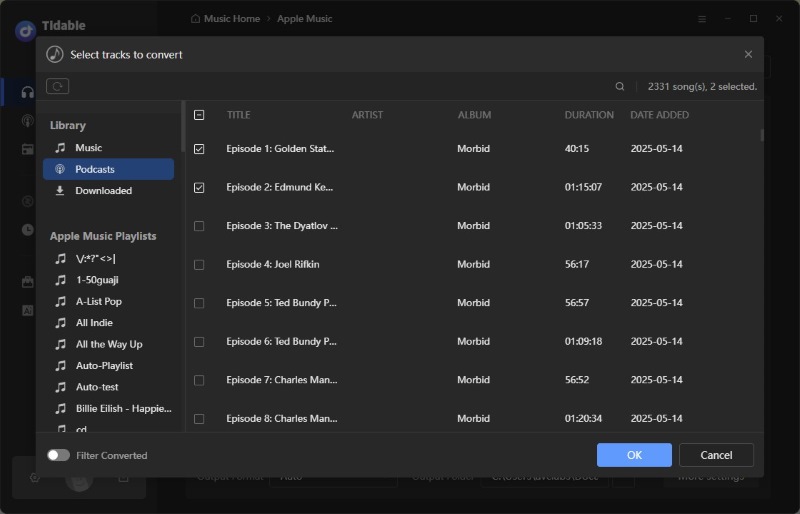
For complete step‑by‑step instructions to download podcasts as MP3s from Apple Music, visit the full tutorial here.
Best Apple Podcast Downloaders Free & Paid
Read this article to find 5 Apple Podcast downloaders to help you enjoy wonderful content at any time. Learn More →
- Apple Music subscribers have podcast episodes saved in their library.
- Users prefer managing music and podcasts in one interface.
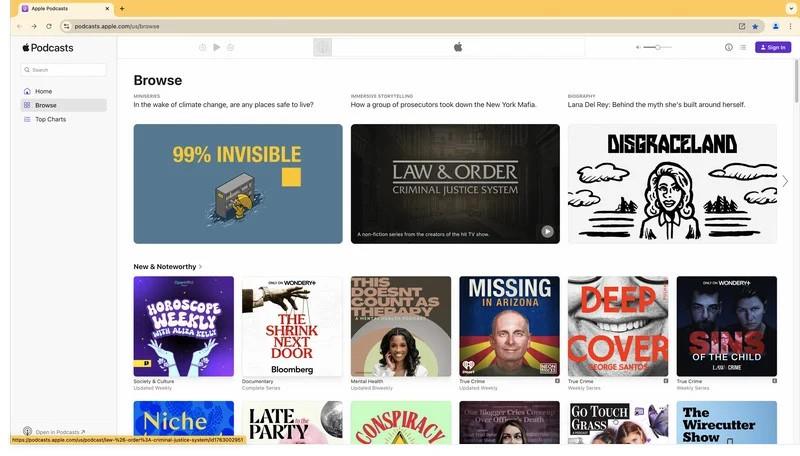
Part 3: Download Apple Podcast Episodes from Web Pages
If you prefer not to install any software, downloading Apple Podcast episodes directly from the web is a viable alternative. Many podcast shows have dedicated web pages, or RSS feeds that allow you to access and save episodes without going through the Podcasts app or iTunes. This method works entirely in your browser and requires no Apple ID login, making it one of the most accessible options for quick, one‑off downloads.
- No software installation.
- No Apple ID is required.
- Does not support batch downloading.
- MP3 files not auto named.
- Cumbersome. May fail if webpage changes.
STEP 1 Launch the Apple Podcasts web player in your browser. Locate the podcast you want and open its episode.
STEP 2 Press Ctrl+U to view the page source, then Ctrl+F to activate the search function. Type "MP3" in the search box to find any URLs containing MP3.
STEP 3 Copy the full URL, paste it into a new browser tab, and download the podcast.
- Users need quick single downloads on shared computers without installing software.
- Occasional listeners need one episode and accept a manual technical process.
Feature Comparison: Which Apple Podcast to MP3 Method Suits You Best?
To help you decide at a glance, this table compares the key features of every approach covered in this guide. The official app works differently on mobile and desktop, while Tidabie Music Go and web downloads each bring their own strengths and trade‑offs. Use this side‑by‑side overview to quickly spot which method gives you the features you care about most.
| Feature | Tidabie Music Go | Official (iPhone) | Official (Mac) | Official (Windows) | Web Download |
|---|---|---|---|---|---|
| Batch Download | ✅ Yes | ❌ No | ❌ No | ❌ No | ❌ No |
| Automatic File Naming | ✅ Yes | ❌ No | ❌ No | ✅ Yes | ❌ No |
| ID3 Tags | ✅ Yes | ✅ Yes | ✅ Yes | ✅ Yes | ❌ No |
| No Apple ID Required | ✅ (Method 1) | ❌ No | ❌ No | ❌ No | ✅ Yes |
| Direct MP3 Access | ✅ Yes | ❌ No | ✅ Yes | ✅ Yes | ✅ Yes |
| No Software Install | ❌ No | ✅ Yes | ✅ Yes | ✅ Yes | ✅ Yes |
| Free to Use | ✅ (Method 2) | ✅ Yes | ✅ Yes | ✅ Yes | ✅ Yes |
| Supports Apple Music Library | ✅ (Method 3) | ❌ No | ❌ No | ❌ No | ❌ No |
FAQs about Apple Podcasts to MP3
Q1: Do all Apple Podcasts episodes download as MP3?
Not always. While MP3 is the most common format, some podcast creators upload their episodes in M4A, AAC, or other audio formats. The format depends entirely on how the creator publishes their show.
Q2: Why do my downloaded episodes keep disappearing?
Apple Podcasts automatically removes played episodes after 24 hours by default. You can turn this off in Settings > Apps > Podcasts by disabling "Remove Played Downloads". Downloaded episodes may also be deleted automatically if your device is running low on storage.
Q3: Can I download all episodes of an Apple Podcast at once?
It depends. The official Podcasts app and iTunes require you to download each episode individually. For batch downloading, you'll need a dedicated tool like Tidabie Music Go.
Q4: Can I play downloaded Apple Podcasts MP3s on any device?
Yes. MP3 is the most universally supported audio format. Once you have the MP3 files, they work on virtually any device: Android phones, MP3 players, car stereos, USB drives, and smart speakers.
Q5: Do I need to subscribe to a podcast to download episodes?
No. You can download episodes from shows you don't follow. Following a show simply enables automatic downloads for new episodes.
Conclusion
This guide has covered three practical ways to download Apple Podcasts episodes as MP3 files. Each approach serves a different purpose, but if you regularly download multiple episodes and value a streamlined, hassle‑free experience, Tidabie Music Go offers the most complete solution. It combines a built‑in Apple Podcasts web player, flexible download modes, and batch processing into one seamless workflow. Download Tidabie Music Go today and take full control of your podcast library.

Jacqueline Swift | Senior Writer
