


TIDAL DL/GUI Review & Alternative
For many music lovers, a Tidal music subscription is the gateway to superior sound quality. A common desire among TIDAL subscribers is to download from TIDAL to build a personal offline library permanently, which often leads users to explore tools like Tidal DL and TIDAL GUI. Naturally, the central question arises: Is TIDAL DL/TIDAL GUI safe and reliable to use? This article provides a definitive review of Tidal DL and TIDAL GUI. We will also tackle the safety concern head-on and present a secure Tidal music downloader alternative, giving you all the information you need to choose the best method for your needs. Read on.
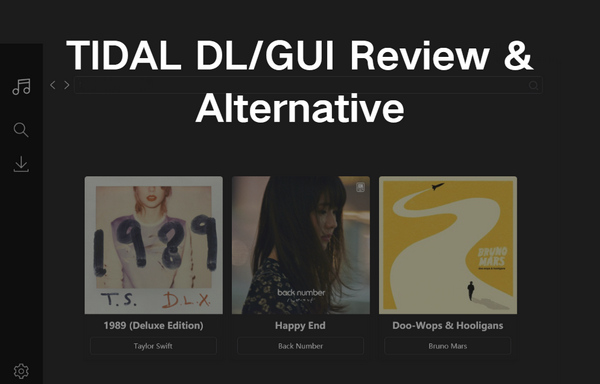
Part 1. What is TIDAL DL/TIDAL GUI?
TIDAL DL and TIDAL GUI are two versions of open-source tools designed to download music from the TIDAL streaming platform. These two Tidal music downloaders cater to music enthusiasts who wish to build a local library of high-quality audio, including HiRes Lossless and TIDAL MAX up to 24-bit/192kHz. While both tools serve the same core purpose, they differ significantly in user experience. TIDAL DL is a command-line interface tool that operates through text commands in a terminal, making it a versatile choice for various operating systems. In contrast, TIDAL GUI provides a graphical user interface, offering a more visual and intuitive, click-and-go experience for users, particularly on Windows. Both require an active Tidal music subscription to function, as they access content from a paid TIDAL plan.
What are the Pros and Cons of TIDAL DL/TIDAL GUI?
😀 Pros
- Free and open-source.
- Download audio in high quality, supporting formats like FLAC for a lossless listening experience.
- Enable downloading not just individual tracks, but also albums, and playlists.
😌 Cons
- Both require a technical setup. Users must install Python and may need to use terminal commands, which can be a significant barrier for non-technical users.
- They are unstable and may suddenly stop working if TIDAL updates its API or security measures, and they lack formal customer support.
- The GUI version is primarily available for Windows, limiting its accessibility for Mac and Linux users who prefer a graphical interface.
Part 2. How to Download and Use TIDAL DL/TIDAL GUI?
The installation process for both TIDAL DL and TIDAL GUI requires careful attention, as it involves several technical steps. The following guide is compiled directly from the provided reference materials to ensure accuracy.

Tired of complex setups? Skip the command line and Python installation. Tidabie Tidal Music Converter offers a one-click installer for a worry-free experience. Enjoy a simple graphical interface to download from Tidal in just a few steps.
Before downloading either tool, ensure you have the following ready:
- A valid Tidal music subscription.
- Python is installed on your computer (required for TIDAL DL and sometimes TIDAL GUI).
- Access to GitHub to download the program files.
How to download and use TIDAL DL?
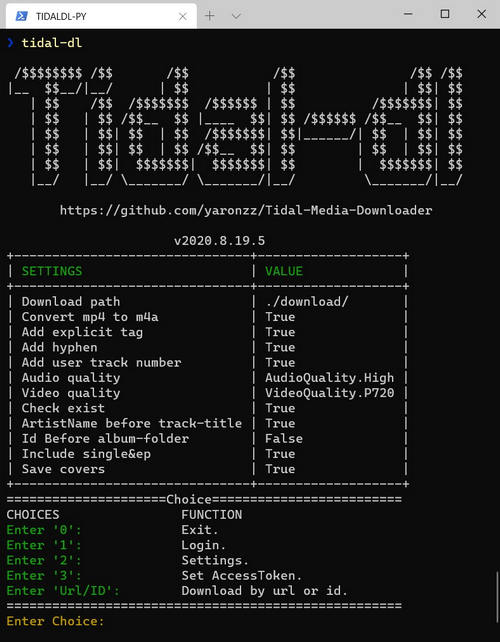
STEP 1 Navigate to the TIDAL DL GitHub Releases page. For Windows users, download the tidal-dl.exe file.
STEP 2 Run the TIDAL DL executable file. You will be prompted to enter your Tidal username and password directly in the command line to log in.
STEP 3 Follow the on-screen prompts to set your preferred output folder, audio format (e.g., FLAC, MP3), and audio quality.
STEP 4 Go to the Tidal web player, find the song, album, or playlist you want, and copy its URL. In the terminal, type the command: TIDAL DL [URL] (replacing [URL] with the link you copied). Press Enter, and it will begin to save files to your devices.
How to download and use TIDAL GUI?
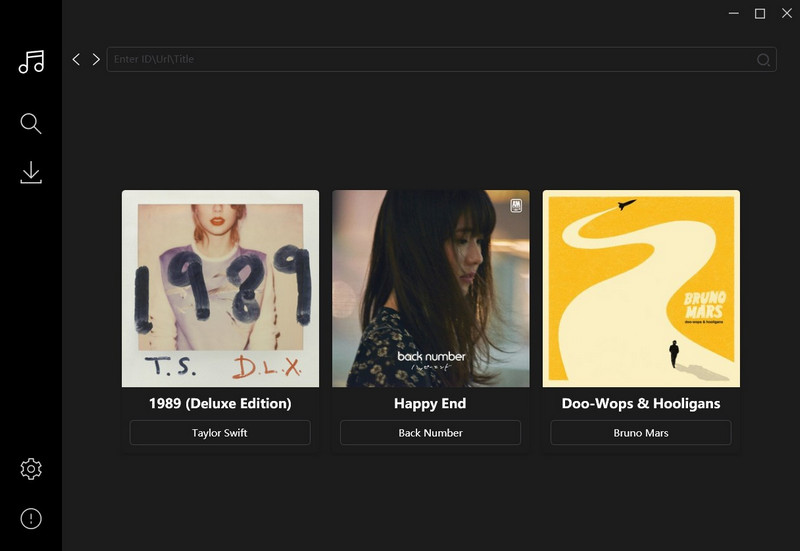
STEP 1 Go to the TIDAL GUI GitHub Releases page. Under "Assets," find and download the latest tidal-gui.exe file.
STEP 2 Install and launch tidal-gui.exe. The application will display a device authorization code. Log in to your Tidal account on the official website and enter this device code to link the application to your account.
STEP 3 Use the built-in search bar within the TIDAL GUI application to find the music you want, or paste a TIDAL URL. Select the tracks, album, or playlist you wish to download.
STEP 4 Choose your desired output settings format and quality in the application. Click the "Download" button, and the files will be saved to your computer.
Part 3. Is TIDAL DL/TIDAL GUI Safe?
When considering using any third-party tool to download from Tidal, safety is paramount. While the official GitHub versions of TIDAL DL or TIDAL GUI are generally not malicious, they come with significant risks that users must acknowledge. The primary concern is account security, as both TIDAL DL and TIDAL GUI require you to enter your Tidal music subscription directly into their interfaces. Since these are unofficial applications with no affiliation to TIDAL, you are trusting a third party with your login information.
Furthermore, the risk of encountering malware is real, especially if you do not download them from official GitHub pages. Obtaining the software from unofficial or untrustworthy portals could result in installing adware, spyware, or viruses alongside the Tidal music downloader.
Finally, TIDAL DL and TIDAL GUI are volunteer-run projects that can be abandoned at any time. Their instability means they might suddenly stop working after a Tidal update, and you will have no official customer support to turn to for help, which could be particularly frustrating.
Therefore, while TIDAL DL and TIDAL GUI themselves may function, using them requires accepting these potential security and operational hazards.
Part 4. Best Alternative to TIDAL DL/TIDAL GUI
For users seeking a more straightforward method to download from TIDAL without technical setup, Tidabie Tidal Music Converter stands out as a professional solution. Unlike open-source tools that require command-line knowledge and pose potential security risks, Tidabie Tidal Music Converter is a dedicated software that offers a safe and intuitive experience for managing your TIDAL music library.
Tidabie Tidal Music Converter allows you to download songs, albums, playlists, and podcasts from Tidal directly to your computer, converting them to universal MP3, AAC, WAV, FLAC, AIFF, and ALAC formats. It preserves high-fidelity audio quality and ID3 tags, such as title, artist, album, and cover art, during conversion, ensuring your offline music collection is both high-quality and well-organized. Furthermore, it operates with up to 10x faster conversion speeds and supports batch downloads, which is ideal for saving large playlists. Tidabie also offers many handy tools for your use, including AA/AAX Converter, Format Converter, Burn CD, Audio Editor, Tag Editor, etc.
Tidabie Tidal Music Converter
- Download Tidal songs/albums/playlists/podcasts locally.
- Convert Tidal tracks to MP3/AAC/WAV/FLAC/AIFF/ALAC.
- Preserve HiRes audio quality and ID3 tags.
- 10x download speed & batch download multiple playlists.
- Offer tools of Format Converter, Tag Edit, etc.
- Enjoy Tidal music on WMP and other music players.
- Keep Tidal downloads forever after the subscription ends.
How to download from TIDAL with Tidabie Tidal Music Converter?
Follow these simple steps to download music from Tidal with Tidabie Tidal Music Converter.
STEP 1 Log in to Tidal
Launch Tidabie Tidal Music Converter. When the Tidal app or built-in web player opens up automatically, log in to your Tidal account. Here we take to download from the Tidal app, for example.
Note: If you download from the Tidal web player, you can achieve speeds up to 10x faster with CD quality. Alternatively, if you choose to download through the Tidal app, the audio quality can be higher, up to HiRes.
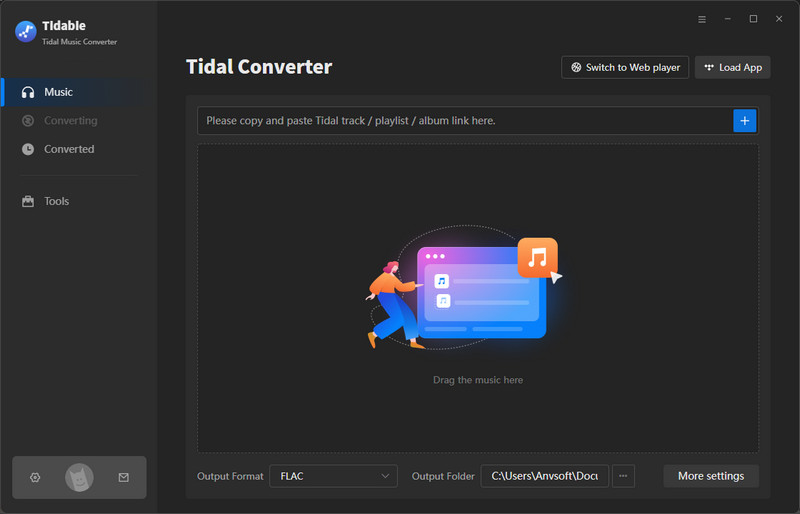
STEP 2 Add Tidal Music
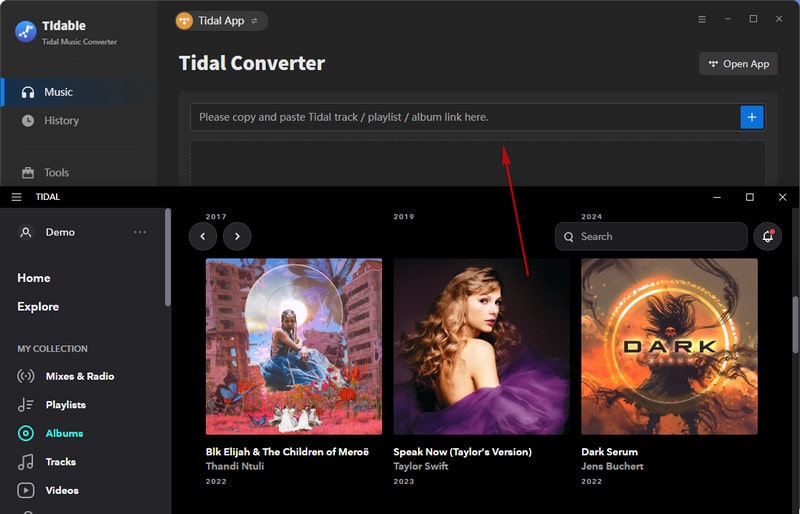
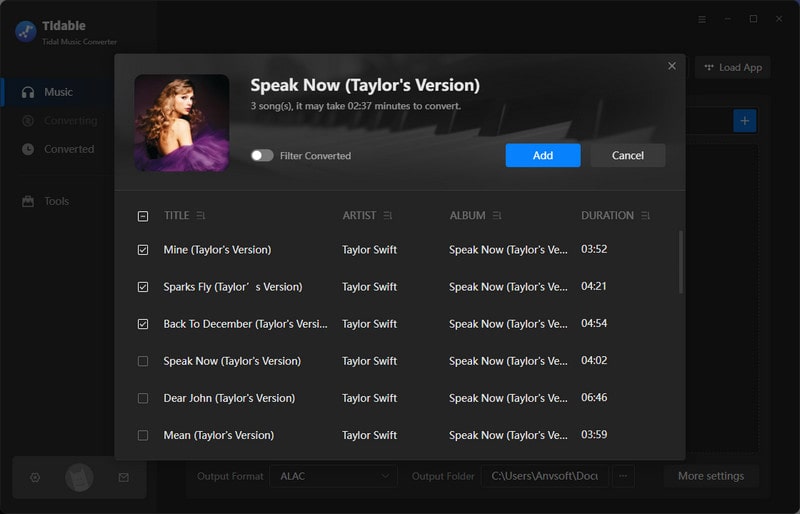
Browse within the TIDAL app on your computer, then drag and drop the title of any song, album, or playlist directly into the Tidabie interface. After a window with a list of songs pops up, select the items you want to download, then click the "Add" button.
Note: Alternatively, click the "+" add button in the bottom right corner of the built-in TIDAL web player. You can also add music to download by copying the shareable link for any track or collection from TIDAL and pasting it into the parsing bar within Tidabie.
STEP 3 Adjust Tidal Settings
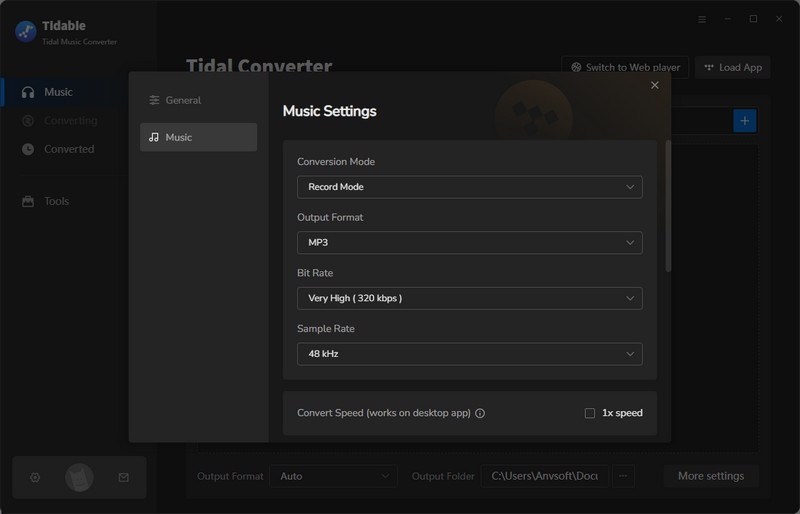
Before starting your download, click the gear icon in the bottom left corner to configure the output settings.
- Conversion Mode: Intelligent Mode, Record Mode, YouTube Mode
- Output Format: Auto, MP3, AAC, WAV, FLAC, AIFF, ALAC
- Bit Rate: 128kbps, 192kbps, 256kbps, 320kbps
- Sample Rate: 44.1kHz, 48kHz, 96kHz, 192kHz
- Bit Depth: 16-bit, 24-bit (Available for FLAC, ALAC, WAV, AIFF)
- Quality: Low, High, Max (Available for the "Auto" format)
- Output File Name: Track Number, Title, Artist, Album, Playlist Index, Year
- Output Organized: None, Playlist, Artist, Album, Artist/Album, Album/Artist, Playlist/Artist, Playlist/Album
STEP 4 Download from Tidal
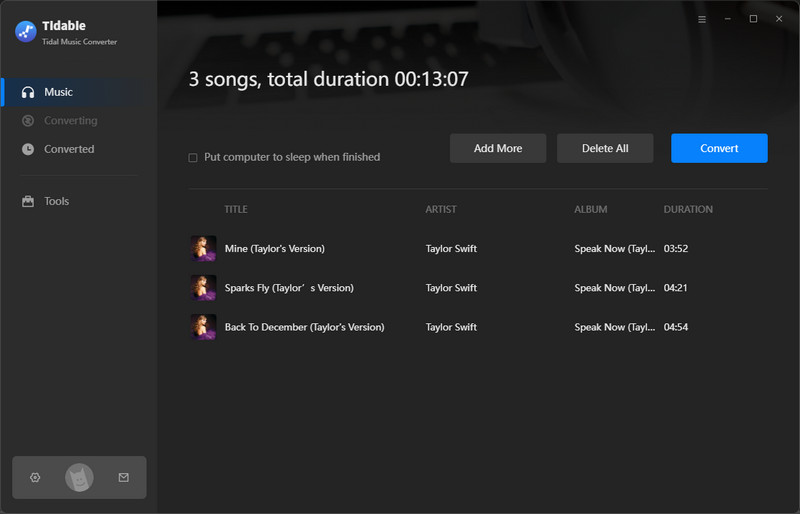
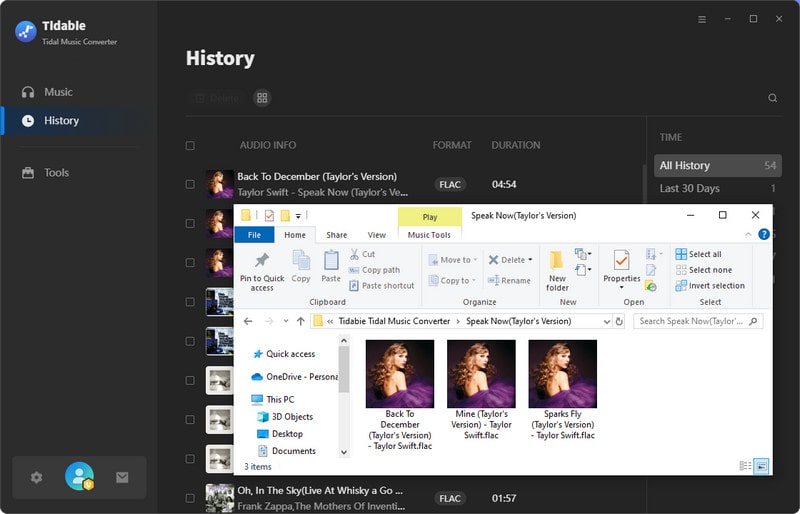
Once you have selected all the music you want and configured your output preferences, click the "Convert" button. Tidabie will then begin downloading and converting your selected tracks at high speed. After the process is complete, you can find your audio files in the designated output folder by clicking the folder icon next to each song title in the "History" tab, ready for offline playback on any device.
What are the Pros and Cons of Tidabie Tidal Music Converter?
😀 Pros
- Simple setup and graphical user interface.
- 10x high-speed conversion and batch downloading.
- Support multiple output formats: MP3, AAC, WAV, FLAC, and ALAC etc.
- Retains Hi-Res audio quality and ID3 metadata.
- Built-in Tidal web player or integration with the Tidal app for easy browsing.
😌 Cons
- Not available for Linux users.
Part 5. Tidabie Tidal Music Converter VS TIDAL DL/TIDAL GUI
The detailed comparison below clearly illustrates why Tidabie is a more refined and user-centric solution compared to the open-source tools.
| Tidabie Tidal Music Converter | TIDAL DL/GUI | |
|---|---|---|
| Ease of Use | Simple | Technical |
| Music Content | songs, albums, playlists, podcasts | songs, albums, playlists |
| Output Format | MP3, AAC, FLAC, WAV, AIFF, ALAC | FLAC, MP3, AAC, WAV |
| Download Speed | Up to 10x | Standard |
| Audio Quality | HiRes | CD Quality |
| Metadata | ID3 tags & lyrics | ❌ |
| Library Organization | Archive by Playlist, Artist, Album, etc. | ❌ |
| Batch Download | ✅ | ✅ |
| Additional Tools | Format Converter, Tag Editor, Audio Editor, Burn CD, etc. | ❌ |
| Customer Support | ✅ | ❌ |
FAQs about TIDAL DL/TIDAL GUI
Q1: Why can't I log in to TIDAL DL/TIDAL GUI?
This often happens after Tidal updates its system. While advanced users can try technical workarounds, the simplest solution is to wait for an updated tool version from volunteer developers. For a hassle-free experience, consider Tidabie Tidal Music Converter, which is updated in a timely manner by a professional development team.
Q2: Why are my downloads so slow or stuck with TIDAL DL/TIDAL GUI?
Ensure you have a stable internet connection and check Tidal's service status. The download speed of TIDAL DL/TIDAL GUI is standard. For accelerated download speed, try Tidabie Tidal Music Converter.
Q3: Why do I see "Track Not Available" or "404 Error" on TIDAL DL/TIDAL GUI?
You are likely using an outdated version of TIDAL DL/TIDAL GUI. Please check the GitHub page for the latest release and update your software to resolve this issue.
Q4: Why does TIDAL DL/TIDAL GUI frequently stop working?
These tools are open-source. When Tidal updates its security or API, the tools break until a volunteer developer releases a fix. This is a major advantage of Tidabie, as it offers professional, timely updates to ensure consistent functionality.
Q5: Can I keep the downloaded songs if my Tidal music subscription ends?
Yes, this is the primary benefit. Once songs are downloaded and converted to local files using these tools, including Tidabie, they are permanently saved on your computer and remain accessible even after your Tidal music subscription ends.
Conclusion
In summary, while Tidal DL and Tidal GUI are free and open-source projects that appeal to technically adept users, their requirement for complex setup, potential security risks, and lack of stability present significant drawbacks for the average listener. In contrast, Tidabie Tidal Music Converter establishes itself as a professional and user-friendly Tidal music downloader. It outperforms open-source tools with its fast conversion speed, comprehensive format support, high audio quality, and full metadata. For an efficient way to enjoy your favorite music offline, explore Tidabie Tidal Music Converter!

Jacqueline Swift | Senior Writer
