


TunePat Music One Review: Is It the Best Music Converter?
What makes a tool the best music converter for streaming fans? This Tunepat Music One review puts the software head-to-head with that question. Designed to help users download music to computer from major platforms, Tunepat Music One enters a growing field of music streaming and download services.
We'll answer how is Tunepat Music One in daily use by testing its performance, and whether it truly earns the best music downloader for PC label imposed by some users.
Part 1. What is TunePat Music One?
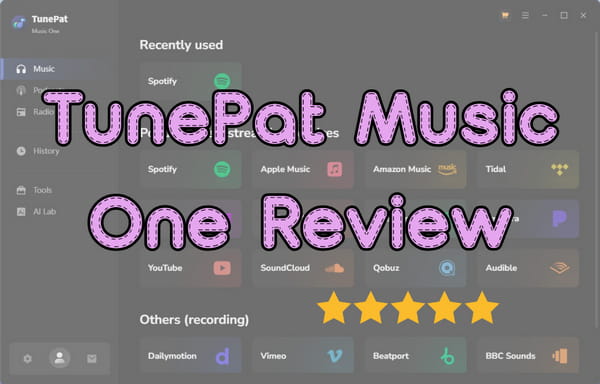
TunePat Music One is an all-in-one music converter designed to download and convert tracks from major streaming platforms like Spotify, Apple Music, Amazon Music, TIDAL, Deezer, YouTube Music, Pandora, and more. It helps users convert streaming content to audio formats such as MP3, FLAC, WAV, AAC, and AIFF, allowing playback on any device without an active subscription. The software advertises batch conversion speeds up to 10x faster and claims to preserve original audio quality with complete ID3 tags. Whether it delivers on these promises consistently is what this review aims to uncover.
Related Article: TunePat Spotify Music Converter Review 2026: Is It Truly Lossless?
Part 2. Key Features of TunePat Music One
Now that you understand what TunePat Music One is, let's explore the specific features that make it a standout choice for music lovers. From broad platform support to useful bonus tools, here's what you can expect.
FEATURE 1 Multi-Platform Support
TunePat Music One supports music downloading from over a dozen streaming services, including Spotify, Apple Music, Amazon Music, YouTube Music, TIDAL, Deezer, Pandora, SoundCloud, etc. Users can download songs, albums, playlists, podcasts, audiobooks, radio shows, and even music videos from this all-in-one program. It also handles audio extraction from customizable websites like Dailymotion, BBC Sounds, and Bandcamp, and can convert Audible audiobooks to common formats.
FEATURE 2 Wide Range of Output Formats
Streaming platforms encode music in proprietary formats that limit where you can play it. TunePat solves this by converting tracks to universally compatible formats like MP3, AAC, WAV, FLAC, ALAC, and AIFF. Users can adjust bit rate and sample rate to balance file size and quality, making the files suitable for anything from casual listening to professional use like burning CDs.
FEATURE 3 Original Audio Quality Preserved
Sound quality remains a top priority during conversion. TunePat retains the original audio fidelity of each track, supporting lossless and Hi-Res formats such as Spotify Lossless, Apple Music Hi-Res, Amazon Music Ultra HD, Tidal Hi-Fi, and more. The conversion process ensures no degradation, so the listening experience matches what you'd get from the streaming service itself.
FEATURE 4 Complete ID3 Tag Retention
Metadata makes music libraries manageable. TunePat preserves all ID3 tags during conversion, including title, artist, album, artwork, year, disc number, and track number. This means your converted files stay organized and searchable across any device or player, with no manual tagging required.
FEATURE 5 High-Speed Batch Conversion
TunePat offers batch conversion, which allows users to add entire playlists or albums and process them all at once. With speeds up to 10x faster than real time, a full playlist can be converted in minutes.
FEATURE 6 Customizable Output Settings
TunePat provides granular control over how files are organized and named. Users can specify output folders, choose file naming conventions using tags like {Title}, {Artist}, or {Album}, and sort files by playlist, artist, or album structure. These options help maintain a clean, personalized music library.
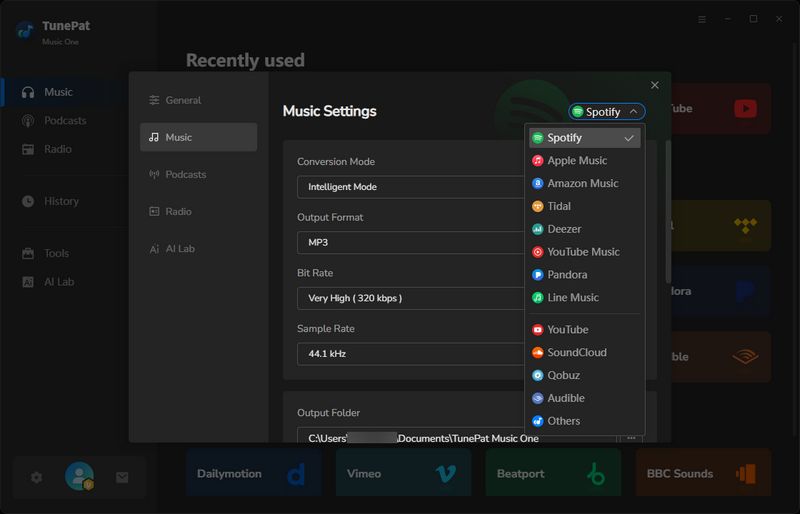
- Conversion Mode: Record Mode, YouTube Mode, Intelligent Mode
- Output Format: Recommended, MP3, AAC, WAV, FLAC, AIFF, ALAC
- Bit Rate: 320kbps, 256kbps, 192kbps, 128kbps
- Sample Rate: 44.1KHz, 48KHz, 96KHz, 192KHz
- Output Folder: To your needs
- Output File Name: Track Number, Title, Artist, Album, Playlist Index, Year
- Output Organized: Playlist, Artist, Album, Genre, Year, Disc Number, New Folder Level (/)
FEATURE 7 Useful Free Tools Included
Beyond downloading, TunePat includes several useful extras. The AI Audio Splitter separates vocals from instrumentals for creating karaoke tracks or remixes. It is completely free. A built-in format converter handles local audio files, while the tag editor lets users modify ID3 metadata on existing tracks. Other handy tools like CD burning and iTunes export are also available, adding real value beyond standard conversion.
Part 3. Step-by-Step Guide to Use TunePat Music One
Getting started with TunePat Music One is straightforward. Here's how to use TunePat Music One to download music to computer. Follow these steps to start building your offline music library.
STEP 1 Select Your Music Source
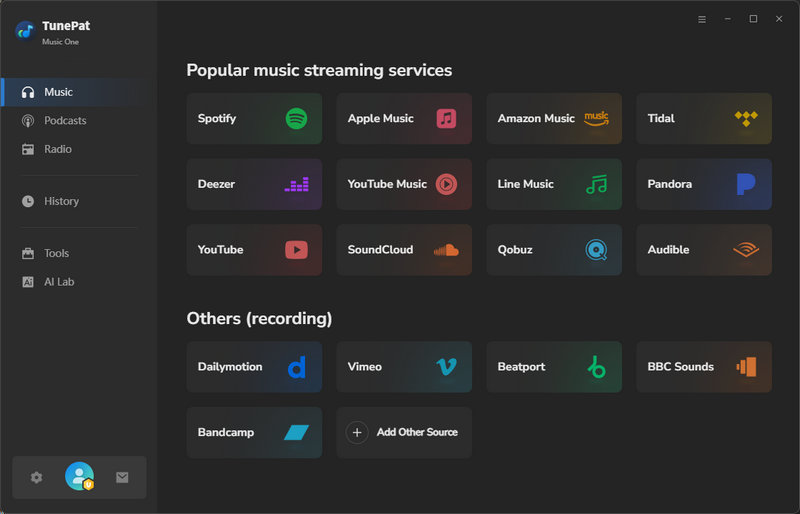
Launch TunePat Music One on your computer. The main interface displays major supported streaming platforms. Choose the service you want to download from. For this guide, we'll use "Spotify" as an example.
Tips: If your desired source isn't listed, click "Add Other Source" and paste the website.
STEP 2 Log In to Your Account
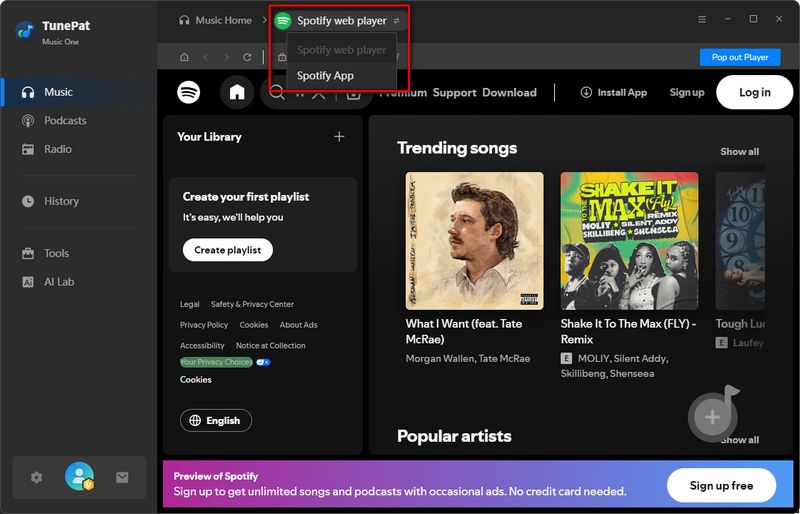
With Spotify selected, you'll see options for either "Spotify App" or "Spotify web player". If you want to download music at a speed up to 10x faster than real time, choose "Spotify web player". For Spotify lossless audio quality, select "Spotify App". Then log in to your Spotify account when prompted.
STEP 3 Add Music to Conversion List
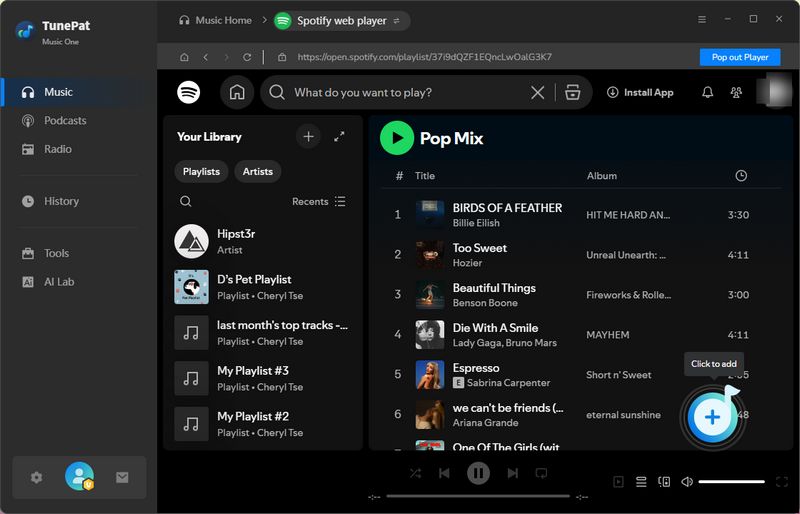
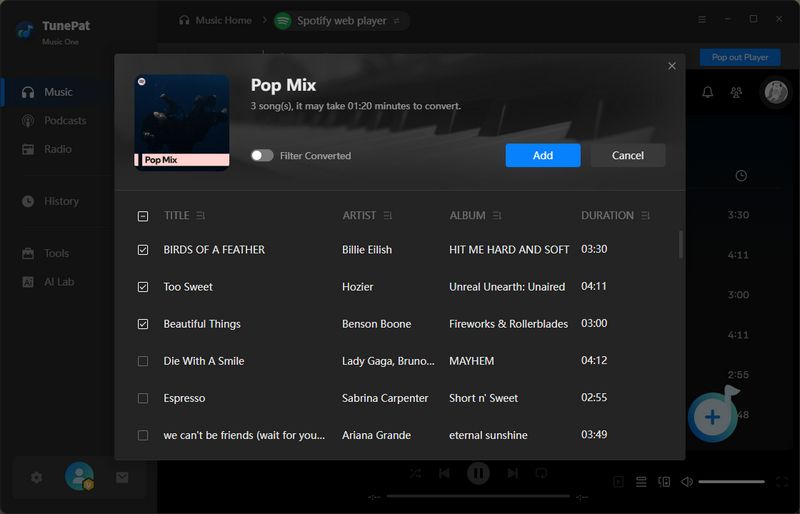
Navigate to the song, album, or playlist you want to convert. Click the "+" button in the lower right corner. TunePat will analyze the content and display all tracks in a pop-up window with checkboxes. Deselect any tracks you don't need, then click "Add" to queue them for conversion.
STEP 4 Configure Output Settings
Click the "Settings" button or the gear icon in the bottom left corner. Here you can customize conversion parameters, including conversion mode, output format, bit rate, sample rate, output folder, output file name, etc.
STEP 5 Start to Convert Music
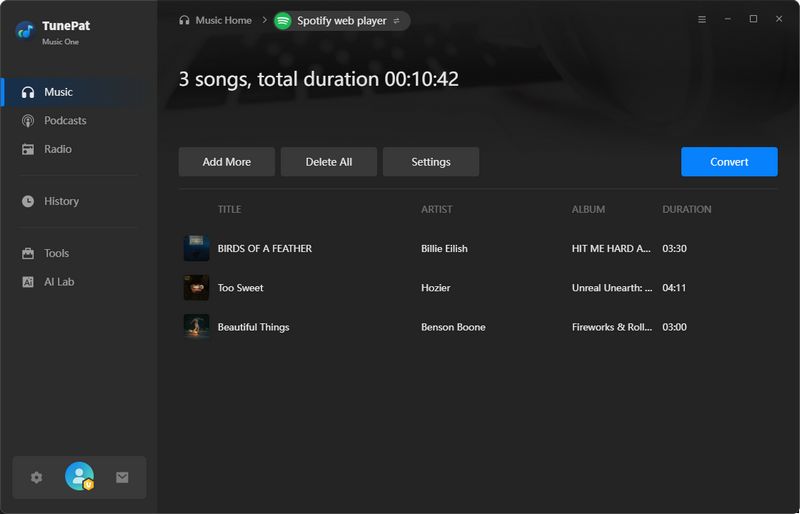
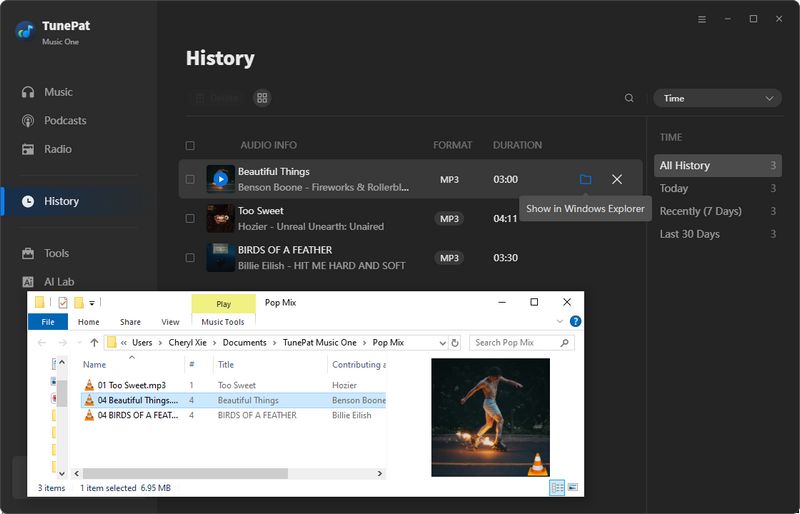
If you want to add more music, click "Add More". Otherwise, click "Convert" to begin the process. The program will convert your selected tracks at high speed and save them to your specified output folder. Once complete, you can find all converted files organized according to your settings. You can also review your download records in the "History" tab.
Part 4. Practical User Experience and Feedback
To provide a balanced view of TunePat Music One, we've given a general rating for each dimension and analyzed real user feedback from Trustpilot, reviews.io, and SmartCustomer. Here's how TunePat Music One performs across the dimensions that matter most.
ASPECT 1 Ease of Use & Interface: 4.7 / 5.0 ⭐⭐⭐⭐⭐
The interface is clean and straightforward. Buttons are clearly labeled, and most controls are where you'd expect them to be. We had no trouble figuring out how to add music or start conversions within the first few minutes.
- "The layout is simple and not confusing, so I didn’t have any trouble figuring things out, even the first time I used it." — Vi Terence, Trustpilot, Feb 2026
- "... Seriously, the user interface is so nice – it caught my eye right away. Using it is a piece of cake, super easy and straightforward." — Crischa C., SmartCustomer, Jan 2024
ASPECT 2 Audio Quality & Metadata Preservation: 4.7 / 5.0 ⭐⭐⭐⭐⭐
Converted tracks sounded just as good as the originals in our listening tests. Metadata was mostly intact, though we noticed that different platforms preserve different sets of tags. Almost all streaming music services came through with complete ID3 tags.
- "I like that the metadata is preserved so I don't have to add it myself, and that little to no quality of the audio is lost." — Anna, Trustpilot, Nov 2025
- "The converted music files retain their original quality, which is crucial for any music enthusiast. I can enjoy my favorite tracks without any degradation in sound... it preserves important metadata such as artist, album, and track information." — Vanila, reviews.io, 2024
ASPECT 3 Download & Conversion Speed: 4.6 / 5.0 ⭐⭐⭐⭐⭐
Batch conversion works as advertised. A 50-track playlist took about 15 minutes, which is significantly faster than real-time recording. Speed varied a bit depending on the platform and network, but we never found ourselves waiting too long.
- "This programme is such a great option for downloading music from Spotify in bulk. I'm a DJ so I am constantly downloading music and this platform makes a tedious process so much quicker." — Renee Oribhabor, Trustpilot, Nov 2025
- "12 tracks took just under ten minutes to download. Tracks are high audio quality MP3s." — Tanya Winston, Trustpilot, Sep 2025
ASPECT 4 Streaming Platform Compatibility: 4.9 / 5.0 ⭐⭐⭐⭐⭐
One of the features we appreciated most during testing was the ability to switch between different streaming services without needing separate tools, using TunePat Music One. We successfully downloaded content from Spotify, Apple Music, Amazon Music, and YouTube Music. TunePat handled each platform's unique requirements seamlessly without compatibility issues. For users who subscribe to multiple services, this consolidation alone is worth the price.
- "I love that it supports multiple platforms like Spotify, Amazon Music, Apple Music, and more." — Brighton Kilgore, Trustpilot, Jun 2025
ASPECT 5 Reliability & Stability: 4.4 / 5.0 ⭐⭐⭐⭐⭐
The software ran steadily throughout testing with no crashes. Large playlists were processed without interruption, and we could run conversions in the background while doing other work. There are no ads or pop-ups.
- "What I love most is how stable and smooth the whole experience is. No more failed downloads or glitchy behavior. No ads. It's clean, fast, and doesn't bombard you with pop-ups or redirects." — Lynne, Trustpilot, Jun 2025
- "The process was stable with no random crashes. Conversion speed was consistent on my PC, and the output quality sounded exactly as I expected." — Александр Тищенко, Trustpilot, Jan 2026
ASPECT 6 Customer Support: 4.0 / 5.0 ⭐⭐⭐⭐
We didn't need support ourselves, but we noticed TunePat replies to most negative Trustpilot reviews within 24 hours. That level of engagement is reassuring. Response times vary depending on issue complexity, and some users report occasional delays during peak periods, but the company does seem to take feedback seriously.
- "The service staff is so nice... They replied to me quickly and provided me the solution." — Alita H., reviews.io, 2024
- "It has timely customer service. Since I didn't receive the registration code, I wrote them an email and got a response right away. Later, I accidentally found an email with a registration code..." — Ann Malarde, reviews.io, 2023
- "TunePat Support Team response also quick and fast." — Hukumchand Kanodia, Trustpilot, Dec 2025
Part 5. A Specialized Alternative for Tidal Users – Tidabie Tidal Music Converter
Tidabie Tidal Music Converter offers functionality similar to TunePat Music One, but is purpose-built specifically for Tidal subscribers. Where Tidabie Tidal Music Converter stands out is in price. For users who primarily use Tidal and don't need the broader platform coverage that TunePat Music One offers, Tidabie Tidal Music Converter delivers the same core experience at a more budget-friendly cost. It is a smart choice if you want to build a permanent Tidal library without paying for features you won't use.
- Download Tidal songs/albums/playlists/podcasts locally.
- Convert Tidal tracks to MP3/AAC/WAV/FLAC/AIFF/ALAC.
- Preserve HiRes audio quality and ID3 tags.
- 10x download speed & batch download multiple playlists.
- Offer tools of Format Converter, Tag Edit, etc.
- Enjoy Tidal music on WMP and other music players.
- Keep Tidal downloads forever after the subscription ends.
For more details on features and others, visit Tidabie Tidal Music Converter Page→.
Conclusion
Streaming services offer plenty of access, but they don't give you ownership. This TunePat Music One review has walked through how the software solves that problem by letting you download tracks from major platforms while preserving original audio quality. The software earns high marks from users for its intuitive interface, fast batch conversion, and reliable performance across multiple streaming services.
For Tidal subscribers who rarely use other platforms, Tidabie Tidal Music Converter offers a focused alternative. It provides the same core functionality, but is optimized specifically for Tidal's ecosystem and costs less. If you want to build a Tidal music library you can keep forever, Tidabie Tidal Music Converter is worth trying. Download it now for a free trial!

Jacqueline Swift | Senior Writer
