


[2026 Tested] Top 13 SoundCloud Playlist Downloaders
Do you want to enjoy your favorite SoundCloud mixes offline? While SoundCloud is a treasure trove of music, it doesn't offer a native way to save entire collections. This guide cuts through the noise to help you find the best SoundCloud playlist downloader for your needs, ensuring you can convert a SoundCloud playlist to mp3 quickly and without hassle.
- Part 1. Best Desktop SoundCloud Playlist MP3 Downloader
- Part 2. Free Online SoundCloud Playlist Converters
- Part 3. Open-Source SoundCloud Playlist Downloader on GitHub
- Part 4. Android APKs for Downloading SoundCloud Playlists
- Part 5. Fast Chrome SoundCloud Playlist Extensions
- FAQs about SoundCloud Playlist Downloaders
Quick Navigation
Before diving into the details, here is a quick overview of the five types of SoundCloud playlist downloaders we tested. This comparison table summarizes their performance across key criteria, so you can easily identify which category best fits your needs.
| Easy to Use | Quality | Format | Batch Download | ID3 Tags | Ad-Free | |
|---|---|---|---|---|---|---|
| Tidabie Music Go | ✔️ | Original | MP3, AAC, WAV, FLAC, AIFF, ALAC | ✔️ | ✔️ | ✔️ |
| Online Converters | ✔️ | 128kbps | MP3 | Rarely | Rarely | ❌ |
| Open‑Source Projects | ❌ | Up to original | MP3 (FLAC, M4A, OPUS supported by SCDL) | ✔️ | ✔️ | ✔️ |
| Android Apps | ✔️ | 320kbps | MP3 | ✔️ | ❌ | ❌ |
| Chrome Extensions | ✔️ | Up to 320kbps | MP3, OPUS | ✔️ | Varies | ✔️ |
Part 1. Best Desktop SoundCloud Playlist MP3 Downloader
When it comes to downloading SoundCloud playlists with high audio quality and reliable batch processing, desktop software outperforms most tools. They preserve original sound fidelity, retain complete ID3 tags, and handle large playlists without interruptions. Among the various options available, Tidabie Music Go stands out as one of the most capable and user‑friendly solutions for both casual listeners and serious music collectors.
🌐Website: https://www.tidabie.com/music-go/
| Security | Ad‑free, 100% safe for personal use. |
| Output Format | MP3, AAC, WAV, FLAC, AIFF, ALAC |
| Batch Download | ✔️ |
| Download Speed | Up to 10x faster (About 10s per track when the network is stable) |
| Quality | Original; 320kbps for MP3 |
| ID3 Tags | Title, Artist, Album, Artwork, Year, Track#, Disc#, Genre. |
| Easy to use | ✔️ |
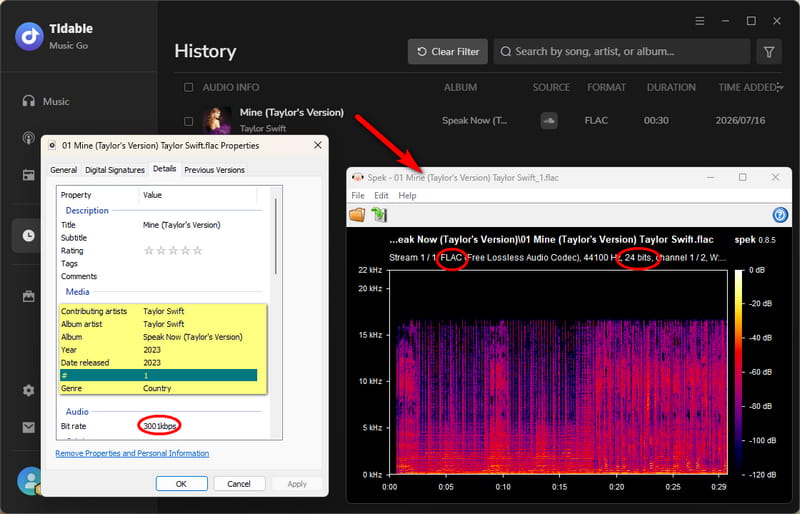
Tidabie Music Go is a desktop audio converter primarily designed to download music from SoundCloud. It also supports other major streaming platforms such as Spotify, Apple Music, Amazon Music, YouTube Music, Tidal, etc. In our hands‑on tests, batch conversion speeds consistently approached up to 10× real‑time, and the available output formats cover most common use cases: MP3, AAC, WAV, FLAC, AIFF, and ALAC. It preserves original ID3 tags and embedded lyrics sometimes. Beyond basic conversion, it includes supplementary tools like an audio splitter, format converter, tag editor, and burn CD. While the final audio quality depends on the source stream's bitrate, Tidabie reliably maintains the original fidelity without re‑encoding artifacts.
- No ads, pop‑ups, or misleading redirects.
- Supports batch downloading of entire playlists.
- Preserves original audio quality, including lossless formats.
- Retains full ID3 tags, artwork, and sometimes lyrics.
- Offers multiple output formats including MP3, FLAC, WAV, and ALAC.
- Works across multiple streaming platforms, not just SoundCloud.
- Requires installation on Windows or Mac.
How to Use Tidabie Music Go for SoundCloud Playlist Downloads?
Using Tidabie Music Go to download SoundCloud playlists is a straightforward process. Click the button below to download and install Tidabie Music Go on your computer first.
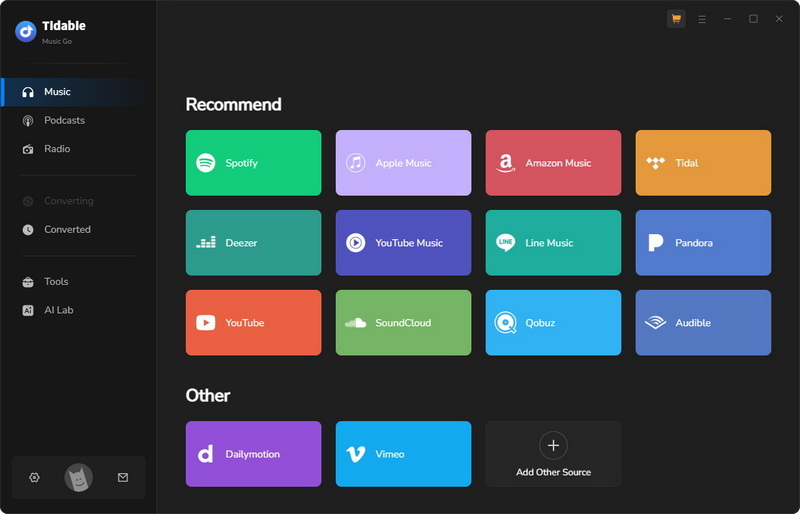
STEP 1 Launch Tidabie, head to the "Music" section, and select "SoundCloud" from the list of supported platforms. You will be prompted to log into your SoundCloud account through the built‑in web player, which allows you to browse and search for content just like you would on the official site.
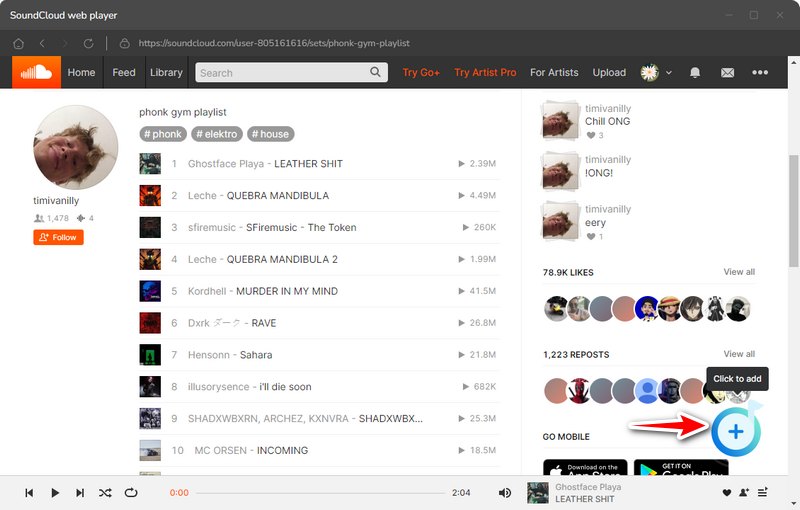
STEP 2 Search for any track, album, or playlist you want to save. Each item has a convenient "+ (Click to add)" button for you to add it. Select them from the list and click "Add" to confirm your selection.
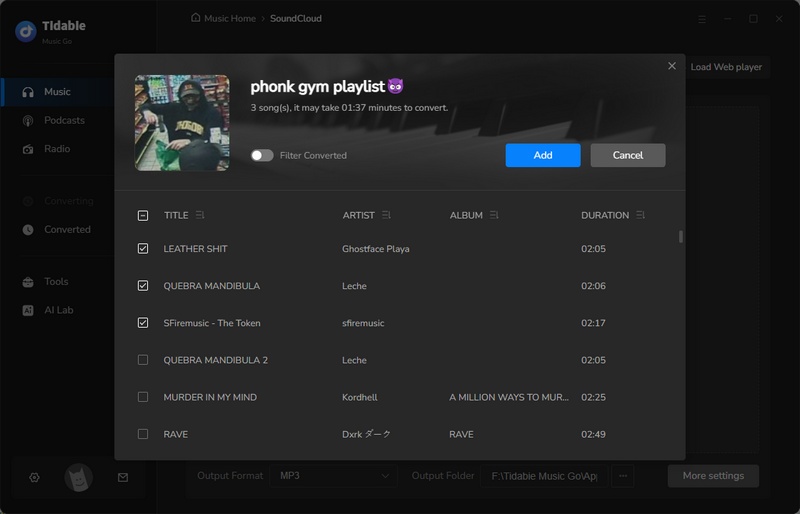
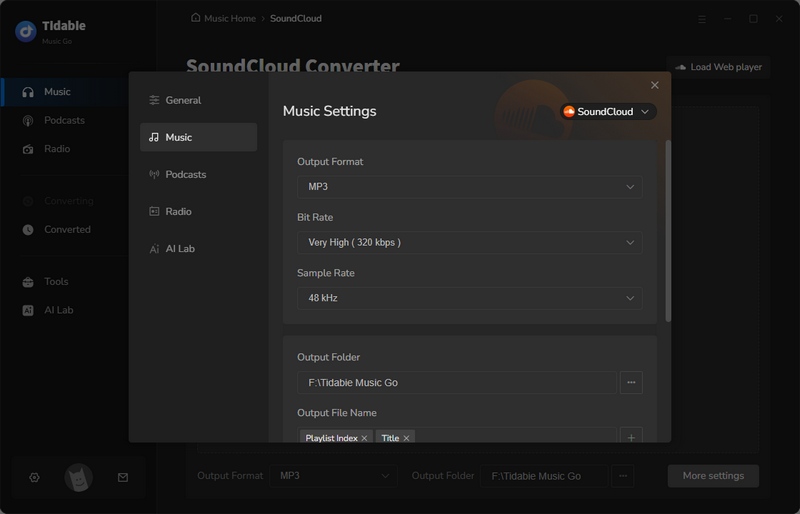
STEP 3 Before starting any downloads, click the "Settings" button to open the settings menu. Here you can choose your desired output format, bitrate, sample rate, and even specify where you want the files saved on your computer.
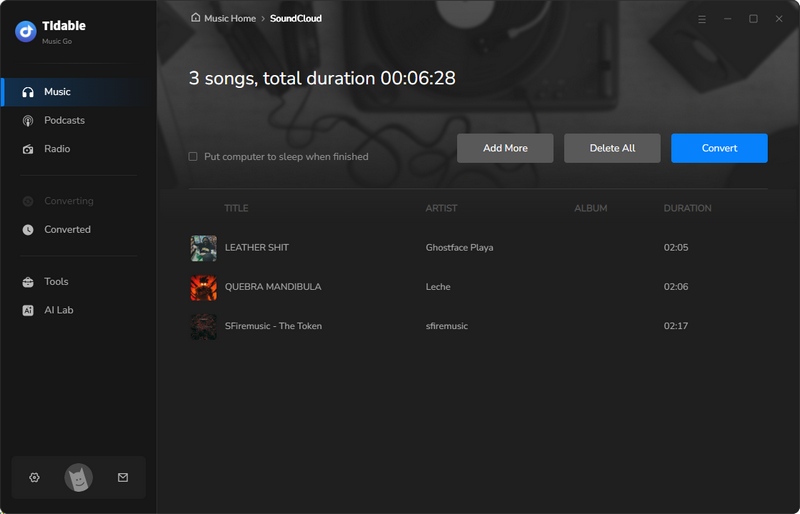
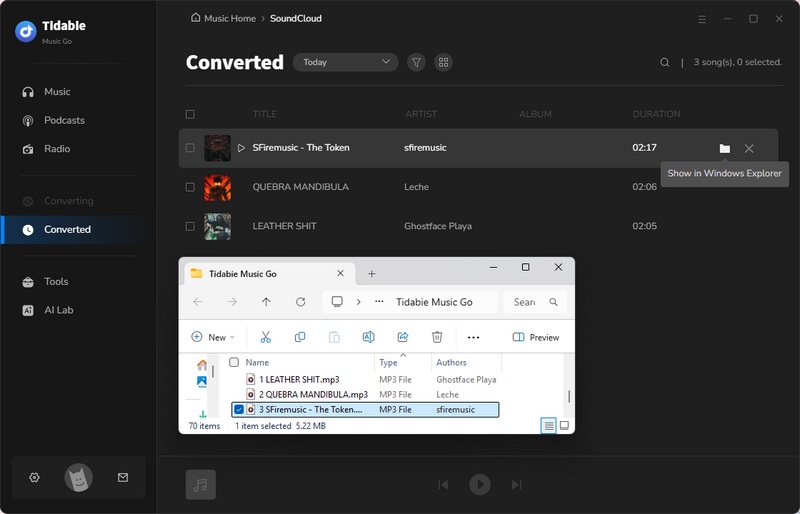
STEP 4 To begin the actual download, press the "Convert" button. Tidabie will then process your selected tracks and save them to your designated output folder. When the conversion finishes, you can find all your downloaded music neatly organized in the "History" section.
Part 2. Free Online SoundCloud Playlist Converters
⚠️ Security Note: Online SoundCloud playlist downloaders often generate intrusive ads and pop‑ups. Please enable an ad‑blocker and avoid downloading unverified files. For a safer and ad‑free experience, we recommend a professional desktop application like Tidabie Music Go.
For users who need a quick solution, online SoundCloud converters are the most convenient option. To provide a reliable assessment, we tested 16 online SoundCloud to MP3 converters and analyzed their performance across key metrics such as download speed, audio quality, metadata retention, and ease of use. Across all services, we observed several common strengths and drawbacks.
- No installation required. Work directly in any browser.
- Free to use. No subscription or payment needed.
- Misleading download buttons and unexpected redirects are common.
- Audio quality is universally capped at 128kbps.
- Batch downloading is rarely supported. Most force single track downloads.
- ID3 tag preservation is inconsistent and often missing.
- Some fail to parse playlist links or show unclear error messages.
Based on our hands‑on evaluation, the following six SoundCloud converters stood out as the most functional and reliable options for downloading SoundCloud playlists.
1. SCtoMP3 - Free SoundCloud Playlist to ZIP Downloader
🌐Website: https://www.sctomp3.org/soundcloud-playlist-downloader/
| Security | Ad‑free during test. |
| Output Format | MP3 |
| Batch Download | ✔️ |
| Download Speed | About 20 seconds for a playlist |
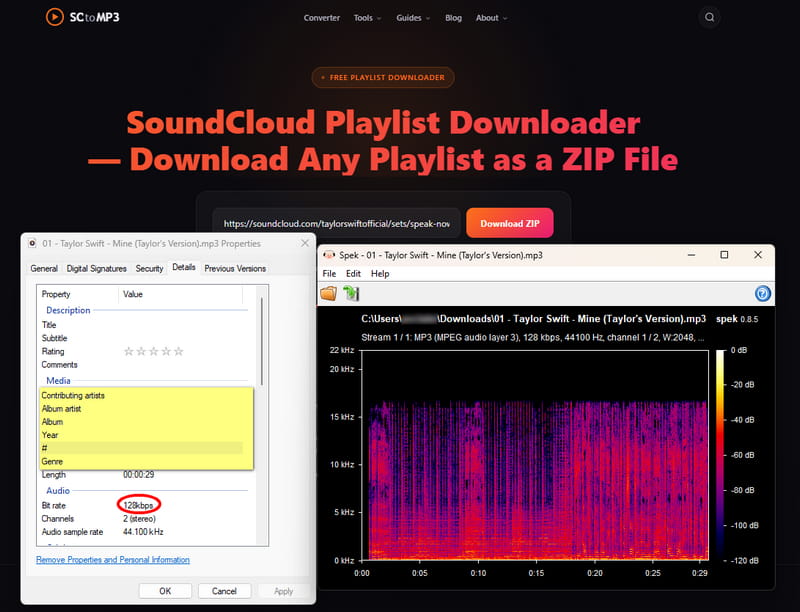
| Quality | 128kbps |
| ID3 Tags | None |
| Easy to use | ✔️ |
In our testing, SCtoMP3 delivered a smooth download experience. We pasted a playlist link and had the entire album packaged as a ZIP file in about 20 seconds. The process was refreshingly ad‑free, which is rare among free online SoundCloud converters. However, the output quality topped out at 128kbps MP3, and the files came without any ID3 tags, meaning no artist names, album art, or track metadata were preserved.
2. GeeksKai – SoundCloud Playlist to MP3 Batch Downloader
🌐Website: https://geekskai.com/tools/soundcloud-playlist-downloader/
| Security | Ad‑free during test. |
| Output Format | MP3 |
| Batch Download | Yes, but as separate MP3 files (not a ZIP). |
| Download Speed | About 5~10 seconds per track. |
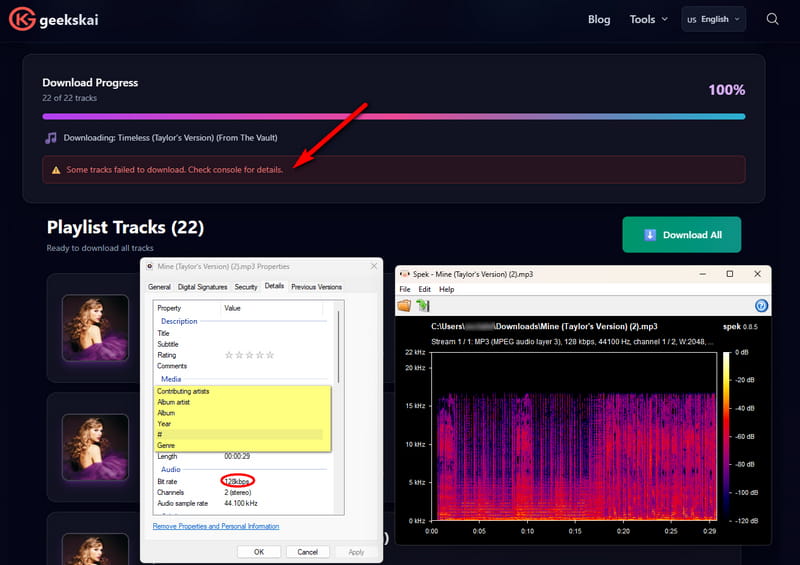
| Quality | 128kbps |
| ID3 Tags | None |
| Easy to use | ✔️ |
In our testing, GeeksKai parsed playlist links cleanly and offered both single and batch downloads. The batch mode, however, saves each track as an individual MP3 rather than a single ZIP archive. Download speeds were impressive at 5~10 seconds per song, though we occasionally saw a "Some tracks failed to download" error. Audio quality remained at 128kbps, and no ID3 tags were preserved.
3. KlickAud – Online SoundCloud Playlist to MP3 Converter
🌐Website: https://www.klickaud.org/en14/
| Security | Several redirects encountered. |
| Output Format | MP3 |
| Batch Download | No, tracks must be downloaded one by one. |
| Download Speed | About 15 seconds per track. |
| Quality | 128kbps |
| ID3 Tags | Title, Artist, Album, Year, Genre. |
| Easy to use | ✔️ |
Our experience with KlickAud showed that it correctly parsed playlist and album links, but batch downloading is unavailable. Each song requires a separate click. Processing took roughly 15 seconds per track, and output was limited to 128 kbps MP3. A prominent "DOWNLOAD 320 KBPS" button proved misleading, as it redirected to external tool recommendations. On the plus side, it preserved useful ID3 tags (title, artist, album, year, genre). The site involved multiple redirects during navigation.
4. DownCloudMe – SoundCloud Playlist to MP3 Downloader
🌐Website: https://downcloudme.com/enTc/
| Security | Redirects noted. |
| Output Format | MP3 |
| Batch Download | ❌ |
| Download Speed | About 10~15 seconds per track. |
| Quality | 128kbps |
| ID3 Tags | Title, Artist, Album, Year, Genre. |
| Easy to use | ✔️ |
DownCloudMe parsed playlist and album links without issues, but like many free online SoundCloud converters, it lacks batch download capability. You have to save each track individually. Download times ranged from 10 to 15 seconds per song, with output fixed at 128kbps MP3. It did retain basic ID3 metadata (title, artist, album, year, genre). However, we encountered several redirects while using the site, which slightly hampered the overall experience.
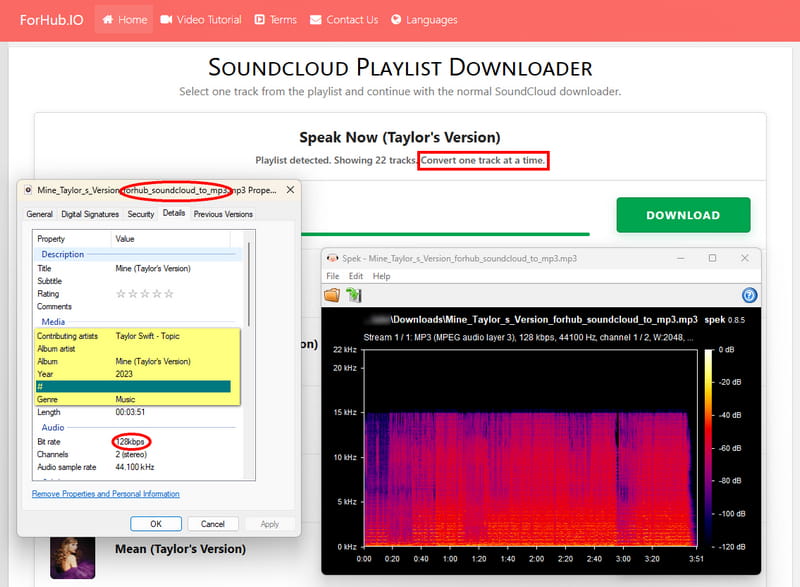
5. ForHub.io – SoundCloud Playlist MP3 Downloader
🌐Website: https://www.forhub.io/soundcloud/en14/
| Security | No intrusive ads observed. |
| Output Format | MP3 |
| Batch Download | ❌ |
| Download Speed | About 15 seconds per track. |
| Quality | 128kbps |
| ID3 Tags | Title, Artist, Album, Year, Genre. |
| Easy to use | ✔️ |
During our tests, ForHub.io successfully parsed playlist and album links, but batch downloading is not supported. Each track must be downloaded individually. Each song took around 15 seconds to process and was delivered as a 128kbps MP3 file. The tool preserved essential ID3 tags, including title, artist, album, year, and genre. Overall performance was consistent, though the absence of batch functionality makes it less efficient for larger collections.
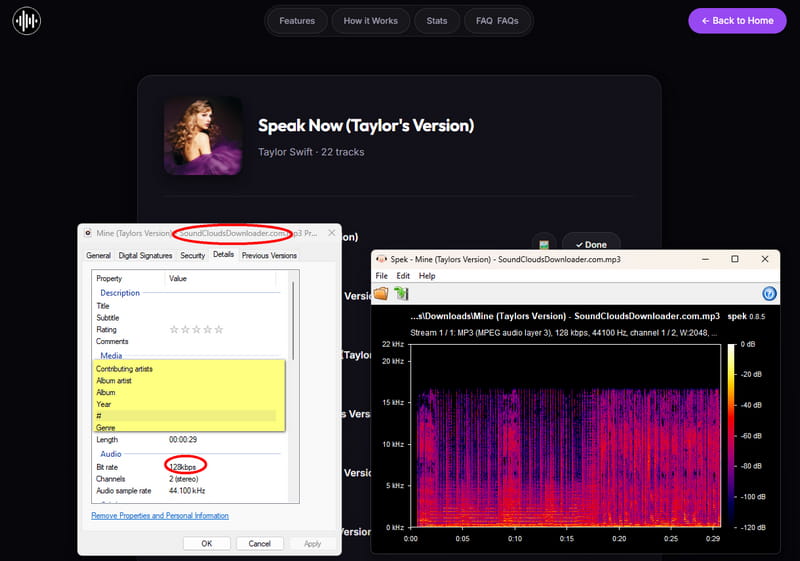
6. SoundCloudsDownloader.com – SoundCloud Playlist to MP3 Converter
🌐Website: https://soundcloudsdownloader.com/
| Security | No ads encountered. |
| Output Format | MP3 |
| Batch Download | ❌ |
| Download Speed | About 10~15 seconds per track. |
| Quality | 128kbps |
| ID3 Tags | None |
| Easy to use | ✔️ |
We found that SoundCloudsDownloader.com parsed playlist and album links without issues, but batch downloading is not supported. Songs must be downloaded one by one. Download speeds were reasonable at 10~15 seconds per track, yet audio quality was capped at 128kbps MP3, and no ID3 tags were saved.
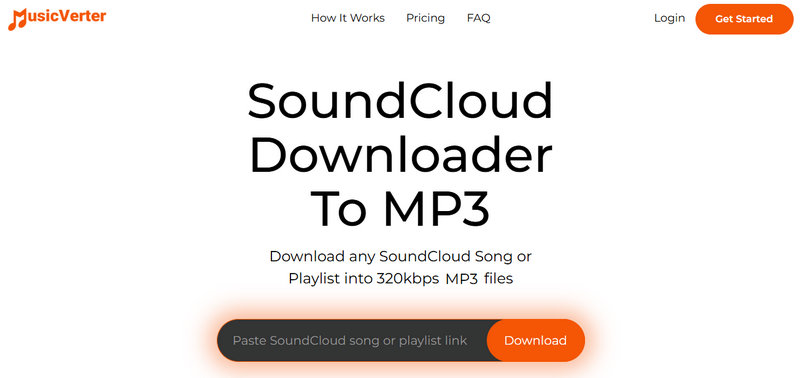
7. MusicVerter – SoundCloud MP3 Downloader with Paid Batch Download
🌐Website: https://www.musicverter.com/soundcloud-to-wav-en
| Security | Self-promotional contents |
| Output Format | MP3 |
| Batch Download | ❌ (Paid feature) |
| Download Speed | About 10~15 seconds per track. |
| Quality | 15kHz; fake 320kbps |
| ID3 Tags | Title, Artist, Album, Artwork (incorrect) |
| Easy to use | ✔️ |
MusicVerter is not a reliable free playlist downloader. It contains self-promotional content, supports only MP3, and locks batch downloading behind payment. Audio quality is limited to 15kHz, and its claimed 320kbps is fake. ID3 tags are added, but the album cover we got is incorrect. More importantly, its performance is unstable. It sometimes fails to work and displays "Error — try again".
Beyond the functional SoundCloud converters, our verification process also uncovered several online services that could not complete a basic SoundCloud playlist download. The issues ranged from parsing failures to fake downloads and endless redirects. The table below summarizes the reliability problems we observed during our hands‑on evaluation.
| Link Parsing | Download Success | Note / Error Message | |
|---|---|---|---|
| CloudMP3 | ✔️ | ✔️ | Only 30‑second previews. |
| SoundCloudMate | ✔️ | ✔️ | Fake download |
| SoundCloudDownloader | ✔️ | ❌ | Stuck at ZIP generation. Only first track parsed. |
| downcloud.cc | ✔️ | ❌ | The download button keeps redirecting. |
| SoundCloud MP3 Downloads | ❌ | ❌ | Could not fetch info from SoundCloud. Please try again. |
| SoundCloudDL | ❌ | ❌ | SoundCloud only provides a preview for this account. |
| cobalt.tools | ❌ | ❌ | The error messages vary. |
| Soundverter | ❌ | ❌ | Playlist downloads require an account. |
| SCDownloader | ❌ | ❌ | Track Not Found |
Part 3. Open-Source SoundCloud Playlist Downloader on GitHub
For users who prefer transparent code and community-driven development, open-source SoundCloud downloaders offer a compelling alternative to online SoundCloud converters. To provide a reliable assessment, we evaluated three popular open-source projects hosted on GitHub.
🗃️ Repositories
- https://github.com/
jerry08/ SoundCloudDownloader - https://github.com/
soundclouddownloaderapp/ soundcloud-downloader-web - https://github.com/scdl-org/scdl
| Security | No ads. |
| Output Format | MP3, FLAC, M4A, OPUS |
| Batch Download | ✔️ |
| Download Speed | Fast |
| Quality | SCDL supports lossless conversion. The web version offers MP3 at up to 256kbps. |
| ID3 Tags | Automatically preserved. scdl embeds ID3/Vorbis/MP4 tags with artwork. |
| Easy to use | ❌ |
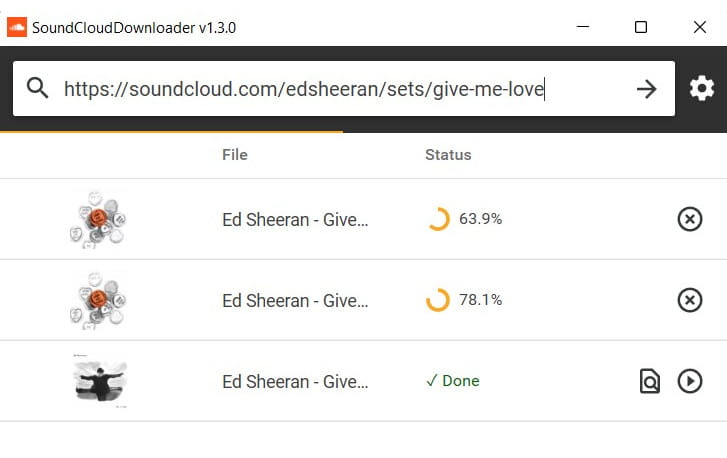
In our testing, all three SoundCloud playlist downloaders successfully parsed playlist links and supported batch downloading. The C# desktop application by jerry08 automatically injects media tags. The web-based one offers a simple browser interface with multiple MP3 bitrate options, though its actual audio quality depends on the source stream. The scdl command-line tool is the most feature-rich among the three, supporting FLAC conversion, download archiving, playlist syncing, and extensive metadata control. However, its development is no longer active, and it now functions primarily as a wrapper around yt-dlp. The C# project is also in maintenance mode with limited ongoing development.
- Work directly within the SoundCloud interface. No need to copy and paste links.
- ID3 tags and cover art are preserved automatically.
- No subscription or payment is required for basic use.
- Only work on publicly available tracks permitted by the artist.
- Some extensions have reliability issues or fail to download certain tracks.
- Playlist support is limited or absent in some extensions.
- Download location can be unclear.
- Cross-browser support may require additional helper extensions.
Part 4. Android APKs for Downloading SoundCloud Playlists
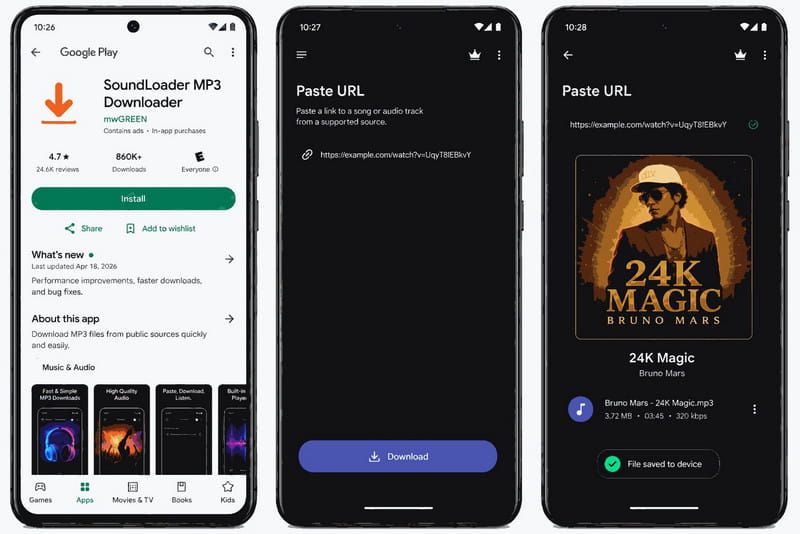
Downloading SoundCloud playlists directly on an Android device is a common need for many music lovers. The Google Play Store hosts several apps that claim to do this, but not all deliver reliable results. We tested one of the most popular and highly rated options, SoundLoader.
🏪 Google Play Store
- SoundLoader: https://play.google.com/store/apps/
details?id=com.mvxgreen.sounddownloader
| Security | No ads and data shared. |
| Output Format | MP3 |
| Batch Download | ✔️ |
| Download Speed | Fast |
| Quality | 320kbps |
| ID3 Tags | Manual editing. |
| Easy to use | ✔️ |
In our testing, SoundLoader delivered a straightforward download experience directly on Android devices. However, we did encounter some reliability issues. Downloaded files sometimes fail to save properly to the device storage, and there were cases where the app downloaded a completely different track than the one requested. These inconsistencies suggest that while SoundLoader is generally functional, its performance can be unpredictable.
- Free to download and use.
- Supports batch downloading for playlists.
- Offers up to 320kbps audio quality.
- Includes a built‑in MP3 tag editor for metadata.
- The ad-free version requires an upgrade.
- Sometimes files fail to save to device storage.
- Occasionally downloads the wrong track.
- Performance can be inconsistent.
Part 5. Fast Chrome SoundCloud Playlist Extensions
Browser extensions offer one of the most seamless ways to download SoundCloud playlists without leaving the site. Instead of copying links to external converters, you simply click a download button that appears right on the SoundCloud page.
🏪 Chrome Web Store
- SoundCloud Enhanced Pro: https://chromewebstore.google.com/
detail/ soundcloud-enhanced-pro/ ggplcohodggmdfpopelnpplhgfjclomi - SoundCloud Track Downloader: https://chromewebstore.google.com/
detail/ soundcloud-track-download/ ekmbbjdpakacalghjkikfppebgdpoebb - AddonCrop SoundCloud Music Downloader (CrossPilot): https://chromewebstore.google.com/
detail/ crosspilot/ migomhggnppjdijnfkiimcpjgnhmnale
| Security | Safe, with no personal data required. |
| Output Format | MP3, with SoundCloud Enhanced Pro offering OPUS. |
| Batch Download | Supported by Enhanced Pro & AddonCrop. |
| Download Speed | Fast |
| Quality | 320kbps (Enhanced Pro) |
| ID3 Tags | Title, Artist, Album(, Genre, Cover Art) (Enhanced Pro & AddonCrop) |
| Easy to use | ✔️ |
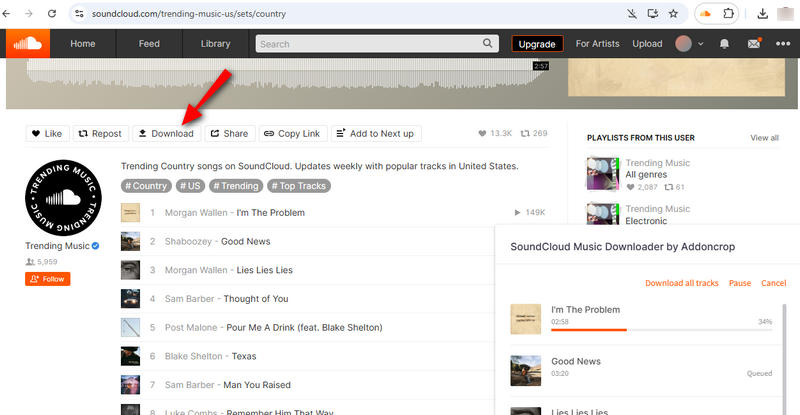
In our testing, SoundCloud Enhanced Pro supports batch downloading of playlists and albums (up to 10 tracks at a time) with a real‑time progress bar. It automatically embeds ID3 metadata including high‑resolution cover artwork. Users can also select from multiple audio quality presets when available. However, sometimes downloaded files do not appear in the expected folder, and the extension only works on publicly available tracks permitted by the artist.
SoundCloud Track Downloader does not support playlist downloads and only works on Chrome. Based on our review, reliability is also inconsistent.
AddonCrop supports a wide range of browsers, including Chrome, Firefox, Edge, Opera, Brave, and Vivaldi via the CrossPilot extension. It handles both single tracks and entire playlists. That said, it can struggle with very long playlists and occasionally fails to download certain songs.
- Free to download and use.
- Supports batch downloading for playlists.
- Offers up to 320kbps audio quality.
- Includes a built‑in MP3 tag editor for metadata.
- The ad-free version requires an upgrade.
- Sometimes files fail to save to device storage.
- Occasionally downloads the wrong track.
- Performance can be inconsistent.
FAQs about SoundCloud Playlist Downloaders
Q1: Why do online SoundCloud converters only offer 128kbps?
It is to save bandwidth and server resources. Also, they typically strip metadata. For high quality and full ID3 tags, you need a desktop application like Tidabie Music Go, which preserves the original stream quality and complete metadata.
Q2: Can I download entire SoundCloud playlists at once?
Yes. Online SoundCloud converters rarely support batch downloads, while desktop applications like Tidabie, open‑source projects, and some Android apps and Chrome extensions do support batch downloading of full playlists.
Q3: Are SoundCloud downloader Chrome extensions safe to use?
Most extensions are safe and do not require personal data, but their reliability varies. Always check user reviews and permission requests before installing. SoundCloud Enhanced Pro and AddonCrop are among the more trusted options.
Q4: Can I download SoundCloud playlists on my Android phone?
Yes, apps like SoundLoader allow Android users to download playlists. However, performance can be inconsistent.
Conclusion
Finding a reliable SoundCloud playlist downloader can be challenging, especially when free online SoundCloud converters often compromise quality and reliability. Throughout this guide, we have explored five categories of downloaders, from desktop applications and online converters to open‑source projects, Android apps, and Chrome extensions. Each option has its strengths, but desktop software consistently outperforms the rest in audio fidelity, metadata preservation, and batch processing capabilities. Among them, Tidabie Music Go stands out as the most complete and dependable solution for music lovers who want to build a permanent offline library without sacrificing sound quality. If you are ready to take full control of your SoundCloud collection, download Tidabie Music Go for a try.

Jacqueline Swift | Senior Writer
