


SoundCloud WAV Downloaders: Real Test & Full Guide
If you want to save SoundCloud tracks as WAV files, SoundCloud itself won't help you. The file you get from its native download feature depends on what was originally uploaded. That is, there is no built-in option to convert SoundCloud to WAV on demand. This limitation pushes many listeners toward third-party SoundCloud WAV downloaders. However, most don't provide real WAV output, hide it behind a paywall, or fail when you paste a track link.
This guide tests 20 online SoundCloud converters available today and shows you the most reliable way to download SoundCloud music in WAV format. We examined what these tools promise, what they actually deliver, and where they fall short. Let's take a look.
Part 1. Can You Download WAV Directly from SoundCloud?
Rarely. SoundCloud does offer a native download button, but it only appears when the artist has manually enabled downloads for that specific track. If the button is there, you receive the file in whatever format the creator originally uploaded. It could be WAV, MP3, FLAC, or something else. That said, several limits apply:
- Download availability depends entirely on the uploader. The default setting is that songs are not downloadable. Artists must go into the track's Permissions tab and enable downloads manually. Most tracks on the platform are stream-only, which means the download button never appears at all.
- The format is not guaranteed to be WAV. Even when a download button exists, the file you get matches what the artist uploaded. If they uploaded a 128 kbps MP3, that is what you download. There is no option to request a different format or a higher quality version.
- Native downloads only work for single tracks. SoundCloud's official download feature does not support exporting an entire playlist or album at once. If you want to save a full set, you would have to download each track individually, assuming downloads are enabled for every one of them.
- A SoundCloud Go+ subscription does not provide WAV files. SoundCloud Go and Go+ offer offline caching inside the mobile app, but those cached files are encrypted and cannot be exported as standard WAV or MP3 files to your computer. The subscription is designed for streaming convenience, not for building a local music library.
In short, the official route gives you WAV only in the rare case where an artist uploaded a WAV file and enabled downloads. For everyone else, there is no built-in way to get WAV output from SoundCloud. That gap is exactly what drives users toward third-party SoundCloud to WAV converters, which we tested in the next section.
Want to Download SoundCloud to WAV Right Away? Skip ahead to our step-by-step guide and learn how to save SoundCloud tracks and playlists in WAV format.
📒 Jump to SoundCloud WAV Download Guide →Part 2. 20 Free Online SoundCloud to WAV Converters Tested
We've tested 20 popular free online SoundCloud to WAV downloaders, including most recommended in existing articles. The reality is that few actually export WAV for free. Common problems include no WAV support, paid-only downloads, cover-only output, error messages, and unavailable sites. Below are the detailed test results.
## How We Tested:
- Testing period: October 2026
- Test devices: Windows 11, Chrome.
- Number of tools evaluated: 20 online popular SoundCloud downloaders that rank high in search results and are widely recommended across articles.
- Track used for testing: "Back to December (Taylor's Version)" by Taylor Swift, from the album Speak Now (Taylor's Version)
- Testing criteria: Whether the tool could be accessed, process a SoundCloud track URL, complete the download, and produce an actual WAV audio file.
- Additional data recorded: Payment requirements, error messages, etc.
1. SoundCloud Downloaders without WAV Support
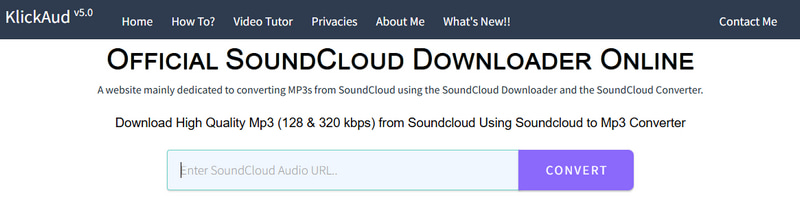
Example: KlickAud, DLTracks, ForHub.IO, SoundCloudAud, DownCloudMe
Our testing showed that these tools typically offer no output format selection, even though many advertise WAV support on their landing pages. That claim turned out to be little more than a traffic lure. As a result, downloaded files default to MP3. We tried the SoundCloud converters above and consistently received MP3 files with no option to change the format. In some cases, the tools did not even display a format dropdown, which means users have no way of knowing what they will get until the download finishes.
2. Paid SoundCloud to WAV Converters
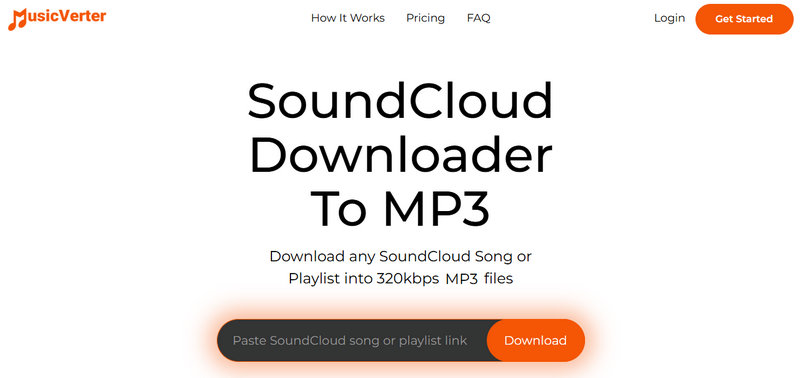
Example: MusicVerter, SongVerter, OKmusi, ytmp3.gg
Based on our hands-on testing, many paid SoundCloud to WAV converters generally lock WAV behind a paywall. Free users are limited to low-bitrate MP3, often 128 kbps. We confirmed this by attempting free downloads, which consistently produced low-quality MP3 files. Some tools went further and simply blocked the download entirely once WAV was selected, prompting users to upgrade to a paid plan. The free tier exists mainly to demonstrate the tool's interface, not to deliver usable WAV output.
3. SoundCloud WAV Converter with Cover-Only Downloads
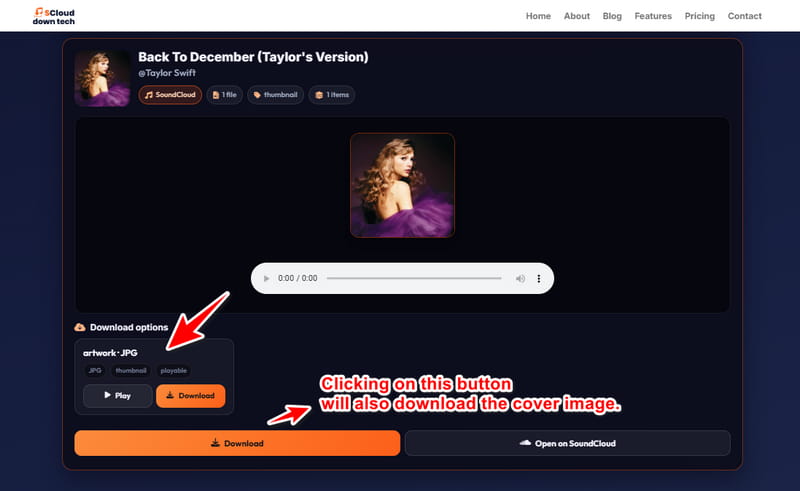
Example: YouAudioDown, SClouddowntech
For SoundCloud WAV converters with cover-only downloads, our tests revealed that the download options only displayed JPG files. Despite repeated attempts, we could only obtain the album cover, never the audio. The interface looked functional, and the download button responded, but the resulting file was always an image.
4. SoundCloud to WAV Downloaders Returning Error Message
Example: downcloud.cc, soundcloudrips, DoubleDouble
These kinds of downloaders failed during parsing or downloading in our tests for various reasons. The error messages varied widely, including "No results found," "The download could not be completed. Try again," "An extractor error occurred," and "xxx is not supported." In every case, the download did not succeed, indicating these SoundCloud converters are unreliable for WAV conversion.
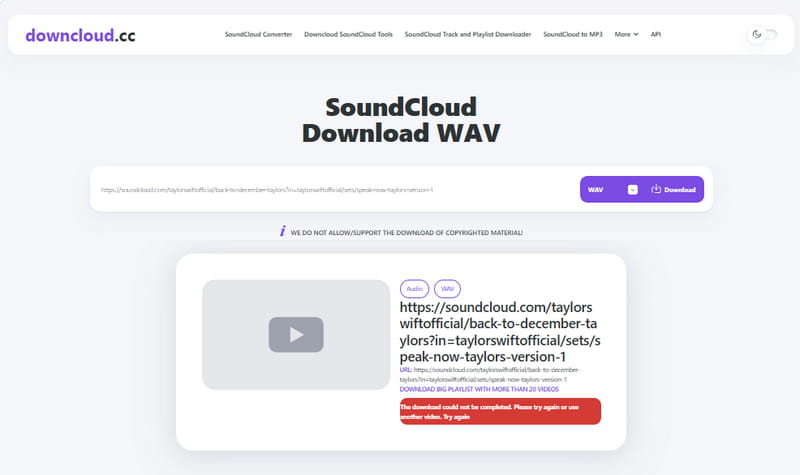
Other tools frequently recommended in similar articles also fell short during our testing. Soundcloudmp3.cc, LOADER.TO, and CutYT could not export WAV for free for various reasons, from missing format options to failed downloads. Soundverter, SCFetch, and DownloaderSoundcloud were completely inaccessible, so we couldn't test them at all. Taken together, these results paint a clear picture: free online SoundCloud to WAV conversion is unreliable at best and impossible at worst.
- Server costs are prohibitively high. WAV files are uncompressed and large, so serving them for free strains bandwidth and storage. Most online tools cannot cover that cost without ads or paid plans.
- SoundCloud's page structure changes frequently. These tools rely on parsing scripts that break whenever the platform updates its layout. Without constant maintenance, they simply stop working.
- Browser processing power is limited. Converting large WAV files in a browser often leads to timeouts, crashes, or incomplete downloads.
- The free model is unsustainable. Ads and paid tiers rarely cover the cost of free WAV conversion, so many tools either lock WAV behind a paywall or quietly drop it.
The reasons above explain why free online SoundCloud converters struggle with WAV. So we don't recommend free online SoundCloud downloaders if WAV output is your goal. A desktop solution like Tidabie Music Go sidesteps these limits entirely. It handles WAV natively without the restrictions that plague free online tools.
Part 3. Best Overall SoundCloud to WAV Downloader & Step-by-Step Guide
As the tests above show, finding a free online SoundCloud to WAV downloader that actually works can be challenging. Many tools either lack WAV support, require payment, or fail to complete downloads. If you want a more reliable way to save SoundCloud tracks as WAV files, a desktop downloader is worth considering. That's where Tidabie Music Go comes in.
Tidabie Music Go is a desktop SoundCloud WAV downloader that converts SoundCloud tracks, albums, and playlists into WAV and other formats, including MP3, FLAC, AAC, AIFF, and ALAC. Other streaming services include Spotify, Amazon Music, Apple Music, Deezer, TIDAL, etc. It supports bulk downloads, so you can add and convert entire playlists and albums in one go, and it runs up to 10x faster while preserving original audio quality. Output settings such as bit rate and sample rate are customizable. It also retains ID3 tags and even lyrics after conversion, so your library stays organized.
Tidabie Music Go
- Download songs, albums, playlists, podcasts, audiobooks, and radio from Spotify, Apple Music, SoundCloud, Amazon Music, TIDAL, YouTube, Qobuz, etc.
- Convert music to MP3, AAC, WAV, FLAC, AIFF, and ALAC.
- Batch download music at up to 10x speed with original quality.
- Keep full ID3 tags such as title, album, and artist.
- Freely enjoy podcasts online and download podcasts.
- Listen to radio shows and record radio freely.
How to Download SoundCloud Music as WAV with Tidabie Music Go?
Saving SoundCloud tracks, albums, and playlists as WAV files with Tidabie Music Go takes just a few steps. To get started, download and install Tidabie Music Go using the buttons above, then follow the steps below to save SoundCloud music in WAV format.
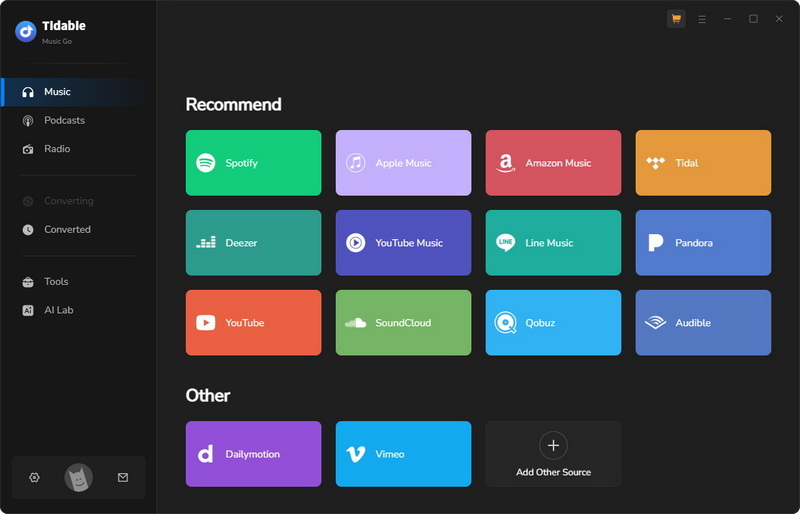
STEP 1 Open Tidabie Music Go. The main "Music" section shows supported streaming services. Pick "SoundCloud" from the list. When the SoundCloud web player appears automatically, sign in to your SoundCloud account by following the on-screen instructions.
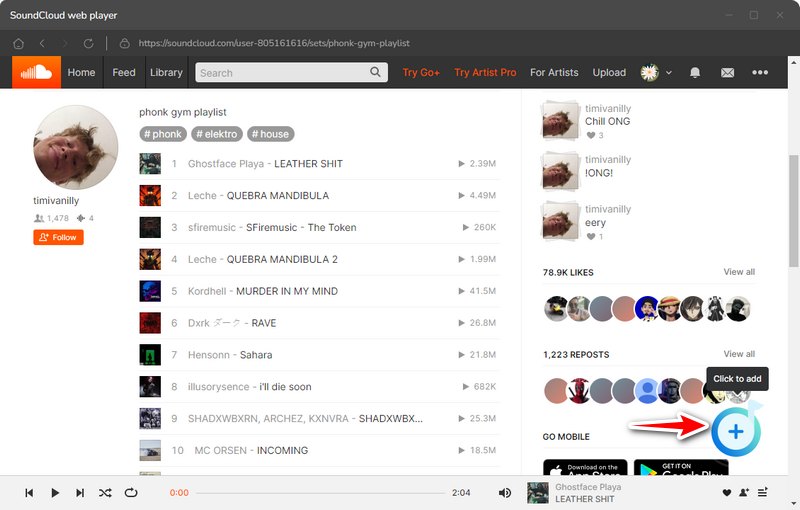
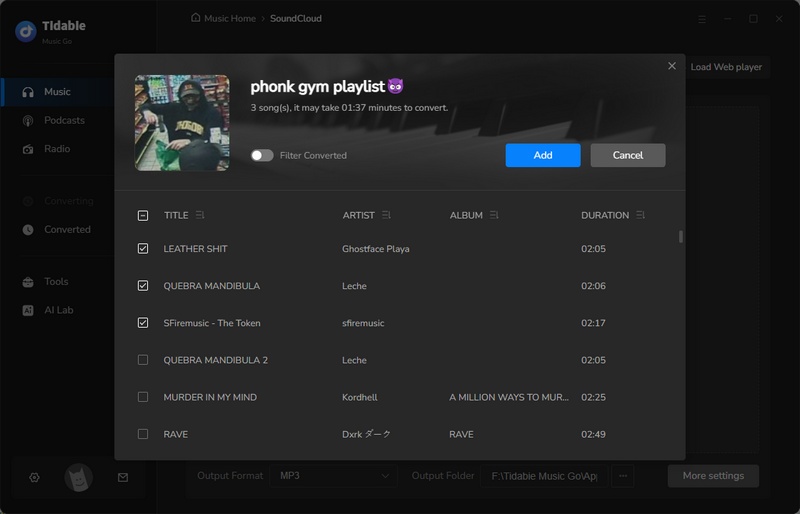
STEP 2 Find the album, playlist, or song you want, then click the "+" icon in the bottom right. In the parsing list, tick the tracks you need and click "Add" to confirm.
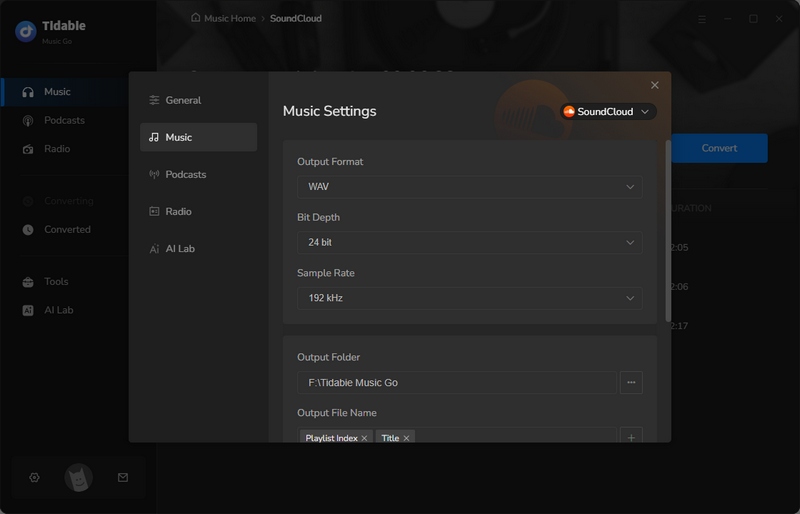
STEP 3 Click "Settings" and select "WAV" as the output format. Adjust other available settings as needed, then confirm your preferences.
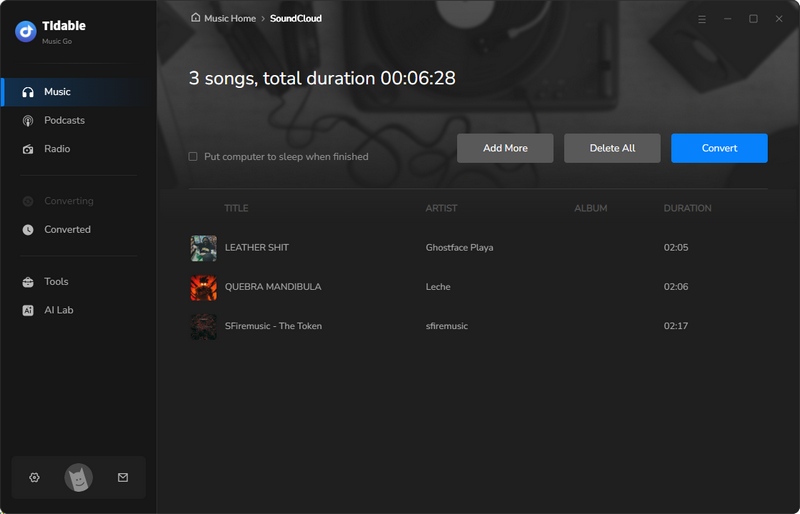
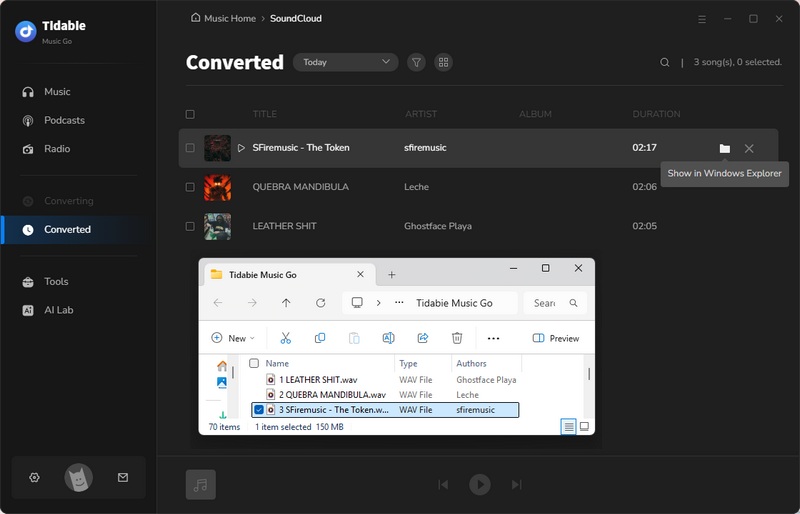
STEP 4 Click "Convert" to start the download. When the conversion finishes, the output folder opens automatically. You can also check completed downloads in the "History" section. To locate the saved SoundCloud WAV files, click the folder icon beside the song.
FAQs About SoundCloud WAV Downloaders
Q1: Is a SoundCloud WAV downloader safe to use?
Some free online SoundCloud to WAV converters may bombard you with intrusive ads or redirect you to unfamiliar sites. Desktop tools from reputable developers tend to be safer overall, but you should still scan any downloaded files and avoid granting unnecessary permissions.
Q2: Does SoundCloud Go+ allow WAV downloads?
No. SoundCloud Go+ only lets you listen offline within the app. It does not offer WAV files or any export feature. The offline cache is encrypted and cannot be used as a standard WAV file.
Q3: Can I download a SoundCloud playlist to WAV?
Most free online SoundCloud to WAV converters either lack playlist support or fail partway through. For a reliable option, consider a professional tool like Tidabie Music Go. It supports batch downloading, so you can add a full playlist and export every track as WAV in one go.
Q4: Why is WAV so much larger than MP3?
WAV stores audio uncompressed, preserving every sample of the original recording. MP3, by contrast, removes data the human ear is unlikely to notice, which drastically reduces file size.
Q5: Does converting SoundCloud to WAV improve audio quality?
No. When you convert a compressed SoundCloud stream to WAV, you are not restoring any lost audio information. You are simply saving the already-decoded audio in an uncompressed format. The final quality still depends entirely on the original source.
Conclusion
This guide has tested the most popular SoundCloud to WAV downloaders and explained why free online options often fail to produce real WAV files. From missing format support and paywalls to cover-only downloads and parser errors, the free route rarely works when WAV output is the goal. If you want to download SoundCloud music in WAV format without fighting broken tools, Tidabie Music Go handles WAV natively, supports batch downloads, and preserves full ID3 tags. It offers a fast, reliable way to build a high-quality library. Click the button below to download Tidabie for a free trial.

Jacqueline Swift | Senior Writer
