


Spotify Premium Mod APK: Is It Safe? Risks & Alternatives
While Spotify's free tier offers basic streaming, many users seek Premium features without a subscription. Spotify Premium Mod APKs promise free access to ad-free listening, unlimited skips, and offline playback, but they come with serious downsides. These unofficial apps violate Spotify's Terms of Service, carry malware risks, and frequently stop working due to Spotify's server-side verification and rapid security updates. This article explains why Spotify Premium APKs fail and introduces safe alternatives that actually work.
- Part 1. What is Spotify Premium APK?
- Part 2. Are Spotify Premium Mod APKs Safe and Legal?
- Part 3. Why Do Cracked Spotify Mod APKs Keep Failing?
- Part 4. How to Fix Spotify Premium APK Not Working?
- Part 5. Safer Alternatives to Spotify Premium Mod APK 🔥🔥
- Comparison Table: Spotify Mod APKs vs. Safe Downloaders
- More FAQs About Spotify Premium APKs
Part 1. What is Spotify Premium APK?
A Spotify Premium APK (also called Spotify Premium Mod APK) is an unofficial version of the Spotify app designed by third-party developers. It offers features like ad-free listening, unlimited skips, and offline downloads without needing a subscription, but it is usually not approved or endorsed by Spotify.
😀 Pros
- Ad-Free listening experience
- Able to skip tracks for unlimited times
- Claims to enable offline download and playback*
- Claims to provide advanced audio quality settings*
😔 Cons
- Potential risks for malware or spyware
- Support Android OS only
- Unreliable performance for unsolved bugs
- Possible account ban for using unauthorized mods
Part 2. Are Spotify Premium Mod APKs Safe and Legal?
Modified Spotify APKs are unauthorized third-party apps that circumvent Spotify’s subscription system. This violates Spotify’s Terms of Service and, in many jurisdictions, may constitute copyright infringement or unauthorized access to a paid service, exposing users to potential legal consequences.
More critically, these APKs are distributed through unregulated websites, which often embed malware, spyware, or adware. Once installed, they can steal login credentials, inject unwanted ads, or compromise the entire device. Antivirus tools frequently flag these files as high-risk.
Spotify actively monitors for irregular activity and may issue warnings, temporary suspensions, or permanent bans. Losing an account means losing all playlists, saved music, and personalized recommendations. No modified APK is safe or lawful. The short-term "free" access is never worth the risks to your privacy, device security, or Spotify account.

Want to download Spotify music without the malware risks of cracked APKs? Try Tidabie Spotify Downloader. It lets you keep songs forever and preserves original quality even without Spotify Premium.
Part 3. Why Do Cracked Spotify Mod APKs Keep Failing?
1. Server-Side Verification
Cracked Spotify mods fail primarily because Spotify verifies all premium features on its central servers, not on your device. Every time you try to skip a track, download a song, or play in high quality, the server checks your account status in real time. A modified app cannot fool this check. It gets blocked or silently reverted to the free tier almost instantly.
2. Rapid Security Updates
Spotify also pushes frequent security updates and employs advanced anti‑tampering measures. These protections are designed to recognise unauthorised changes to the app and neutralise them quickly. As soon as a new exploit is discovered, Spotify patches it, often within days or even hours, making any working mod short‑lived.
3. Unstable User Experience
The constant back‑and‑forth between modders and Spotify leaves users with an unstable, frustrating experience. Playlists disappear, shuffle gets stuck, repeat stops working, and downloaded tracks never save properly. In the end, relying on cracked APKs guarantees endless glitches and no lasting solution.
Part 4. How to Fix Spotify Premium APK Not Working?
As explained above, Spotify's ongoing countermeasures have made most modified apps unstable. For those still attempting to use them, here are some temporary workarounds that users have reported:
- Verify the APK source: Ensure you downloaded the Spotify APK from a trusted website. Unofficial sources can often host corrupted or malware-infected files.
- Update the APK: Check for newer versions of the APK. Outdated APKs may no longer work with Spotify’s updated servers, especially for modified Spotify Premium versions.
- Reinstall the APK: Uninstall the current APK, re-download it from a reliable source, and reinstall it. This can help fix any corrupted files or installation errors.
- Check Compatibility: Confirm the Spotify APK is compatible with your device’s Android version, as incompatibility is a common issue affecting mod functionality.
- Use a VPN: Sometimes, restrictions relate to geographical limitations. Using a VPN can help bypass such restrictions for access to certain content.
- Explore safer alternatives: If the above solutions don’t work, consider switching to the official Spotify app or exploring authorized tools like Tidabie Spotify Downloader, which offers a secure and stable experience while staying compliant with Spotify's policies.
Part 5. Safer Alternatives to Spotify Premium Mod APK 🔥🔥
Given all the risks and instability discussed above, it's clear that relying on modified APKs is a losing game. Fortunately, there are better ways to enjoy Spotify music offline without endangering your device. Below are two reliable tools that let you download and keep your favorite tracks permanently. One is designed for Android users, and the other for PC and Mac.
1. Android Solution - Safe Spotify Downloader App
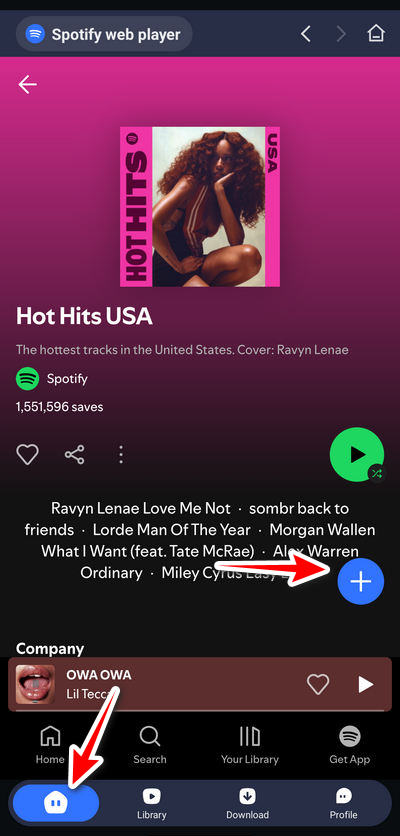
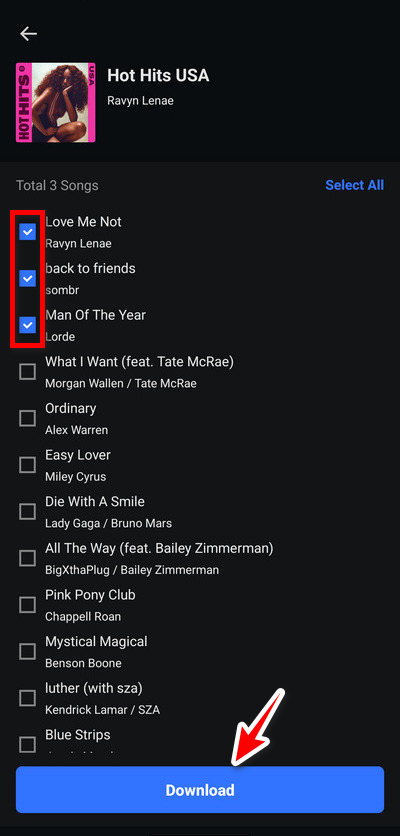
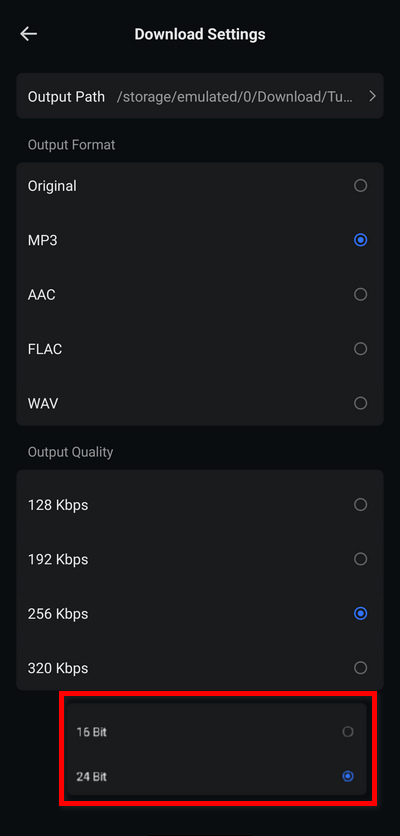
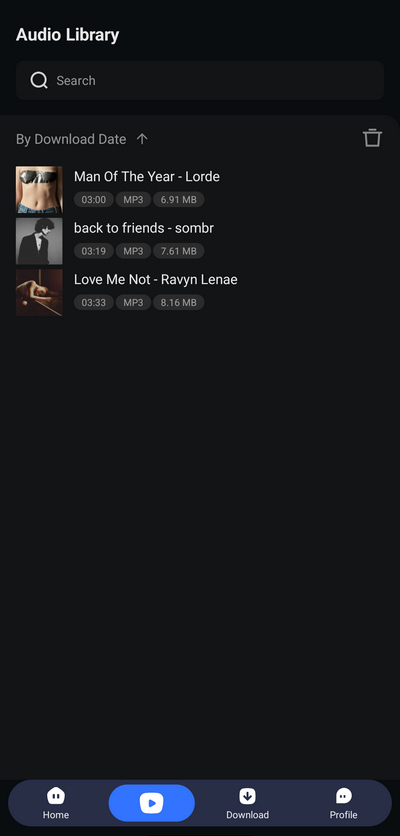
TuneCable Spotify Downloader for Android is designed for downloading Spotify music to local storage on Android devices. Its functions are similar to Spotify. This app allows users to listen to music online and download songs, podcasts, audiobooks, and other content from Spotify for offline listening without a premium account. It is an affordable option for users who want to listen to Spotify music offline permanently.
2. PC/Mac Solution – Professional Spotify Downloader
Tidabie Spotify Downloader is a comprehensive music downloader designed to help you download songs from Spotify. Compatible with both Windows and Mac, this easy-to-use software lets you batch-download your favorite music quickly and effortlessly. Forget unreliable mods and risky APKs. With Tidabie Spotify Downloader, downloading and managing your favorite Spotify tracks has never been easier. Here’s how you can enjoy your favorite songs without a Spotify Premium subscription!
Tidabie Music Go
- Batch-download songs, albums, playlists, and podcasts from major streaming services like Spotify, Amazon Music, Apple Music, etc.
- Preserve original audio quality, such as Spotify HD, Apple Music Lossless (Hi-Res), Amazon Music HD & Ultra HD and more.
- Convert music to MP3/AAC/WAV/FLAC/AIFF/ALAC.
- Run at up to 10X speed & keep full ID3 tags.
- Keep the downloaded songs forever even when your subscription expires.
- Enjoy music offline on any device.
STEP 1 Download and install Tidabie. Once launched, select "Spotify" as the source. Follow the on-screen instructions to log in to your Spotify account. Even if you're not a Spotify Premium user, Tidabie allows you to download your favorite tracks. Also, you can choose to download music from the Spotify web player or the app using Tidabie.
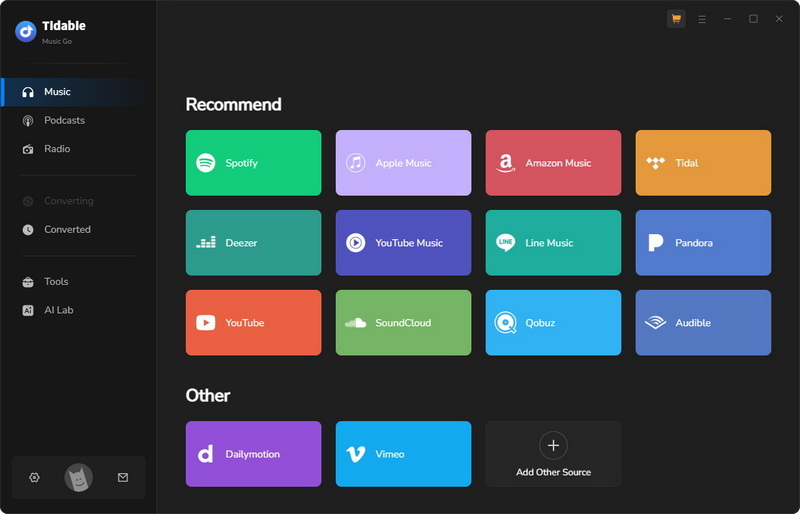
Note: Audio quality depends on listening method: the Spotify app offers lossless (Premium only), while the web player caps at 320 kbps. For better quality, use the Spotify app; for faster downloads (up to 40×), choose the web player.
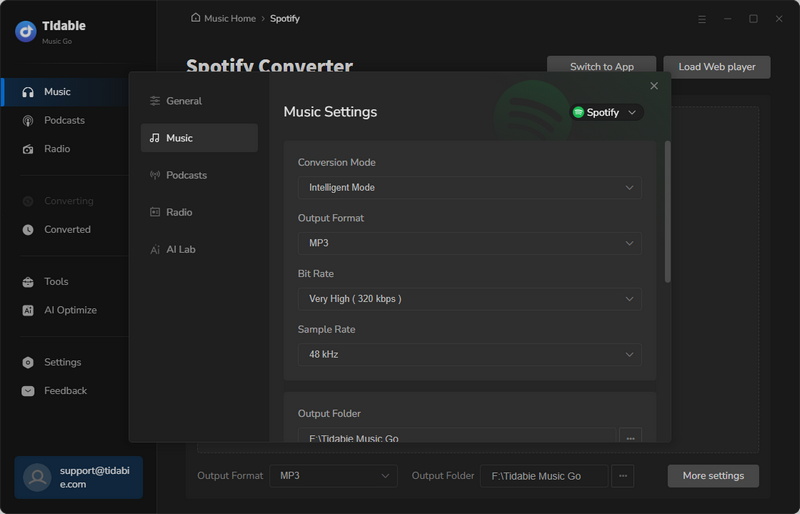
STEP 2 Click "Settings" on the left to open the preferences panel. There, you can adjust conversion mode, output format, bit rate, sample rate, output folder, etc. For lossless quality, select "Record Mode" as your conversion mode and set your output format to "Recommended".
- Output Format: Recommended, MP3, AAC, WAV, FLAC, AIFF, ALAC
- Bit Rate: 320kbps, 256kbps, 192kbps, 128kbps
- Sample Rate: 44.1KHz, 48KHz, 96KHz, 192KHz
- Output File Name: Track Number, Title, Artist, Album, Playlist Index, Year, Disc Number
- Output Organized: Playlist, Artist, Album, Genre, Year, Disc Number
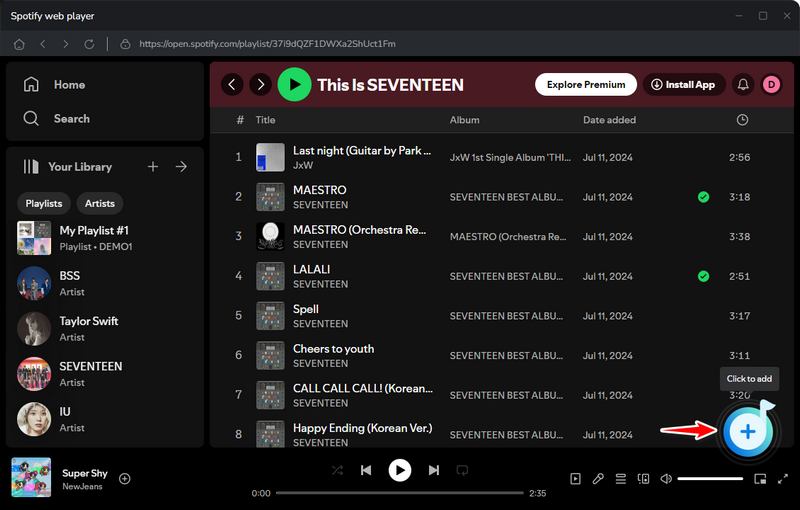
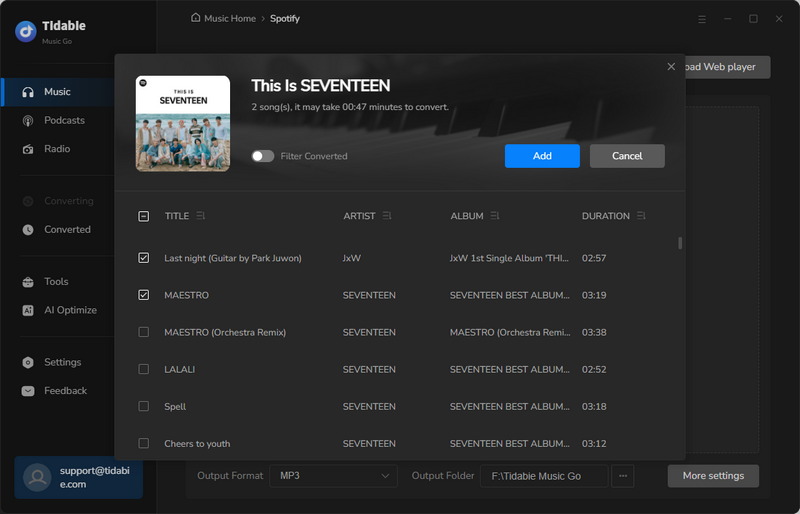
STEP 3 Browse Spotify and click the purple "+" button in the lower-right corner to parse the playlist. A window will display the extracted tracks. Select the tracks you'd like to download and click "Add".
STEP 4 Start Downloading
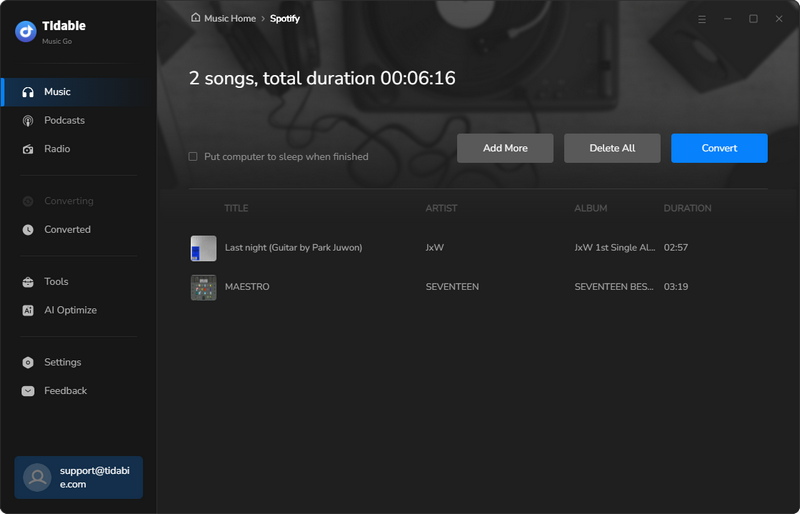
When you finish adding songs to Tidabie, you can start downloading by clicking the "Convert" button. Your favorite Spotify tunes will be downloaded very soon.
STEP 5 Review the Download History
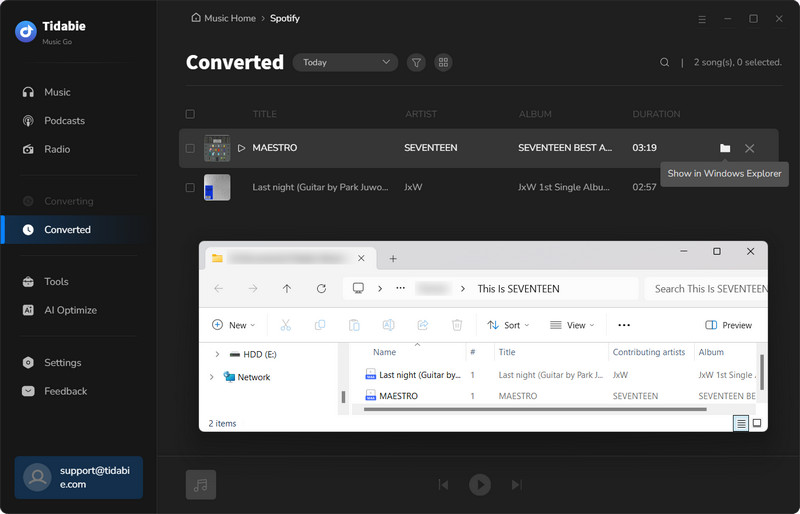
You can find the "History" section where you can check your download history. All the music you've downloaded will be listed there, and by clicking on the folder icon, you can easily locate the downloaded music files on your computer.
Comparison Table: Spotify Mod APKs vs. Safe Downloaders
To help you make an informed decision, here's a side‑by‑side comparison of Spotify modified APKs against the two safe alternatives covered above.
| Spotify Mod APK | TuneCable (Android) | Tidabie (PC/Mac) | |
|---|---|---|---|
| Safety | ❌ High risk | ✔️ Safe & verified | ✔️ Safe & verified |
| Offline Forever | ❌ No (server‑dependent) | ✔️ | ✔️ |
| Audio Quality | Standard | up to 320 kbps | Lossless |
| Platform | Android only | Android | Windows + Mac |
| Batch download | ❌ Unreliable | ✔️ | ✔️ Yes (40× speed) |
More FAQs About Spotify Premium APKs
Q1: Do I Need a Subscription to Use Spotify Premium APK?
Most Spotify Premium APKs bypass the need for a subscription. However, using these apps still violates Spotify's Terms of Service. Instead of risking your account, explore legal and safer alternatives.
Q2: Can I use Spotify Premium APK on iOS?
Spotify Premium APKs are primarily designed for Android devices. For iOS users, installing such modified apps often requires jailbreaking, which compromises your device's security and voids warranties. A common alternative is Spotify++, a modified Spotify version for iOS, though it comes with the same risks and legality issues.
Q3: How Can I Get Spotify Premium Officially for Free?
Instead of taking risks with APKs, try Spotify's free trial! It’s a legitimate way to test premium features before committing. Check out guides like "Top Ways to Get Spotify Premium Free Forever" for more tips.
Q4: Are Any Spotify Premium APKs Still Available?
Some reports suggest apps like Spotube APK, a free and open-source music streaming tool, are still functioning and offer ad-free listening. Additionally, the once-popular xManager Spotify APK is reportedly accessible in certain instances. However, ongoing updates from Spotify may render these options unreliable.
Q5: How Can I Prevent Spotify from Blocking My APK?
It’s almost impossible to avoid Spotify’s updates targeting modified apps. Instead, consider switching to reputable software like Tidabie Spotify Downloader, which offers a legal way to convert and access music hassle-free.
Conclusion:
Free Spotify Premium APK Mod gives users access to features like unlimited skips, ad-free listening, high-quality audio, and offline downloads without paying for a subscription. However, these mods can pose serious security risks, such as malware infections or account bans. A safer option is Tidabie Spotify Downloader, which lets you download Spotify tracks without needing a Premium subscription. Enjoy offline listening and high-quality audio without the risks.

Jacqueline Swift | Senior Writer
Related posts
