


10 Best Spotify Album Downloaders 2026 (PC/Android/Online)
If you are a music lover, nothing beats the feeling of finding a brilliant album and wanting to save the entire collection for offline listening. While Premium users can cache songs inside the app, the real challenge is finding a reliable Spotify album downloader that can extract full tracklists into universally compatible files. Whether you want to enjoy high-fidelity tracks on your high-end speakers or simply want to download Spotify albums free to save phone storage, standard recordings just won't cut it—you need high-quality 320kbps MP3 or even lossless FLAC formats.
The good news? You don't have to search the web blindly. In this ultimate guide, we have tested and rounded up the best solutions available in 2026. From powerful desktop software like Tidabie Spotify Downloader to convenient Spotify album downloader Android apps and the top 8 online free tools, we will compare their speed, audio quality, and batch-download stability to help you find the perfect match.
Part 1. Tidabie Spotify Downloader - Desktop Lossless Spotify Album Downloader
 Tidabie All-in-one Spotify Downloader


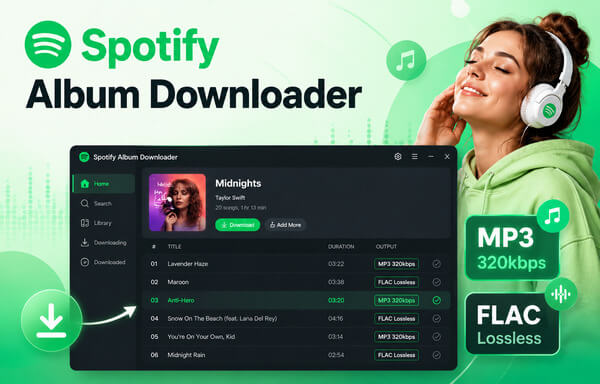
Tidabie Spotify Downloader stands out as one of the best desktop solutions for downloading Spotify albums. Unlike free online tools that restrict your downloads to standard 320kbps MP3 files, Tidabie empowers you to download premium, lossless FLAC songs from Spotify with up to 24-bit audio depth. Its powerful batch download feature makes it the perfect choice for heavy users looking to save multiple albums, playlists, podcasts, and audiobooks efficiently. Furthermore, original ID3 tags (including title, artist, album, and track number) are fully preserved for seamless music collection management. With just one click, this handy tool also downloads the original high-resolution album cover art and synchronized song lyrics.
How to Download Spotify Albums with Tidabie?
STEP 1 Launch Tidabie and select "Spotify" from the available services. Tidabie allows you to download music via two flexible options: the Spotify web player (up to 320kbps MP3) or the Spotify app (up to 24-bit FLAC). Simply choose your preferred audio source, then log in to your Spotify account when prompted.
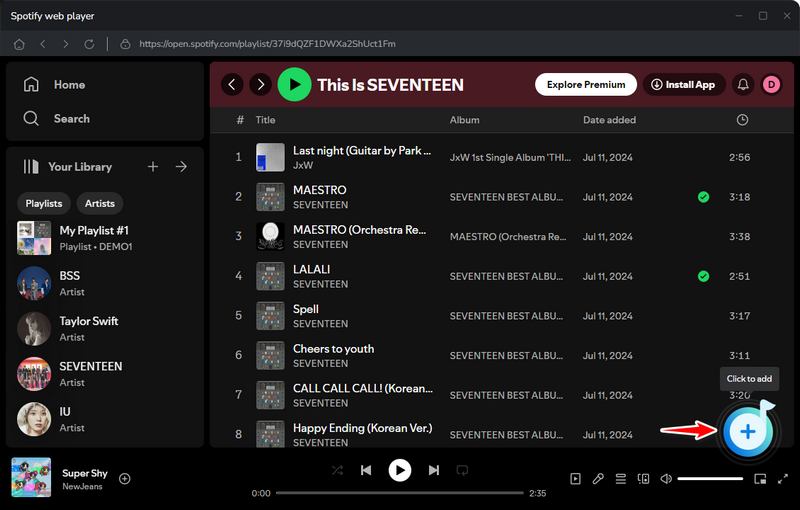
STEP 2 Open the Spotify album you want to download and click the "+" button located at the bottom right. A popup window will display all available tracks within the album. Check the boxes next to the songs you wish to save and click "Add".
STEP 3 Go to the "Settings" section to customize your download preferences. Here, you can adjust the output format, bit rate, sample rate, and output folder according to your needs.
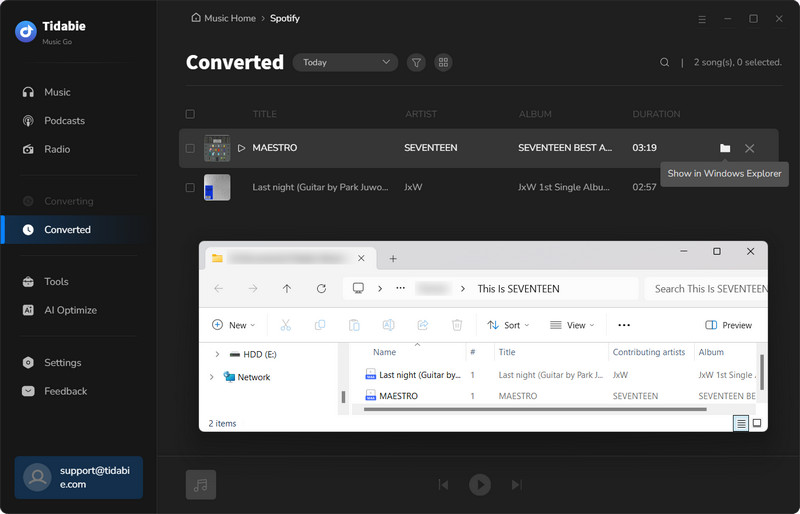
STEP 4 Click the "Convert" button to start the downloading process. Once completed, your destination folder will open automatically, and your high-quality Spotify tracks will be ready for offline listening.
- Supports downloading full albums with a Spotify Free account or even without logging in.
- Batch downloads entire albums and playlists withc 1-click.
- Incredible download speeds up to 10x faster.
- Automatically organizes and archives downloaded songs by album, artist, or playlist.
- Flexible formats: MP3, FLAC, AAC, WAV, ALAC, and AIFF.
- Downloads Spotify music with lossless HD audio quality.
- Preserves full ID3 tags, original artwork, and lyrics.
- Supports multiple music streaming services, including Spotify, Apple Music, YouTube Music, TIDAL, Deezer, etc.
- 100% clean, safe, and ad-free interface.
- No dedicated mobile apps for Android or iOS.
- Lossless audio downloading requires a premium subscription.
- Speed limitation on Mac: While Windows supports 10x speed for all audio sources, the Mac version is capped at 1x speed when using the Spotify app audio source (10x speed is still available via the web player audio source).
Part 2. Spotify Album Downloader for Android
If you prefer to listen to music on the go, TuneCable Spotify Downloader for Android is the perfect mobile companion. As a dedicated Spotify album downloader for Android, this powerful application allows you to download Spotify albums, songs, playlists, podcasts, and audiobooks directly to your mobile device for permanent offline playback. Unlike many unreliable online tools that fetch lower-quality audio from YouTube sources, TuneCable acts as a direct Spotify to MP3 album downloader, working seamlessly with both Spotify Free and Premium accounts to extract tracks from the official audio source. It preserves 100% original sound quality, completes ID3 metadata tags, and supports batch downloading into multiple popular formats, including MP3, AAC, WAV, and FLAC.
How to Download Spotify Albums on Android with TuneCable?
STEP 1 Download and install the TuneCable Spotify Android APK on your device.
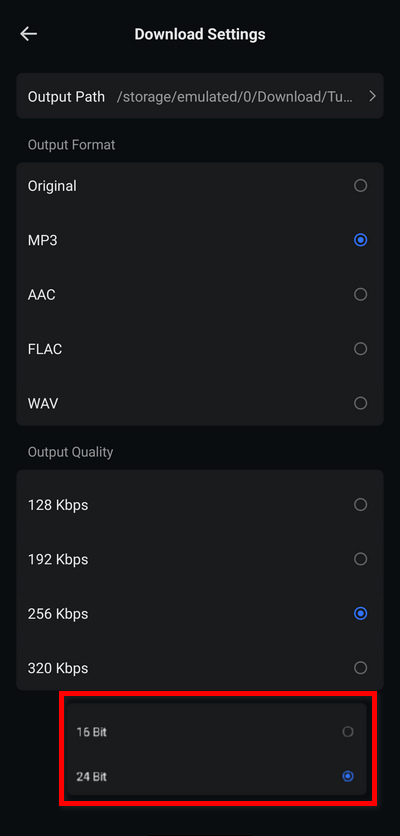
STEP 2 Open the app, go to the "Profile" tab to finish the registration. And select "Login Spotify" to connect your account (compatible with both Free and Premium subscriptions). Next, tap "Download Settings" to customize your preferred output formats and folder paths.
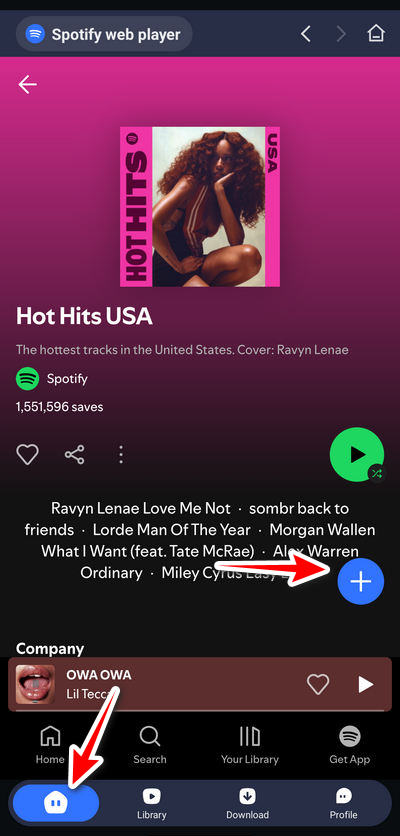
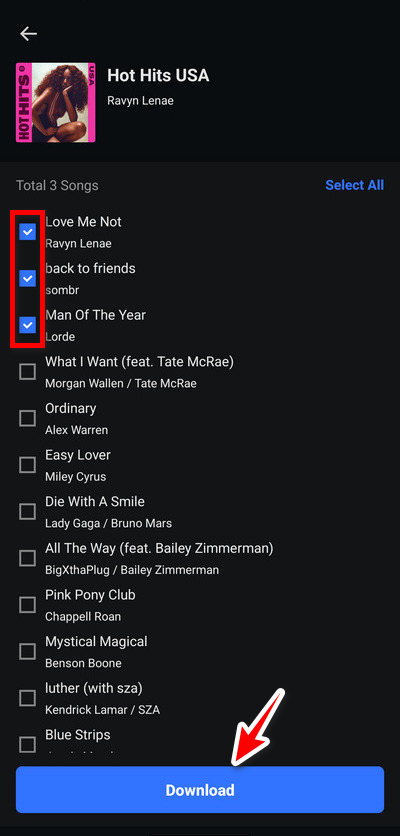
STEP 3 Return to the "Home" screen and search for the Spotify albums you wish to save. Tap the "+" button to analyze the tracklist, select the songs you want, and tap "Download". Confirm your options to trigger the fast batch download process.
STEP 4 Once the conversion finishes, navigate to the "Library" tab to check your history. All downloaded files are stored permanently on your local storage and can be played using any standard Android media player.
- Up to 320kbps MP3 high-quality audio extraction.
- Instantly parses and downloads entire albums or playlists.
- Automatically preserves ID3 tags, artist info, and cover art.
- Saves files directly to local storage or an SD card to play on any Android media player forever.
- Flexible formats: MP3, FLAC, AAC, and WAV.
- Safe and clean Spotify album downloader APK with stable performance
- No iOS Support: Strictly compatible with Android 8 or above; iPhone users are excluded.
- Not available on the Google Play Store; requires downloading and installing the .apk file manually.
- The free version restricts downloads to the first minute of each song until unlocked with a license.
Part 3. Top 8 Online Spotify Album Downloaders - Download Spotify Albums Free
If you prefer a quick, one-off solution without installing any software or apps, choosing a free online Spotify album downloader is a highly convenient alternative. These web-based tools allow you to download Spotify albums free directly through your browser on any device. If you wish to proceed with browser-based tools, here are the top 8 online options tested in 2026.
Many free online downloading sites rely heavily on intrusive pop-up ads, redirect scripts, or may even host copyrighted content. To protect your digital privacy and data, always ensure your device has a reliable antivirus program enabled before browsing these sites. For a 100% safe, stable, and clean experience, we still highly recommend sticking to professional, legal desktop tools like Tidabie Spotify Downloader or dedicated mobile tools like TuneCable.
1. Spotisaver - Free Online Spotify Album Downloader
: https://spotisaver.net/en/album-downloader
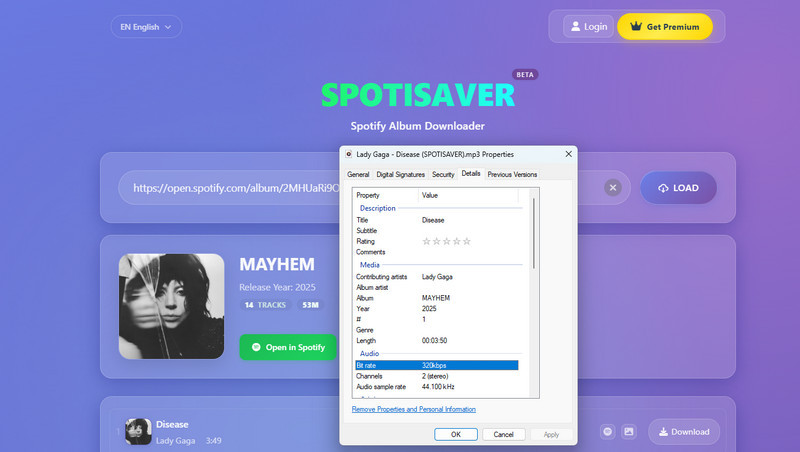
Editor Review: At first glance, spotisaver.net offers a refreshing, clean interface that is completely free of intrusive ads or unexpected pop-ups. Once you enter a valid Spotify album link and click the "Load" button, the web-tool accurately fetches and displays the entire tracklist. While it supports high-quality 320kbps MP3 downloading, users do not have options to customize other audio qualities or alternative formats. A standout bonus feature is the dedicated image icon next to each track, allowing you to preview and download the high-res album cover art separately. Basic ID3 tags (such as artist, album, track number, and artwork) are kept intact. However, the free tier only allows for single-track downloads, and the platform automatically appends its brand name ("SPOTISAVER") to the downloaded file titles. If you are just looking to grab one or two tracks and don't mind a bit of manual file renaming, Spotisaver is an excellent free choice.
Rating: ★★★☆☆
- 100% clean interface with no pop-up ads.
- Supports high-quality 320kbps MP3 output.
- Preserves basic ID3 tags and album cover art.
- Batch downloading entire albums requires a Premium subscription (€2/month, capped at 1,000 tracks).
- Watermarked file names: Automatically inserts "SPOTISAVER" into the song titles.
- No flexibility to change audio formats or adjust bitrates.
How to Download Spotify Albums with Spotisaver?
STEP 1 Copy the target album URL from your Spotify app or web player, then navigate to the Spotisaver website.
STEP 2 Paste the link into the input box and click "Load". To download songs individually, simply click the "Download" button located next to each specific track.
STEP 3 To save the full collection (note: the site labels the button as "Download Entire Playlist" even for albums), scroll down to the bottom of the page to trigger the batch extraction process.
2. SpotMate - Spotify Album to MP3 Browser Downloader
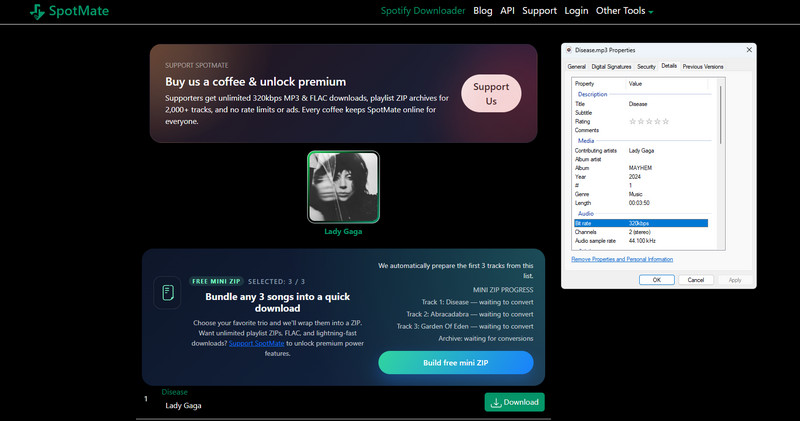
Editor Review: The website interface of spotmate.online is relatively clean, featuring only a single sponsored ad banner recommending TuneCable for lossless FLAC downloads. However, the user experience can be quite tedious. After pasting an album link and clicking "Start," a popup immediately appears urging you to upgrade to their premium version, as the free tier is strictly limited to MP3 downloads (FLAC audio and full Spotify album ZIP downloads are locked behind a paywall). After bypassing this by clicking "No thanks, continue with free version," you will encounter a misleading "Convert" button. Clicking it once transforms it into a "Download" button, and clicking it again triggers yet another popup requesting support for their development team before finally revealing the genuine download link. On the plus side, the output files are standard 320kbps MP3s with clean file names that do not contain website watermarks. Key ID3 tags like title, artist, and album are preserved, though album cover art is lost. Ultimately, while the output quality is acceptable, the exhausting download process makes saving an entire album track-by-track a massive test of patience.
Rating: ★★☆☆☆
- Clean file names with no website brand name watermarks appended.
- Extracts audio in standard 320kbps MP3 bitrate.
- Preserves essential text-based ID3 tags (title, artist, and album).
- Exhausting download process filled with multiple purchase-prompt popups and deceptive buttons.
- No batch download for albums: you must manually clear popups for every single track.
- Premium subscription required to unlock lossless FLAC and full album ZIP downloads.
- Fails to preserve original album cover art.
How to Download Spotify Albums with spotmate.online?
STEP 1 Copy the Spotify album URL from the Spotify desktop app, mobile app, or web player.
STEP 2 Visit the spotmate.online website and paste the copied URL into the center input box.
STEP 3 Click the "Start" button to analyze and process the album link.
STEP 4 Click "Convert" next to your desired track, clear the donation/premium prompts, and click the final "Download" button to save the MP3 file to your device.
3. Spotdown - Spotify Album Link Downloader Online
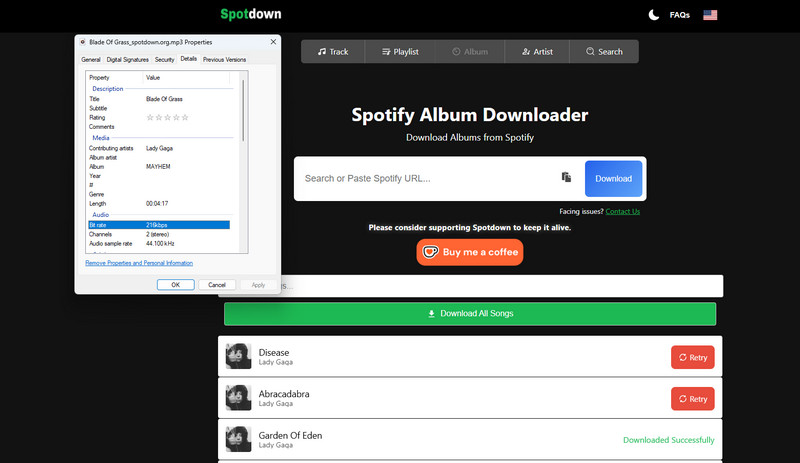
Editor Review: Navigating spotdown.org felt less like testing a tool and more like dodging a digital security minefield. Although the homepage looks deceptively clean without ad banners, almost every action on this site triggers aggressive redirect loops. When we pasted our Spotify album link, it fetched the tracklist easily enough, but clicking the "Get Link" or "Download All Songs" buttons repeatedly hijacked our browser, forcing open multiple hazardous third-party tabs. We had to persistently click the download button multiple times and close endless malicious pop-ups before the actual download finally initialized. To make things worse, the performance was abysmal: 4 out of 14 tracks failed to download entirely during our test. For the songs that did make it through, we ended up with subpar, highly compressed ~200kbps MP3 files that were watermarked with "Spotidown.org" branded onto the file names. Between the severe security risks and the unreliable output, this site is a hard pass.
Rating: ★☆☆☆☆
- Preserves basic metadata, including artist name, album info, and cover art.
- The initial landing page is free of static ad banners.
- Aggressive and risky redirects that send users to suspicious third-party sites on almost every click.
- High download failure rate (e.g., failed to convert 4 out of 14 tracks during testing).
- Low audio quality, extracting lossy MP3 files at only around 200kbps instead of the standard 320kbps.
- Watermarked file names with "Spotidown.org" branded onto every downloaded track.
How to Download Spotify Albums with spotdown.org?
STEP 1 Copy the target Spotify album URL from your Spotify client or browser.
STEP 2 Go to spotdown.org, paste the URL into the search bar, and click the "Download" button to load the album tracks.
STEP 3 Click "Get Link" next to a specific track (or click "Download All Songs"). You will notice that each of your initial clicks forces open a suspicious third-party tab instead of starting the download.
STEP 4 Close those ad tabs and return to the original page. You must persistently click the download button multiple times; after surviving several redirect loops, the actual MP3 file download will finally trigger.
4. SpotiDost - Spotify Album ZIP Downloader Web Tool
: https://spotidost.com/album-downloader
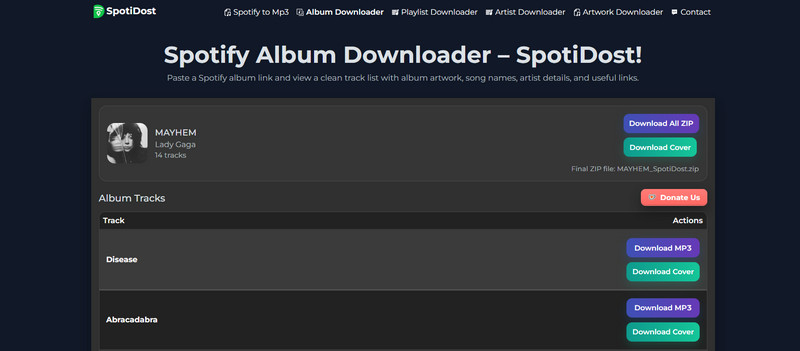
Editor Review: SpotiDost stands out visually by offering an ad-free, clutter-free environment that doesn't bombard you with sketchy redirects. While the process feels smooth and lacks the usual intrusive pop-ups found on free websites, the backend is unfortunately completely broken. During our practical test, attempting to batch-download a 14-song album resulted in excruciatingly slow processing speeds—the progress bar permanently stalled at 72% after 30 minutes, without delivering any actual ZIP file. Switching to single-track extraction yielded the same disappointing result, revealing that the "Download MP3" buttons are essentially non-functional dead links. The only feature that actually works is the cover art downloader. In short, despite its clean aesthetic, SpotiDost fails at its primary purpose and cannot actually download Spotify album music for you.
Rating: ★☆☆☆☆
- Ad-free and clean interface with no deceptive redirect loops.
- The "Download Cover" feature successfully extracts original Spotify album artwork.
- Completely broken core function; it cannot actually deliver any audio files.
- Stalled downloads: Batch ZIP conversion gets permanently stuck mid-way (e.g., hanging at 72% for over 30 minutes).
- Dead buttons: The single-track "Download MP3" options are completely non-responsive.
How to Attempt Downloading Spotify Albums with SpotiDost?
STEP 1 Copy your desired album URL from the Spotify app or web interface.
STEP 2 Visit the SpotiDost website, paste the link into the designated input field, and click the "Download" button.
STEP 3 Once the tracklist loads, you can click "Download Cover" to save the artwork, or click "Download All Zip" to try and initialize the full album compression wrapper.
STEP 4 Wait for the server to process the request. (Note: Due to severe server-side issues, the conversion process will likely hang indefinitely, making it impossible to successfully grab the local MP3 files.)
5. Spotidown - Spotify Album Track Downloader Application
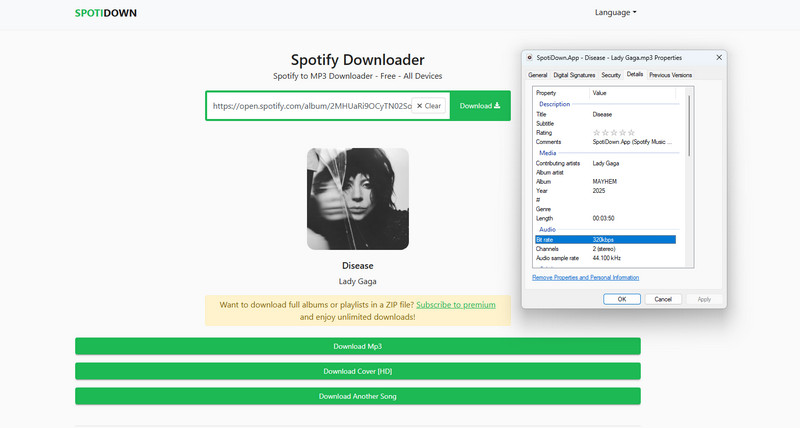
Editor Review: Testing Spotidown was a frustrating experience from the very first click, as pasting our Spotify link immediately triggered a shady redirect popup. While the site successfully loaded the album's tracklist, we quickly found that the enticing "Download Album" button is locked behind a massive $20/month paywall. For free users, you are forced to process songs one by one. The single-track download page is another minefield; clicking "Download HD" sent us straight to suspicious third-party sites, while the real "Download MP3" button was painfully sluggish, taking a full 30 seconds just for a 3-minute song. To make matters worse, once we checked the output files, we discovered that Spotidown permanently brands your music, forcing their name into both the file titles and the internal ID3 tag comments. If you hate aggressive ads and watermarked audio, this one is a pass.
Rating: ★★☆☆☆
- Saves individual tracks in standard 320kbps MP3 audio quality.
- Preserves core text-based metadata, including artist info and album details.
- Aggressive redirect loops triggered at the very start of the link submission.
- Exorbitant premium paywall ($20/month) required just to unlock the batch album downloader.
- Deceptive UI and slow speeds: The "Download HD" button is a deceptive link, and the actual download takes 30 seconds per track.
- Metadata watermarking: Permanently injects the brand name into the file title and the internal ID3 tag comments section.
How to Download Spotify Tracks via Spotidown?
STEP 1 Copy the Spotify album link from your music client or browser address bar.
STEP 2 Open Spotidown, paste the URL into the search box, and click "Download". (Note: Close the suspicious advertising tab that opens automatically on your first click.)
STEP 3 Scroll through the parsed tracklist and click "Download MP3" next to the single song you want to download. This will redirect you to a new download processing page.
STEP 4 On the new page, click the genuine "Download MP3" button. Avoid the "Download HD" option, and wait for the slow extraction process to save the file locally.
6. SpoMp3 - Spotify Album to MP3 Converter Online
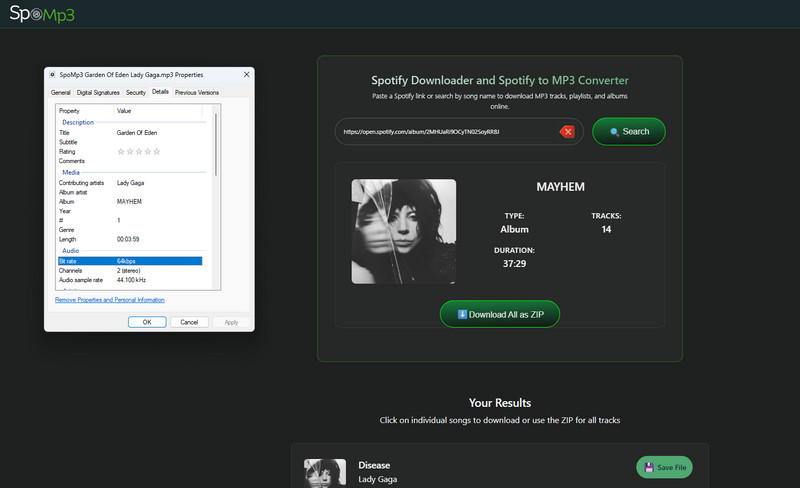
Editor Review: Using SpoMp3 felt like a complete waste of time during our hands-on test. While the homepage looks deceptively clear of static ad banners, the site's backend relies heavily on aggressive click-jacking and redirects. After parsing our Spotify album link, we were greeted by a "Download All as ZIP" button that demands an outrageous $99/year premium subscription to unlock. Free users are stuck with single-track downloads, which are an absolute chore to get through. Clicking "Download" next to a song does nothing but hijack your browser with a third-party ad tab; you have to return to the original page, where the button changes to "Save File," and click it again—triggering yet another redirect loop—before the download finally ticks over. The biggest disappointment, however, is the output quality. SpoMp3 delivers a horrific, muddy 64kbps audio bitrate that is virtually unlistenable on any modern device, and it even goes out of its way to watermark the file names. No matter how clean its landing page looks, no one should tolerate 64kbps audio in 2026.
Rating: ★☆☆☆☆
- Retains basic text metadata and embedded album cover art.
- Abysmal audio quality: Extracts tracks at an unacceptable 64kbps bitrate.
- Absurd premium paywall ($99/year) just to unlock the batch album ZIP downloader.
- Double redirect loops: Forces users through multiple malicious third-party tab jumps for every single song.
- Watermarked file names that blemish your local music collection.
How to Download Spotify Tracks via SpoMp3?
STEP 1 Copy the target Spotify album link from your app or browser player.
STEP 2 Head to SpoMp3, paste the URL into the center input box, and hit the "Search" button to load the tracklist.
STEP 3 Click the "Download" button next to a track. Close the suspicious third-party ad tab that immediately pops open, and return to SpoMp3.
STEP 4 Click the newly transformed "Save File" button. Close the second wave of redirects, and wait for the browser to finalize saving the low-quality MP3 file.
7. Spotidown.co - Spotify Album to MP3 Tool Online
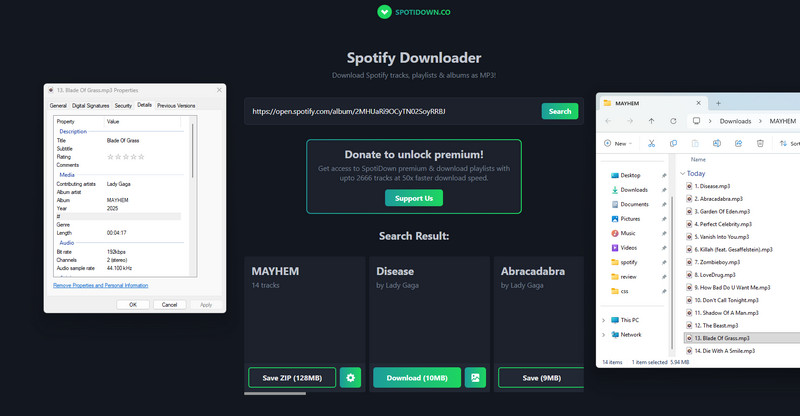
Editor Review: Spotidown.co provided a surprisingly refreshing experience during our testing, operating without the aggressive redirect loops or intrusive ad banners that usually plague free sites. After parsing our Spotify link, the platform loaded the full tracklist alongside a dedicated button to preview and download the high-res album art. The standout feature here is that it actually lets free users batch-download the entire Spotify album as a ZIP file without a paywall. However, the mechanism is quite clunky; after waiting 10 minutes for our 14-song album to process, we had to click the button a second time (once it changed to "Save ZIP") to finally trigger the browser download. While we were pleased to find clean file names with track numbers and no obnoxious brand watermarks, the audio quality is a letdown, maxing out at a lossy 192kbps MP3 bitrate. Additionally, the website's front-end code is poorly optimized, forcing you to horizontally scroll a clumsy container just to view the tracks. If you are in a pinch and don't mind sacrificing premium audio fidelity for free ZIP packaging, it is an acceptable temporary fix.
Rating: ★★★★☆
- Free full-album batch downloading delivered as a single ZIP file.
- Clean user experience with no malicious redirects or pop-up ad scripts.
- No watermarks; preserves genuine file names, track numbers, and core ID3 tags.
- Restricted audio quality: Output is capped at 192kbps MP3 instead of standard 320kbps.
- Flawed interface layout that requires awkward horizontal scrolling to see individual tracks.
- Slow processing times, requiring you to wait about 10 minutes and click twice to grab the ZIP file.
How to Download Full Spotify Albums via Spotidown.co?
STEP 1 Copy the target album link from your Spotify desktop app, mobile device, or web player.
STEP 2 Navigate to Spotidown.co, input the link into the URL field, and click the "Search" button to parse the album.
STEP 3 Scroll down to view the fetched tracklist (you may need to scroll horizontally to see everything) and click the "Download ZIP" button to begin the cloud packaging process.
STEP 4 Wait for the server to finish compressing the tracks. Once the loading bar finishes, click the button again (which will now display as "Save ZIP") to download the archive directly to your hard drive.
8. Spowload - Spotify Album URL to MP3 Tool
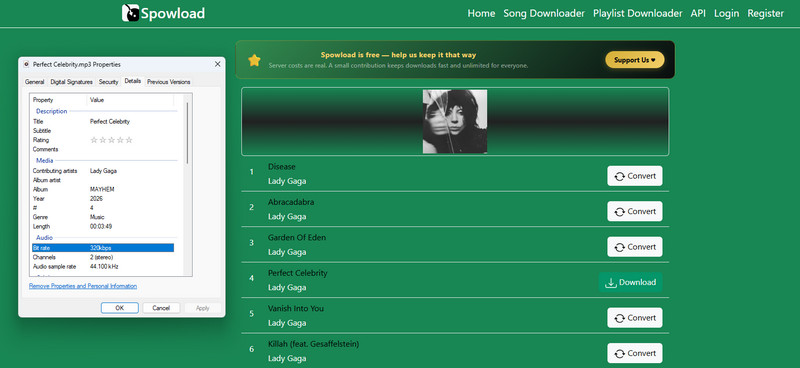
Editor Review: Running our link through Spowload revealed another platform that traps batch-downloading convenience behind a paywall. Pounding an album URL into the search bar brings up the entire tracklist, but free users are completely blocked from downloading the full collection at once; the ZIP extraction option requires a $5/month Premium membership capped at 2,000 tracks. Instead, we had to process each song individually. The individual downloading process is ad-free but demands patience: you must click "Convert" next to a song, wait for the server-side buffer to finish processing, and then click the newly generated "Download" button to trigger the file transfer. On the technical side, the output delivers solid 320kbps MP3 audio, and the site preserves text metadata like artist names and track numbers. However, it completely strips away the album cover art. If you only need to cherry-pick a few high-quality MP3 tracks from an album and want to avoid shady pop-up scripts, Spowload serves as a decent, albeit tedious, ad-free alternative.
Rating: ★★★☆☆
- Delivers tracks in standard high-quality 320kbps MP3 bitrate.
- Ad-free environment with no intrusive pop-up scripts or banner advertisements.
- Keeps basic text-based ID3 tags, including artist name and track number.
- No free batch download; full album ZIP packaging is locked behind a $5/month premium wall.
- Lacks visual metadata: Completely fails to preserve original album cover art.
- Two-step single downloading: Requires waiting for an online conversion buffer for every single song before the download link activates.
How to Extract Individual Spotify Album Tracks via Spowload?
STEP 1 Copy the Spotify album URL from your music player app or browser.
STEP 2 Head to Spowload, paste the link into the URL container, and click the "Search" button to fetch the tracks.
STEP 3 Locate the first track you want to save and click the "Convert" button. Wait a few moments for the web server to process the stream.
STEP 4 Once the button turns into a green "Download" link, click it to save the 320kbps MP3 file to your device, then repeat the process for other tracks.
Part 4. Comparison between Spotify album downloaders
| Ad-Free | Supported Platforms | Output Format | Best Quality | Batch Download | Clean Output | Free for Use | |
|---|---|---|---|---|---|---|---|
| Tidabie Spotify Downloader | ✔️ | Spotify and 15+ music services | MP3, AAC, WAV, FLAC, AIFF, and ALAC | Lossless FLAC | ✔️ | ✔️ | ❌ |
| TuneCable | ✔️ | Spotify | MP3, AAC, WAV, FLAC | 320kbps | ✔️ | ✔️ | ❌ |
| Spotisaver | ✔️ | Spotify | MP3 | 320 kbps | ✔️ | ❌Watermarks | ❌ |
| SpotMate | ❌ | Spotify | MP3 | 320 kbps | ❌ | ✔️ | ✔️ |
| Spotdown | ❌ | Spotify | MP3 | 200kbps | ✔️ | ❌Watermarks | ✔️ |
| SpotiDost | ✔️ | Spotify | MP3 | N/A | ❌ | N/A | ✔️ |
| Spotidown.app | ❌ | Spotify | MP3 | 320 kbps | ✔️ | ❌Watermarks | ❌ |
| SpoMp3 | ❌ | Spotify | MP3 | 64 kbps | ✔️ | ❌Watermarks | ❌ |
| Spotidown.co | ✔️ | Spotify | MP3 | 192kbps | ✔️ | ✔️ | ✔️ |
| Spowload | ✔️ | Spotify | MP3 | 320kbps | ❌ | ✔️ | ❌ |
Conclusion: Which Spotify Album Downloader Should You Choose?
To wrap up, choosing the right Spotify album downloader comes down to balancing your budget against your patience. If you are looking for a flawless, multi-platform investment with pristine audio quality and professional editing tools, Tidabie Spotify Downloader stands as the undisputed champion. For Android and desktop users seeking a sweet spot between stable 320kbps performance and a budget-friendlier price tag, TuneCable is a highly reliable smart choice.
On the flip side, while free online downloaders seem tempting for quick, one-time tasks, they are a literal digital minefield. Between the abysmal 64kbps audio quality, permanently watermarked files, and aggressive malware redirect loops, the hidden time and security costs of web tools far outweigh the price of a secure desktop client. For a seamless and risk-free music collection, sticking with professional desktop or verified APK solutions is always your safest bet.

Jacqueline Swift | Senior Writer
