


8 Best Beatport Music Downloaders in 2026
If you're a DJ or an electronic music lover, you know Beatport is the go‑to platform for high‑quality tracks. However, the official way to own your favorite tunes often involves paying per song or maintaining a Beatport subscription. While that works for some, many users look for a more flexible method to download music from Beatport without restrictions. That's where a reliable Beatport downloader comes into play. In this guide, we've hand‑picked the 8 best Beatport music downloaders for 2026 to help you make the right choice.
- Part 1. How to Purchase and Download Music from Beatport [Official]
- Part 2. Best Desktop Beatport Music Downloader 🔥
- Part 3. Top Free Online Beatport Downloaders
- Part 4. Technical Beatport Music Downloader Solutions
- Comparison Table: Which Beatport Downloader Should You Choose? ⏩
- FAQs about Beatport Downloaders
Part 1. How to Purchase and Download Music from Beatport [Official]
Many people assume that a Beatport subscription gives you permanent ownership of tracks, but that is not how the platform works. A streaming subscription lets you listen to full tracks online and even use them in compatible DJ software, yet those files are not truly yours to keep forever. If you want to actually own the music and use it offline on any device without restrictions, you need to purchase individual tracks or albums. Once you have completed your purchase, you can immediately download music from Beatport and save the files directly to your computer. Below is a simple step‑by‑step guide to help you get started.
STEP 1 Log in to your Beatport account. If you don't have one, sign up with your email address and a password. Once logged in, search for the track or album you want.
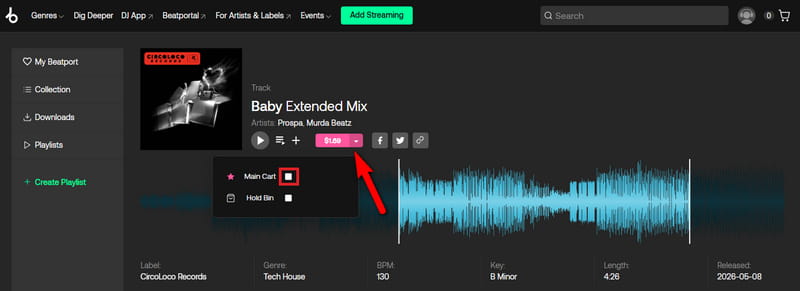
STEP 2 On the song details page, click the pink dropdown button marked with the price. Then check the "Main Cart" option to add it to your cart. For an entire playlist or album, use the "Buy All" button.
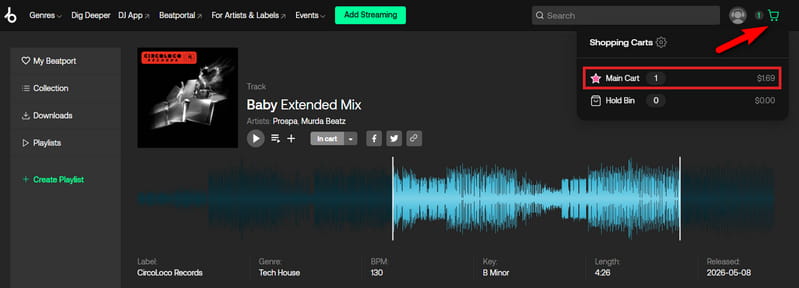
STEP 3 Open your cart in the top right corner.
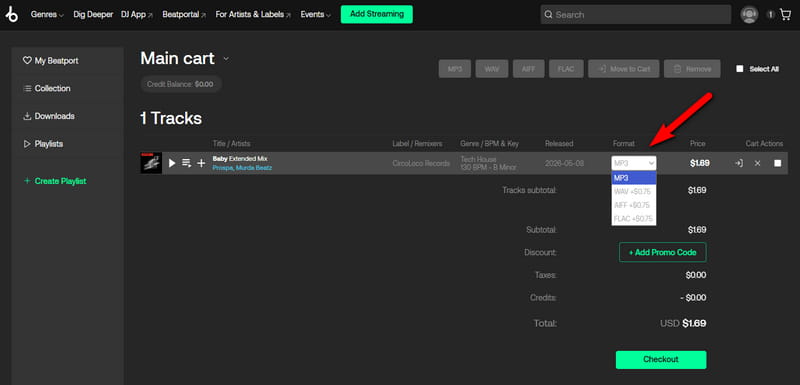
STEP 4 Choose your preferred audio format. Note that lossless formats cost a little more. Then click "Checkout" and complete it by entering your payment details.
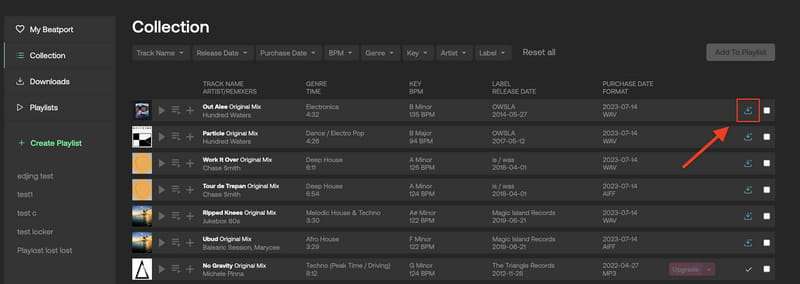
STEP 5 Go to "Collection" in the top left side. Next to each track, click the blue download icon. To download Beatport songs in bulk, tick the checkboxes of multiple tracks, then click the master blue download icon at the top to save the downloaded files.
Part 2. Best Desktop Beatport Music Downloader 🔥
While the official purchase guarantees DRM‑free files, it can quickly become expensive if you buy many tracks individually. For users who want a more cost‑effective way to build a permanent offline Beatport library without paying per song, a dedicated desktop downloader offers the best balance of quality, convenience, and value.
Tidabie Music Go is a professional desktop audio recorder and converter designed to capture streaming audio from Beatport as well as other popular music platforms directly on your computer. It works through a built‑in browser window where you log into your Beatport account and play any track, album, or playlist you wish to save. Tidabie records the audio in real time and stores it as a permanent local file on your hard drive. You can choose from multiple output formats, such as MP3, AAC, WAV, FLAC, AIFF, and ALAC, and you can adjust the bitrate up to 320 kbps for high‑quality listening.
For popular streaming platforms such as Spotify, Apple Music, and Tidal, Tidabie offers batch downloads at up to 10x the normal speed and retains complete ID3 tag information. You can also use the built‑in tag editor to add or change metadata after the recording is finished. Other useful features include an AI Audio Splitter, Format Converter, Audio Editor, and Burn CD. Whether you need to save a Beatport exclusive for offline DJ performances or extract a background track for your own creative project, Tidabie Music Go converts any Beatport audio into a permanent file on your local drive.
Tidabie Music Go
- Download music from Bandcamp, Spotify, Apple Music, SoundCloud, Amazon Music, TIDAL, YouTube Music, Qobuz, etc.
- Convert music to MP3, AAC, WAV, FLAC, AIFF, and ALAC.
- Batch download music at up to 10x speed with original quality.
- Keep full ID3 tags such as title, album, and artist.
- Freely enjoy podcasts online and download podcasts.
- Listen to radio shows and record radio freely.
How to download Beatport to MP3 with Tidabie Music Go?
Follow these steps to record any Beatport track and save it as a high‑quality MP3 file on your computer.
STEP 1 Select Beatport as recording source
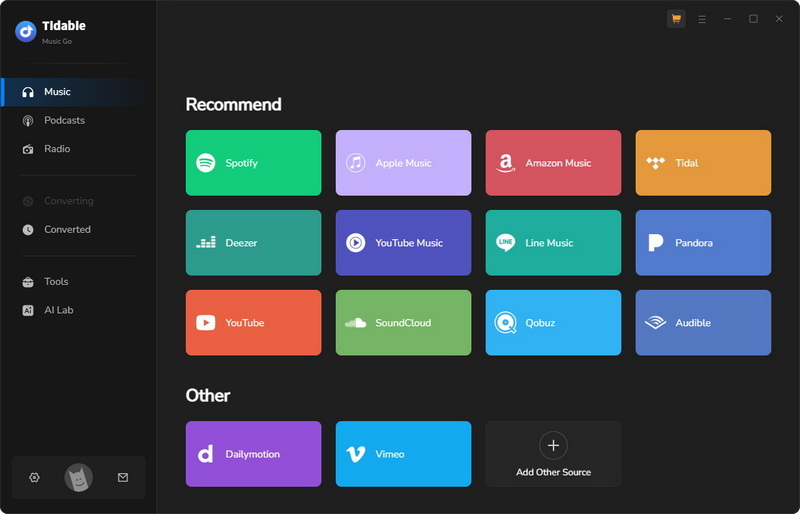
Launch Tidabie Music Go. On the main "Music" tab, scroll down to locate the "Beatport" option and click it. The software will open a built‑in browser window ready for Beatport.
STEP 2 Find Beatport music to record
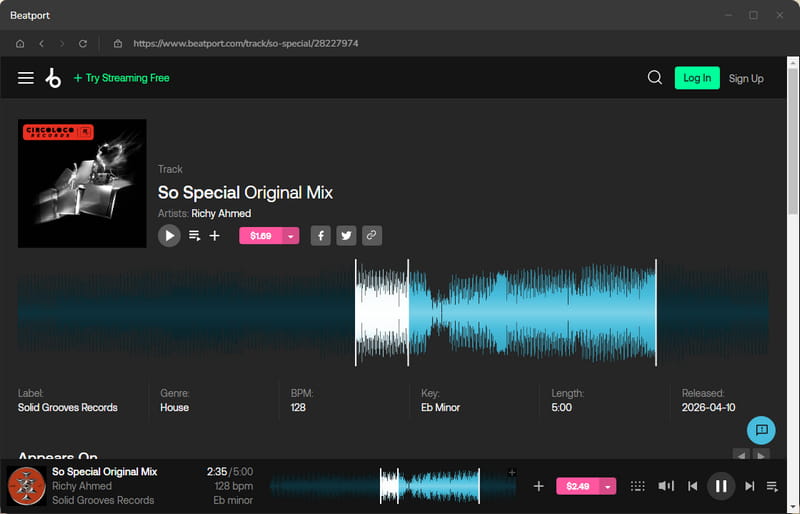
Inside the built‑in Beatport web player, log in to your Beatport account. Browse to the track, album, or playlist you wish to save. Play the audio for a few seconds to make sure everything is working properly.
STEP 3 Customize Beatport output settings
Return to the main Tidabie window. Choose your preferred output format, for example, MP3, and set the desired quality. Select an output folder on your computer where the recorded files will be stored. After these settings are done, click the "Click to Start" button to get ready for recording.
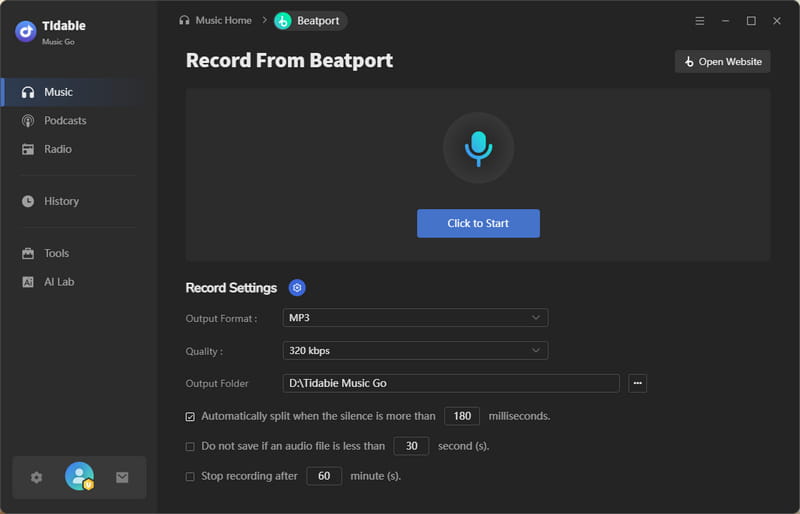
STEP 4 Record Beatport to MP3
Go back to the built‑in browser and start playing the Beatport audio from the beginning. Tidabie will automatically detect the sound and begin recording. Let the track or playlist play through to the end. When the recording finishes, click the "Stop Recording" button.
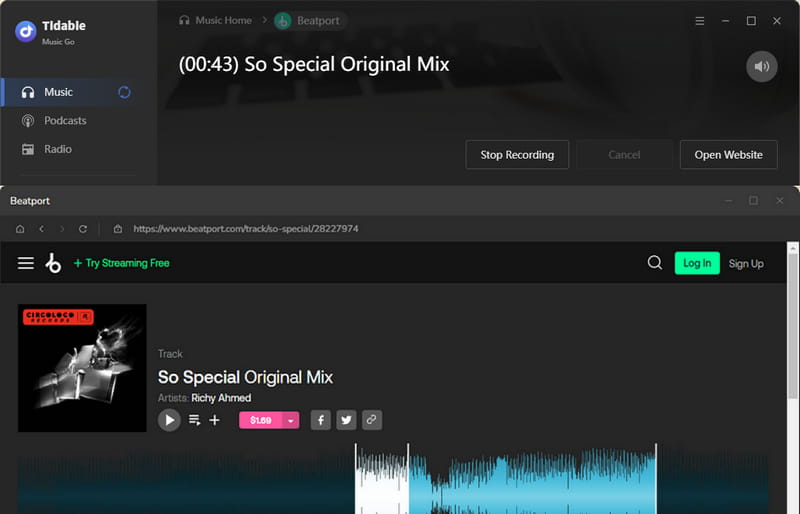
STEP 5 Save Beatport downloads
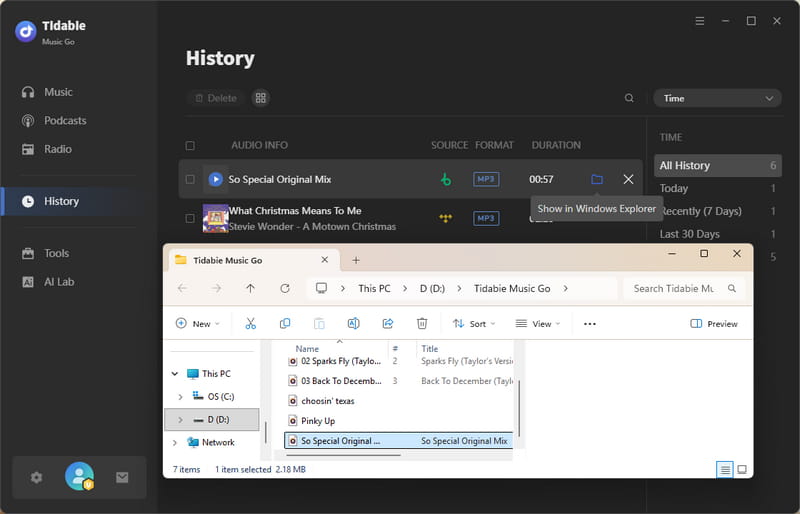
Tidabie immediately saves the captured audio to the output folder you selected. To view all your recorded files, go to the "History" section in the left menu. You can use the built‑in tag editor under "Tools" to manually edit metadata such as title, artist, album name, and cover art.
- Records Beatport audio at up to 320 kbps in MP3 format.
- Supports multiple output formats, including MP3, AAC, WAV, FLAC, AIFF, and ALAC.
- Works with Beatport as well as Spotify, Amazon Music, Apple Music, Deezer, TIDAL, YouTube, and many other platforms.
- Preserves full ID3 tags and enables 10× faster batch downloads for major streaming services.
- Includes free built‑in tag editing and audio editing tools.
 Pros
Pros
- Requires installation on your computer.
- Only works on Windows or macOS.
 Cons
Cons
Part 3. Top Free Online Beatport Downloaders
If you prefer not to install any software and only need to grab a single track occasionally, free online downloaders might seem tempting. Below are five popular online free Beatport Downloaders.
1. PasteDownload
: https://pastedownload.com/29/
PasteDownload is a free online downloader that extracts audio and video content from hundreds of websites, including Beatport. It provides a quick way to grab music files without installing any software. Unlike many Beatport downloaders that focus only on audio, PasteDownload also handles video content, such as music videos, live DJ sets, and festival recordings. However, the service sometimes fails to extract tracks and may redirect users to paid programs or display intrusive ads. The maximum audio quality is also questionable. For occasional use and simple track‑grabbing needs, it can serve as a quick alternative, though it is not a substitute for official purchases or dedicated desktop software.
- Free and requires no account registration.
- No software installation needed.
- Works directly in any browser.
- Supports both audio and video content from Beatport.
- Handles hundreds of different websites beyond Beatport.
Pros
- Intrusive ads with potential redirects to paid programs
- Suspected low audio quality.
- No batch download for playlists or albums.
- Confusing workflow with the download button hidden at the bottom under heavy ads.
Cons
How to convert Beatport to MP3 with PasteDownload?
STEP 1 Open Beatport in your browser and find the track or video you want to save. Copy the full URL from the browser's address bar.
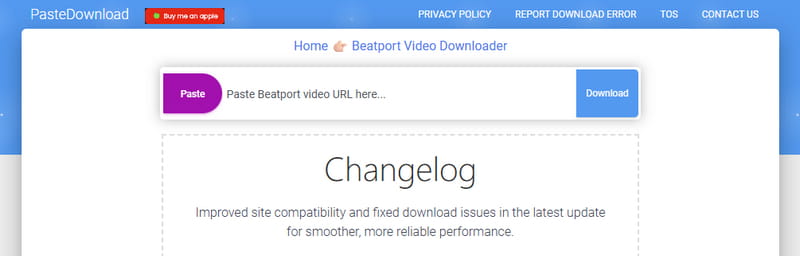
STEP 2 Open a new tab and go to PasteDownload. Paste the Beatport URL into the input field at the center. Then click the download button next to the field.
STEP 3 Wait for the site to process your link. Scroll down through the ads under the input box to find the download section. Click the purple download button to save the MP3 file.
2. 9XBUDDY / YT2Save
: https://yt2save.com/beatport/
Note: After you paste a Beatport song URL into YT2Save, the website automatically redirects you to 9xbuddy to finish the download.
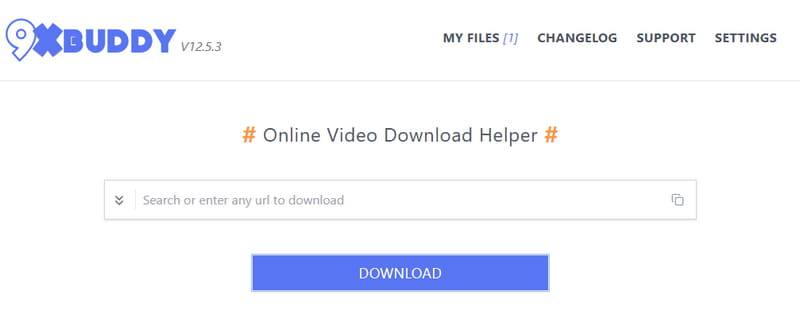
9xbuddy is a free online media downloading service that extracts audio and video content from a wide range of websites. It scans the HTML and JavaScript of a given page to locate the actual media file and provides a direct download link. It serves as a simple Beatport downloader and can process streaming media from platforms that do not offer an MP3 download link. The service supports multiple output formats, including MP3, MP4, FLV, and AVI. However, its primary strength is video extraction, and its performance with dedicated music platforms like Beatport can be inconsistent.
- Free and requires no registration.
- No software installation needed.
- Works on any device with a browser.
- Supports multiple output formats.
- Actively maintained and supports many streaming services.
Pros
- Some security analyzers give it a low trust score.
- Primarily designed for video, so audio extraction quality may vary.
- No batch download support for playlists.
- Availability may be inconsistent.
Cons
How to convert Beatport to MP3 with 9xbuddy?
STEP 1 Open Beatport and find the track you want to save. Click the track title to open its dedicated playback page, then copy the full URL from the browser's address bar.
STEP 2 Open a new tab and visit 9xbuddy. Paste the Beatport track URL into the input field. Then click the "Download" button under it.
STEP 3 Wait for 9xbuddy to process the link and extract the media file. It will display available download options. Select your preferred one and click "DOWNLOAD NOW" to save the file.
3. TubeRipper
: https://tuberipper.net/73/site/beatport
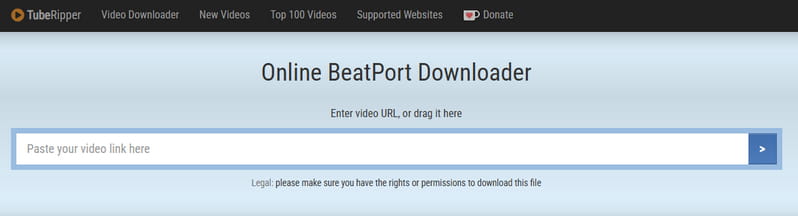
TubeRipper is a web-based media extraction tool that lets you convert streaming audio into downloadable files without installing any software. It supports multiple output formats, including MP3, M4A, WAV, OGG, and FLAC. You can choose quality levels from 64 kbps to 256 kbps for MP3 files. However, the maximum audio quality is 256 kbps, which falls short of the 320 kbps standard that many DJs and audiophiles prefer. It also does not support batch downloading. Additionally, the website contains ads that can sometimes redirect you to other pages, so it is wise to use an ad blocker or stay alert while navigating.
- Completely free with no registration.
- No software installation needed.
- Supports MP3, M4A, WAV, OGG, and FLAC.
- Works on desktop and mobile browsers.
Pros
- Contains ads with occasional redirects.
- Maximum quality is 256kbps.
- No batch download for playlists or multiple tracks.
- Download speed depends on your internet connection.
- Originally designed for video content, so they often fail to parse pure song URLs from Beatport.
Cons
How to download Beatport songs with TubeRipper?
STEP 1 Open your browser and go to Beatport. Find the track you want to save, then copy its full URL from the browser's address bar.
STEP 2 Open a new tab and visit TubeRipper. Paste the Beatport track URL into the input field in the middle of the page. Then click the arrow button or press Enter on your keyboard.
STEP 3 The website will process the link. After a few seconds, extraction options appear. Select output format and choose a bitrate.
STEP 4 Click the "Extract Audio" button. Wait for the extraction to finish. Once completed, a download button will appear. Click it to save the file to your device.
4. TubeNinja
: https://www.tubeninja.net/how-to-download/beatport
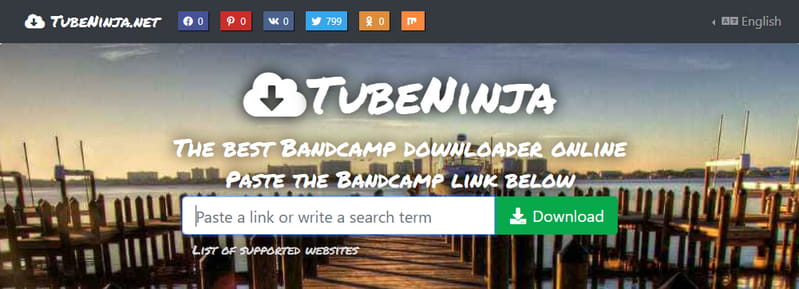
TubeNinja is a free online downloader that extracts audio and video content from over 50 streaming websites, including Beatport. For Beatport users specifically, TubeNinja allows you to paste a track URL and retrieve an audio file directly from the streaming page. However, the success rate can vary depending on Beatport's current anti-download protections. Some users also report that the site may struggle with newer Beatport page structures or certain track formats. While security scans show the main domain is safe, the site displays frequent pop-up ads and redirects that can lead to potentially harmful external pages.
- Free and requires no account registration.
- No software installation on your computer.
- Supports over 50 websites, including Beatport.
- Works on both desktop and mobile browsers.
- Offers a bookmarklet for one-click downloads.
Pros
- Pop-up ads and occasional redirects.
- Limited format options for audio extraction.
- May fail to process tracks with certain URL structures.
- No batch download for playlists or albums.
Cons
How to download Beatport to MP3 format with TubeNinja?
STEP 1 Open Beatport and find the track you want to save. Click the track title to open its dedicated playback page, then copy the full URL from the address bar.
STEP 2 Open a new tab and go to TubeNinja. Paste the Beatport track URL into the input field. Then click the "Download" button next to it.
STEP 3 TubeNinja will process the link. Once finished, it will display available download options. Select your preferred audio format and quality level if offered.
STEP 4 Click the download link to save the file to your device.
Part 4. Technical Beatport Music Downloader Solutions
For users with more technical skills or those who want to integrate downloading into a custom workflow, command‑line tools and bots offer a different approach. These solutions are not for everyone, but they provide unique advantages such as lossless formats and batch processing.
1. Beatport Downloader Bot (Telegram)
: https://t.me/beatport_downloader_bot
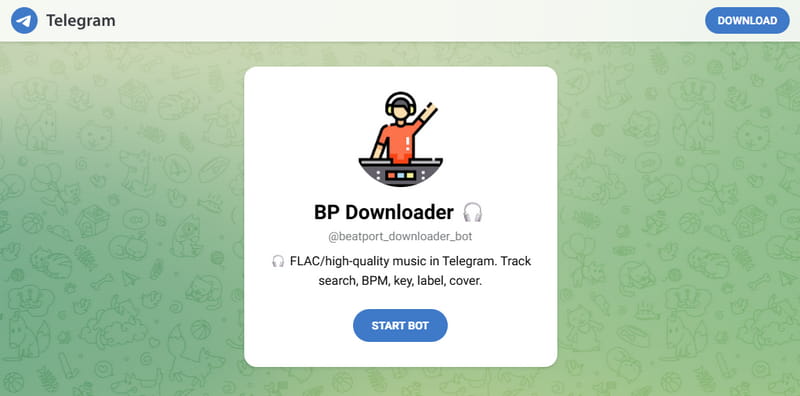
The Beatport Downloader Bot is a Telegram mini app that lets you fetch Beatport tracks and deliver them as audio files directly inside your chat interface. Multiple bots exist, with BeatBot and BeatPortal Downloader being the most actively used among Telegram users. These bots offer a convenient alternative for users who want to keep their music acquisition workflow entirely within the Telegram environment, eliminating the need for browser tabs or external download tools.
For BeatBot, downloads are available in multiple audio formats, including WAV, AIFF, FLAC, and MP3, covering both lossless formats for archiving or professional editing and MP3 for lightweight everyday listening. BeatPortal Downloader takes a slightly different approach, offering downloads in either 256kbps AAC or 320kbps MP3 formats. This bot supports downloading both individual tracks and full albums, and allows up to 10 tracks per request.
Both bots are designed for users who need quick access to music without compromising on audio quality, but they rely on third‑party servers for processing, may experience downtime or rate limiting, and their continued operation is not guaranteed.
- Works entirely within the Telegram app on any device.
- No software installation or browser plugins required.
- Supports multiple formats, including WAV, AIFF, FLAC, and MP3 (BeatBot).
- Handles both individual tracks and full albums (BeatPortal Downloader).
Pros
- Requires a Telegram account and the Telegram app.
- Daily or per‑session download limits (BeatPortal Downloader).
- No batch download support for playlist processing.
- Less intuitive for users unfamiliar with Telegram bots.
- Bot availability and uptime are not guaranteed.
Cons
How to download Beatport songs with Beatport Downloader Bot?
STEP 1 Install Telegram and create an account. Search for the bot you want (BeatBot or BeatPortal Downloader) and open it.
STEP 2 Start a chat with the bot by clicking "Start". If needed, type /start to activate it. Follow any on‑screen instructions.
STEP 3 On Beatport, copy the URL of the track or album you want to download.
STEP 4 Paste the URL into the Telegram chat and send it. For BeatPortal Downloader, choose your output format (e.g., 320kbps MP3) if prompted.
STEP 5 Wait for the bot to process the link. BeatPortal Downloader handles up to 10 tracks per request. The bot will then send the audio file(s) as attachments in the chat.
STEP 6 Click the file attachment to download it. The file saves to your device's default download folder.
STEP 7 For multiple tracks, download each file one by one. If a download fails, simply resend the same link to the bot.
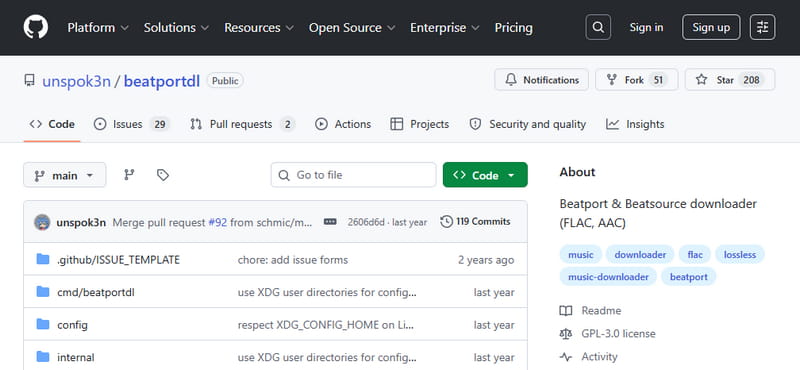
2. Beatportdl (GitHub)
: https://github.com/unspok3n/beatportdl
Beatportdl is an open‑source command‑line tool that downloads music directly from Beatport and Beatsource. Written in the Go programming language, it supports lossless FLAC and AAC and offers extensive customization through a YAML configuration file. Unlike user‑friendly downloaders with graphical interfaces, beatportdl requires familiarity with terminal commands, Go language dependencies, and manual configuration. It is designed for technically inclined users who are comfortable compiling software from source code. The tool can handle concurrent downloads, log errors for debugging, and organize files into folders. It requires an active Beatport or Beatsource streaming plan to function properly.
- Supports lossless FLAC and AAC formats.
- Concurrent download support for faster batch processing.
- Highly customizable via YAML configuration file.
- Auto‑organizes files into folders.
- Works on Windows, macOS, and Linux with pre‑compiled binaries available.
- Error logging for troubleshooting failed downloads.
- Progress bar display for better user experience.
Pros
- Requires a Beatport streaming plan.
- No graphical user interface.
- The setup process is complicated for non‑developers.
Cons
How to download Beatport songs with beatportdl on GitHub?
STEP 1 Make sure you have an active Beatport streaming plan. A free account will not work.
STEP 2 Download the pre‑compiled beatportdl executable for your OS from the GitHub Releases page. If you prefer to build from source, install Go, clone the repo, and run go build.
STEP 3 Open a terminal in the folder containing the beatportdl binary. Run ./beatportdl (or .\beatportdl.exe on Windows). Enter your Beatport username, password, download folder, and audio quality when prompted. This creates a beatportdl-config.yml file.
STEP 4 Edit the beatportdl-config.yml file to adjust settings like quality, download directory, concurrent workers, sorting, cover art, and tags.
STEP 5 Copy the URL of the Beatport track, release, playlist, chart, or label you want to download. Remove any extra tracking parameters after the question mark if needed.
STEP 6 In the terminal, run ./beatportdl "your_beatport_url" (use .\beatportdl.exe on Windows). The tool will authenticate and start downloading. A progress bar shows the status.
STEP 7 Go to your specified download folder to find the audio files. If you enabled sort_by_context, files are automatically organized into subfolders by playlist, release, etc. Check the terminal for any error messages.
Comparison Table: Which Beatport Downloader Should You Choose? ⏩
| ID3 Tags | Quality | Ad-Free | Batch Download | Output Format | Rating | |
|---|---|---|---|---|---|---|
| Tidabie Music Go | Full metadata for popular platforms | 320kbps | ✅ | ✔ (10x speed for major services) | MP3, AAC, WAV, FLAC, AIFF, ALAC | ★★★★★ |
| PasteDownload | ❌ | Low | ❌ | ❌ | MP3 | ★ |
| 9xbuddy | ❌ | 320kbps | ❌ | ❌ | MP3 | ★★ |
| TubeRipper | ❌ | 256kbps | ❌ | ❌ | MP3, M4A, WAV, OGG, FLAC | ★★ |
| TubeNinja | ❌ | Low | ❌ | ❌ | MP3 | ★★ |
| BeatBot | ❌ | 320kbps | ✅ | ❌ | MP3, WAV, AIFF, FLAC | ★★★ |
| BeatPortal | ❌ | 320kbps | ✅ | ✔ (up to 10 tracks) | MP3, AAC | ★★★ |
| Beatportdl | ✔ (via fix_tags) | 320kbps | ✅ | ✅ | AAC, FLAC | ★★★★ |
FAQs about Beatport Downloaders
Q1: How do I convert Beatport to MP3 easily?
The most straightforward way is to use a Beatport to MP3 converter like Tidabie Music Go. It also supports other formats, such as WAV and FLAC. Alternatively, online Beatport downloaders can do the same, but they usually produce lower bitrates and come with heavy ads.
Q2: Is it safe to use online Beatport downloaders?
Not always. Most free online Beatport downloaders contain aggressive ads, pop‑ups, and redirects that may lead to malicious sites. Some even ask you to install questionable browser extensions. To stay safe, use a reputable desktop application like Tidabie. If you must use an online service, run an ad‑blocker and avoid clicking on anything suspicious.
Q3: Which Beatport downloader gives the highest audio quality?
For the best quality, choose a tool that supports lossless formats. Among the options covered in this guide, Tidabie Music Go can save as FLAC and WAV. Beatportdl (GitHub) also supports FLAC and AAC.
Conclusion
From official purchases to free online Beatport downloaders, Telegram bots, and technical command‑line tools, there are many ways to download music from Beatport. For most DJs and electronic music lovers, the best all‑around choice is a dedicated desktop recorder like Tidabie Music Go. It delivers up to 320kbps MP3 or lossless formats, works with Beatport and dozens of other services, and keeps your music library clean with built‑in tag editing. Download Tidabie Music Go now and take full control of your music collection.

Jacqueline Swift | Senior Writer
