


6 Tested Qobuz Downloaders 2026 (Desktop, GitHub & Online)
If you're a serious music listener, you probably know that a Qobuz subscription offers incredible high-resolution sound, but what happens when you want to listen offline or your subscription ends? The official Qobuz desktop app only lets you cache songs for temporary offline playback, locking your music inside its ecosystem. This is where a dedicated Qobuz music downloader comes in. It converts those streaming tracks into permanent local files you can truly own. This guide covers 6 Qobuz downloaders for your choice, including desktop software, open‑source projects, and online downloaders. Let's take a look.
Part 1. The Official Way to Download Qobuz Music & Its Limitations
Qobuz provides two official methods to get tracks onto your device, but they serve very different purposes. One gives you temporary offline access as a subscriber; the other lets you truly own the files by purchasing them individually. Knowing the difference between these two options is the first step toward building the kind of music library you actually want.
Method 1: Import Tracks for Offline Playback (Subscription Required)
If you have an active Qobuz subscription, you can "import" any album, playlist, or track for offline listening. This is Qobuz's built‑in solution for listening without an internet connection.
STEP 1 Launch the Qobuz desktop app on your computer. Note that the Qobuz web player does not support offline playback.
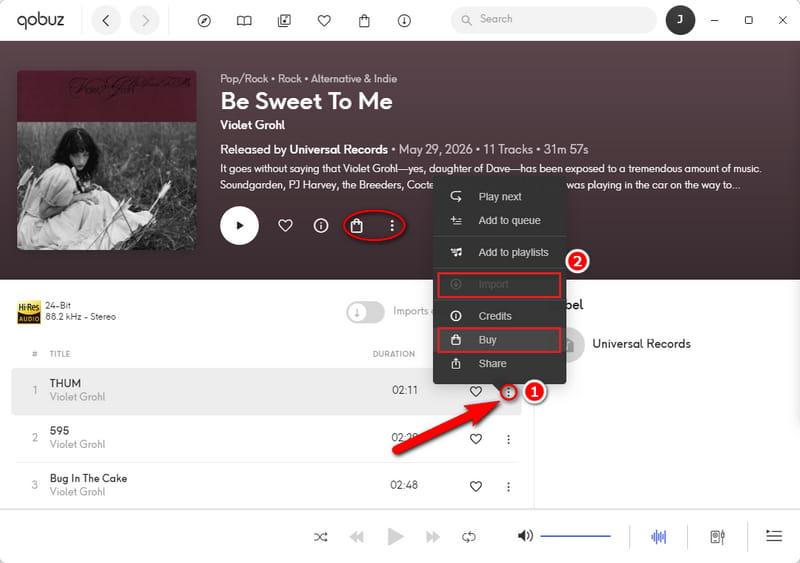
STEP 2 Navigate to the album or track you want to save. Click the three dots next to the item, then select "Import".
STEP 3 Once the download completes, the music will be available for playback without an active internet connection.
Method 2: Purchase and Permanently Download Music
The second official way to download from Qobuz is through its Download Store, where you buy albums and tracks individually. When you purchase music this way, you receive DRM‑free files that are yours to keep forever, available in formats including 24‑bit Hi‑Res FLAC.
STEP 1 Go to the Qobuz online store or use the desktop app. In the Qobuz desktop app, navigate to the non‑playing page of the song, album, or playlist you want to buy.
STEP 2 To purchase a whole playlist, click on the shopping bag icon under the playlist name. To buy a single track, click the vertical three-dots icon and select "Buy" from the pop‑up menu.
STEP 3 At checkout, click the "Pay in 1‑click with" option. If payment is successful, the track will be available for download.
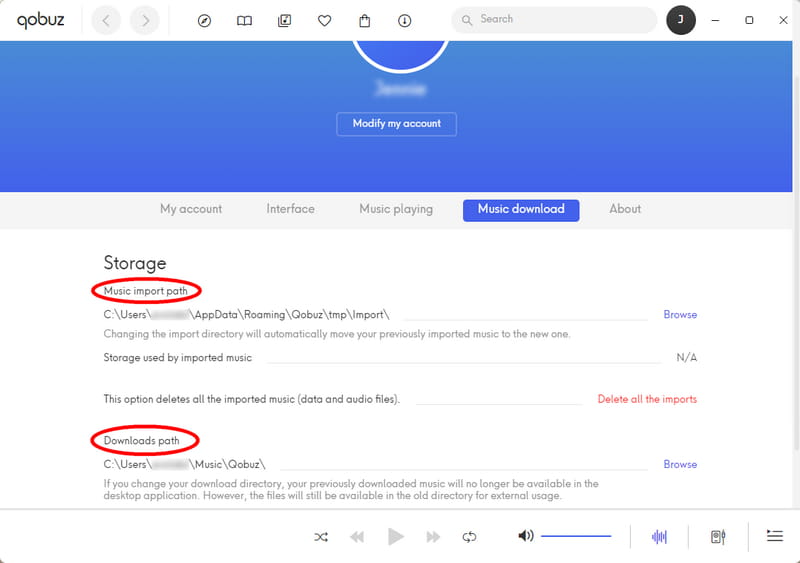
STEP 4 In the Qobuz desktop app, downloads begin immediately once you select the audio quality. The files will be saved to the folder you've configured under My Account > Settings > Music Download.
Limitations of Official Qobuz Download
While both methods work as advertised, they come with significant drawbacks that push many users to look elsewhere.
1. Encrypted and locked to the app. Imported tracks are stored in an encrypted cache inside the Qobuz app. You cannot move them, play them with another music player, or access them after your Qobuz subscription ends.
2. Subscription‑dependent. Once your subscription lapses, all offline imports become inaccessible.
3. High cost for large libraries. Buying every track individually gives you real ownership, but the cost adds up quickly, especially if you want to save numerous playlists.
4. Web player limitation. The Qobuz web player does not support offline playback at all, so you are forced to use the Qobuz desktop app or mobile app.
These limitations explain why many users seek out alternative solutions. In Part 2, we'll explore the best Qobuz downloaders that give you full control over your music library.
Part 2. Popular Qobuz Downloaders We Tested 💯
After extensive testing, we have grouped these six Qobuz music downloaders into three categories: professional desktop software, open‑source GitHub projects, and online downloaders as follows. Each has its own strengths and trade‑offs. We start with the most polished and feature‑complete option for most users.
| Category | Ease of Use | Output Format | Audio Quality | Link Parsing | Ad-Free | Lyrics | Custom Output Settings | Examples |
|---|---|---|---|---|---|---|---|---|
| Desktop Tools | ✅ | FLAC, MP3, AAC, AIFF, ALAC, WAV | Lossless / Hi-Res | ✅ | ✅ | ✅ | ✅ | Tidabie Music Go |
| GitHub Tools | ❌ | FLAC, MP3 | 24-bit / 192kHz | ✅ | ✅ | Usually No | ✅ | qobuz-dl, QBZ‑Downloader |
| Online Tools | ✅ | FLAC | 24-bit / 88.2kHz | Varies | ❌ | ❌ | Varies | DoubleDouble, SquidWTF |
1. Tidabie Music Go - Best Professional Desktop Software
Tidabie Music Go is a professional desktop music converter designed to download songs, albums, playlists, podcasts, and audiobooks from over a dozen streaming platforms, including Qobuz. It allows you to download Qobuz tracks in MP3, FLAC, AAC, AIFF, ALAC, and WAV. It preserves the original audio quality of Qobuz streams, including lossless Hi‑Res files, and completes conversions at up to 10x speed with full ID3 tag retention.
With a straightforward interface and one‑click batch processing, you can save entire Qobuz playlists or albums in one go. Users report that Tidabie Music Go is easy to use, reliably fast, and backed by responsive customer support.
Tidabie Music Go
- Download music from Qobuz, Spotify, Apple Music, Amazon Music, TIDAL, etc.
- Convert Qobuz music to Hi-Res FLAC, MP3, AAC, WAV, AIFF, and ALAC.
- Batch download music at up to 10x speed with original quality.
- Keep full ID3 tags such as title, album, artist, and lyrics.
- Freely enjoy podcasts online and download podcasts from 126k+ sites.
- Listen to radio shows and record radio freely from 67k+ sites.
How to download Qobuz music with Tidabie Music Go?
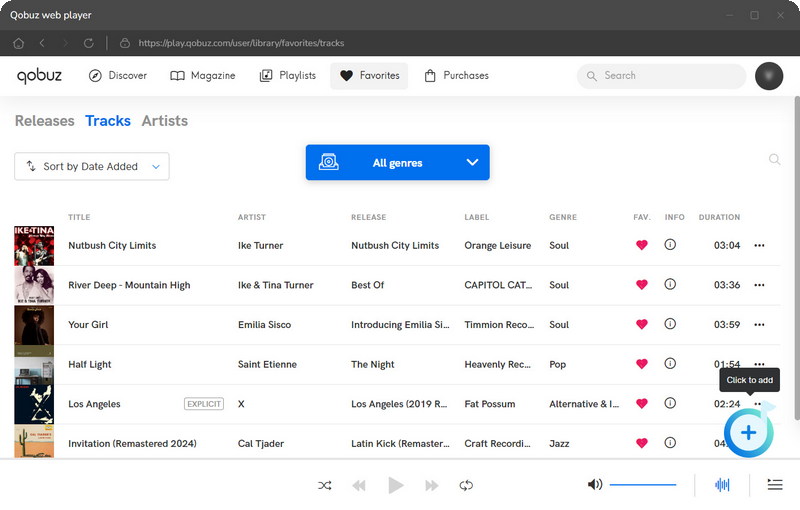
STEP 1 Open Tidabie Music Go. From the main interface, select Qobuz. The Qobuz web player will open automatically. Log in to your Qobuz account. Note that a Qobuz free trial account also works for downloading music.
STEP 2 Browse the Qobuz player and open any playlist, album, or track collection. Click the "+" button in the lower‑right corner. Tidabie will then display all songs in that album or playlist. Pick the ones you wish to download and click "Add" to confirm.
STEP 3 Click the "Settings" button. Here you can customize conversion mode, output format, bit rate, sample rate, output folder, output file name, etc.
STEP 4 Close the settings window. Click "Convert" to begin downloading the selected tracks. You can also click "Add More" to include songs from other albums or playlists for batch processing.
2. Top Free & Open-Source Tools on GitHub
If you're comfortable exploring GitHub, several powerful free Qobuz downloaders give you complete control over your music. Unlike the official Qobuz desktop app, these Qobuz downloader GitHub projects let you permanently save lossless and Hi‑Res tracks without any file encryption. The most popular options are listed below. While they differ in interface and platform support, they all download high‑quality audio directly from Qobuz.
- 1. qobuz-dl: https://github.com/vitiko98/qobuz-dl
- 2. QBZ-Downloader: https://github.com/ifauzeee/QBZ-Downloader
- 3. streamrip: https://github.com/nathom/streamrip
- 4. QobuzDownloaderX-MOD: https://github.com/DJDoubleD/QobuzDownloaderX-MOD
Special Notes:
1. QBZ‑Downloader and QobuzDownloaderX‑MOD offer a full graphical interface, but they are Windows only.
2. Streamrip also supports Tidal, Deezer, and SoundCloud. It is great if you use multiple services, but it requires Python 3.10+ and ffmpeg.
How to use QBZ‑Downloader to download Qobuz music?
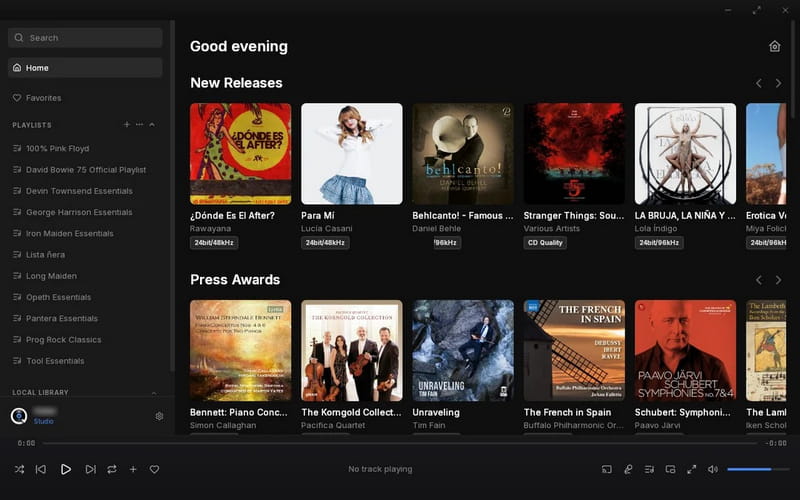
Below is a simple tutorial using QBZ‑Downloader as an example. The steps are similar for the other Qobuz downloader GitHub projects. A valid Qobuz subscription is required. These tools will not work with just a free account.
STEP 1 Visit the QBZ‑Downloader Releases page on GitHub. Download the latest .exe file (installer or portable version). Run the installer directly.
STEP 2 Follow the onboarding process and enter your Qobuz credentials in the Settings section. The app securely stores your login information locally for future use.
STEP 3 Use the built‑in search bar to find albums, tracks, artists, or playlists. You can also paste a Qobuz URL directly into the application.
STEP 4 Select the content you want. Choose your preferred audio quality. Click the download button. QBZ‑Downloader will save the files to your computer.
Security Note:
Our testing revealed that several free online Qobuz downloaders exposed users to redirects. Use them with caution. For a secure alternative, choose a trusted desktop tool like Tidabie.
3. DoubleDouble – Free Qobuz Downloader Online
🔗: https://us.doubledouble.top/
DoubleDouble is a free, browser‑based qobuz downloader online that also supports Amazon Music, SoundCloud, Deezer, and Tidal.
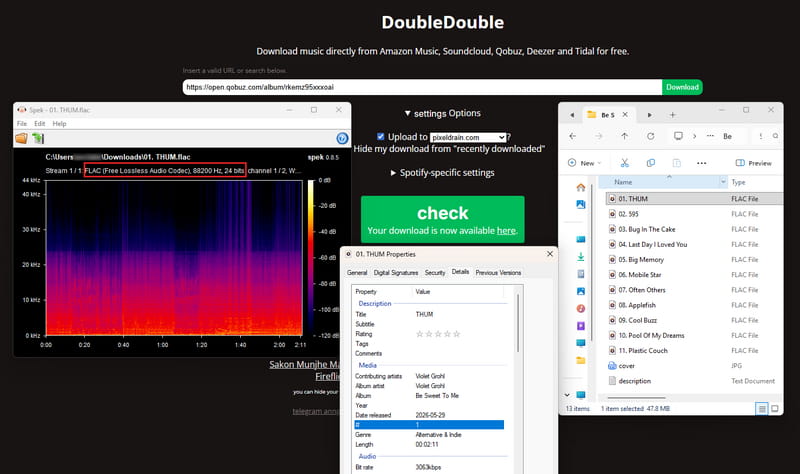
Our experience shows the process is smooth. We tested it with Qobuz album links. The tool preserved FLAC lossless quality whenever available. It successfully parsed entire albums and downloaded all tracks in one go. Most ID3 tags were retained, including title, artist, album, track number, year, and genre. The only missing element is embedded album artwork. But we found that a separate JPEG cover file is saved alongside the audio files.
We did not see ads on the main DoubleDouble page, but the redirection to another site for the actual download does raise some caution. During our testing, we remained careful and recommend scanning any downloaded ZIP file with antivirus software before opening it.
How to download Qobuz music with DoubleDouble?
STEP 1 Go to DoubleDouble. Copy a Qobuz album, playlist, or track URL and paste it into the input field.
STEP 2 Click the "Download" button. Wait a few seconds while the tool parses the URL and rips the audio.
STEP 3 When processing finishes, a green "check" button appears with the message "Your download is now available here". Click that button.
STEP 4 You will be redirected to another website where all tracks are packaged into a single ZIP file (for albums or playlists). Click the "Download" button below the ZIP file listing.
4. JUMO-DL - Online Free Qobuz Downloader by Search
JUMO-DL is a browser-based Qobuz downloader that relies on searching by song or album name rather than pasting URLs.
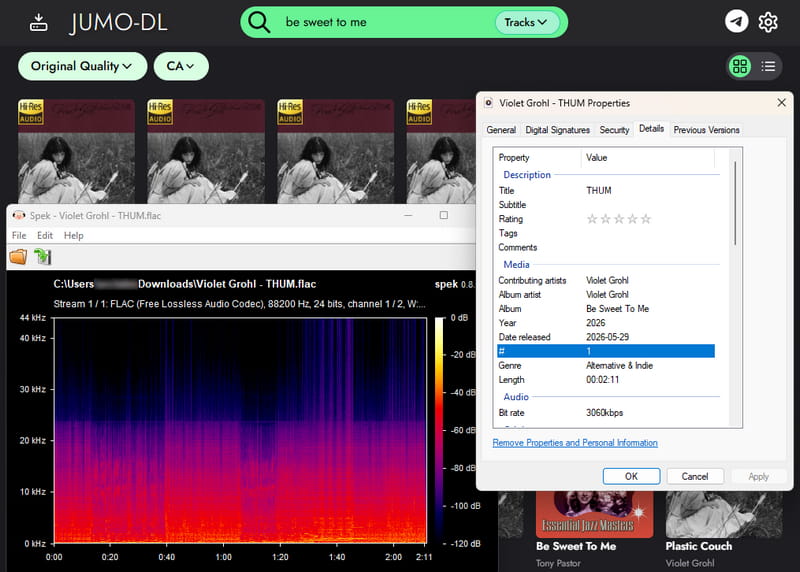
Our testing revealed that the tool is designed for search-by-name functionality. When we pasted a Qobuz URL into the input field, the page could not parse the link and became unresponsive. We did manage to download files in FLAC format, 24‑bit, with full ID3 tags preserved.
If you want to download an entire album, you must select the "Albums" option on the right side of the input box. Otherwise, the search results will only display individual track download links from that album.
How to use JUMO-DL to download Qobuz music?
STEP 1 Visit JUMO-DL. Search by entering a song or album name into the input field. Do not paste a Qobuz URL, as the tool cannot parse it.
STEP 2 Beside the input box, select the content type (Albums or Tracks).
STEP 3 Press "Enter" to start the search. If you selected "Albums" on the right side, the results should show full albums. If you selected "Tracks", you will see individual track download links.
STEP 4 Hover your cursor over the file you want to download, then click the download button that appears. This will add the file to a download queue.
STEP 5 Click the send button in the top‑right corner, and the download should then begin. During this process, a redirect may occur. We advise you not to click anything suspicious. Close the redirect page and return to the main site.
5. SquidWT - Free Qobuz Music Downloader Online
🔗: https://qobuz.squid.wtf/
SquidWTF is a browser-based Qobuz downloader online that allows you to download songs, albums, and entire artist discographies from Qobuz.
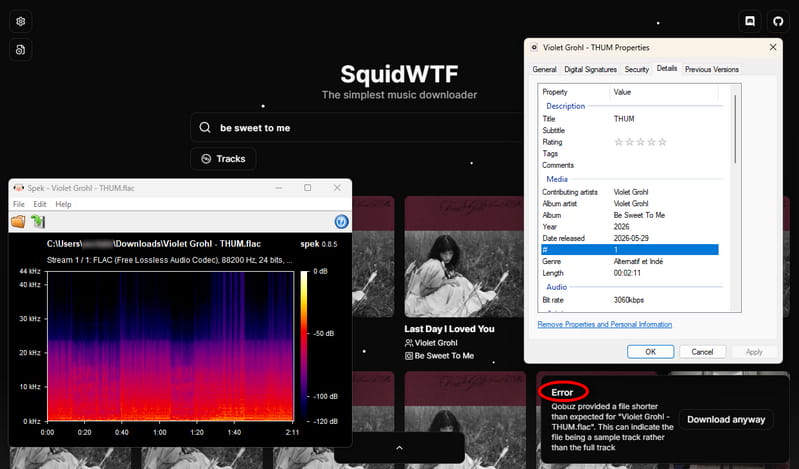
Similar to JUMO-DL, our testing confirmed it cannot parse direct Qobuz links, so you must search by the song, album, or artist name. Downloaded tracks are provided in FLAC 24‑bit format with all ID3 tags preserved.
However, we must note that SquidWTF is not that reliable. Sometimes downloads fail with an error message like: "Qobuz provided a file shorter than expected for 'file name'. This can indicate the file being a sample track rather than the full track." It means the tool only supplies 30‑second previews instead of full‑length tracks. While the service occasionally recovers, the experience remains inconsistent.
How to use SquidWTF to download Qobuz music?
STEP 1 Visit SquidWTF. Enter the name of the song, album, or artist you want into the search field.
STEP 2 Below the search field, select the appropriate content type (Albums, Tracks, or Artists). Then click the arrow button (→) to submit your search.
STEP 3 Browse the search results. When you find the content you want, hover your cursor over it and click the download button that appears.
STEP 4 A "Captcha verification required" prompt will appear. Complete the CAPTCHA challenge, then click "Continue download".
STEP 5 The download will begin immediately. A prominent progress bar will appear at the bottom of the page so you can track the process in real time. After a short wait, the file will be saved to your device.
6. Lucida - Popular Free Qobuz Downloader Online
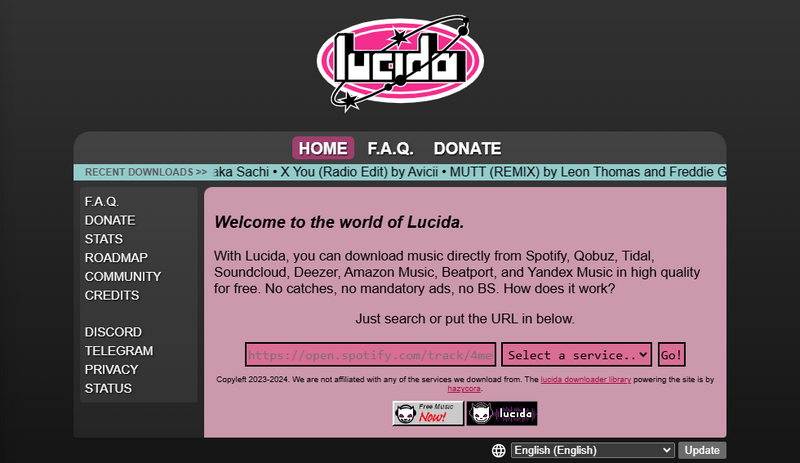
Lucida is a popular free Qobuz downloader online that claims to support Qobuz, Spotify, Tidal, Amazon Music, and other streaming platforms.
When fully functional, Lucida promises high-quality music downloads in formats including FLAC, MP3, WAV, M4A, and OGG. It also claims to support batch downloads and metadata preservation.
However, our own test encountered a parsing failure, so we did not receive any downloadable files. Many users complain about failed downloads, endless retry loops, server timeouts, and unstable performance. Several users mentioned that Lucida now fails to download music from Qobuz, Tidal, and Deezer.
How to use Lucida to download Qobuz music?
STEP 1 Visit the Lucida website. Ensure JavaScript is enabled, as it is required for the site to function.
STEP 2 Copy a Qobuz album, playlist, or track URL and paste it into the input field on the homepage.
STEP 3 Click the "Go!" button to start analyzing the track data.
STEP 4 Select your desired audio format and bitrate from the provided options.
STEP 5 Click the download button to save the file.
Part 3. Quick Comparison Table Between Qobuz Downloaders ⏩
The table below summarizes the key differences at a glance.
| Type | Ease of Use | Supported Platforms | Output Format | Audio Quality | Link Parsing | Ad-Free | Lyrics | Custom output settings | |
|---|---|---|---|---|---|---|---|---|---|
| Tidabie Music Go | Desktop | ✅ | Qobuz, Spotify, Apple Music, YouTube, SoundCloud, TIDAL, Deezer, Amazon Music, etc | FLAC, MP3, AAC, AIFF, ALAC, WAV | Lossless Hi-Res | ✅ | ✅ | ✅ | ✅ |
| qobuz-dl | GitHub | ❌ | Qobuz | FLAC, MP3 | 24-bit / 192kHz | ✅ | ✅ | ❌ | ✅ |
| QBZ‑Downloader | GitHub | ✅ | Qobuz | FLAC | 24-bit / 192kHz | ✅ | ✅ | ✅ | ✅ |
| streamrip | GitHub | ❌ | Qobuz, Tidal, Deezer, SoundCloud | FLAC | 24-bit / 192kHz | ✅ | ✅ | ❌ | ✅ |
| QobuzDownloaderX‑MOD | GitHub | ✅ | Qobuz | FLAC | 24-bit / 192kHz | ✅ | ✅ | ❌ | ❌ |
| DoubleDouble | Online | ✅ | Qobuz, Amazon, SoundCloud, Deezer, Tidal | FLAC | 24-bit / 88.2kHz | ✅ | ❌ | ❌ | ❌ |
| JUMO-DL | Online | ✅ | Qobuz | FLAC | 24-bit / 88.2kHz | ❌ | ❌ | ❌ | ❌ |
| SquidWTF | Online | ✅ | Qobuz | FLAC | 24-bit / 88.2kHz | ❌ | ✅ | ❌ | ✅ |
| Lucida | Online | ✅ | Qobuz, Spotify, Tidal, Deezer, Amazon, SoundCloud | FLAC, MP3, WAV, M4A, OGG | N/A | N/A | N/A | N/A | ✅ |
🏅 Editor's Choice
-
🥇 Best Overall — Tidabie Music Go
Best for audiophiles and DJs who need to batch download Qobuz Hi-Res with a safe all-in-one tool. -
🥈 Open‑Source Pick — QBZ‑Downloader
Best for tech-savvy users who are comfortable digging into GitHub and running command-line tools. -
🥉 Online Option — DoubleDouble
Best for casual users who just want to grab a few songs for free. Watch out for ads and shady redirects, though.
FAQs about Qobuz Downloaders
Q1: Is Qobuz free?
Qobuz offers a free trial, usually one month, after which you need a paid Studio or Sublime subscription. There is no permanent free tier.
Q2: Can I download Qobuz music with a Qobuz free trial account?
Yes, but only with certain Qobuz music downloaders. Tidabie supports Qobuz free trial accounts. The Qobuz downloader GitHub projects require a paid subscription.
Q3: Will downloaded files work after my Qobuz subscription ends?
Yes, if you use a proper downloader. Files downloaded with Tidabie are standard FLAC files that you can keep forever. The official Qobuz offline cache, however, stops working the moment your subscription expires.
Q4: Does Qobuz have podcasts?
Qobuz focuses on high‑quality music streaming and does not offer podcasts. If you need podcasts, you'll need a separate service like Spotify or Apple Podcasts.
Conclusion
The official Qobuz app locks your downloads behind a subscription. Free online Qobuz music downloaders come with broken links or security risks. Open‑source scripts give you power but demand technical comfort. After testing every option, one tool stands out for its simplicity, reliability, and complete feature set. Tidabie Music Go lets you download Hi‑Res FLAC tracks, keep all ID3 tags and embedded artwork, and works even with a Qobuz free trial account. Stop renting your music. Download Tidabie to keep it!

Jacqueline Swift | Senior Writer
