


EzMP3 Review 2026: Is It Safe? Tests & Alternatives
EzMP3 has been a popular choice for converting YouTube videos to MP3, thanks to its simple interface, free access, and flexible audio quality options. However, if you visit its original website, ezmp3.co, today, you'll find yourself redirected to a new platform called EzConv. So, is EzMP3 still worth using under its new name?
In this EzMP3 review, we'll take a closer look at EzConv's features, safety, and limitations. We'll also walk you through how to use the EzMP3 YouTube to MP3 converter and explore some of the best EzMP3 alternatives to help you download YouTube videos to MP3 and decide whether it's the right YouTube to MP3 converter for your needs.
Update Notice (Nov. 2026): EzMP3's previous website, ezmp3.co, now redirects to EzConv at ezconv.org. This updated EzMP3 review evaluates the features and performance of EzConv, the service currently accessible through that redirect.
Part 1. EzMP3 Converter Overview
EzMP3 is a free online YouTube to MP3 converter that now redirects to EzConv. It allows users to extract audio from YouTube videos without installing software or creating an account. The EzMP3 converter offers MP3 quality options ranging from 64 kbps to 320 kbps, along with a built-in trimming feature for saving specific audio segments. It works directly in web browsers on computers and mobile devices.
EzConv supports free conversions of videos up to 4 hours long, while supporters can process audio up to 12 hours. Although the interface is straightforward, its actual audio quality depends on the original YouTube source.
| Original Website | https://ezmp3.co/ |
| Current Website | https://ezconv.org/ (EzConv) |
| Pricing | Free (Supporter benefits available) |
| Output Format | MP3 (64~320 kbps), M4A, WAV (Paid), MP4, MKV, MOV, WebM |
| Registration & Installation | Not required |
| Processing | Server-side |
How to Use EzMP3 Converter (EzConv) to Convert YouTube to MP3?
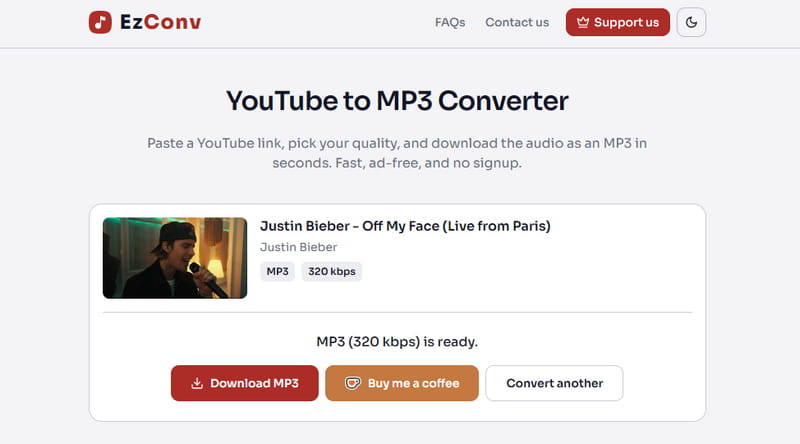
STEP 1 Visit EzConv, the current website that EzMP3 redirects to.
STEP 2 Copy the URL of the YouTube video you want to convert and paste it into the input box.
STEP 3 Select your preferred MP3 bitrate. You can also enable Trim to extract a specific portion of the audio.
STEP 4 Click "Convert" to parse the YouTube link.
STEP 5 Once processing is complete, click "Download MP3" to download the MP3 file.
- Free to use with no registration or installation required.
- Simple interface with no ads observed during testing.
- Multiple MP3 bitrate options up to 320 kbps.
- Supports various formats, including MP3, M4A, MP4, and MKV.
- Built-in audio trimming.
- Works on desktop and mobile browsers.
- Free conversions are limited to 4 hours per video.
- No dedicated batch or playlist conversion feature.
- Audio quality depends on the source.
- Requires an internet connection and relies on server availability.

Need music from more than just YouTube? Check out Tidabie Music Go, an all-in-one music converter for downloading music from Spotify, Apple Music, Amazon Music, Tidal, and more.
Part 2. EzMP3 Performance Review: What We Found in Testing
EzMP3, now accessible through EzConv, promises fast YouTube to MP3 conversions with flexible audio quality settings. But how well does it perform beyond what it advertises? Let's examine its conversion speed, audio quality, trimming accuracy, and overall usability.
1. Conversion Speed and Reliability
EzConv processes conversions on its servers, so you don't need a powerful computer to use it. The website also states that previously processed videos may be available almost instantly through cached files.
However, actual conversion speed can vary depending on the video length, server traffic, and whether the requested audio has already been processed. Longer videos may take more time, and occasional conversion failures are possible.
| Test Video | Duration | File Size | Conversion Time | Speed | Result |
|---|---|---|---|---|---|
| Music video | 2 minutes 43 seconds | 6.22 MB | ~6 seconds | ~27x | Pass |
| Live Stage Collection | 26 minutes 21 seconds | 60.3 MB | ~2 minutes 47 seconds | ~9x | Pass |
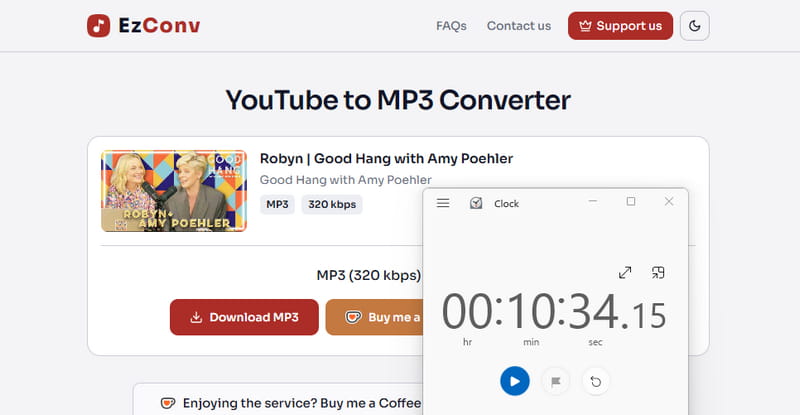
| Podcast | 1 hour 9 minutes 36 seconds | 159 MB | ~10 minutes 34 seconds | ~6x | Pass |
We tested 3 publicly accessible YouTube videos of different lengths. Conversion time was measured from clicking "Download MP3" until the download became available.
2. MP3 Audio Quality: Is 320 kbps Really Better?
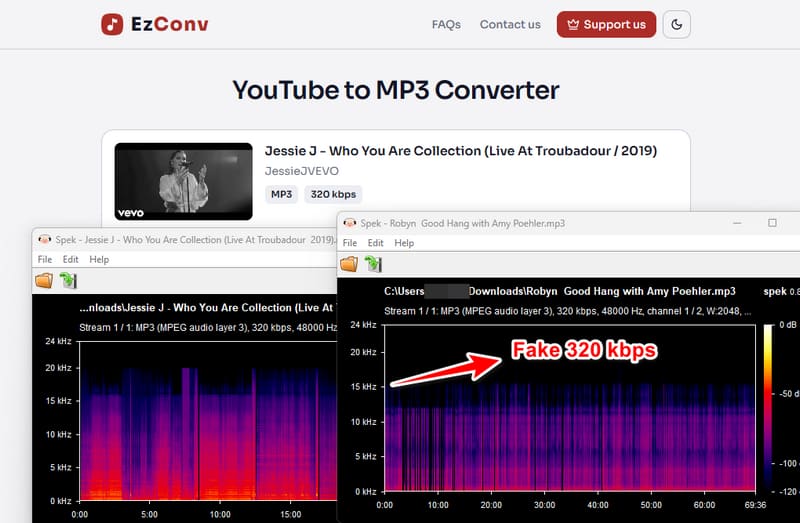
EzConv offers MP3 bitrate settings from 64 kbps to 320 kbps, with 128 kbps displayed as the default option. Higher bitrates generally produce larger files and can preserve more audio information during encoding.
However, selecting 320 kbps does not guarantee better sound quality. YouTube audio is already compressed, and converting it to a higher-bitrate MP3 cannot restore details lost in the original recording. In our testing, one of three files labeled 320 kbps showed signs of lower-quality source audio. To verify the actual output, check the downloaded MP3 with a tool such as MediaInfo or Spek.
3. Audio Trimming Feature
One useful feature of EzConv is its built-in Trim option, which lets users select a specific section of a YouTube video instead of converting the entire recording.
For example, you can select a 30-second segment from an authorized video and download only that portion as an MP3. This can save time and storage space when extracting a short clip from a long interview or lecture.
Need to download multiple YouTube videos or entire playlists as MP3s? Tidabie Music Go supports batch downloads, multiple audio formats, and music metadata preservation.
Overall, EzConv offers the essential features expected from a browser-based YouTube to MP3 converter, including selectable bitrates, audio trimming, and server-side processing. Its main appeal is convenience rather than advanced audio control.
Part 3. Is EzMP3 Safe to Use? What User Reviews Reveal
Is EzMP3 safe to use? The answer isn't entirely straightforward. While many users praise its simplicity and ad-free experience, others have reported suspicious ads, unexpected redirects, and occasional download issues. Let's examine user feedback and third-party security reports to understand the potential risks.
1. What Do Real Users Say About EzMP3?
On Trustpilot, EzMP3 has a 4.6/5 rating based on 39 reviews as of November 2026. Most reviewers appreciate its straightforward interface, easy MP3 downloads, and lack of intrusive advertisements. However, feedback on Reddit is more mixed. Some users have complained about:
- Unexpected ads and pop-ups: Users reported suspicious advertisements, particularly on mobile devices.
- Frequent domain changes: Multiple name and URL changes have made it difficult to identify the correct website.
- Conversion problems: Users have encountered slow downloads, missing download buttons, and temporary outages.
Interestingly, other Reddit users reported having no advertising issues at all. Some suggested that similarly named copycat websites might explain these conflicting experiences. These reports reflect individual experiences and do not establish that the current EzConv website has the same problems.
2. What Do Website Security Checkers Say?
Third-party security reports also provide mixed signals. According to PCrisk, a scan of ezconv.org on November 12, 2026, returned a trust score of 50/100 (Moderate Risk), with none of the 93 security engines detecting threats. Meanwhile, Scam Detector gives ezmp3.com a score of 80.5/100, while ScamAdviser provides a separate assessment of ezmp3.nl.
The current EzConv FAQ claims that the website uses HTTPS, requires no installation, and contains no advertisements or fake download buttons. Its privacy policy also states that conversions are not linked to user identities, although the service retains temporary technical logs and caches converted files. These are useful disclosures, but they do not independently guarantee complete security or privacy.
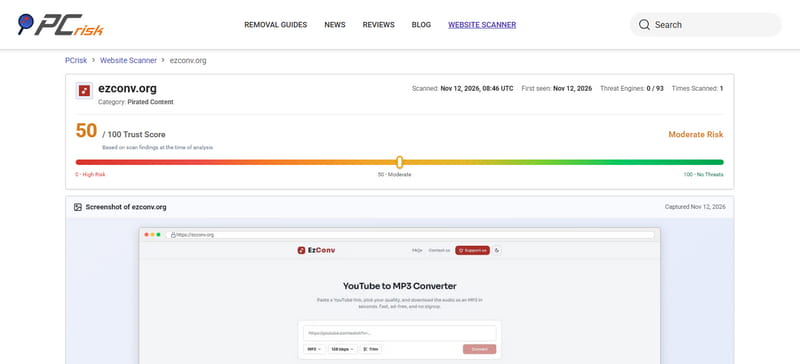
Our Verdict: Based on the available security reports and user feedback, there is no conclusive evidence that the current EzConv website is malicious. However, its moderate third-party trust score and the mixed experiences associated with similarly named EzMP3 domains suggest that users should remain cautious. Always verify the website address, avoid unexpected downloads, and never install software prompted by unrelated pop-ups.
Part 4. Best Alternatives to EzMP3 YouTube to MP3 Converter
EzMP3 works for basic YouTube to MP3 conversion, but it may not meet everyone's needs. If you want batch downloads, more audio formats, better metadata handling, or support for other music platforms, these 4 alternatives to the EzMP3 converter are worth considering.
1. Tidabie Music Go — Best for Multi-Platform Music Downloads
Tidabie Music Go is a desktop music downloader that supports YouTube, YouTube Music, Spotify, Apple Music, Amazon Music, Tidal, and more. Unlike basic online YouTube to MP3 converters, it combines multi-platform access, batch downloads, multiple audio formats, and music metadata management in one application.
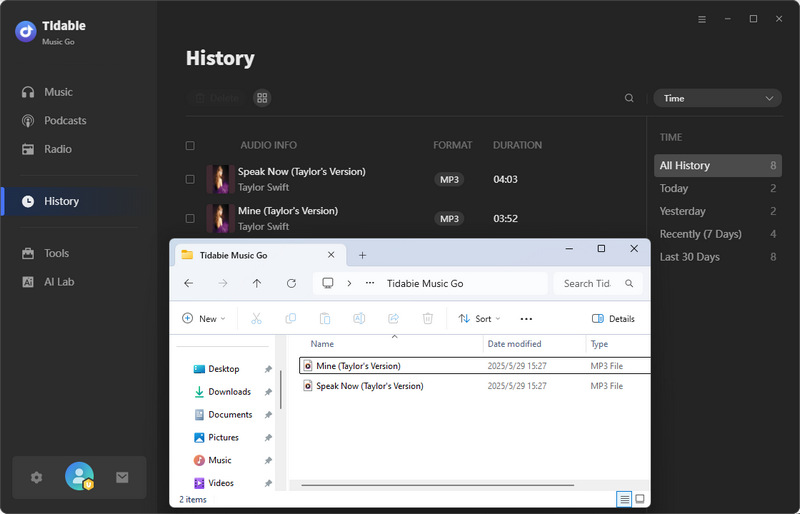
Our Testing Verdict: Tidabie Music Go earned 4.5/5 in our review. In the YouTube download test, it saved a YouTube video as a 320 kbps MP3. The spectrogram showed frequencies extending to around 20 kHz. The downloaded files were accessible through the app's History section and output folder. Overall, its test results were particularly strong in audio output, metadata preservation, and file management.
- Security
- Ad-free and safe
- Batch Download
- √Supported with no limits
- Output Format
- MP3, AAC, WAV, FLAC, AIFF, ALAC
- Audio Quality
- Up to 320 kbps (Original)
- Metadata
- Up to 8: Title, Artist, Album, Year, Genre, Track#, Disc#, Artwork (Depending on source)
- Supported Platform
- YouTube, YouTube Music, Spotify, Amazon Music, Apple Music, Tidal, Deezer, Line Music, Pandora Music, SoundCloud, Qobuz, etc.
- Supports YouTube, Spotify, Apple Music, Tidal, and other music platforms.
- Batch downloads videos, playlists, and albums.
- Offers MP3, FLAC, WAV, AAC, AIFF, and ALAC output formats.
- Supports MP3 downloads up to 320 kbps.
- Preserves up to 8 metadata fields when available.
- Includes an audio editor, tag editor & AI audio splitter.
- Requires desktop installation.
- No dedicated iOS or Android app.
- Less convenient than online converters for occasional single-video downloads.
📒 For step-by-step instructions on downloading YouTube videos as MP3s with Tidabie Music Go, check out our complete guide here: How to convert a YouTube playlist to MP3.
2. SaveMP3 — Best Online Alternative for YouTube Playlist Parsing
Online YouTube converters such as CnvMP3, YTMP3, Y2Mate, and MP3Juice generally focus on individual videos. SaveMP3 stands out for its ability to parse a playlist URL and display multiple videos. However, each video must still be downloaded separately.
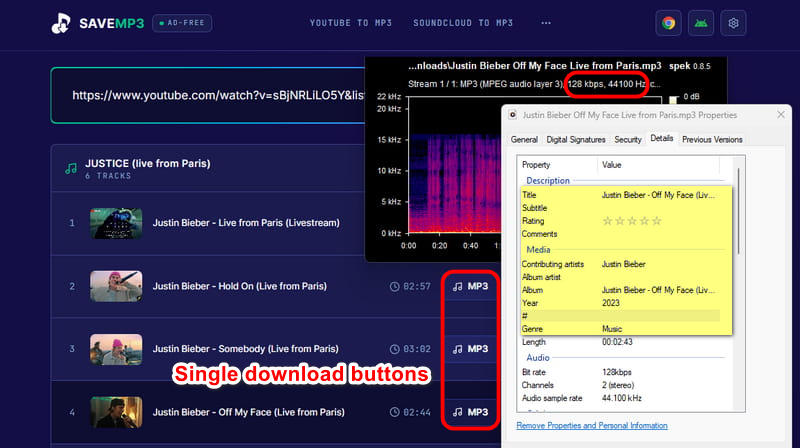
Our Testing Verdict: SaveMP3 received 3/5 in our testing. It successfully parsed a YouTube playlist and displayed individual download buttons for each track, but it could not download the entire playlist in one batch. The tested MP3 was encoded at 128 kbps and 44.1 kHz. Its file properties showed six metadata fields: title, artist, album, year, genre, and artwork. While the playlist parsing and metadata results were useful, the lower tested bitrate, MP3-only output, and need to download tracks individually limited its overall performance.
- Security
- Potential pop-up risks
- Batch Download
- ×Playlist enumeration is supported, but batch download is not. Only single-video downloads are available.
- Output Format
- MP3
- Audio Quality
- 128 kbps tested
- Metadata
- Title, Artist, Album, Year, Genre, Artwork
- Supported Platform
- YouTube, SoundCloud
- No installation required.
- Parses YouTube playlist links.
- Preserves several metadata fields.
- No one-click batch downloading.
- MP3-only output in testing.
- Potential pop-up risks.
3. Any Video Converter — Best for Video Conversion and Audio Extraction
Any Video Converter offers a broader conversion toolkit than EzMP3. It supports multiple audio and video formats, batch processing, and output settings, making it useful for users who work with both music and video files.
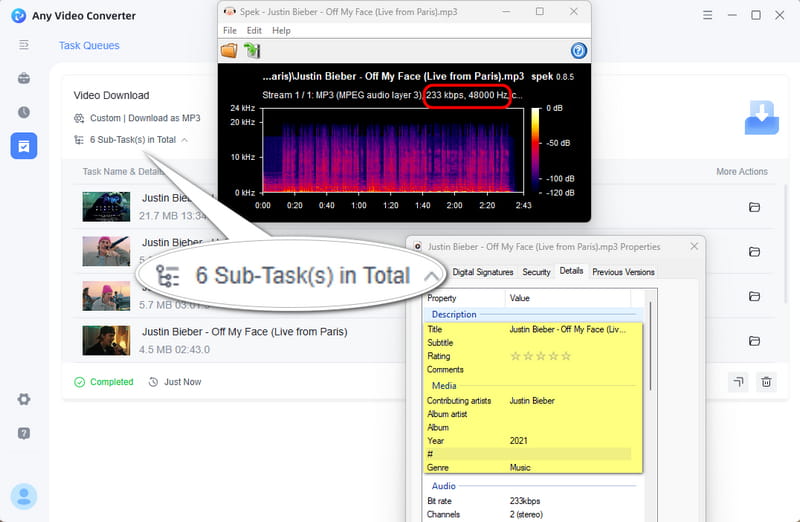
Our Testing Verdict: Any Video Converter scored 4/5 in our review. The task queue showed six subtasks completed successfully. The examined MP3 was encoded at 233 kbps and 48 kHz, with its spectrogram displaying the audio's frequency distribution. The downloaded file retained four metadata fields: title, artist, year, and genre. Compared with SaveMP3's 128 kbps output, Any Video Converter produced a higher-bitrate MP3 in this test.
- Security
- Ad-free and safe
- Batch Download
- √Supported
- Output Format
- MP3, M4A, WAV, FLAC, MP4, MKV
- Audio Quality
- 233 kbps
- Metadata
- Title, Artist, Year, Genre
- Supported Platform
- YouTube, Vimeo, Dailymotion, Facebook, Metacafe, Howcast, Niconico, VEVO, Veoh, Break, Liveleak, Myvideo.de, Rutube, etc.
- Supports audio and video conversion.
- Batch processing is available.
- Multiple output formats and quality settings.
- Requires installation.
- Less focused on streaming music library management.
4. yt-dlp — Best Free Open-Source YouTube to MP3 Converter
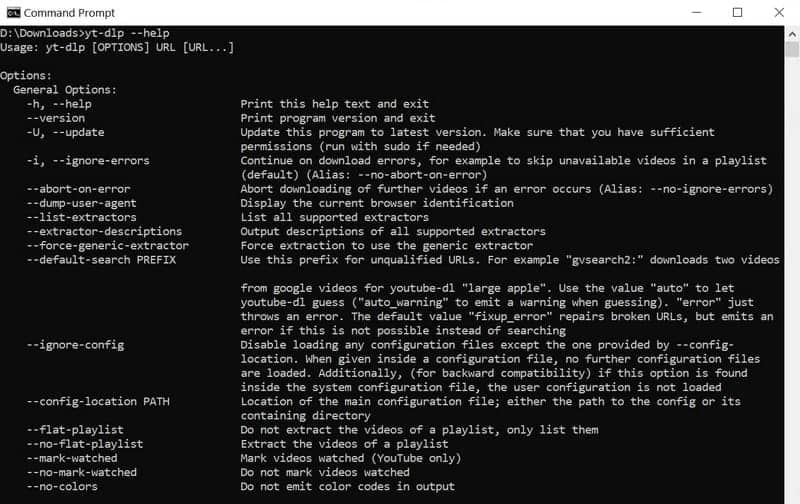
yt-dlp is a free, open-source command-line downloader supporting YouTube and many other websites. It can process playlists, extract audio, convert files into different formats, and embed metadata or thumbnails using optional commands. Audio conversion requires FFmpeg.
Review Verdict: yt-dlp was not included in our hands-on download tests, so we cannot report verified conversion times, measured MP3 bitrates, or actual metadata retention results. Based on its documented capabilities, audio quality depends on the source and conversion settings, while metadata embedding can be configured through command-line options.
- Security
- Verify download source
- Batch Download
- √Supported
- Output Format
- MP3, M4A, FLAC, WAV, AAC, Opus, ALAC, Vorbis
- Audio Quality
- Source-dependent
- Metadata
- Source-dependent
- Supported Platform
- YouTube, SoundCloud, Vimeo, etc.
- Free and open-source.
- Powerful playlist and batch processing.
- Flexible audio formats and quality settings.
- Requires command-line knowledge.
- Some features require additional dependencies.
- Website changes can affect downloads.
EzMP3 Converter vs. Alternatives: Quick Comparison
The table below compares the EzMP3 converter with 4 alternatives across key features, including batch downloads, audio formats, quality, metadata, supported platforms, etc.
| EzMP3 | Tidabie Music Go | SaveMP3 | Any Video Converter | yt-dlp | |
|---|---|---|---|---|---|
| Tool Type | Online | Desktop | Online | Desktop | Command-line |
| Installation | ❌ | ✔️ | ❌ | ✔️ | ✔️ |
| Batch Download | ❌ | ✔️ | ❌ | ✔️ | ✔️ |
| Output Formats | MP3, M4A, WAV (Paid), MP4, MKV, MOV, WebM | MP3, AAC, WAV, FLAC, AIFF, ALAC | MP3 | MP3, M4A, WAV, FLAC, MP4, MKV | MP3, M4A, FLAC, WAV, AAC, Opus, ALAC, Vorbis |
| Tested Quality | 128~320 kbps | 320 kbps | 128 kbps | 233 kbps | 128~320 kbps (Not tested) |
| Metadata | ❌ | ✔️ Up to 8 fields | ✔️ 6 fields | ✔️ 4 fields | ✔️ Configurable |
| Supported Platforms | YouTube | YouTube, YouTube Music, Spotify, Apple Music, Amazon Music, Tidal, Deezer, SoundCloud, Qobuz, etc. | YouTube, SoundCloud | YouTube, Vimeo, Dailymotion, Facebook, etc. | YouTube, SoundCloud, Vimeo, etc. |
| Best For | Quick YouTube MP3 conversions | Multi-platform music downloads | Online playlist parsing | Video and audio conversion | Advanced, technical downloads |
FAQs about EzMP3 YouTube to MP3 Converter
1. Is EzMP3 YouTube to MP3 Converter free?
EzMP3 offers free YouTube to MP3 conversion, including MP3 bitrate options from 64 to 320 kbps. Some features, such as YouTube WAV downloads, require payment.
2. Is EzMP3 safe to use?
EzMP3 may carry advertising or redirect risks common to any online YouTube converters. Avoid suspicious pop-ups, unnecessary downloads, and requests for personal information.
3. Can EzMP3 convert YouTube videos to 320 kbps MP3?
Yes. EzMP3 offers a 320 kbps MP3 option, but the actual audio quality depends on the original YouTube source. Selecting 320 kbps does not ensure high-quality audio.
4. Does EzMP3 support YouTube playlist downloads?
No. EzMP3 does not support one-click batch downloading of YouTube playlists. For batch music downloads, Tidabie Music Go is an alternative that supports multiple streaming platforms and audio formats.
5. Why is EzMP3 not working?
EzMP3's original website, ezmp3.co, now redirects to EzConv at ezconv.org. If EzMP3 isn't working, first make sure you're using the current, accessible website rather than an outdated or unofficial domain. Other possible causes include server issues, unsupported or restricted YouTube videos, network problems, or changes to YouTube. Try refreshing the page, checking the website address, or converting another public video. If the problem persists, consider using an EzMP3 alternative.
Conclusion
In short, EzMP3 is a convenient option for quick YouTube to MP3 downloads, but its lack of batch downloading and metadata support limits its usefulness. To help you find the right YouTube to MP3 converter, we've selected several EzMP3 alternatives to suit different needs, including SaveMP3 for online playlist parsing, Any Video Converter for video and audio conversion, and yt-dlp for advanced users. If you need a more versatile alternative, Tidabie Music Go is worth considering. With support for multiple music streaming platforms, batch downloads, various audio formats, and metadata preservation, it offers a more complete solution for downloading and managing your music collection.

Jacqueline Swift | Senior Writer
